











Best DVD Ripper 2026: Tested & Ranked Across Speed, Quality & DVD Protection Support

Summary: Upon benchmark testing[1] of 18 DVD ripping software based on DVD decryption ability, ripping speed, video/audio quality, stability, supported formats & features, and hardware acceleration, we could see clear differences between free tools and paid solutions.
Benchmark Results & Key Findings:
- Best Overall: WinX DVD Ripper achieved the highest benchmark score in our tests because it delivered the best balance of high-speed hardware acceleration, solid DVD decryption, flexible backup options, and excellent stability.
- Best lossless backup: MakeMKV remained the preferred choice for lossless DVD backups as it preserved original video, audio, subtitles, and chapter structure without re-encoding.
- Best free: HandBrake continued to be the leading free open-source transcoder for homemade and unprotected DVDs.
- Best all-in-one AI media toolkit: VideoProc Converter AI combined DVD ripping with video conversion and powerful AI enhancement of 480p movies in a single app.
- Best for DVD + Blu-ray users: DVDFab provided broad ecosystem for ripping and copying both DVD and blu-ray discs.
- Key finding: Free DVD rippers generally struggled with copy-protected commercial discs. Hardware-accelerated DVD rippers significantly outperformed CPU-only solutions in our testing.
This guide combines detailed DVD ripper review, real-world testing, and personal experience to help you choose the best DVD ripper for your specific needs in 2026.
DVDs may no longer dominate home entertainment, but millions of movies, TV series, concerts, and personal collections still exist only on disc. Converting DVDs into digital files helps preserve aging media, save storage space, eliminate disc swapping, and make content accessible across phones, tablets, media servers, and smart TVs. However, choosing the right DVD ripper is not as simple as it sounds. If you search online, 90% of reviews simply copy-paste vendor claims without inserting a single disc. In reality, many tools struggle with modern copy-protected discs, produce poor video quality, run slowly, or fail when encountering damaged DVDs.
To cut through the fluff, we narrowed down our testing pool of 18 applications to review the top 8 popular DVD ripping tools in-depth using both commercial and standard DVDs. We evaluated each tool using the same testing environment and criteria, including ripping speed, copy protection support, output quality, format compatibility, hardware acceleration, and ease of use. Whether you're looking for the fastest DVD ripper, a free open-source option, or a reliable tool for backing up protected DVDs, this guide covers the best choices available in 2026.
TL;DR: Our Top Picks (Tested and Rated)
| Software | Best for | Key strength | Score |
|---|---|---|---|
| WinX DVD Ripper Platinum | Best Overall | Speed and DVD decryption | 9.94/10 |
| VideoProc Converter AI | Best All-in-One Media Tool | AI enhancement | 9.76/10 |
| DVDFab DVD Ripper | Best for DVD + Blu-ray users | Broad disc support | 7.62/10 |
| MakeMKV | Best Lossless Backup | Original quality | 7.77/10 |
| HandBrake | Best Free Open-Source Option | Open source | 7.08/10 |
| VLC Media Player | Best built-in Media Solution | Built-in playback & conversion | 3.58/10 |
| Wonderfox DVD Ripper | Best for Beginners | Ease of use | 7.31/10 |
| DVD Shrink | Legacy DVD Backup | Legacy DVD backup | 6.02/10 |
How We Tested & Evaluated the DVD Ripping Software
Unlike other roundup posts tend to merely list vendor's claims and features, this article relies on hands-on testing[1]. A total of 18 DVD ripping applications was tested under the same hardware benchmark platform (AMD Ryzen 5 5600 CPU paired with AMD Radeon RX 6700 XT GPU, and 48GB DDR4 RAM running the Windows 10 64-bit) and DVD conditions to ensure fair comparisons. No rankings were purchased or influenced by software vendors.
Our testing focused on the criteria that matter to regular consumers the most when it comes to ripping a DVD:
- The ability to decode commercial and copy-protected DVDs;
- DVD ripping speed and hardware acceleration performance;
- The quality of output files;
- The stability of the DVD backup and ripping process;
- Features and format compatibility aspects;
- Pricing and user-friendly interface testing.
In addition to our own benchmark testing, we also reviewed recommendations and evaluation criteria from tech giants like TechRadar[2] to compare usability, format support, etc. To eliminate any possible personal bias, we rated all the DVD ripper tools according to a rigorous mathematical Weighted Scoring Model (0–100) along the 6 mentioned technical dimensions, including DVD parsing (20%), DVD ripping/backup speed performance (30%), DVD decryption (20%), resource usage (15%), and process stability (15%).
For tech enthusiasts who want to see raw performance data, DVD parsing speed, GPU hardware acceleration efficiency, protected DVD handling success rates, and quality benchmarks, check out our complete DVD ripper Benchmark tests report.
Deep Dive: Top 8 Best DVD Ripper Software Reviews
#1 WinX DVD Ripper Platinum
Best For: Fast, high-efficiency conversion and seamless 1:1 backup of heavily encrypted commercial discs.
WinX DVD Ripper Platinum is our top overall pick because it achieved the highest benchmark score in our tests, delivering the best balance of ripping speed, copy-protection support, resource usage and overall reliability. It stands out as a reliable solution for both casual users and media archivists alike, designed specifically for professional DVD conversion and backup. Unlike general-purpose DVD video converters, WinXDVD features an optimized DVD analysis engine specialized in handling commercial DVDs, slightly damaged discs, region-locked media, and complex copy protection schemes, including 99-Title project, Sony ARccOS, etc . It utilizes Level-3 Hardware Acceleration to read and transcode complex commercial DVD, ISO, or folder to up to 350+ modern formats like MP4, HEVC, AVI, H264, MOV, etc within minutes while preserving visually high quality.
Beyond its automated profiles, the software allows users to take granular control over advanced parameters, including resolution, bitrates, frame rates, specific compression codecs, and more. Users can also use the integrated editing feature to trim non-essential movie lengths, crop black bars, add or hardcode external subtitle tracks. Despite this deep feature set, the user experience remains streamlined: insert the disc, select a target format or device preset, and begin the conversion.
 Free Download
 Free Download
Key Features
- Intelligent Title Check Mechanism: Quickly identifies the real movie file from deceptive 99-title protection schemes that commercial studios often employ.
- Level-3 Hardware Acceleration: Make full use of Intel QSV, NVIDIA NVENC, and AMD to accelerate the process and finish the full disc transcoding under 10 minutes on your average machine without crashes or freezing.
- 1:1 Backup Mode: Offers specific backup modes to clone an entire DVD to a flawless ISO image, folder, or a single MPEG file while including the complete original audio tracks and subtitle streams.
- Support for handling major algorithms incl. X-project, CSS, Region Codes, ARccOS.
- Fast processing speed when fully utilizing local GPU architecture.
- 1:1 ISO, folder, and MPEG-2 backup modes.
- Beginner-friendly interface appropriate for non-technical users.
- Fast adaptation to newly deployed structural protection via constant updating.
- Windows-focused feature set.
- Not open-source.
 Benchmark Highlights
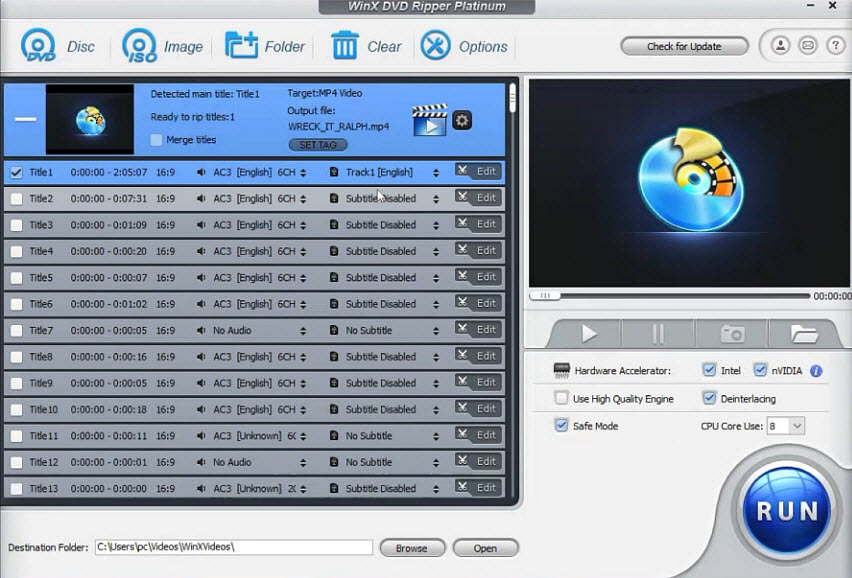
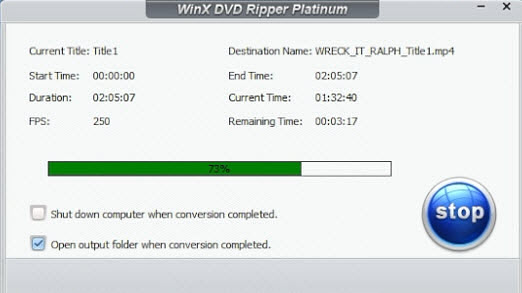
In our test, WinX DVD Ripper was indeed the winner in the complicated Vector A (Wreck-It Ralph) test. Its unique Title Check Mechanism detected Title 1 as the actual 1-hour-41-minute long feature film in 5 seconds, completely disregarding the other deceptive titles. With the AMD Radeon RX 6700 XT hardware acceleration pipeline, conversion speeds averaged 177.14 fps (see the fps even reached to 250 in the pic below), resulting in total conversion of Wreck It Ralph into a highly optimized MP4 H.264 format in just 10 minutes 16 seconds while producing an MP4 video file under 1 GB in size with high visual clarity.
Our hardware monitor captured efficient resource utilization throughout the stress test: power consumption was only 6.43W (lowest across the entire test field) with max thermals capped at 47°C during continuous rendering. It had a light RAM usage of 4.44 GB with no leaks, avoiding the system-crashing memory spikes of the likes of other heavy applications we tested (such as VideoByte, which hit 18.57 GB). The whole session passed with 100% error-free and no application freezes or stream corruption.
Visit WinX DVD Ripper Platinum official site>>
What to do if your DVD is encrypted with 99 titles?
#2 MakeMKV
Best For: DVD collectors who want to preserve every detail of the original disc without re-encoding.
MakeMKV, a lossless DVD and Blu-ray backup tool, is our preferred choice for users who want to preserve original disc structure without re-encoding. It takes a fundamentally different approach from other DVD rippers like WinX DVD Ripper and Handbrake. Instead of compressing, altering, or re-encoding DVD video, MakeMKV just peels the video off its decryption layer, correctly finds the required title, and remuxes the raw data directly into a modern, uncompressed MKV container. It alters nothing inside the video and audio bitstreams, preserving all original content without any generational quality loss. The software is still in beta, and can be used for free by obtaining a public key every 2 months through its official forum. Get MakeMKV beta key for free here >>
Unfortunately, MakeMKV doesn’t provide user with any DVD converting options at all. This is especially frustrating when your hard drive is running out of space, since the original MKV file can easily take up to 5-8 GB per DVD movie, which can quickly exhaust your storage space. That’s why many users tend to resort to Handbrake for further video transcoding to reduce the file size. But if you are still opt for quality and original DVD backup, go for MakeMKV.
MakeMKV Website Status: The main MakeMKV website has been experiencing an extended outage since late July 2026, which may prevent users from accessing its download pages. The official forum remains available, and users looking for the software can also check archived MakeMKV pages through the Internet Archive. Or you can check reliable free DVD ripper if you need to back up DVD rightnow.
See the YouTube guide on how to download MakeMKV when the website is down →
Key Features
- Lossless copying: The original video MPEG-2 track and audio AC3/DTS data are transferred into the new container without any re-encoding process.
- Broad Optical Support: It can easily read from both DVD and Blu-ray discs from one single interface, eliminating the need for separate software.
- Multi-Platform: Runs natively on all the major computer operating systems (Windows, Mac OS X, Linux).
- Completely free to use.
- Zero compression artifacts since the source data streams are copied exactly as they are.
- Perfect preservation of multi-language audio and subtitle tracks.
- MKV output format results in files that are exactly the same in size as the physical disc, thus requiring huge amounts of storage space (~5GB-8GB per DVD).
- No transcoding options for creating light versions that are easy on small mobile devices.
Benchmark Highlights
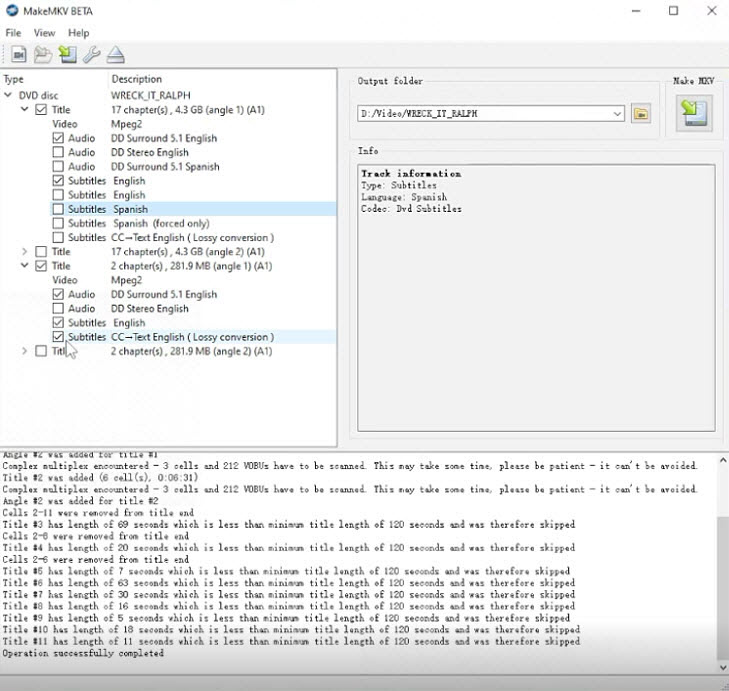
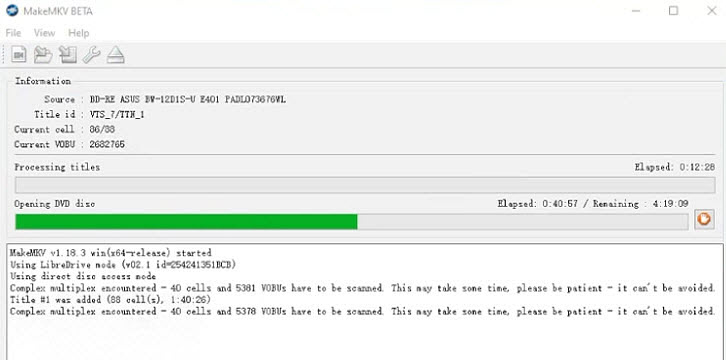
During our test on Vector A (Wreck-It Ralph), the Java-powered decoding component used in MakeMKV took a very long time of 42 minutes just to complete the first stage of the disc reading process, which is the most time-consuming stage across all of the testing DVD rippers reviewed. During this stage, the log displayed the message: "Complex multiplex encountered - 40 cells and 5381 VOBUs have to be scanned. This may take some time, please be patient - it cannot be avoided." (The screenshot below captured the exact elapsed time during our disc reading benchmark in MakeMKV). But once the actual backup begins, MakeMKV demonstrates the effectiveness of its true remuxing capabilities. The process involves no compression or transcodings whatsoever, hence all of the processing cores remain virtually unused (2% utilization or less), and the frame rate of the original video content stays at 23.97 fps.
MakeMKV works at an effective rate of 145.94 FPS (only limited by the read speed of the optical drive), completing the full backup operation in nearly 10 minutes. The non-transcoding process allows it to be completed 16 seconds earlier than the hardware-accelerated transcoding to 29.97 fps (at a speed of 177.14 FPS) in WinXDVD. This, however, comes at a price: the final file created with MakeMKV is gigantic, reaching 3.81 GB in size while retaining absolutely perfect quality but being poorly optimized for network streaming.
Visit MakeMKV Official Site [Currently inaccessible]
See Makemkv vs WinX DVD Ripper side by side comparison >>
#3 HandBrake
Best For: Enthusiasts wanting advanced open-source transcoding control without paying a cent.
HandBrake is still one of the most widely used free and open-source video transcoders available around for converting homemade and unprotected DVDs and videos. This free DVD ripper and converter software allows its users to fine-tune all manner of advanced settings for encoding, including codec settings, target file sizes, frame rates, subtitles, and visual filters. For those who value flexibility and openness, it still remains one of the best solutions for ripping DVD to MP4, MKV, WebM, and MOV formats[3].
On the other hand, HandBrake comes with a massive caveat: it has absolutely no ability to decrypt commercial copy protections such as CSS, region codes, X-Project, ARccOS, or other structural protections commonly found on DVDs. As a result, most protected discs typically require third-party decryption tools such as Libdvdcss or pre-processed VIDEO_TS folders before they can be successfully imported into HandBrake. See how to install Libdvdcsss for Handbrake to rip CSS-protected DVDs >>
Key Features
- Granular Encoding Parameters: Offers total access to advanced structural settings for x264, x265, AV1, and SVT-AV1 encoders, from quality settings to presetting, frame rates, profiles, and much more advanced compression settings.
- Queue Automation: Supports batch processing by making use of an internal queue system where several encoding operations can be automatically performed one after another.
- Advanced Video Filters: Features many video processing filters such as Decomb, Deinterlace, Denoise, and Detelecine to helpenhance the appearance of video files obtained from DVDs and broadcasting sources.
- 100% free and open-source project, no tracking, or bundles software present.
- Highly sophisticated video processing filters (incl. decombing, deinterlacing, and denoising).
- Device optimized profiles for modern smartphones, tablets, and streaming boxes.
- Highly precise fine-tuning of advanced video/audio parameters;
- Cannot handle commercially protected DVDs natively; requires external library (like libdvdcss) to handle CSS-encrypted discs.
- The steep technical learning curve can overwhelm casual users looking for a single-click solution.
Benchmark Highlights
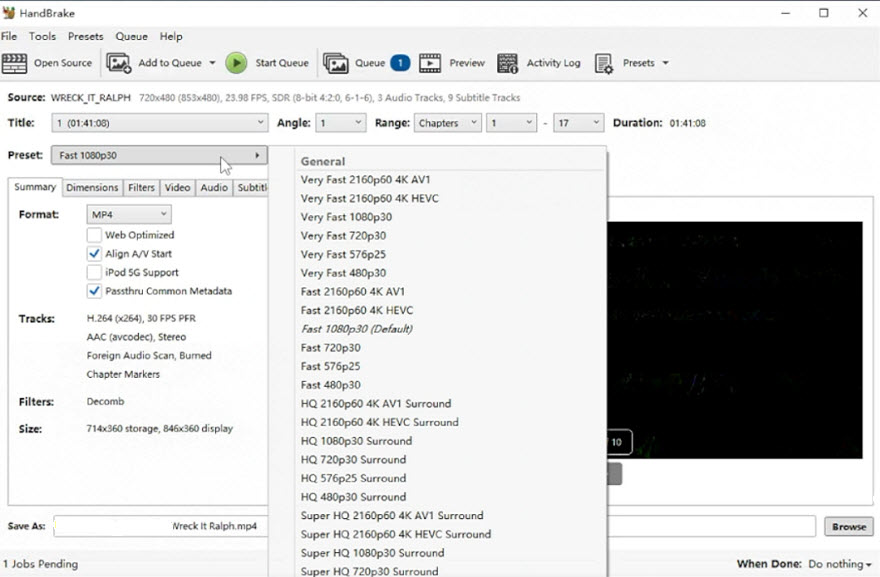
In the Wreck-It Ralph DVD benchmark, Handbrake took 31 seconds to analyze the disc structure before beginning the conversion process. The actual transcoding stage took 575 seconds and yielded an average encoding speed of 100.3 FPS. Resource consumption remained relatively low during the test, with only 2.26% GPU utilization, 9.38W GPU power draw, and 27.9% CPU utilization on average. The final H.264 MP4 output measured 976 MB at an average bitrate of 1,225 kbps.
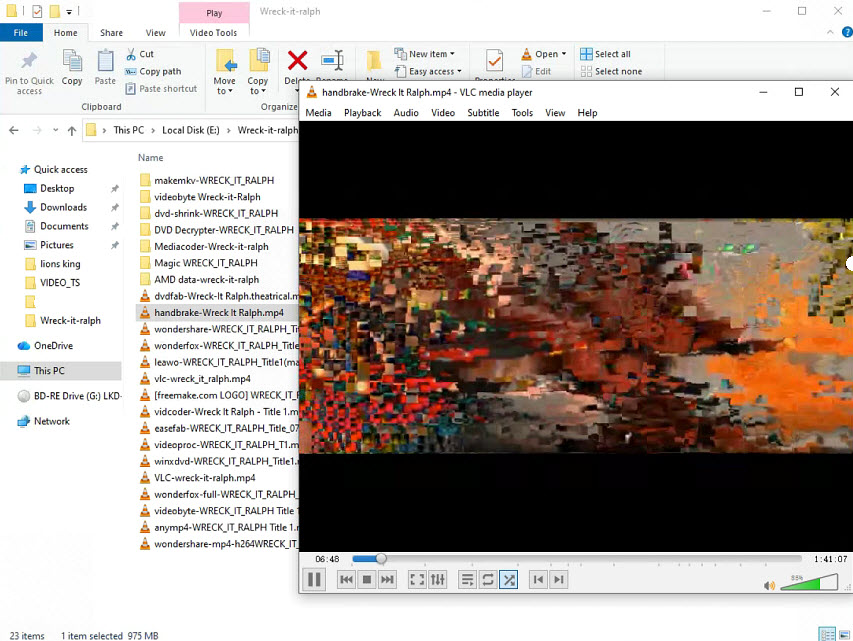
However, the resulting video was ultimately unwatchable (see the screenshot below). During testing, HandBrake could not decode certain parts of the DVD structure correctly, producing severe visual corruption and large block artifacts throughout the output file. Even manually injecting an external 64-bit libdvdcss.dll into its root folder did not fully resolve the issue. Additional testing with The Lion King DVD yielded similar results. This means that the problem is not just the low-level decryption of CSS but maybe more complex disc structures, title obfuscation, or copy-protection schemes present on many commercial DVDs. You need to switch some other robust DVD ripper software for protected discs. But if you are just digitizing and backing up your home video DVDs, Handbrake is still good to go as it produced exceptional, highly optimized file-size compression results.
Visit HandBrake Official Site >>
See how to use Handbrake to rip DVD in detail >>
#4 DVDFab DVD Ripper
Best For: Managing large DVD and blu-ray libraries for home media servers.
DVDFab is a heavyweight disc processing suites designed for users who need to handle a wide range of physical media formats. It supports DVDs, Blu-rays, and UHD discs, along with functions for conversion, backup, and basic authoring. Users can convert DVD discs to highly-compressed MP4, HEVC, AC3 and other video, audio formats.
It also includes tools for customizing the output settings, such as video parameters, audio and subtitle track selection, as well as trim and clip functions. This DVD ripper not only supports over 200 device profiles for Apple, Android, but also backs up DVD using VOB and MKV passthrough that allows to preserve original audio and subtitle streams without transcoding. It relies heavily on cloud decryption keys to decode newly released discs and is suitable for people with large collections of international discs and mixed media formats who need a comprehensive, all-in-one processing solution.
Key Features
- 1000+ Output Profiles & Lossless MKV: Converts DVDs to over 1,000 video/audio formats and device profiles, while also supporting 1:1 MKV Passthrough with original video, audio, and subtitle preservation.
- Metadata Preservation: Can retrieve and embed movie metadata for better media library organization in media servers.
- Integrated Disc-to-Mobile Workflow: Provides ready-made profiles for phones, tablets, TVs, game consoles, and media players.
- Features a reliable Cloud-based Decryption service that supports many mainstream DVD protections.
- Large format and device profile library.
- Good options for configuring video, audio, and subtitle streams.
- The entire software package has a premium price tag compared to single-purpose utilities.
- Conversion of DVDs can be intrusive, with occasional product recommendation.
Benchmark Highlights
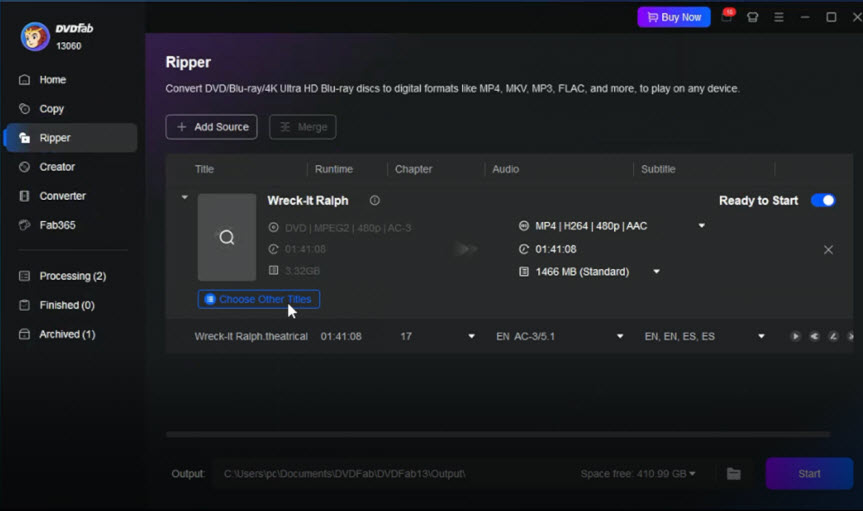
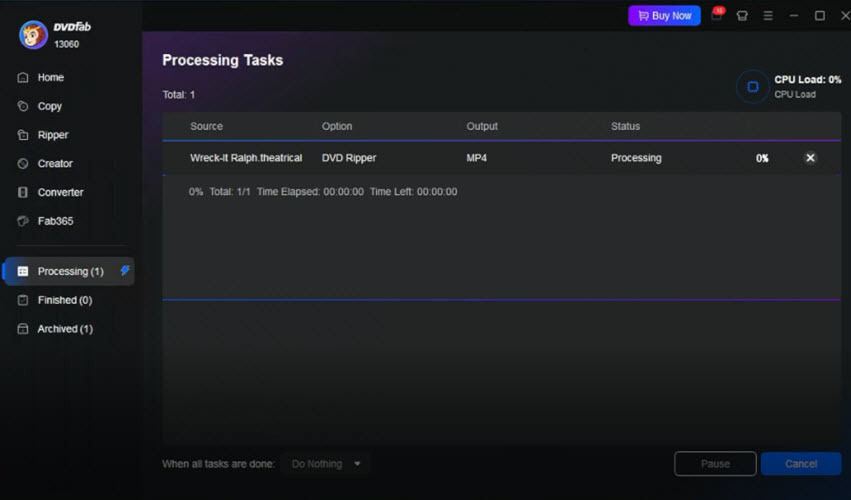
In the case of Vector A (Wreck-It Ralph), DVDfab managed to identify and analyze the disc structure within 12 seconds, being 7 seconds slower than the fastest performer WinX DVD Ripper in our speed test. It maintained an average throughput of 109.92 FPS and completed the entire DVD conversion in 13 minutes and 23 seconds, placing it in the middle tier for the DVD ripper performance. We observed a significant initialization lag: after clicking the Start button, DVDfab stalled for 3min 18sec before actually initiating the DVD ripping proces (see the picture below). While this result was sufficient for occasional DVD digitization tasks, it lagged behind WinX DVD Ripper in our speed benchmark, which finished the same title in approximately 10 minutes. Resource consumption remained reasonable, peaking at 6.25GB of RAM.
While its speed trailed WinX DVD Ripper and VideoProc Converter AI, DVDFab successfully processed the copyrighted discs and delivered a stable ripping experience throughout our additional NCIS (Vector B) benchmarks without issue, demonstrating reliable DVD structure analysis despite its slower overall performance.
Visit DVDFab DVD Ripper Official Site
See in-depth look at the features and limits of DVDFab >>
#5 VideoProc Converter AI
Best For: Users seeking a versatile all-in-one utility that combines robust DVD ripping with AI-driven video enhancement.
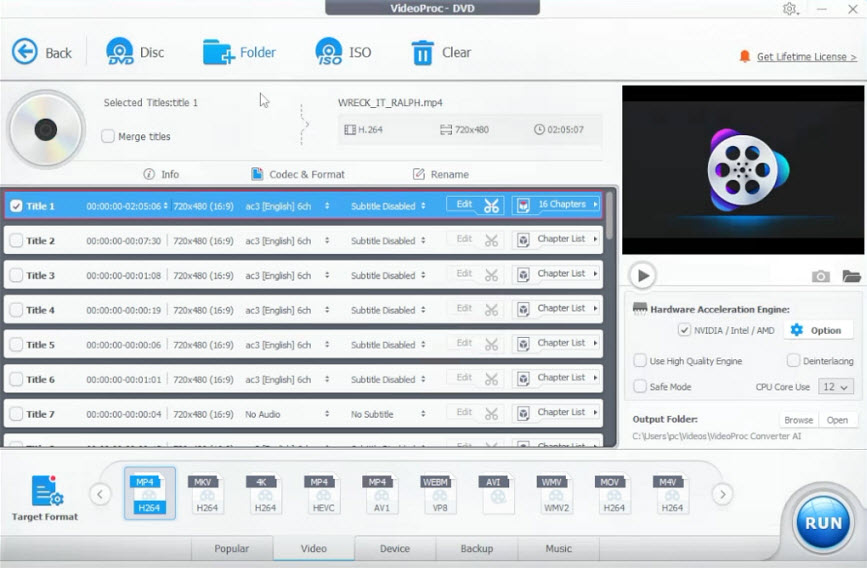
VideoProc Converter AI, bringing together traditional DVD ripping and video conversion technology alongside a cleaner software design, is a strong choice for users who want to further enhancing DVD movie quality while converting DVDs. The software reads both unencrypted and encrypted disc files, but it also offers a suite of tools for AI-based upscaling, frame rate interpolation, shaky video stabilization, and noise removal. Leveraging localized AI models, the software is tailored to rejuvenate 480i analog media and upconvert to higher resolution up to 4K without inducing any hallucinations or relying on cloud processing. Read our detailed VideoProc Converter AI review to see more examples of its AI features.
It also functions as an all-in-one media toolkit, combining video transcoding, compression, editing, and screen recording in a unified interface. Users can efficiently manage multimedia workflows while leveraging both CPU and GPU acceleration for improved performance across heavy processing tasks.
Key Features
- AI Super Resolution: Includes specialized AI module to clean up and upscale interlaced, low-resolution DVD footage to clear 1080p or 4K files.
- Complete Hardware Optimization: Full architectural integration with NVIDIA, AMD, Intel, and Apple Silicon processing systems.
- Comprehensive Media Toolset: Includes additional tools for enhancing, compressing, editing, web-video downloading, and desktop recording.
- Good AI enhancing features to convert outdated 480i footage from family camcorders and home movies into high-definition content.
- Full hardware acceleration for stable performance and efficient workload distribution across CPU and GPU.
- All-in-one toolkit that handles DVD, video, audio, and image processing tasks in a single unified solution.
- DVD features are not its primary focus compared to dedicated ripping tools.
- Advanced AI tools like upscaling and frame interpolation are separate from core ripping profiles.
- AI Super Resolution requires advanced GPU hardware; integrated GPUs may experience longer processing times.
Benchmark Highlights
Similarly, we tested the performance of VideoProc Converter AI v8.10 against a rigorous test using the Vector A (Wreck-It Ralph) benchmark profile. It managed an impressive hardware-assisted conversion rate of 160.59 frames per second, finishing within 678 seconds. Moreover, it demonstrated excellent overall performance efficiency and effective silicon optimization even when working on the complicated multi-title encryption pattern. During the queue time, VideoProc Converter AI exhibited very little strain on the graphics hardware, taking only 6.92% of the total GPU compute capacity. This led to better temperature management, as it was able to keep GPU power consumption at just 11.77W with maximum temperatures reaching 48°C. On top of that, the software maintained a consistent system RAM allocation of 6.4 GB during testing without any freezing or dropped frames.
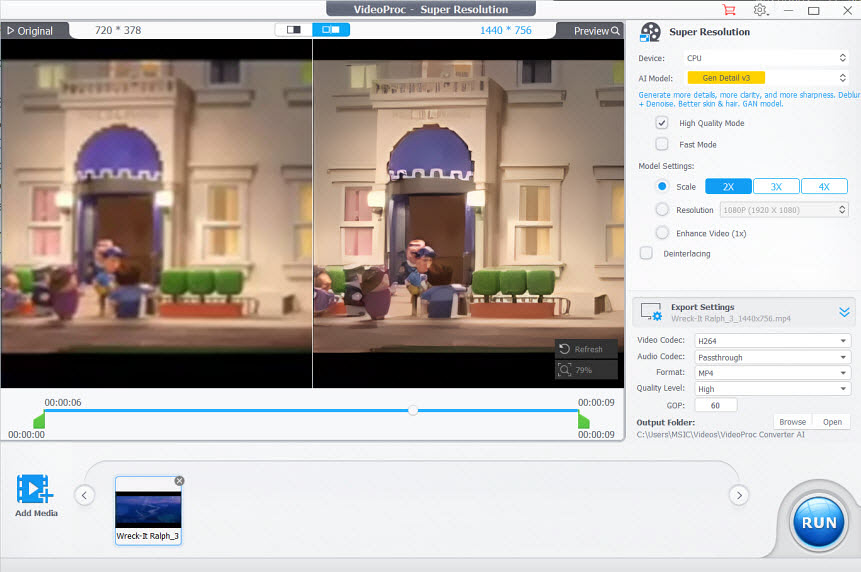
Furthermore, we also performed an upscaling of a legacy DVD video clip from 480p to 720p resolution through its built-in AI Super Resolution module, albeit under a heavier computational load (the pic below showed how VideoProc upscaled the movie clip with satisfactory result.
Download VideoProc Converter AI
#6 VLC
Best For: Casual users who need an emergency DVD ripping tool and already have the media player installed.
While primarily celebrated as a lightweight, universal media playback application that supports an extensive range of audio and video formats without needing any additional codec packs, VLC contains an underlying DVD conversion routine system that can convert basic unencrypted DVDs into basic digital file formats like MP4 (H.264). The primary strength of VLC is that it is easy to use and available on all major platforms free of charge, making it a common default tool for quick media access and basic DVD conversion tasks.
However, VLC is not a specialized DVD ripping or transcoding solution. The program has very limited functionality, lacking advanced features such as hardware-accelerated encoding control, encryption handling, or output optimization presets. Like HandBrake, VLC highly depends on local system configurations to handle encryption. As a result, while it can perform basic conversions, it can run into stability and output consistency issues when dealing with longer or copy-protected DVDs compared to professional-grade DVD rippers.
Key Features
- Multi-Format Container Export: Offers standard transcoding routes to profiles like MP4, WebM, and Ogg.
- Live Direct Network Streaming: Allows you to stream physical disc playback directly across a local network.
- Audio Track Extraction: Includes clean routing options to pull pure audio tracks out of musical concert DVDs.
- 100% free and pre-installed on millions of consumer computers worldwide.
- Saves time from searching for and downloading a dedicated single-purpose ripping application.
- The workflow path is hidden deep inside several menus.
- No built-in tools to handle advanced structural protection or damaged disc sectors.
- Prone to audio/video desynchronization when processing complex discs.
Benchmark Highlights
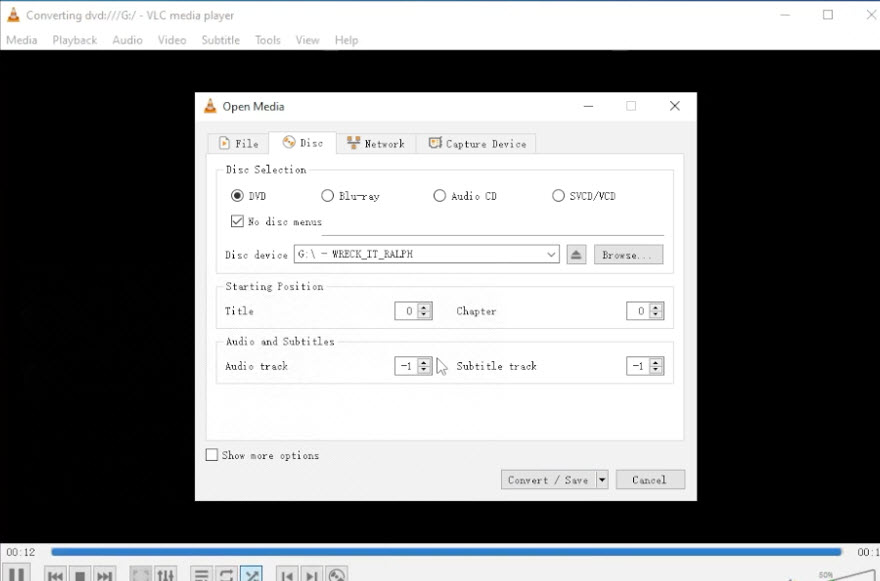
In this test scenario using the "Wreck It Ralph" DVD title, VLC required 83 seconds for initial processing, followed by 1715 seconds for conversion, resulting in a total runtime of 1798 seconds (approximately 30 minutes). VLC defaults to Title 0 (the entire disc), requiring us to manually identify and select the correct movie title (Title 1 in this test) before starting the DVD ripping. During the encoding process, the system showed very low hardware utilization, with GPU usage averaging only 2.45% and CPU utilization around 9.55%, indicating that VLC did not effectively leverage available hardware acceleration. GPU power draw remained low at 10.33W, with peak temperature at 48°C, and RAM usage stayed modest at 5.58%.
The final output was an MP4 H.264 file at 720×480 resolution with a bitrate of 839 kb/s and an average frame rate of around 31.8 fps. While playback was technically functional, there were signs of potential frame inconsistency or dropped content during processing. Notably, the final duration was reduced to 1h 16min compared to the expected runtime of 1h 41min, suggesting possible segmentation or incomplete title handling. However, in another test with the NCIS DVD, the disc was fully backed up to MP4 (H.264) with no playback or readability problems. This shows that the results are not exactly the same for all discs, it depends on the DVD title, its protection or the structural complexity of the DVD.
Visit VLC official site
See how to rip DVD with VLC [with troubleshootings and tips] >>
#7 DVD Shrink
Best For: Enthusiasts working on vintage computers or archiving legacy physical disc media collections.
Software Overview
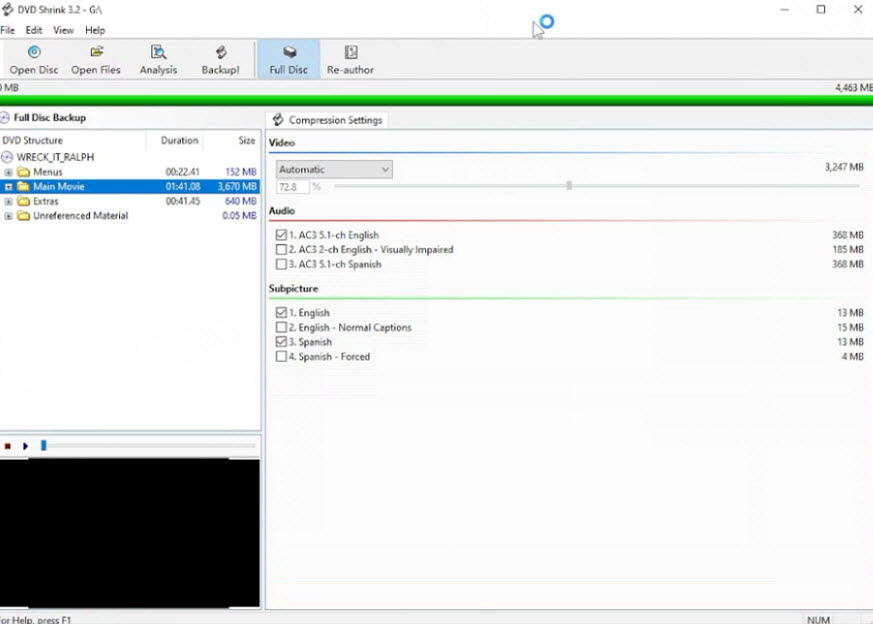
DVD Shrink is a legacy freeware utility program which was immensely popular in the early 2000s and is still being used by some people now to freely back up DVDs which have no protection or minimal protection. The free DVD ripper software has not been updated since the mid-2000s and its creation can be traced back to an era when media backup was more prevalent, hence having an extremely specific task to perform: that of converting dual layer DVDs of ~8.5 GB capacity into single layer DVDs with a capacity of 4.7 GB. The GUI of the program is also very simplistic, comprising of two panes only.
Although the program comes with built-in functions of decrypting even early CSS and region copy-protection methods, the old engine does not cope with new structural copy-protection methods without the help of any additional software. As the program provides output of content in a native form of structure either in compressed or uncompressed state but does not convert content into the modern container format, it can be regarded as a specialized staging utility.
Key Features
- DVD-9 to DVD-5 Compression: Allows converting large DVDs with two layers (8.5 GB) into small standard DVDs with one layer (4.7 GB) without changing the initial DVD architecture, menus, chapters, etc.
- Backup and Reauthoring: Enables users to eliminate any additional audio tracks, subtitles, bonus content, menus before performing the backup in order to save space for the main film.
- DVD Architecture Backup: DVD architecture compliant VIDEO_TS folder or ISO image is created during the process of backup.
- Completely free vintage application with a tiny software footprint.
- Highly efficient, intelligent video compression algorithms that look great on older screens.
- Allows you to easily strip out heavy extra features, foreign languages, and trailer advertisements to prioritize movie space.
- Discontinued long ago; cannot defeat modern digital encryption protections deployed after 2005.
- Runs into operational and stability issues on modern Windows 11 64-bit environments without using OS Compatibility mode toggles.
Benchmark Highlights
In the course of benchmark testing with the use of Wreck It Ralph test profile, DVD Shrink 3.2 showed consistent, though average processing speed. DVD parsing and operation took 149 seconds, then came the transcoding stage that took 588 seconds of the software's work. It showed average render speed that is equal to 148.43 FPS. It worked at a very low cost of the computing resources: average CPU usage was 4.99%, average GPU usage – 2.76% with 8.41W power consumption. Final resource usage was moderate: 5.62 GB of RAM and 411 MB of VRAM.
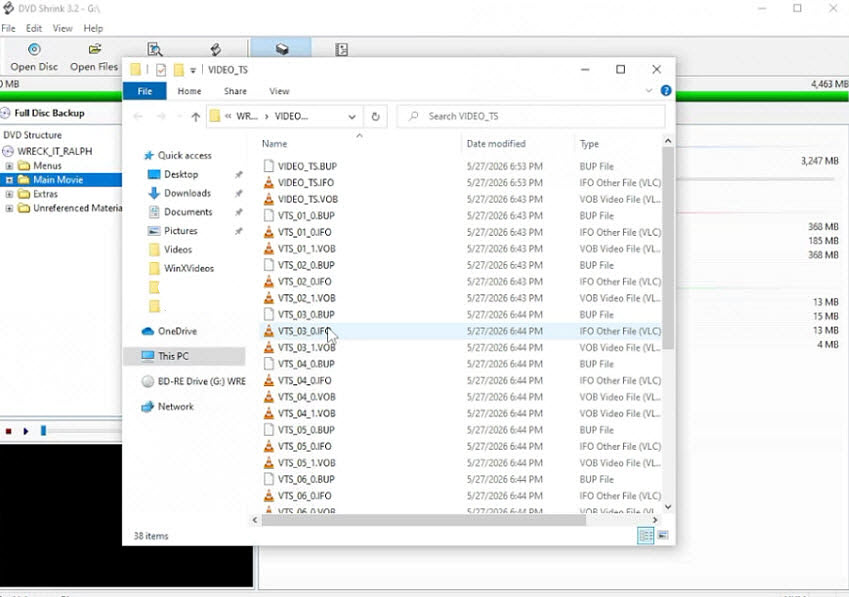
As expected from the application with legacy architecture, DVD Shrink 3.2 does not convert video to MP4 and MKV files but saves results in VIDEO_TS / AUDIO_TS folders, delivering a native VIDEO_TS folder with a total size of 4.35GB (see the screenshot below). However, a more detailed technical analysis of the output folder confirmed the presence of precisely 16 split VOB files ranging in size from a minimum of 64 KB to the maximum UDF file system limit of 1,048,574 KB (1 GB). Since there is a hard-coded limit on the maximum size of VOB files for the sake of compatibility with older DVD players, the largest possible 1 GB VOB file could hold no more than about 12 minutes of video content. In practice, despite an attempt to disable splitting VOB files in preferences, the software adhered to this limitation.
Download DVD Shrink Legacy Edition
DVD Shrink has stopped updating for years, try the best alternative to backup modern DVDs >>
#8 WonderFox DVD Ripper
Best For: Users seeking a straightforward, reliable balance of conversion choices and direct UI layout.
WonderFox DVD Ripper Pro seeks to make the process of digitization more accessible and automated through its user-friendly design, suitable for users who want straightforward DVD ripping workflows over advanced customization features. Being marketed as a fast solution for consumers' archival needs, the program streamlines ripping to three main steps: loading of the disc, selection of the appropriate profile, and conversion. The software is equipped with a powerful decryption module able to overcome mainstream regional restrictions and copy protections (CSS, Sony ARccOS, UOP) without any configuration from the side of the user during the disc loading process.
Instead of offering complicated encoding parameters to users, the program aims at facilitating the output management in a practical way by providing more than 300 optimized profiles for flawless mapping of DVD content to different mobile phones, consoles, smart TVs, and common formats (MP4, MKV, MOV). Apart from common compression capabilities, it provides an open architecture for those who seek a perfect 1:1 copying of DVD to ISO, MPEG2, and Video_TS folder. However, this software has stopped updating since July 12, 2019.
Key Features
- Flexible Audio/Subtitle Management: Keeps selected multi-language audio streams and clean external subtitle attachments.
- Device Target Presets: Export output profiles tailored for the modern television display and game consoles.
- Simple Clip Trimming: Includes editing options to quickly delete unwanted studio logos or credits before processing.
- Reliable decryption success rates on typical retail disc types.
- Intuitive, highly legible control panels for configuration.
- Includes editing options for basic clipping and simple adjustments.
- Lacks the advanced, deep configuration parameters technical power users crave.
- Transcoding speed performance degrades considerably when dealing with large volume disc queues.
- Stability and application responsiveness issues with high-load decryption workflows.
Benchmark Highlights
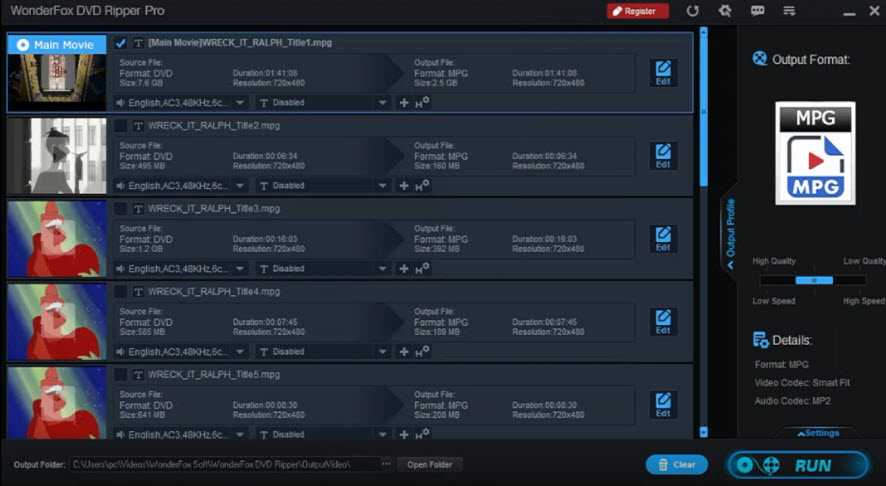
Concerning the pure encoding capabilities, WonderFox DVD Ripper v23.8 shows relatively good results, making it among the top three applications in the list of tested utilities by speed. Decoding the Wreck It Ralph (Title 1) file in the MP4 H.264 format resulted in a very fast render time of 211.88 FPS. The conversion stage lasted 515 seconds and the total process completed within 597 seconds. The extremely fast transcoding goes hand-in-hand with an almost non-existent overhead, with average GPU usage recorded at just 0.94%, positioning it among the most efficient engines for raw video rendering throughput.
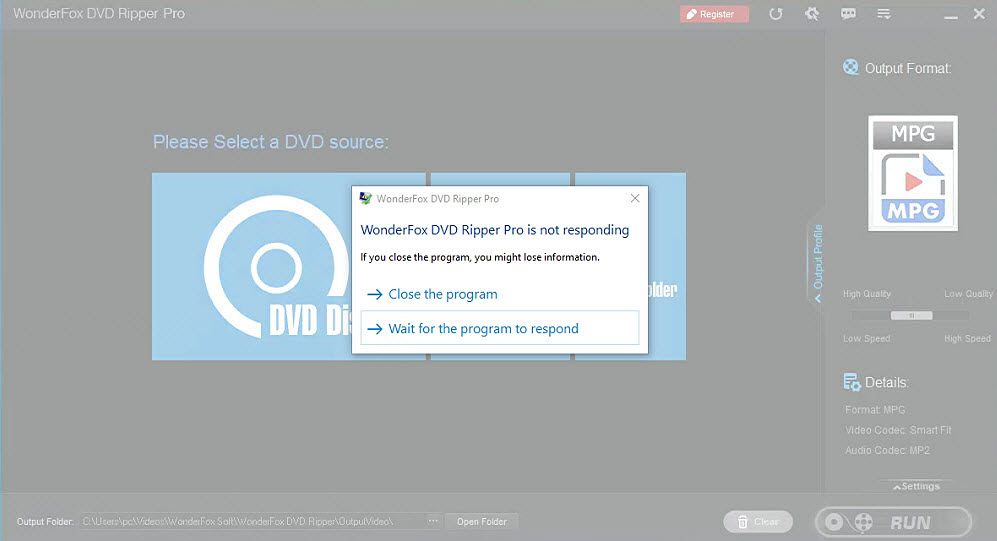
At the same time, these fast render times are partially offset by application instability during parsing and configuration stages of the workflow. Enabling the "enhanced decryption" option caused noticeable system lag and frequent "not responding" states. Disabling this option improved stability but increased initialization time to up to 8 minutes, which significantly slowed the start of processing. Additionally, opening the internal editing window introduced intermittent freezes lasting 10–20 seconds, indicating that UI responsiveness is not fully aligned with its high-speed encoding backend. Overall, the results suggest that while the transcoding engine is highly optimized, decryption handling and interface stability still require refinement for consistent production use.
Visit WonderFox Official Site
Check the side-by-side comparison of WinX DVD Ripper vs Wonderfox DVD Ripper
Side-by-Side Comparison Table of the 8 DVD Rippers
| Software | Ripping Speed | Handles Protected DVDs | Primary Output Formats | GPU Acceleration | Starting Price |
|---|---|---|---|---|---|
| WinX DVD Ripper | Excellent (Up to 177 fps) | Yes (Comprehensive) | Extensive (MP4, MKV, AVI, H.264, ISO, MPEG-2, etc) | Yes (Level-3 Intel/NVIDIA/AMD) | $39.95 (5 minutes free trial) |
| VideoProc Converter AI | Excellent (160 fps) | Yes (Comprehensive) | Extensive (MP4, MKV, MOV, HEVC, AV1, VOB, etc) | Yes (Full GPU Acceleration) | $34.95 (5 minutes free trial) |
| DVDFab DVD Ripper | Moderate (109 fps) | Yes (Cloud Decryption) | Extensive (MP4, MKV, FLV, M2TS, profiles) | Yes (GPU accelerated) | $59.49 (3 discs free trial) |
| MakeMKV | Fast (145 fps) | Yes (AACS/BD+ Core) | MKV Only | No (Direct Stream Copy) | Free (Beta) |
| HandBrake | Moderate (100 fps) | No (Requires external library) | MP4, MOV, MKV, WebM | Yes (Intel QSV / NVENC / AMD support) | Free (Open-Source) |
| VLC Media Player | Slow (67 fps) | No (Requires external library) | Basic (MP4, WebM, TS, Ogg) | No (Hardware decoding only) | Free (Open-Source) |
| WonderFox DVD Ripper | Excellent (211 fps) | Yes (Standard) | Good (MP4, MKV, MOV, MP3) | Yes | $29.95 (15 minutes free trial) |
| DVD Shrink | Fast (148 fps) | No (Outdated) | Limited (ISO, DVD Video Folder) | No | Free (Legacy abandonware) |
Performance Showdown: Speed & Copy-Protection Rankings
Which DVD Ripper Is the Fastest?
Our lab benchmark shows a distinct difference in the speed of DVD rippers with GPU-acceleration versus CPU based or legacy tools. In DVD parsing and reading speed, WinX DVD Ripper Platinum and VideoProc Converter AI are the fastest, both taking only 5 seconds to detect and parse the DVD, followed by VLC at 9 seconds and DVDFab DVD Ripper at 12 seconds. Meanwhile, tools like HandBrake and DVD Shrink are noticeably slower at 31 seconds and 119 seconds. MakeMKV crawls at a painful 2542 seconds because its java-powered engine executes exhaustive decryption routines to process complex structural obfuscation.
In terms of speed in encoding, WonderFox DVD Ripper proves to be a fast solution at 211 FPS, with WinX DVD Ripper Platinum (177 FPS) and VideoProc Converter AI (160 FPS) forming the top tier, whereas other software, CPU-bound, or legacy solutions such as DVDFab (109 fps), HandBrake (100 fps), and VLC (67 fps) lag behind. MakeMKV has a special place here: it lacks the transcoding architecture to compete with raw frame processing parameters but its zero-compression 'Direct Stream Copy' remux mechanism allows it to produce files at 145.94 fps once it has overcome the initial parsing hurdle. This confirms that hardware-accelerated solutions deliver the fast and most consistent overall DVD ripping performance.
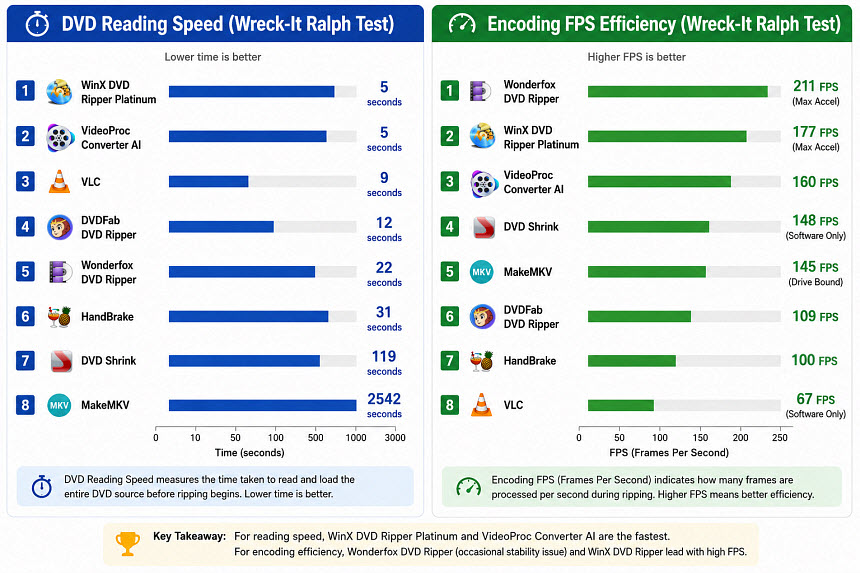
While all 8 programs performed well, the fastest tools combined GPU acceleration with efficient DVD analysis and decryption engines. For detailed FPS results and hardware utilization data, see our complete DVD ripper benchmark tests report.
Which DVD Ripper Handles Copy-Protected DVDs Best?
The table below illustrates the technical compatibility of each software against industry-standard encryption and structural modifications:
| Software | CSS | Region Code | UOPs | APS | Sony ARccOS | 99-title | Damaged DVD |
|---|---|---|---|---|---|---|---|
| WinX DVD Ripper | ✓ | ✓ | ✓ | ✓ | ✓ | ✓ | ✓ |
| VideoProc Converter AI | ✓ | ✓ | ✓ | ✓ | ✓ | ✓ | ✓ |
| DVDFab DVD Ripper | ✓ | ✓ | ✓ | ✓ | ✓ | Limited | ✓ |
| WonderFox DVD Ripper | ✓ | ✓ | ✓ | ✓ | ✓ | ✓ | Limited |
| MakeMKV | ✓ | ✓ | ✓ | ✓ | ✓ | Limited | Limited |
| DVD Shrink | ✓ | ✓ | ✓ | ✓ | ✗ | ✗ | ✗ |
| VLC | ✓ (Libdvdcss required) | ✓ (Libdvdcss required) | ✗ | ✗ | ✗ | ✗ | ✗ |
| HandBrake | ✓ (Libdvdcss required) | ✓ (Libdvdcss required) | ✗ | ✗ | ✗ | ✗ | ✗ |
To verify these decryption claims under real-world conditions, we stress-tested the applications using highly complex structural protections, specifically Wreck-It Ralph (99-title layout) and NCIS Season 9, Disc 6 (multi-title TV series). The empirical results revealed that handling encryption is only half the battle; structural title identification poses a significantly greater challenge. While the generic open-source converters (HandBrake, VLC) showed problems with playback reliability due to issues with dropped frames, not watchable content, and limited output duration (about ~1h16min output for Wreck-it Ralph), the important thing is how correctly the software can recognize titles from protected discs.
On the multi-title NCIS disc, DVDFab recognized Title 14 as default one, while MakeMKV could identify several correct titles (7, 10, 11, 13, 14) and WonderFox DVD Ripper could detect four titles (7, 10, 13, 14). In contrast, software such as WinX DVD Ripper and VideoProc Converter managed to recognize Title 7 properly and generate output that is consistent with what was anticipated.
In summary, "best handling of copy-protected DVDs" consists of two distinct skills – structural title identification and overall playback reliability. The MakeMKV application is superior in terms of raw title capture, thus is very efficient when dealing with multi-title discs in which the structure is deliberately complicated. On the other hand, WinX DVD Ripper and VideoProc Converter provide better practical use through reliable identification of the right main title (Title 7) and provision of stable output without further manual fixing.
For a deeper dive into decryption capabilities, read our exhaustive best DVD ripper for copy-protected DVDs reviews for detailed lab data and compatibility charts.
Want to see which software successfully handles tough regional copy protections and 99-title structures? Read our complete protection compatibility results on the full DVD Ripper benchmark report.
What to Consider While Choosing DVD Rippers?
In order to find the perfect DVD ripping tool for your library, you should concentrate on the following six parameters of performance:
Support for DVD Decryption: Many commercial DVDs use region coding or protection of their structure and even contain encrypted titles that could confuse an ordinary DVD ripping tool. In order to deal with it properly, it is important to choose a DVD ripper that interprets the structure of a disc and supports the decryption of titles.
Speed, Hardware Acceleration and CPU Efficiency: The efficiency of a DVD ripping process depends on both the conversion rate and the efficient use of system resources. An ideal DVD ripping application must allocate tasks to the CPU cores as well as be able to harness the power of GPU technology (Intel, NVIDIA, AMD, or Apple Silicon) to enable fast encoding and batch processes.
Output Video Quality: It is very important to keep the video quality during the process of its digitalization, especially if it is 480i. Choose the tool that preserves the original resolution but offers additional features like deinterlacing or even AI-based enhancements.
Output Formats and Device Profiles: Good DVD rippers should support modern formats such as MP4, MKV, and HEVC. It is also beneficial to select tools that include predefined device profiles for iPhone, iPad, Android devices, smart TVs, and gaming consoles to simplify the export process.
Ease of Use: As a novice, you should focus on simplicity rather than complex encoding options when it comes to the user interface of DVD ripping tools. For example, if you desire a simple process, do not look for a tool with a lot of technical elements.
Final Verdict
The choice of the best DVD ripping software will be determined by what kind of disc you have in your collection and your requirements. If you are a user who is concerned about the speed and wants to save time and effort, WinX DVD Ripper and VideoProc Converter AI will prove to be very useful in this case because of their good performance in terms of encoding and decryption capabilities. However, if the task is to make an exact copy and if the available space is not an issue, then MakeMKV will be more helpful due to its ability to produce lossless files. If the disc is unencrypted or it is home video material, then you may prefer using HandBrake.
 FAQ about DVD Ripper
For most users, WinX DVD Ripper Platinum is the best overall choice, since it offers a perfect balance of fast GPU processing speeds, decryption features that work on difficult commercial DVDs, and an easy-to-use interface.
If you have a non-protected home video discs, the best choice is HandBrake, but if you want lossless and unencrypted backups of commercial DVDs for free, then MakeMKV will do the job.
Yes, HandBrake is among the best open-source video conversion tools that you can find out there for free. Unfortunately, HandBrake cannot rip commercial DVDs because it does not have decryption features and needs to be supplemented with libdvdcss files.
Some commercial DVD rippers (WinX DVD Ripper and DVDFab) come with in-built decryption capabilities which work on region codes and copy-protected DVDs.
It all depends on where you are located. In many countries, copying data from media that you legally own for personal use falls under Fair Use. However, it is totally illegal to circumvent digital protection measures in order to redistribute and share copyrighted movies.
DVD ripping and DVD backup are often used interchangeably, although they refer to different workflows[4]. Ripping involves conversion of video from DVD to digital formats like MP4 or MKV. Backing up implies making an image or duplicate of the disc.
Some quality loss is inevitable during the process of re-encoding video. But today, there are codecs and high bitrates that allow to preserve all visible quality details.
Based on our benchmark testing, WinX DVD Ripper Platinum delivered one of the fastest overall DVD ripping performances among the tested tools, especially when handling complex DVD structures and copy-protected discs. Its advantage comes from fast DVD analysis, reliable decryption, and efficient hardware acceleration rather than encoding speed alone.
Yes. GPU acceleration can significantly reduce DVD ripping time by speeding up the DVD video encoding process. In our benchmark, hardware-accelerated DVD rippers consistently outperformed CPU-only solutions, delivering much faster processing speeds while maintaining similar output quality.
For users who want to preserve the original DVD structure, MakeMKV is a popular choice because it creates lossless backups without re-encoding and keeps original video, audio, subtitles, and chapter information. Some DVD ripping software like WinX DVD Ripper Platinum, VideoProc, Wondershare, Wonderfox can also preserve selected DVD features depending on the output mode.
Some DVD rippers perform better at handling scratched or damaged discs than others. They use advanced DVD analysis and error-handling technologies to improve the chances of successfully reading problematic discs, although severely damaged DVDs may still require physical repair before ripping.
Legal Disclaimer: WinXDVD, developed by Digiarty Software, is designed strictly for personal, non-commercial media backup under fair use. Digiarty Software strictly respects copyright laws and does not condone, facilitate, or support copyright infringement or unauthorized copying. Users are advised to check and comply with their local DVD copyright laws and regulations before use.
Sources referenced in this guide
- "18-Tool DVD Ripper Benchmark (2026)" - WinXDVD Labs
- "Best Free DVD Ripper Software Review" - Techradar
- "Video Transcoding and Format Support" - HandBrake Documentation
- "Comparison of DVD Ripping Software" - Wikipedia


