









DVD Ripper Benchmark 2026: 18 Software Speed, Decryption, Performance & Stability Test

The existing consumer market for DVD ripping and digitization market is crowded by claims from manufactures such as "unbeatable speeds", "lossless conversion", or "universal decryption" that are not supported by any credible empirical evidence. Our present comprehensive benchmark report cuts through all the market hype. By conducting our tests in a highly controlled laboratory environment on an AMD hardware platform, we tested the 18 most popular DVD ripping and backup software solutions through a series of rigorous benchmark scenarios using two legally purchased retail DVDs: a commercially released feature film DVD and a multi-title television series DVD.
Executive Summary: With a rigorous weighted scoring model taking into consideration such parameters as DVD structure parsing, DVD ripping and backup speed, decryption compatibility, system stability, and resource allocation, WinX DVD Ripper and VideoProc Converter AI come out to be the Tier-1 solutions. They deliver the most optimal balance of advanced hardware-acceleration scheduling and 100% successful decrypting in highly protected situations.
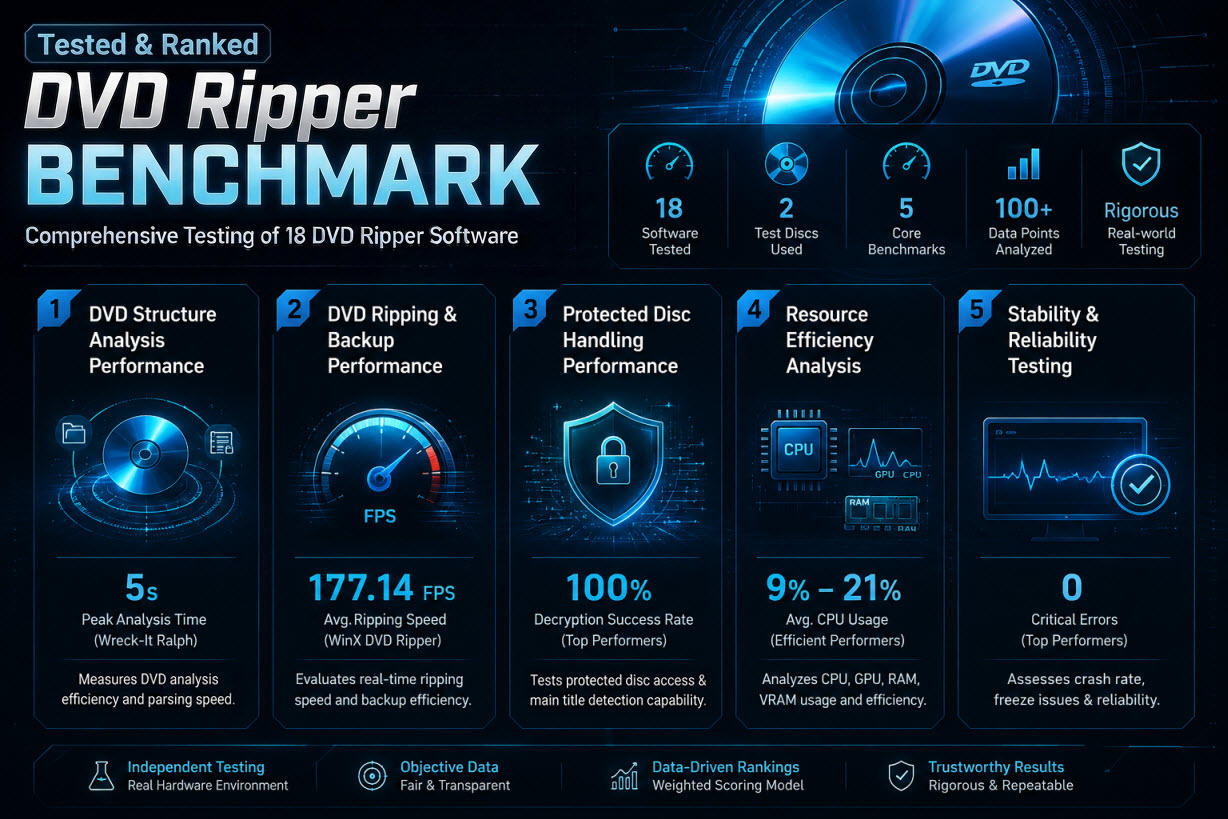
Key Findings:
- Throughput & Efficiency Champions: WinX DVD Ripper captured the absolute raw encoding crown, finishing a quick DVD reading within 5 seconds and reaching 177.14 FPS during DVD to MP4 H.264 compression. When executing non-re-encoded lossless extraction (NCIS), WinX DVD Ripper engaged an optimized DVD backup mechanism, driving processing speeds past 380+ FPS while dropping GPU power consumption to a remarkably efficient 8.15W. MakeMKV required extended analysis under complex encryption condition, and thus spent over 42min parsing disc in the Wreck It Ralph test case, making it less efficient in high-throughput batch workflows.
- Protected Disc Handling: Commercial DVD ripping solutions like WinX DVD Ripper, VideoProc, Wondershare, and the like achieved a flawless 100% success rate against X-Project and multi-title structural protections. Conversely, open-source alternatives or video-specific programs (e.g., Handbrake, Vidcoder, Mediacoder, Cisdem, and Movavi) lacked native commercial decryption libraries, resulting in immediate decryption failures and rendering an unweighted decryption score of 0.
- Sub-optimal Coding & Memory Leaks: Several applications at the middle tiers (specifically VideoByte and AnyMP4) proved severely inefficient in terms of memory utilization. During feature-length encoding tasks, they aggressively consumed 18.5GB+ of system RAM, directly triggering 2 application crashes per test session.
- User Experience (UX) Bottlenecks: Although DVDFab was efficient in decrypting the structure of the DVD video, it introduced a significant 74-second initial analysis lag accompanied by a 3-minute "pseudo-freeze" state (stuck at 0% progress) and intrusive remote application prompts when backing up DVD NCIS.
How We Test the DVD Ripper Applications
In order to achieve absolute reproducibility, mathematical consistency, and accuracy of results, all 18 DVD ripping and cloning software programs were tested using a strictly controlled lab setting. There were no other background applications running during this data collection process.
Hardware Configuration
All tests were carried out using identical hardware specifications to avoid any variation due to different hardware configurations or thermal throttling.
- CPU: AMD Ryzen 5 5600 (6-Cores / 12-Threads, Stock Clocks)
- GPU: AMD Radeon RX 6700 XT (12GB VRAM)
- RAM: 48GB DDR4 (Dual-Channel Architecture)
- OS: Windows 10 64-bit (Build verified stable)
- Optical Disc Drive (ODD): Standard Desktop DVD-ROM / Blu-ray Internal Drive (Uniform Read Speed Enabled)
Test DVDs & Structural Profiles
Two commercial DVD structure types were chosen to test for both encoding efficiency and structure parsing ability under practical conditions:
| Disc | Wreck-It Ralph | NCIS S9 D6 |
|---|---|---|
| Profile | Feature-length encrypted movie | Multi-title episodic DVD |
| Content | Main Title (~101 min) | Target Title 7 (~41 min) |
| Target Workflow | H.264 MP4 transcoding | Lossless extraction (remux) |
| Stress Focus | GPU encoding efficiency, bitrate control, VMAF quality consistency | Structural parsing complexity, multi-title navigation handling, stream extraction efficiency |
Testing Procedure
In order to achieve uniformity and minimize the impact of variability in the system (such as time spent initializing the drive or cache effects), each application underwent the following evaluation process:
1. Repeated Execution Cycles: Each program was run two to three times per scenario. Results reported here are the arithmetic average of all successful runs.
2. Standardization of Configuration: If available, hardware acceleration (AMD) was used. All applications used output configurations which were as close as possible with respect to:
- H.264/MP4 encoding profile for transcoding scenarios
- Passthrough/remux/backup mode for lossless extraction scenarios
3. Resources Monitoring: Performance monitoring was performed using AMD Radeon Software Adrenalin (ALT + R → Performance Tracking). Logging was started at the beginning of each test and stopped immediately after completion. Measures included:
- CPU utilization (average)
- GPU utilization (average)
- GPU power (average)
- Peak GPU temperature
- Peak GPU VRAM
- Peak RAM consumption
- DVD read/conversion/backup time and encoding fps for each task
- DVD analysis successful rate and error encountered
Core Performance and Reliability Benchmarks
The following benchmark sections provide measured results of each major stage of the DVD processing workflow. Instead of measuring only a single speed metric, every benchmark evaluates one independent aspect of software performance under the same testing environment.
Each section focuses on a specific performance dimension, such as DVD analyzing, protected DVD handling success rate, transcoding speed, backup efficiency, hardware resource consumption, and stability of the software. These metrics are independently evaluated because they measure fundamentally different aspects of overall performance.
Then a weighted scoring model is applied in the final ranking to combine these measurementsinto an overall performance assessment.
Not sure how these tools compare in real-world usage? Check best DVD ripper review >>
Benchmark 1: DVD Disc Structure Analysis Speed
The initial disc structural analysis phase is the critical gateway of the archiving workflow. When commercial DVDs employ structural protection schemes—such as intentionally introducing hundreds of fake titles, modified navigation sectors, or corrupt sectors—an unoptimized parsing engine can experience prolonged parsing, severe execution hangs, generate incorrect title maps, or crash the pipeline entirely.
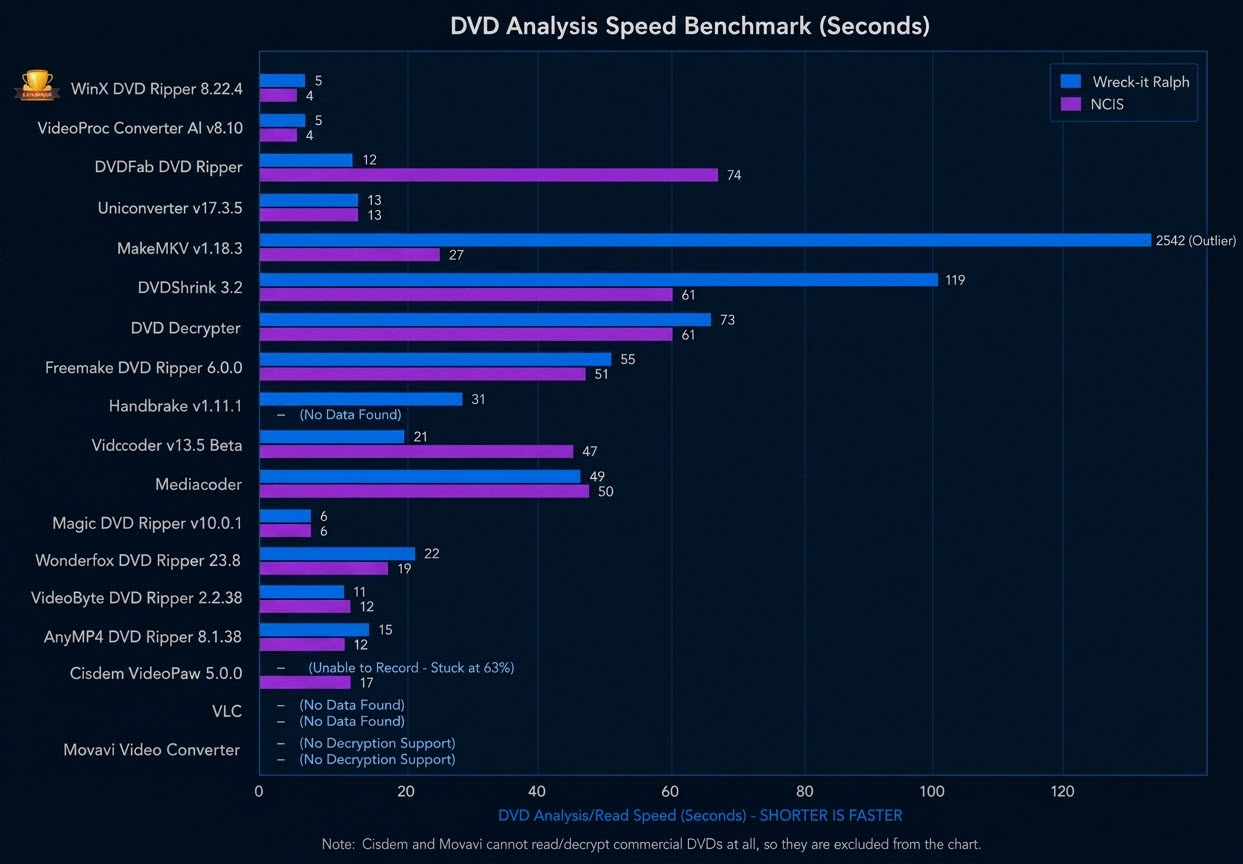
The structural analysis processing durations required to achieve comprehensive sector parsing across both standardized test disc matrices are outlined below:
Empirical Performance Analysis
Benchmark of DVD structure analysis illustrates significant variations among the applications while working with both single-title and multi-title DVD structures.
1. High-Performance Cluster (Fast Parsing Engines): The Tier-1 optimization track (WinX DVD Ripper and VideoProc Converter AI) demonstrated outstanding, highly optimized structural pre-scanning engine. Both programs accomplished the same speed of 4 to 5-second parsing execution loop across both standard and complex multi-title discs. Magic DVD Ripper also performed well at 6 seconds per disc, placing it close to the top-tier cluster.
2. The Multi-Title Multiplicity Hang: DVDFab DVD Ripper worked well on a single-title commercial disc (12 seconds) but experienced a massive processing slowdown on the multi-title structural matrix of NCIS S9 D6, extending to 74 seconds. In addition, logs documented that it triggered a 3-minute "pseudo-freeze" state (0% progress indicator) along with background remote invocation, implying less efficiency during complex navigation parsing scenarios.
3. Outlier Parsing Behavior in Deep Scanning Engines: MakeMKV exhibited great differences in terms of the two test discs:
- Wreck-It Ralph: 2542 seconds
- NCIS: 27 seconds
This means very different parsing behavior depending on disc structure complexity.
DVDShrink also showed moderate-to-slow performance across both discs (119s / 61s), reflecting its legacy parsing design.
4. Parsing or Failed Parsing in Certain Tools: Open-source and non-decryption-oriented tools (Handbrake, VLC, VidCoder, Mediacoder, Cisdem, and Movavi) had different degrees of failure in structural parsing when processing protected multi-title DVD content. While HandBrake, VidCoder, and MediaCoder were able to detect and list selectable DVD titles, the output video in both preview and final encoding was filled with block artifacts to the point of being completely unusable. Movavi refused to process the copyrighted DVD altogether, resulting in an error: "Warning. The specified media is copyright protected and cannot be converted. No video." Cisdem Video Converter managed to start parsing of the DVD called Wreck-It Ralph, however, got stuck in parsing around 63% of the way through with overall parsing taking more than 12 minutes.
Based on our benchmark results, you can also explore our recommended DVD ripping software for ripping copy-protected DVDs.
Benchmark 2: DVD Ripping Speed and Conversion Efficiency
This benchmark measures the processing performance for two typical DVD workflows: transcoding DVD to MP4 from the encrypted Wreck-It Ralph DVD and lossless DVD cloning (copy/mux) from the NCIS S9 D6 multilingual DVD. These two workloads cover the two most frequent practical use cases of DVD digitization, while stressing separate parts of the respective applications' processing pipeline. Due to the fact that DVD transcoding and DVD lossless backup are two different real-life workloads, the benchmark assesses both of them to provide a more complete evaluation of processing performance. In contrast to simple speed measurement, this benchmark demonstrates how each particular application works under the stress of two different workloads.
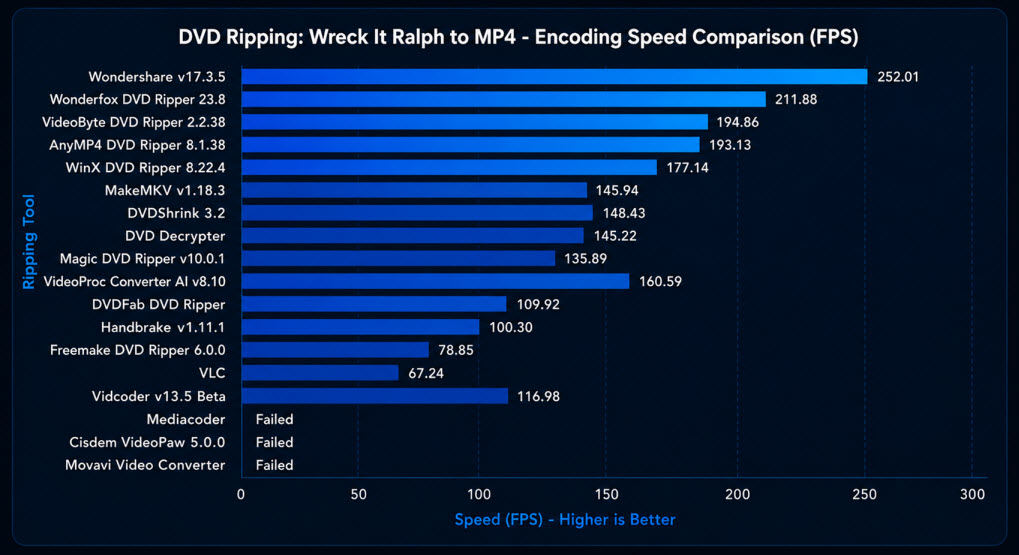
DVD Ripper Benchmark: Wreck-It Ralph DVD Encoding Performance (Higher FPS = Better)
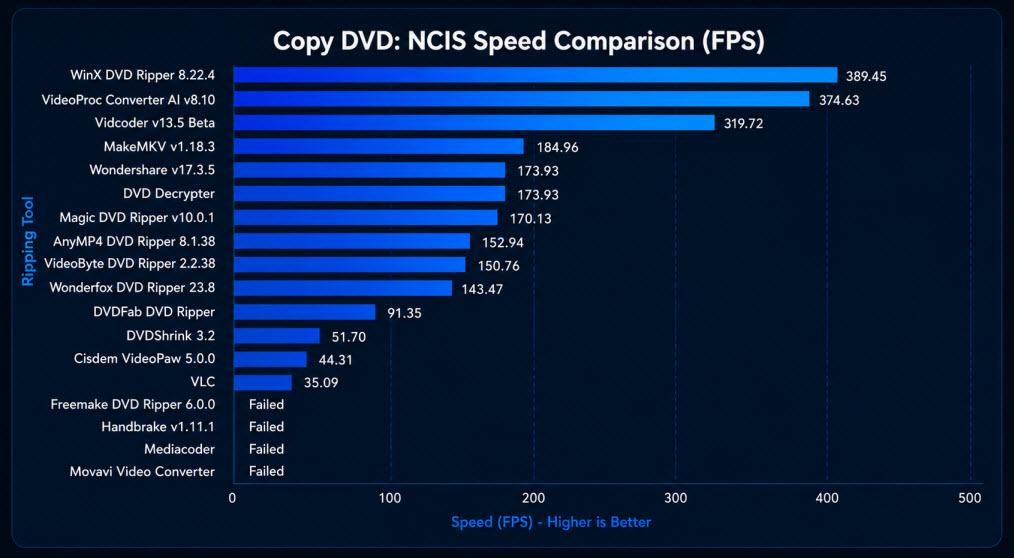
DVD Ripper Benchmark: NCIS DVD Backup Performance (Higher FPS = Better)
Key Findings
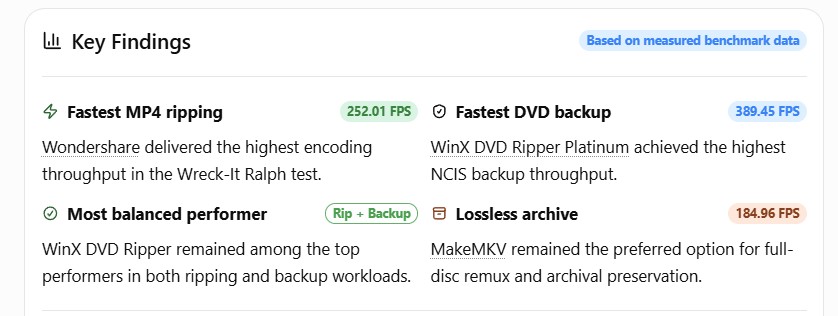
- Peak Transcoding Performance: Wondershare UniConverter v17.3.5 achieved the highest DVD-to-MP4 encoding throughput, reaching 252.01 FPS during the Wreck-It Ralph transcoding task.
- Fastest DVD Backup Performance: WinX DVD Ripper delivered the fastest protected DVD backup performance, reaching 389.45 FPS during lossless extraction of the NCIS S9 D6 disc.
- Most Consistent Cross-Workflow Performance: Although Wondershare showed better performance in the transcoding tests, WinX DVD Ripper remained among the top-performing applications across both transcoding and backup workloads, demonstrating the strongest cross-workflow consistency.
1. High Transcoding Performance
The benchmark shows that DVD transcoding performance is determined primarily by the processing architecture and hardware acceleration strategy rather than encoding speed alone. It is possible to observe clear differences between the performance of GPU-optimized transcoding engines, hybrid accelerations, and lossless extraction tools.
In terms of the top transcoding tier, Wondershare UniConverter v17.3.5 (252.01 FPS) and WonderFox DVD Ripper (211.88 FPS) achieved the highest encoding performance during the Wreck-It Ralph workload. VideoByte (194.86 FPS), AnyMP4 (193.13 FPS), and WinX DVD Ripper (177.14 FPS) made up the group of the next level performers. Although WinX DVD Ripper did not reach the highest peak FPS, it maintained competitive encoding throughput while also ranking among the fastest applications in the backup benchmark, indicating balanced performance across multiple workflows rather than optimization for a single task.
2. Fast DVD Backup Performance
Unlike full transcoding, DVD backup primarily measures the efficiency of stream extraction after successful DVD analysis and decryption. Under this workload, WinX DVD Ripper (389.45 FPS) and VideoProc Converter AI (374.63 FPS) demonstrated a significantly better performance and exceeded almost all the other competing applications.
It is evident that these applications employ highly optimized backup pipelines capable of minimizing the processing overhead once protected DVD structure was successfully analyzed. In contrast, several transcoding-oriented applications showed lower backup speed despite good ranscoding performance, demonstrating that high encoding FPS does not necessarily translate into equally efficient lossless extraction.
3. Lossless Extraction Utilities
Applications like MakeMKV, DVD Shrink, and DVD Decrypter represent a different type of DVD processing software. Rather than performing DVD transcoding, these utilities make copies of the original video streams and put them into different containers without any transcoding. Thus, their performance is limited only by the speed of reading the optical disc, analyzing the DVD structure and remuxing the container. Their throughput therefore should not be directly compared with transcoding applications, as both software categories are optimized for fundamentally different objectives.
Benchmark Conclusion
This benchmark proves that DVD transcoding speed and DVD backup performance can be considered to be two separate tasks and should not be evaluated using a single throughput metric alone. Fast transcoding FPS does not necessarily guarantee equally efficient protected DVD backup, while lossless DVD backup utilities employ a fundamentally different processing algorithm, compared to the transcoding software.
The results also show that software architecture is a major factor affecting performance. Some software applications are focused on achieving high encoding throughput, while other programs are designed for stream extraction after analyzing and decrypting the DVD. Therefore, transcoding speed and backup efficiency are two separate measures of performance.
These findings form one component of the final weighted scoring methodology, where they are evaluated alongside the DVD compatibility, hardware resource efficiency, software stability, and more.
Benchmark 3: Protected Disc Recognition and Processing Success Rate
This benchmark evaluates the DVD structural analysis and decryption capabilities of the 18 selected DVD rippers. Modern DVDs employ a layered matrix of copy protections—ranging from standard Content Scramble System (CSS) and Region Codes (RCE) to complex copy protection schemes like ARccOS and multi-title sructural protection, which intentionally introduce corrupted sectors and hundreds of fake titles to confuse parsing engines.
Testing was conducted using highly protected commercial assets, specifically measuring decryption stability, sector-error handling capability, and title navigation accuracy.
You can check the image below to see the overall DVD decryption:
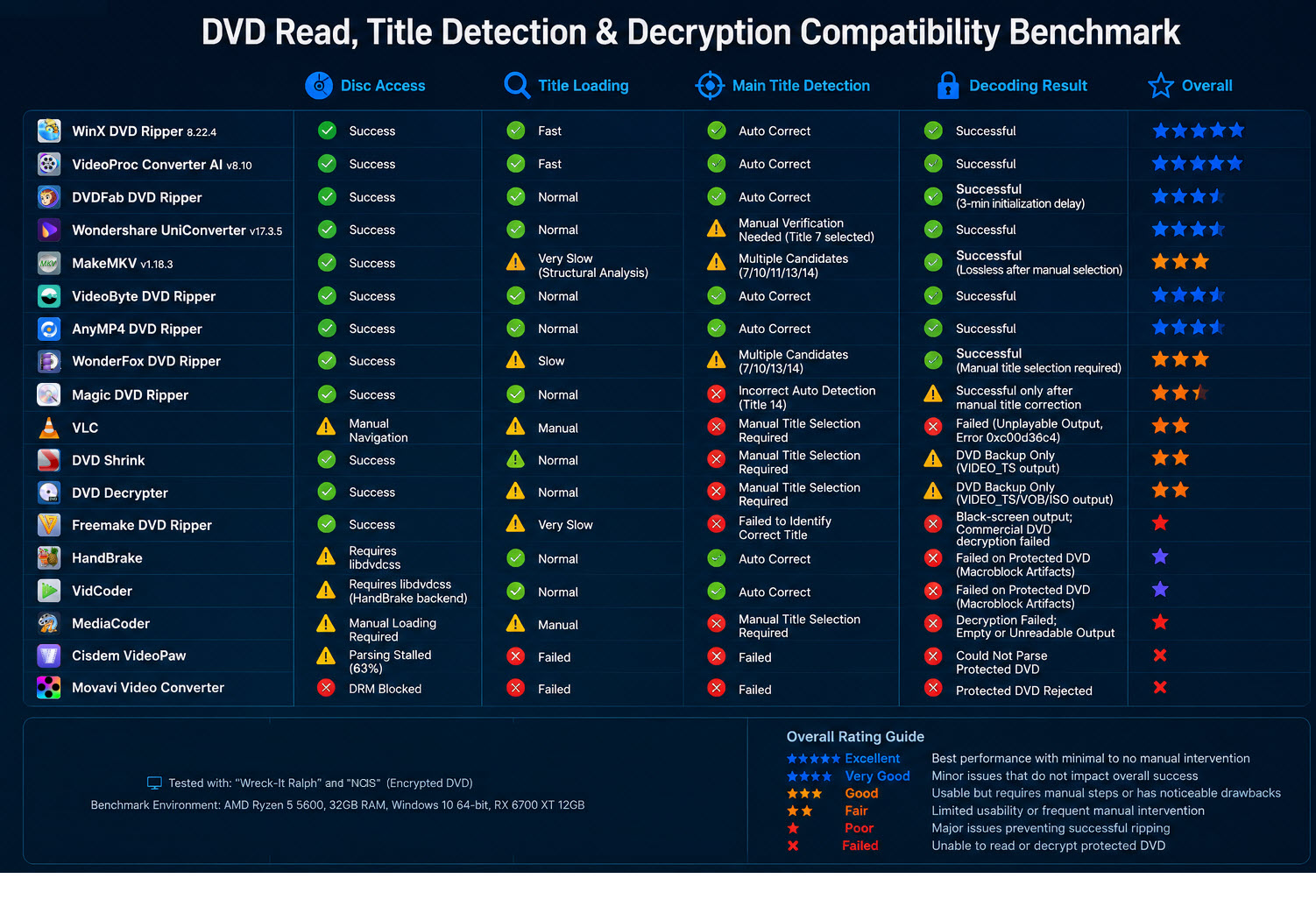
The table below details the empirical decryption success rates across all 18 tools, highlighting the performance drop-off when moving from standard region/CSS locks to advanced structural modifications:
| Software Brand & Version | Standard Protection (CSS / Region) | Advanced Structural Protection | Title Mapping Accuracy (Wreck-It Ralph & NCIS) | Core Operational Status & Log Artifacts |
|---|---|---|---|---|
| WinX DVD Ripper 8.22.4 | 100% | 100% |
Successful (Auto) • Ralph: Target Title 1 matched. • NCIS: Target Title 7 matched. |
Pass. 0 errors; clean stream output; seamless execution across both workloads. |
| VideoProc Converter AI v8.10 | 100% | 100% |
Successful (Auto) • Ralph: Target Title 1 matched. • NCIS: Target Title 7 matched. |
Pass. 0 errors; clean stream output; seamless execution across both workloads. |
| UniConverter v17.3.5 | 100% | 100% |
Successful (Auto) • Ralph: Locked onto title 7 but also showed correct content. • NCIS: Target Title 05_02 but also showed correct content. |
Pass. High-speed conversion. However, user experience is slightly degraded as the post-conversion output guide interface window fails to open. |
| DVDFab DVD Ripper | 100% | 80% |
Successful (With Issues) • Ralph: Target Title 1 matched. • NCIS: Target Title 7 matched. |
Partial Pass. When loading Wreck-It Ralph, the engine experiences a 3-minute hard freeze at 0% progress before initializing the transcode loop. Intrusive popups require external app installation. |
| VideoByte BD-DVD Ripper 2.2.38 | 100% | 60% |
Successful (With Issues) • Ralph: Target Title 1 matched. • NCIS: Target Title 7 matched. |
Degraded Pass. Severe resource leaking. During Wreck-It Ralph processing, clicking the [Edit -> Effect] panel triggers an immediate application crash (replicated twice consecutively). |
| AnyMP4 DVD Ripper 8.1.38 | 100% | 60% |
Successful (With Issues) • Ralph: Target Title 1 matched. • NCIS: Target Title 7 matched. |
Degraded Pass. Shared identical codebase flaws and trial restrictions as VideoByte. Triggered 2 consecutive application crashes upon accessing the built-in video editor on the movie workflow. |
| MakeMKV v1.18.3 | 100% | 70% |
Failed (Mismapped) • Ralph: Stuck in long parsing loop and Locked onto main Title 1 and title 2. • NCIS: Detected 5 duplicate titles. |
Degraded Pass. Suffers from extreme disc analysis lag (2,542s / 42-min). “Complex multiplex encountered”message pops up. On NCIS, it fails to isolate Title 7, spitting out 5 overlapping main titles (7, 10, 11, 13, 14). |
| Wonderfox DVD Ripper 23.8 | 100% | Limited |
Failed (Mismapped) • Ralph: Target Title 1 matched but endured “not responding” issue in trial version • NCIS: Spat out 4 conflicting titles. |
Critical Bug. On Trial 1 (Wreck-It Ralph), checking the "Enhanced Decryption" box triggers an immediate Is Not Responding program lock. Trial 2 took 8.10 mins just to load without decryption. On NCIS, it yields 4 conflicting main titles (7, 10, 13, 14). |
| Magic DVD Ripper v10.0.1 | 100% | Limited |
Failed (Mismapped) • Ralph: Target Title 1 matched. • NCIS: Misidentified Title 14 as main. |
Fail. On NCIS, its internal sorting logic mistakenly locks onto Title 14 based entirely on maximum duration bias, completely discarding the actual target (Title 7) data block. |
| Vidcoder v13.5 Beta | 100% (libdvdcss req.) | 0% (Fail) |
Failed (No Decryption) • Ralph: Target Title 1 matched but output unplayable. • NCIS: Target Title 7 matched but output unplayable. |
Fail. Lacks native decryption. Both the compressed Wreck-It Ralph file and the NCIS backup stream are completely broken into unwatchable mosaic pixel blocks due to structural protection lockout. |
| Handbrake v1.11.1 | 100% (libdvdcss req.) | 0% (Fail) |
Failed (No Decryption) • Ralph: Target Title 1 matched but output unplayable. • NCIS: Target Title 7 matched but output unplayable. |
Fail. Zero native decryption capabilities. Without manual library intervention, the output files for Wreck-It Ralph and NCIS are entirely heavily corrupted, blocky, and unwatchable. Refuses to copy episodic discs natively. |
| DVD Shrink 3.2 | Legacy Base | 0% (Fail) |
Failed (Incomplete backup) • Ralph: Target Title 1 matched. • NCIS: Target Title 7 matched. |
Fail. Obsolete legacy engine. When exporting Wreck-It Ralph, unchecking the "split VOB" option still results in a fractured, scattered directory of multiple separate raw VOB files. |
| DVD Decrypter | Legacy Base | 0% (Fail) |
Failed (Incomplete backup) • Ralph: Manual title selection required in IFO mode. • NCIS: Manual title selection required in IFO mode. |
Fail. Discontinued in 2005. When ripping Wreck-It Ralph using IFO mode, the engine gets tricked by the encryption map, generating a corrupted VOB file that contains only 14 minutes of the movie. |
| VLC Media Player | 0% (Fail) | 0% (Fail) |
Failed (Explicit) • Ralph: Manual title selection required. • NCIS: Manual title selection required. |
Fail. Lengthy conversion and incomplete ripping. On Wreck-It Ralph, it runs extremely slowly for 28 mins 25 secs in ripping the 1h 41min movie (chopped down to 1:16:07 total due to possible framing drops). |
| Freemake DVD Ripper 6.0.0 | 0% (Fail) | 0% (Fail) |
Failed (Crash) • Ralph: Target Title 1 matched, but the content is watermarked. • NCIS: Spat out 3 conflicting titles. |
Fail. The output file for Wreck-It Ralph renders as a completely black screen with a massive intrusive central watermark, confirming zero protection handling capability. On NCIS, the loading loop triggers an immediate program crash across 3 consecutive trials. |
| Cisdem VideoPaw 5.0.0 | 0% (Fail) | 0% (Fail) |
Failed (Frozen & Mismapped) • Ralph: Title loading stuck at 63% • NCIS: Manual selection required among multiple listed titles. |
Fail. Catastrophic processing loop. Takes an agonizing 12 minutes to parse titles, only to freeze permanently at 63% on the loading bar while processing Wreck-It Ralph. The software lacks a native DVD copy feature and suffers from frequent app crashes. |
| MediaCoder | 0% (Fail) | 0% (Fail) |
Failed (Explicit) • Ralph: Manual title adding required. • NCIS: Manual title adding required. |
Fail. Hostile engineering framework. For Wreck-It Ralph, manual title selection is mandatory; selecting an alternate stream yields a garbled, corrupted 5-minute unplayable payload due to "Duration Limit Exceeded" parameters. For NCIS, it hits a hard stop and throws Last Error Code: 007. Imposes a hostile 120-minute interface lock on free profiles. |
| Movavi Video Converter | 0% (Fail) | 0% (Fail) |
Failed (Explicit) • Ralph: Copy-Protection Block. • NCIS: Copy-Protection Block. |
Fail. Active anti-ripping protection middleware integration. On Wreck-It Ralph and NCIS, it halts instantly and triggers a warning: "The specified media is copyright protected and cannot be converted. No video." Refuses to read encrypted episodic data entirely. |
Empirical Log Findings & Decryption Anomalies
Title Selection Blindspot: The benchmark shows an industry-wide difference in DVD title-mapping algorithms under multi-title and structural protection conditions, including the playlist obfuscation in the case of NCIS and similar series). WinX DVD Ripper, VideoProc Converter AI, and UniConverter showed the most stable automatic title selection behavior across both tested DVDs, consistently converging on the correct primary video stream without the need for manual intervention. DVDFab also correctly identified the target titles in both scenarios; however, it has shown pre-transcode initialization latency under heavily structured discs, indicating a separation between correct title recognition and parsing efficiency. At the same time, MakeMKV, Magic DVD Ripper, WonderFox, and Freemake exposed structural ambiguity in title mapping, producing multiple conflicting titles (4–5 variants) or relying on duration-based heuristics that misaligned with the actual playback stream in episodic discs.
Structural Parsing Initialization Bottleneck: DVDFab demonstrated a 3-minute initialization stall when loading highly structured DVDs such as Wreck-It Ralph. This behavior reflects a pre-transcode parsing overhead rather than decryption failure, indicating inefficiency in structural map reconstruction under complex playlist hierarchies.
Post-Decryption Processing Instability: VideoByte DVD Ripper and AnyMP4 DVD Ripper exhibited nearly identical failure modes during post-processing. While both successfully completed decryption, both triggered repeated application crashes when accessing editing modules, suggesting instability in shared UI or rendering subsystems rather than core decryption engines.
The UI Lockout Bug: Wonderfox DVD Ripper suffered from a deterministic UI-level failure when enabling "Enhanced Decryption". Instead of degrading gracefully, the DVD ripper entered a non-responsive state, indicating a run-time deadlock condition caused by feature activation rather than failure to decrypt content.
Dependency-based or Non-Native Decryption Limitations: Open-source programs (HandBrake, VidCoder, VLC, MediaCoder) lack native commercial DVD decryption ability and rely on external libraries such as libdvdcss. While ripping encrypted structural DVDs, they either produce corrupted output or require manual title intervention. Movavi Video Converter explicitly blocks encrypted content, refusing processing at the ingestion stage.
Legacy Engine Structural Obsolescence: DVD Shrink and DVD Decrypter remain capable of interpreting traditional DVD structures but fail under modern structural protection schemes. The IFO-based logic leads to fragmented or incomplete VOB outputs and cannot reliably reconstruct multi-title playlists.
Structural protection as Primary Differentiation layer: Nearly every commercial ripper successfully handled conventional CSS and region protection. Performance divergence emerged only when confronting modern structural protection , where title mapping, playlist reconstruction, and parser stability—not basic decryption—became the defining factors separating reliable products from failed implementations.
Benchmark 4: Hardware Resource Usage and System Efficiency
This benchmark evaluates the system footprint and resource optimization efficiency of the 18 tested DVD rippers. These metrics isolate average CPU usage, GPU core/encoder utilization, GPU temperature, GPU VRAM, and systemic RAM consumption to identify critical memory leaks or optimization bottlenecks during heavy processing cycles.
The table below outlines the empirical resource metrics captured during DVD transcoding pipelines:
| Software | GPU Util (Avg.) | GPU Power (Avg.) | CPU Util (Avg.) | GPU Temp (Peak) | GPU VRAM (Peak) | RAM Usage (Peak) |
|---|---|---|---|---|---|---|
| WinX DVD Ripper 8.22.4 | 0.86 | 6.43 | 21.15 | 47 | 364 | 4.44 |
| VideoProc Converter AI v8.10 | 6.92 | 11.77 | 9.19 | 48 | 479 | 6.4 |
| DVDFab DVD Ripper | 6.75 | 12.04 | 13.49 | 50 | 575 | 6.25 |
| Wondershare v17.3.5 | 8.86 | 14.55 | 13.76 | 52 | 270 | 7.11 |
| MakeMKV v1.18.3 | 2.02 | 7.3 | 1.55 | 46 | 336 | 5.76 |
| VideoByte DVD Ripper 2.2.38 | 25.37 | 9.69 | 18.55 | 48 | 461 | 18.57 |
| AnyMP4 DVD Ripper 8.1.38 | 24.13 | 13.77 | 16.38 | 48 | 462 | 18.66 |
| Wonderfox DVD Ripper 23.8 | 0.94 | 5.7 | 30.14 | 43 | 359 | 4.54 |
| Magic DVD Ripper v10.0.1 (2019.7.12) | 1.41 | 6.99 | 5.27 | 45 | 418 | 4.6 |
| VLC | 2.45 | 10.33 | 9.55 | 48 | 475 | 5.58 |
| DVDShrink 3.2 (No longer developed) | 2.76 | 8.41 | 4.99 | 47 | 411 | 5.62 |
| DVD Decrypter (DVDDecrypter.com was shut down) | 1.35 | 6.86 | 4.16 | 43 | 413 | 4.58 |
| Freemake DVD Ripper 6.0.0 | 4.62 | 7.84 | 8.02 | 45 | 452 | 4.77 |
| Handbrake v1.11.1 | 2.26 | 9.38 | 27.94 | 53 | 657 | 6.75 |
| Vidcoder v13.5 Beta | 1.76 | 7.13 | 15.19 | 46 | 491 | 5.24 |
| Mediacoder | 1.7 | 6.97 | 5.38 | 45 | 389 | 5.56 |
| Cisdem VideoPaw 5.0.0 | / | / | / | / | / | / |
| Movavi Video Converter | / | / | / | / | / | / |
Empirical Log Findings & Resource Anomalies
Across the DVD ripping and backup benchmark tests, overall performance differences are primarily due to the system resource efficiency and architectural design, rather than raw CPU/GPU utilization or encoding FPS values.
1. High-Efficiency Encoding Pipeline Tier
WinX DVD Ripper and VideoProc Converter AI consistently demonstrate that superior performance can be achieved with low-to-moderate system load, including GPU utilization typically below 7%, moderate CPU usage of around 9–21%, and controlled system memory consumption of around 4.4–6.4GB. Despite the low loads, both rippers maintain stable high throughput at about 160–177 FPS with low power draw and stable thermal behavior, indicating highly optimized decoding pipelines, efficient caching strategies, and balanced hardware scheduling. No decoding errors, freezes, or crash events were observed under standard workloads, making them suitable for sustained batch DVD digitization.
2. High-Throughput but Resource-Intensive Tier
Wondershare UniConverter produced high transcoding throughput (252.01 FPS), but it did so at the cost of significantly increased GPU power consumption (14.55W) and elevated thermal output (52°C). VideoByte and AnyMP4 similarly exhibited high GPU utilization (24%+), but their performance gains did not match their resource usage, accompanied by extremely high memory consumption (~18.6GB). This suggests less efficient resource scheduling, particularly under memory-constrained environments (e.g., 16GB systems), where software crash or instability may occur, and this has been demonstrated in the stability benchmark section.
3. Lossless Backup / Remux-Oriented Tools
Concerning the lossless backup and remuxing oriented software like MakeMKV and DVD Decrypter, both CPU and GPU usage is minimal. It proves the fact that these procedures are I/O bound rather than compute bound since the speed is limited by optical disc reading and structure analysis, not encoding capacity.
In summary, the benchmark test indicates that DVD ripping performance depends on architecture efficiency, e.g. DVD decryption, pipeline design, and resource management—rather than the CPU/GPU load or encoding FPS alone. High resource consumption may be related to program inefficiency, while optimized DVD ripper delivers better real-world throughput with lighter system pressure and more balanced resource allocation.
Benchmark 5: Stability, Error Handling & Reliability
This benchmark assesses operational resiliency under continuous, prolonged period of processing stress. In extended transcoding sessions, unoptimized parsing algorithm or memory leaks results in hard errors within programs.
Testing monitored the 18 apps under heavy processing load, logging four standardized failure dimensions:
- Freeze: The application becomes unresponsive at the UI level but does not exit or crash.
- Performance Stall: The application continues running but shows no meaningful progress for a long period.
- Dead Loop: The application gets stuck in an infinite processing cycle without reaching completion.
- Crash: The application unexpectedly terminates due to a critical error at process or module level.
Here is the pic you can clearly see the stability difference among the 18 tools.
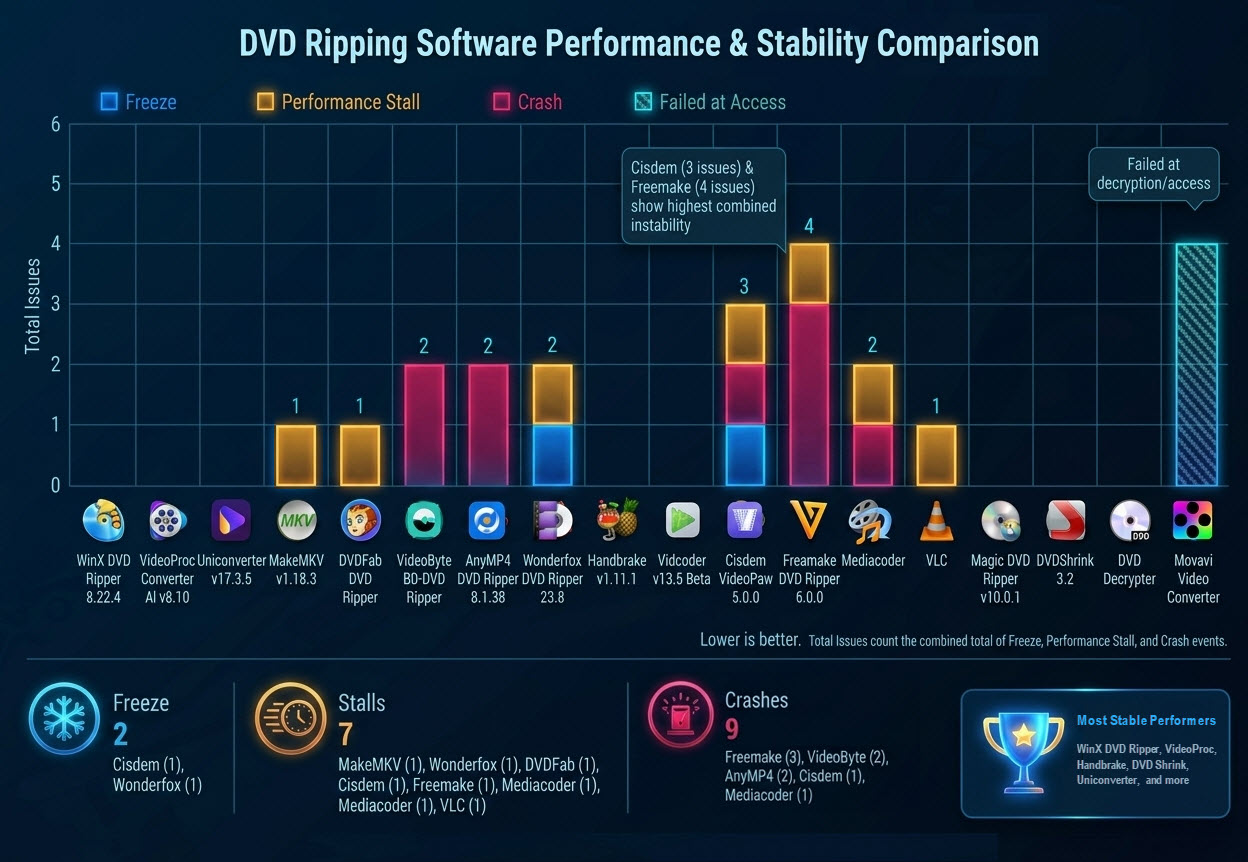
Stress Test Reliability & Exception Matrix
The table below documents the empirical failure metrics recorded during our laboratory testing:
| Software | Freeze |
Performance Stall |
Crash |
Overall Stability Status |
|---|---|---|---|---|
| WinX DVD Ripper 8.22.4 | 0 | 0 | 0 | Fully stable execution; no UI or process instability observed across workflow |
| VideoProc Converter AI v8.10 | 0 | 0 | 0 | Stable pipeline with no observable UI or processing interruptions |
| Uniconverter v17.3.5 | 0 | 0 | 0 | Video failed to open via UI workflow during test cycle |
| MakeMKV v1.18.3 | 0 | 1 | 0 | Processing stall during certain DVD scan phase; no crash or freeze |
| DVDFab DVD Ripper | 0 | 1 | 0 | 3-min initial processing stall with temporary non-responsive behavior, but no crash |
| VideoByte BD-DVD Ripper | 0 | 0 | 2 | Severe instability due to repeated module-level crashes during editing workflow |
| AnyMP4 DVD Ripper 8.1.38 | 0 | 0 | 2 | Identical interface-level crash pattern |
| Wonderfox DVD Ripper 23.8 | 1 | 1 | 0 | UI freeze and processing slowdown observed under enhanced decryption load |
| Handbrake v1.11.1 | 0 | 0 | 0 | Stable runtime behavior with no execution-level instability, but completely blocked by commercial encryption, resulting in unwatchable macroblock artifacts |
| Vidcoder v13.5 Beta | 0 | 0 | 0 | No freeze or crash behavior observed during DVD ripping; inherits Handbrake's decryption limitations with structurally corrupted output (macroblocks) |
| Cisdem VideoPaw 5.0.0 | 1 | 1 | 1 | Mixed instability: UI freeze, progress stuck at 63% during title parsing, and isolated crash events |
| Freemake DVD Ripper 6.0.0 | 0 | 1 | 3 | Slow DVD opening and highly unstable with repeated application crashes and processing interruptions |
| Mediacoder | 0 | 1 | 1 | Moderate instability with both processing stall and single crash event |
| VLC | 0 | 1 | 0 | Processing stall observed during conversion; no crash or freeze |
| Magic DVD Ripper v10.0.1 | 0 | 0 | 0 | Stable execution with no observable runtime instability |
| DVDShrink 3.2 | 0 | 0 | 0 | Stable but lightweight execution without runtime failures |
| DVD Decrypter | 0 | 0 | 0 | Stable core execution with no UI or process instability |
| Movavi Video Converter | - | - | - | Excluded from stability metrics: decryption failure prevented pipeline initialization |
Empirical Log Findings & Stability Anomalies
No Stability Failure Group: Multiple software applications like WinX DVD Ripper 8.22.4, VideoProc Converter AI v8.10, DVDShrink 3.2, DVD Decrypter, and others have managed to complete all the DVD ripping and backup tests without experiencing any issues related to stability, such as UI freeze, performance stall, or crash events. Movavi Video Converter is excluded from the stability metrics due to pre-execution failure.
Processing Stall Behavir: Some programs experienced temporary performance stall issues during execution. Cisdem VideoPaw consistently stalled at approximately 63% progress when reading the disc, indicating it cannot deal with the severely protected DVDs, whereas DVDFab experienced temporary initialization freeze (~0% progress delay) before the normal execution resumed. MakeMKV v1.18.3 showed a single rocessing stall during DVD scanning phases, indicating temporary slowdown in execution flow without further instability.
UI Freeze or Responsiveness Degradation: UI-level responsiveness issues were observed in Wonderfox DVD Ripper 23.8, which demonstrated noticeable UI hangs during advanced DVD operations. Entering the DVD editing window required more than 10 seconds and repeatedly displayed a "WonderFox DVD Ripper is not responding" message. In addition, enabling the Enhanced Decryption option on complex protected DVDs leads to complete unresponsiveness, requiring forced termination through Windows Task Manager. Whereas Cisdem VideoPaw also showed UI freeze events, except for the progress stalls, during execution.
Reproducible Crash Pattern: According to our laboratory tests, both VideoByte BD-DVD Ripper and AnyMP4 DVD Ripper have been found reproducible application crashes when entering the Edit → Effects module after nearly 1 minute and 9 seconds of processing. The crashes occurred consistently in repeated tests. Since the failures were triggered by accessing the editing interface rather than during DVD parsing or ripping itself, they are classified as editing-module stability failures. Freemake DVD Ripper 6.0.0 demonstrated severe instability with multiple application crashes during DVD processing workflows, while Mediacoder showed a single reproducible crash event during execution.
Cross-Benchmark Performance Insights
This section consolidates findings from Benchmark 1–5 and identifies consistent performance patterns across different testing scenarios.
Core Performance Separation
Benchmark results clearly show three functional groups based on their processing architecture, workflow design, and optimization priorities:
- Full workflow rippers: support complete DVD processing workflows, from DVD structure analysis, content processing, format conversion, to output flexibility.
- Specialized tools: optimized for either lossless backup or high-speed encoding, rather than all-purpose usage.
- Legacy tools: Remain functional for traditional DVD structures but show limited compatibility when handling modern encrypted DVDs.
Practical Meaning of the Benchmark Results
When all five benchmarks are combined, three real-world patterns emerge:
- Individual benchmark leaders do not always become overall ranking leaders because final scores consider multiple performance dimensions. For example, a program may achieve exceptionally high encoding throughput but experiencing prolonged DVD analysis delays, consuming too much system memory, fail to rip copy-protected discs, or enduring stability issues. Likewise, software optimized for lossless extraction may not have the transcoding capability or vice versa.
- Disc compatibility and processing reliability become major differentiators. The benchmark shows that performance differences become more visible when applications encounter complex disc structures requiring accurate title detection, structure analysis, and reliable processing workflows.
- Stability becomes critical in long batch workflows. For long-duration batch workflows, resource management, application stability, and consistent performance become critical factors. Applications with high memory consumption, frequent stalls, or repeated crashes may receive lower overall scores despite strong performance in individual categories.
Final Ranking & Scoreboard
Weighted Scoring Methodology
For objective evaluation and repeatability, a weighted scoring system is applied across five performance dimensions derived directly from Benchmark 1–5.
Scoring Formula:
Final Score = ∑(Category Score×Weight)
Benchmark Category Weight Distribution:
| Category | Weight | Source Benchmark |
|---|---|---|
| DVD Structure Analysis Speed | 20% | Benchmark 1 |
| Ripping and Backup Performance | 30% | Benchmark 2 |
| Decryption Capacity | 20% | Benchmark 3 |
| Resource Efficiency | 15% | Benchmark 4 |
| Stability and Reliability | 15% | Benchmark 5 |
Notes: Scores within each category are normalized (on a scale of 1.0-10.0) based on raw hardware logs, conversion FPS, decoding efficiency, and instability events. The quality evaluation module (Benchmark 6 extension for VMAF/SSIM-based output fidelity analysis) is currently being expanded and will be integrated into future updates of this benchmark dataset to ensure continued measurement accuracy.
18-Tool Quantitative Master Scoreboard (Rank #1 – #18)
All scores listed below are derived directly from Benchmark 1-5.
| Rank | Software | Structure (20%) | Ripping (30%) | Decryption (20%) | Resource (15%) | Stability (15%) | Final |
|---|---|---|---|---|---|---|---|
| #1 | WinX DVD Ripper 8.22.4 | 10 | 10 | 10 | 9.6 | 10 | 9.94 |
| #2 | VideoProc Converter AI v8.10 | 10 | 9.7 | 10 | 9 | 10 | 9.76 |
| #3 | Wondershare UniConverter v17.3.5 | 8.2 | 10 | 9 | 8.6 | 9.5 | 9.16 |
| #4 | Magic DVD Ripper | 9.5 | 8 | 5 | 8.5 | 9.5 | 8.00 |
| #5 | MakeMKV v1.18.3 | 3.5 | 8.8 | 8.5 | 9.2 | 9 | 7.77 |
| #6 | DVDFab DVD Ripper | 6.5 | 6.8 | 9 | 8 | 8.5 | 7.62 |
| #7 | VideoByte DVD Ripper | 9 | 9.2 | 9 | 3.5 | 4 | 7.49 |
| #8 | AnyMP4 DVD Ripper | 8.8 | 9.1 | 9 | 3.5 | 4 | 7.42 |
| #9 | WonderFox DVD Ripper | 6.8 | 7.5 | 6.5 | 9 | 7 | 7.31 |
| #10 | VidCoder v13.5 | 6.5 | 7.2 | 4 | 9 | 10 | 7.11 |
| #11 | HandBrake v1.11.1 | 6.8 | 7 | 4 | 8.8 | 10 | 7.08 |
| #12 | DVD Decrypter | 4.5 | 6 | 3 | 8.5 | 10 | 6.08 |
| #13 | DVDShrink 3.2 | 4.5 | 5.8 | 3 | 8.5 | 10 | 6.02 |
| #14 | Freemake DVD Ripper | 7 | 5 | 1.5 | 7 | 3 | 4.70 |
| #15 | MediaCoder | 4 | 4.5 | 1 | 5 | 6 | 4.00 |
| #16 | VLC Media Player | 3 | 3 | 1 | 5.5 | 7 | 3.58 |
| #17 | Cisdem VideoPaw | 2 | 1.5 | 1 | 2.5 | 2 | 1.73 |
| #18 | Movavi Video Converter | 1 | 1 | 0.5 | 1.5 | 1 | 0.98 |
Performance Tier Distribution Insights (Derived from Final Socres)
All scores below are directly derived from Benchmark 1–5 datasets and normalized to a unified 1–10 scale.
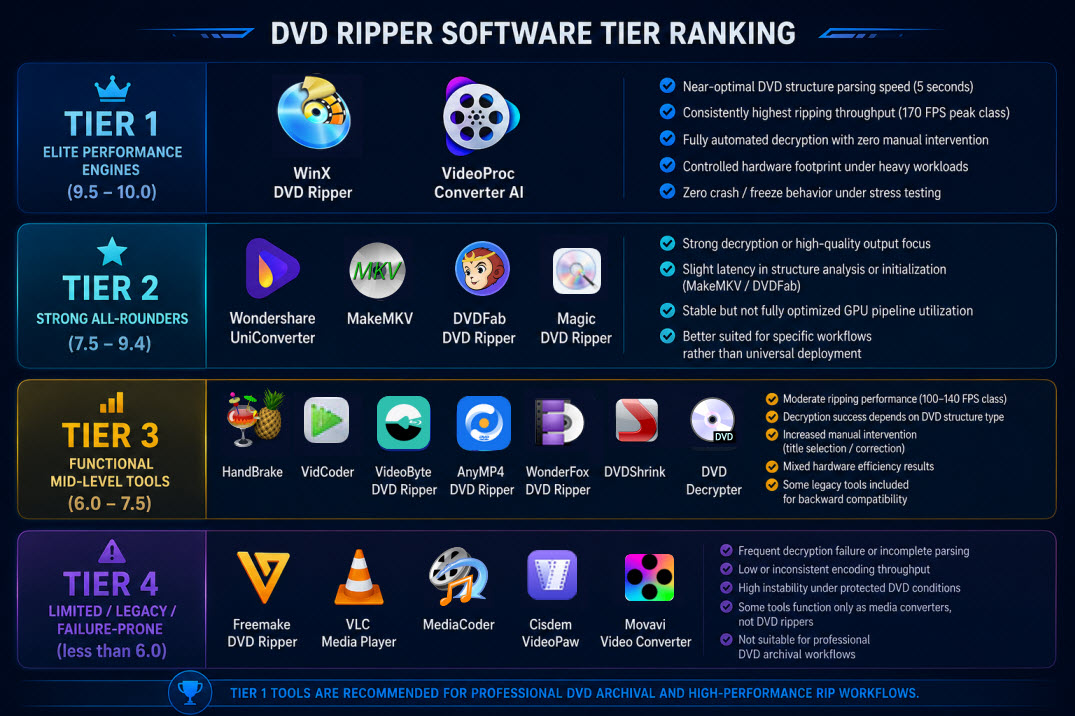
Tier 1 — Elite Performance Engines (9.5–10.0)
- WinX DVD Ripper
- VideoProc Converter AI
These tools demonstrate balanced top-tier performance across all five benchmark dimensions:
- Near-optimal DVD structure parsing speed (5 seconds on standard discs)
- Consistently highest ripping throughput (170 FPS peak class)
- Fully automated decryption with zero manual intervention
- Controlled hardware footprint under heavy workloads
- Zero crash / freeze behavior under stress testing
These engines represent fully integrated "hardware-synchronized DVD processing pipelines".
Tier 2 — Strong All-Rounders (7.5–9.4)
- Wondershare UniConverter
- MakeMKV
- DVDFab DVD Ripper
- Magic DVD Ripper
Tools in this tier provide highly capable DVD processing, but show trade-offs in either speed, compatibility, or architectural efficiency:
- Strong decryption or high-quality output focus
- Slight latency in structure analysis or initialization (especially MakeMKV / DVDFab)
- Stable but not fully optimized GPU pipeline utilization
- Better suited for specific workflows rather than universal deployment
These tools are "specialists within general-purpose frameworks".
Tier 3 — Functional Mid-Level Tools (6.0–7.5)
- HandBrake
- VidCoder
- VideoByte DVD Ripper
- AnyMP4 DVD Ripper
- WonderFox DVD Ripper
- DVDShrink
- DVD Decrypter
These applications are operationally usable but not optimized for all DVD conditions, especially protected or multi-title discs:
- Moderate ripping performance (100–140 FPS class)
- Decryption success depends heavily on DVD structure type
- Increased manual intervention (title selection / correction)
- Mixed hardware efficiency results
- Some legacy tools included for backward compatibility
These tools are "functionally adequate but architecturally inconsistent".
Tier 4 — Limited / Legacy / Failure-Prone (less than 6.0)
- Freemake DVD Ripper
- VLC Media Player
- MediaCoder
- Cisdem VideoPaw
- Movavi Video Converter
These tools exhibit critical limitations in modern encrypted DVD workflows, including failed decryption, unstable pipelines, or outdated architectures:
- Frequent decryption failure or incomplete DVD parsing
- Low or inconsistent encoding throughput
- High instability under protected DVD conditions
- Some tools function only as media converters, not DVD rippers
These tools are not suitable for professional DVD archival workflows.
Data doesn't lie. Our benchmark results prove that WinX DVD Ripper delivers the highest score while maintaining the fast encoding speed via GPU acceleration. To see how these tools compare in terms of pricing, features, and overall ease of use, check out our comprehensive guide to the best DVD rippers of the year.
Conclusion & Industry Technology Trends
The current benchmark shows that DVD ripping performance is defined by a multi-factor system rather than a single metric. Across 18 tools and five benchmark dimensions, results are determined by:
- Structural parsing efficiency
- Encoding throughput
- Decryption robustness
- System resource control
- Execution stability
No single tool dominates all dimensions simultaneously. Instead, clear performance clusters emerge, with top-tier tools balancing all metrics while mid- and low-tier tools sacrifice stability, compatibility, or decryption capability for speed or simplicity.
 FAQ about DVD Ripping Benchmark
Because final scoring includes decryption, stability, and resource efficiency, not only speed.
They prioritize quality preservation over speed and compatibility.
No. It improves speed but may increase resource usage depending on implementation.
Legal and Ethical Testing Disclaimer
This benchmark was conducted solely for software evaluation and technical analysis purposes. All test media used in this study consisted of legally purchased retail DVDs and was used only under controlled testing conditions to measure software performance, compatibility, output quality, and reliability.
This report does not promote or encourage unauthorized copying, distribution, or commercial use of copyrighted content. Users should ensure that any DVD-related activities comply with applicable copyright laws, local regulations, and ownership rights in their respective jurisdictions.


