





-
WinX DVD Ripper Platinum vs WonderFox DVD Ripper
- 1. Quick Verdict
- 2. Performance Test
- 3. Interface & Ease of Use
- 4. DVD Decryption
- 5. Features Comparison
- 6. Conclusion
WinX DVD Ripper Platinum vs WonderFox DVD Ripper: Full Comparison & Test
WinX DVD Ripper Platinum and WonderFox DVD Ripper are two of the top-Rated DVD rippers tested for Windows. Both can convert DVDs to MP4, MKV, AVI, and other digital formats, but they differ significantly in DVD protection support, ripping speed, hardware acceleration, output quality, and backup features. We tested both applications using commercial, scratched, and multi-title DVDs to compare their real-world performance.
WinX DVD Ripper vs WonderFox DVD Ripper: Quick Verdict
Both WinX DVD Ripper Platinum and WonderFox DVD Ripper Pro can convert DVDs into digital formats such as MP4, HEVC, AVI, and MKV. However, our hands-on testing showed noticeable differences in workflow, stability, and overall usability. While WonderFox completed the encoding stage slightly faster, WinX DVD Ripper delivered a smoother ripping experience with much faster DVD loading, fewer interruptions, and more complete backup options.
What matters most? |
WinX DVD Ripper Platinum |
WonderFox DVD Ripper Pro |
DVD loading |
Loads commercial DVDs quickly (5 seconds in our test). |
Much slower loading (22 seconds); Enhanced Decryption further increased loading time. |
Workflow stability |
Smooth and responsive throughout the entire ripping process. |
Multiple "Not Responding" pauses occurred while loading DVDs and entering the editing window. |
Protected DVD handling |
Opened and processed our commercial DVD without issues. |
Worked, but decryption options noticeably slowed the workflow. |
Output options |
MP4, HEVC, AVI, MOV, MKV, MPEG, ISO, VIDEO_TS and more. |
MP4, AVI, MKV, MOV and other common video formats. |
1:1 DVD backup |
ISO image, VIDEO_TS folder, and MPEG-2 copy modes. |
ISO image backup only. |
Hardware acceleration |
Intel Quick Sync, NVIDIA NVENC, AMD. |
Intel Quick Sync and NVIDIA acceleration. |
Built-in editing |
Trim, crop, subtitle, merge, and basic adjustments. |
Crop, rotate, filters, and visual effects. |
Free version |
Allows full DVD loading with output limitations. |
Only converts the first 15 minutes of a DVD. |
Overall, WonderFox achieved slightly faster encoding in our benchmark, while WinX DVD Ripper offered a more reliable workflow thanks to faster DVD recognition, better stability, and more comprehensive DVD backup features.
WinX DVD Ripper vs WonderFox DVD Ripper: Performance Test
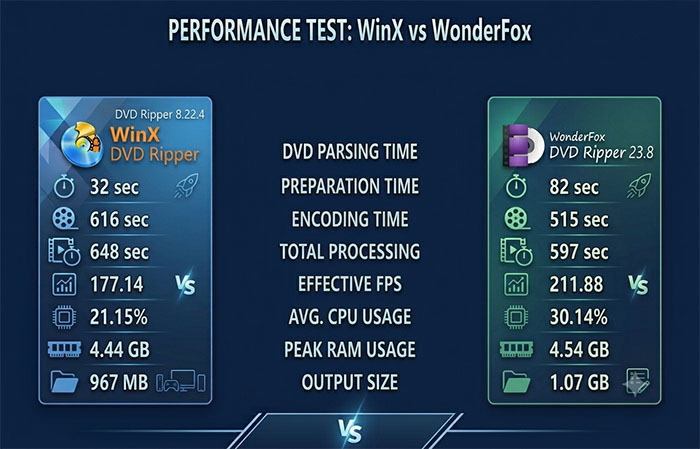
Rather than relying on vendor claims, we tested both programs using the same commercial DVD (Wreck-It Ralph, Title 1, 1h 41m) on identical hardware and output settings (MP4 H.264). The benchmark compares DVD loading, processing speed, resource usage, and real-world workflow.
Key Test Results Overview
| Metric | WinX DVD Ripper 8.22.4 | WonderFox DVD Ripper 23.8 |
| DVD Parsing Time | 5 sec | 22 sec |
| Preparation | 32 sec | 82 sec |
| Encoding Time | 616 sec | 515 sec |
| Total Processing Time | 648 sec | 597 sec |
| Effective FPS | 177.14 | 211.88 |
| Average CPU Usage | 21.15% | 30.14% |
| Peak RAM Usage | 4.44 GB | 4.54 GB |
| Output Size | 967 MB | 1.07 GB |
Real-World Observations
- WinX DVD Ripper: Loaded the DVD in only 5 seconds, entered the ripping interface immediately, and completed the entire workflow without freezes or error messages.
- WonderFox DVD Ripper: Needed 22 seconds to recognize the DVD. Enabling Enhanced Decryption further increased loading time, and the software displayed several "Not Responding" messages while loading the disc and opening the editing window.
- Encoding performance: WonderFox finished the encoding stage slightly faster (515 sec vs. 616 sec), resulting in a higher effective FPS.
- Overall workflow: Despite the faster encoding speed, WonderFox's longer loading time, interface lag, and trial limitations reduced its overall usability during testing.
- Free version limitation: WonderFox only converts the first 15 minutes of a DVD, making it difficult to evaluate or process full-length movies without upgrading.
Quality & Compression
Both programs produced visually comparable H.264 videos suitable for everyday playback. WonderFox generated a slightly larger output file and marginally higher objective quality scores, while WinX DVD Ripper produced a smaller file with no obvious visual difference during normal viewing. For users balancing storage efficiency and playback quality, both deliver good results, although WinX achieved better compression in this test.
WinX DVD Ripper Platinum vs WonderFox DVD Ripper: Interface & Ease of Use
A DVD ripper's interface directly affects how quickly users can complete the ripping process. Unlike general video converters, DVD ripping involves several steps, including disc detection, title selection, output profile settings, and conversion options. A well-designed interface can reduce the learning curve, especially for users who are converting their DVD collections for the first time.
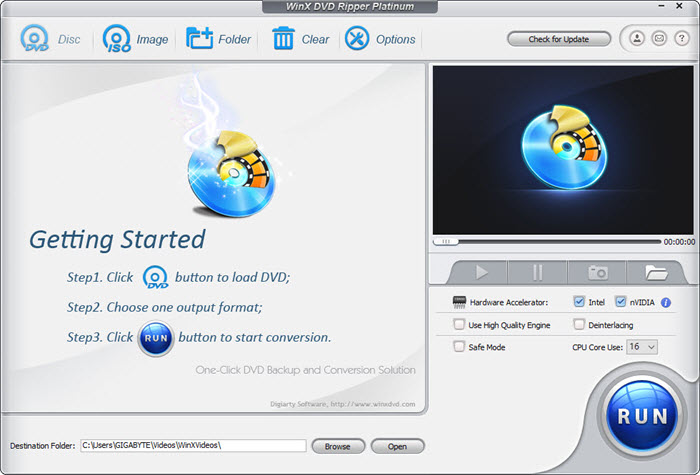
WinX DVD Ripper Platinum: Simple Workflow with Clear Ripping Steps
WinX DVD Ripper Platinum uses a straightforward workflow. After inserting a DVD, users can load the disc, select the desired title, choose an output format, and start ripping without navigating through complicated menus. The main functions are clearly arranged on the interface, making it easy to locate common options such as DVD backup, video conversion, subtitles, and audio settings.
WonderFox DVD Ripper: Feature-Rich Layout
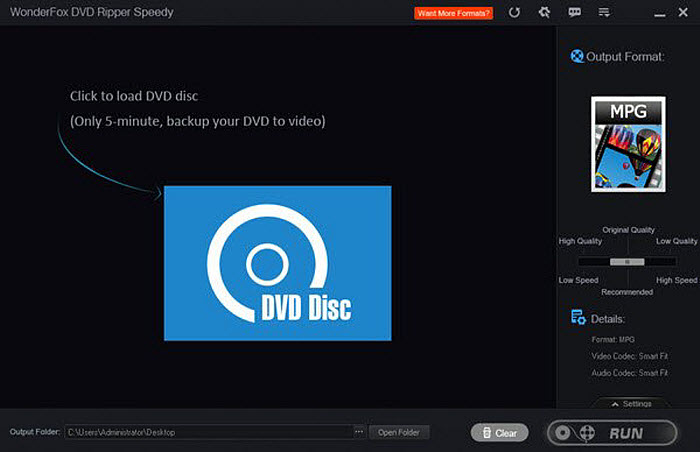
WonderFox DVD Ripper Pro also provides the essential DVD ripping functions, but its interface places more options and adjustment settings on the main screen. This can be useful for users who prefer manual control, although beginners may need some extra time to understand where certain options are located.
Interface Comparison: Which One Is Easier to Use?
Both programs provide the basic workflow needed for DVD conversion, but they take slightly different approaches. WinX DVD Ripper Platinum focuses more on a streamlined ripping experience, while WonderFox provides a wider range of visible controls for users who like to fine-tune settings.
Key takeaway: For users who want a faster and more guided DVD ripping workflow, WinX DVD Ripper Platinum offers a cleaner learning curve. WonderFox DVD Ripper may appeal more to users who prefer having more adjustment options available directly in the interface.
WinX DVD Ripper Platinum vs WonderFox DVD Ripper: DVD Decryption & Disc Handling
For DVD ripping software, decryption ability is one of the most important factors. A ripper may support many output formats, but it is of little use if it cannot properly read protected or complicated discs. We tested both programs with commercial DVDs to see how they handled real-world DVD protections, title structures, and loading stability.
Test Result: WinX DVD Ripper Handled More DVD Sources Successfully
During our test, WonderFox DVD Ripper Pro had difficulties loading some protected DVDs. Although WonderFox claims support for encrypted DVDs, the software returned loading errors when we tried to process the movie DVD Divergent.
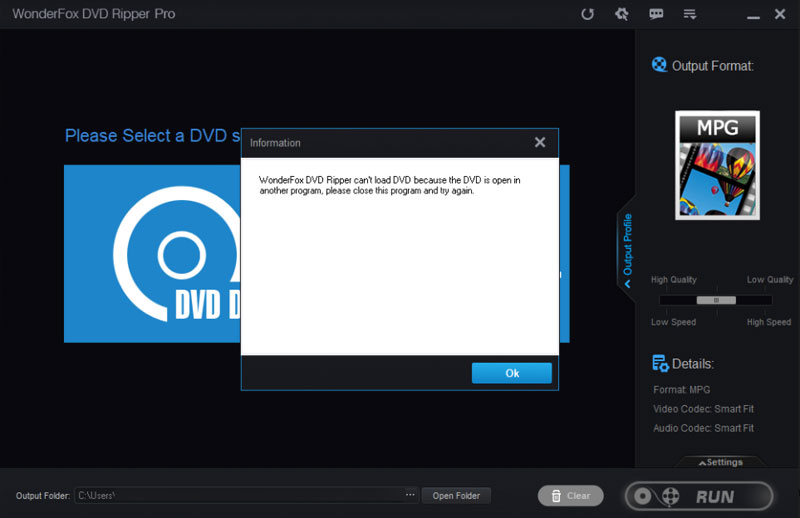
We also noticed that enabling the "Enhanced Decryption" option in WonderFox improved compatibility in some cases, but it increased the loading time and occasionally caused the program to become unresponsive during DVD analysis.
In comparison, WinX DVD Ripper Platinum successfully loaded the tested DVDs, including commercial movie DVDs, workout DVDs, and older discs with complex title structures. It automatically analyzed the disc content and provided available titles for ripping without requiring additional configuration.
Why Decryption Matters in Real DVD Ripping
Modern DVDs often include copy protection, multiple titles, fake playlists, and damaged sectors. A reliable DVD ripper needs more than format conversion support — it must first correctly access and analyze the disc structure. This is especially important for users who want to digitize old DVD collections or back up discs that no longer play smoothly on standard players.
Key takeaway: In our testing, WinX DVD Ripper Platinum showed better stability when handling protected and complex DVDs, while WonderFox DVD Ripper may require additional settings adjustments for certain discs.
WinX DVD Ripper Platinum vs WonderFox DVD Ripper: Features
Performance is only one part of the decision. Beyond encoding speed, we compared the two applications based on everyday usability, backup flexibility, supported formats, customization, and DVD handling features. The table below highlights the practical differences that matter when ripping commercial or personal DVDs.
Features |
WinX DVD Ripper Platinum |
WonderFox DVD Ripper |
Support DVD disc, folder and ISO image |
Yes |
Yes |
Rip all kinds of DVDs |
Yes |
No |
Extra DVD copy modes: DVD to ISO image, DVD to MPEG2, main title copy and full title copy |
Yes |
No |
Output video formats |
350+ |
116 |
Rip DVD to VCD Format |
No |
Yes |
User Friendly |
Yes |
Hard to find where to choose or change the output format |
Room for customization |
Yes |
No |
Help Document |
More detailed and helpful |
No |
Hyper-Threading tech, Super Encode Engine and Multi-core CPU use for speed acceleration |
Yes |
No |
High Quality Engine and De-interlacing Engine for quality enhancement |
Yes |
No |
Options of Safe Mode, High Quality Engine and CPU Core Use to get better image quality, faster speed and more smooth conversion process |
Yes |
No |
Preserve original 5.1 Channel AC3/DTS Dolby Audio |
Yes |
No |
DVD title merge |
Yes |
No |
Video edit features |
Merge, trim, crop, expand videos, add external subtitles |
Crop, Brightness, Contrast, Mosaic, Blur, Sharpen, Emboss, Noise, Old Film, etc. |
Price |
$39.95 |
$39.95 |
Key Takeaways
- WinX DVD Ripper Platinum focuses on a complete DVD backup workflow, offering ISO and VIDEO_TS backup modes, more output profiles, title copy options, subtitle support, and additional controls for compression and quality.
- WonderFox DVD Ripper provides a solid set of video editing effects and supports common output formats, but offers fewer DVD backup modes and fewer customization options overall.
You can click here to read a detailed review of WinX DVD Ripper Platinum
Conclusion: WinX DVD Ripper vs WonderFox DVD Ripper
Both WinX DVD Ripper Platinum and WonderFox DVD Ripper Pro are capable DVD ripping tools, and either can convert DVDs into common digital formats. In our testing, WonderFox completed the encoding stage slightly faster, but the overall experience wasn't as smooth. DVD loading took noticeably longer, the interface became unresponsive several times, and the free version's 15-minute conversion limit made it difficult to evaluate or process full-length movies.
WinX DVD Ripper Platinum, on the other hand, provided a more consistent workflow. It detected the DVD much faster, remained stable throughout the test, and offered additional backup options such as ISO images and VIDEO_TS folders alongside flexible output formats. If your priority is simply raw encoding speed, WonderFox performs well. But if you regularly back up commercial DVDs and value a reliable, hassle-free ripping process from start to finish, WinX DVD Ripper Platinum is the more practical choice based on our hands-on testing.
Legal Disclaimer: WinXDVD, developed by Digiarty Software, is designed strictly for personal, non-commercial media backup under fair use. Digiarty Software strictly respects copyright laws and does not condone, facilitate, or support copyright infringement or unauthorized copying. Users are advised to check and comply with their local DVD copyright laws and regulations before use.