









 win
win
 Super Resolution
  Video Stabilization
  Frame Interpolation

 Denoise Image
  Restore Old Photo
  Unblur Image
  Recover Face
  Upscale Image
  Colorize Photo
 Video Conversion >
 Video Compression >
 Screen Recording >

AnyMP4 Review: Is AnyMP4 DVD Ripper Worth It?
 Donna Peng
Updated on
I tested AnyMP4 DVD Ripper to see how it holds up in real-world DVD ripping. The focus is on the things that matter when you actually use it: ripping speed, output quality, DVD compatibility, ease of use, and how smoothly it handles the whole process. Rather than simply repeating AnyMP4's advertised features, this review looks at what worked well, where it fell short, and whether it's worth your money.

Quick Verdict
After putting AnyMP4 DVD Ripper through a real best DVD conversion test, we found it easy to use and reasonably fast, but not a clear performance winner. A 1-hour-41-minute DVD took 641 seconds to convert to H.264 MP4, reaching 193.13 FPS and producing a 1.28 GB file. The catch was image quality: our visual check found the output blurry, while peak RAM usage hit 18.66 GB. In other words, AnyMP4 works well as a convenient everyday DVD converter, but if your priority is maximum picture quality or the lowest resource usage, its results give you reasons to look elsewhere.
| Category | Verdict |
|---|---|
| Ease of Use | ★★★★★ |
| DVD Format Support | ★★★★★ |
| Output Formats | ★★★★★ |
| Ripping Speed | See our hands-on benchmark |
| Output Quality | See our quality test |
| Copy-Protection Handling | Depends on the DVD |
| Editing Features | ★★★★☆ |
| Free Version | ★★★☆☆ |
| Value for Money | ★★★★☆ |
AnyMP4 Review at a Glance
AnyMP4 is a software brand focused on digital media and disc-related utilities. Its product lineup includes DVD and Blu-ray tools alongside video conversion, recording, editing, and other media software.
For this AnyMP4 review, however, the focus is specifically on AnyMP4 DVD Ripper. That's because DVD ripping is where the practical questions become much more interesting: how well does it read a real DVD, how much control do you get over the output, and what happens when you move beyond a simple home-made disc?
AnyMP4 positions the DVD Ripper as an all-in-one way to convert DVD content into MP4 and other modern digital formats. It can load a DVD disc, DVD folder, or ISO file, then either convert the content to formats such as MP4 and MKV or create a DVD folder/ISO backup. The official documentation also lists a large selection of audio and video output formats.
| Feature | Details |
|---|---|
| Developer | AnyMP4 |
| Main Purpose | Convert DVD content to digital video/audio or create DVD backups |
| Input | DVD Disc / DVD Folder / DVD ISO |
| Output | MP4 / MKV / MOV / AVI / MPEG / H.264 / HEVC and 500+ formats |
| DVD Backup | DVD Folder / DVD ISO |
| Operating System | Windows / macOS |
| Hardware Acceleration | NVIDIA / AMD / Intel-supported acceleration |
| Built-in Editing | Yes — trimming, cropping, effects, watermark, and other basic adjustments |
| Free Trial | Yes |
| License | Paid plans available |
The supported formats and system requirements can change between versions. At the time of this review, AnyMP4 lists Windows 11/10/8.1/8/7 and macOS support, while its current references page lists DVD Disc, DVD Folder, and DVD ISO as supported DVD sources.
What matters more than the feature list:
On paper, AnyMP4 DVD Ripper checks most of the boxes you would expect from a modern DVD ripper. The more useful question is what those features look like when you actually put a DVD in the drive. That's where this review goes beyond the specification sheet.
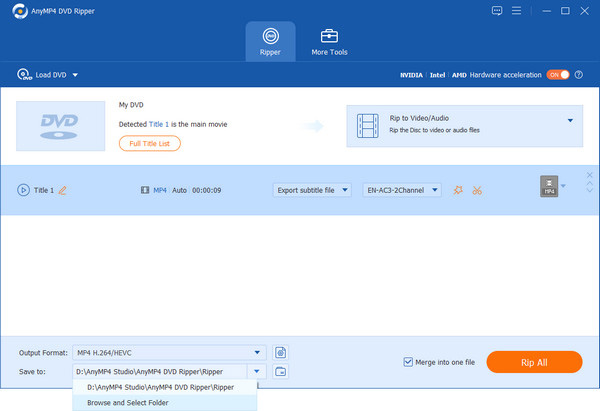
I tested the software with a real DVD and recorded the complete ripping workflow, including disc analysis, preparation, conversion time, output size, system resource usage, and video quality. Those results are covered separately in the performance section, so the table above is meant as a quick orientation rather than a substitute for the hands-on tests.
How We Tested AnyMP4 DVD Ripper
A DVD ripper can look impressive on a feature list and still be frustrating when you actually put a disc in the drive. Loading time, title detection, conversion speed, output quality, and resource usage can all change the experience. That's why we didn't base this AnyMP4 review on the software's advertised specifications alone. We ran AnyMP4 DVD Ripper through a real DVD ripping workflow and recorded what happened from the moment the disc was analyzed to the moment the finished file was ready.
Our Test Setup
To make the results reproducible, we kept the hardware and operating environment consistent throughout the test. The benchmark was performed on the following Windows PC:
| Test Component | Configuration |
|---|---|
| Operating System | Windows 10 64-bit |
| CPU | AMD Ryzen 5 5600X 6-Core Processor, 3.70 GHz |
| GPU | AMD Radeon RX 6700 XT |
| Memory | 48GB RAM |
| Software | AnyMP4 DVD Ripper |
The same machine was used throughout the test rather than switching between systems for different measurements. This matters particularly for ripping speed and hardware utilization: CPU performance, GPU acceleration, available memory, and background system load can all affect the numbers.
What We Measured
We looked beyond the final conversion time. The complete workflow was broken into separate stages so that a slow result could be traced back to DVD analysis, preparation, or actual video conversion.
- DVD parsing time: How long AnyMP4 took to analyze the disc and identify its contents.
- Preparation time: The time spent preparing the selected title before conversion began.
- Conversion time: How long the actual video conversion took.
- Total processing time: The complete elapsed time from the beginning of the workflow to the finished output.
- Effective FPS: Conversion performance calculated from the source video's total frames and processing time.
- CPU and GPU utilization: Resource usage during the conversion rather than relying only on the software's claimed hardware acceleration.
- GPU temperature and VRAM: Peak GPU temperature and video-memory usage during processing.
- RAM usage: Peak system memory consumed by the application during the test.
- Output file size and bitrate: To see how much the DVD content was compressed during conversion.
- Video quality: We also examined objective quality metrics and the resulting image rather than judging quality from file size alone.
How We Evaluated the Output
Speed is only half of the story. A DVD ripper that finishes quickly but produces visibly soft or heavily compressed video isn't much of a win. For that reason, we checked the resulting MP4 against the source DVD using both visual inspection and objective video-quality measurements.
The test output was examined for resolution, frame rate, bitrate, image sharpness, compression artifacts, and overall visual clarity. Where applicable, we also recorded PSNR, SSIM, VMAF, and XPSNR measurements to give the quality assessment a numerical reference.
This approach is particularly useful for DVD sources because their original resolution is already limited. Aggressive compression or scaling can make fine details look noticeably softer even when the output technically plays without errors.
Why We Separate the Test Results
The benchmark section later in this review reports the raw performance results in detail. That includes parsing time, preparation time, conversion time, total processing time, FPS, CPU/GPU utilization, file size, bitrate, and video-quality measurements.
Keeping those figures separate from the general review lets us answer two different questions: what does AnyMP4 DVD Ripper offer? and how well does it actually perform? The first is covered throughout the review; the second is based on the measurements from our test machine.
Test note:
Results can vary with the DVD drive, source disc, title length, output profile, hardware acceleration, and system background load. The figures in this review should therefore be read as results from our specific test setup, not as a universal conversion speed for every PC or DVD.
AnyMP4 DVD Ripper Performance Test: Speed, Quality & File Size
Specs and feature lists can tell you what a DVD ripper is supposed to do. They don't tell you how long you'll actually wait for a movie to finish, how much of the GPU it uses, or whether the smaller output file comes with a noticeable loss of detail. That's why the performance part of this AnyMP4 review is based on our own test rather than AnyMP4's advertised speed claims.
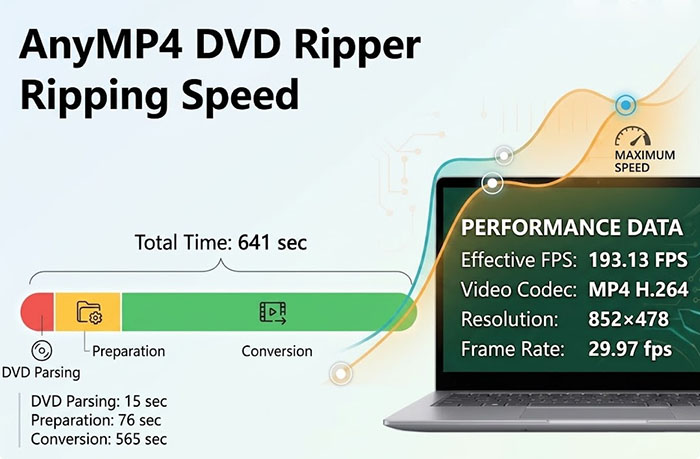
For this test, we used AnyMP4 DVD Ripper 8.1.38 to process Wreck-It Ralph, Title 1, with a running time of 1 hour and 41 minutes. The DVD was converted to MP4 H.264 at 852 × 478 and 29.97 fps. Along with the total processing time, we recorded the individual stages, FPS, CPU/GPU utilization, memory usage, output size, bitrate, and several objective video-quality measurements.
AnyMP4 DVD Ripper Ripping Speed Test
The conversion itself took 565 seconds, while the complete workflow was recorded at 641 seconds. More importantly, the test shows that the time spent ripping a DVD is not simply the time spent encoding video. AnyMP4 first has to analyze the disc and prepare the selected title before the actual conversion begins.
| Test | Result |
|---|---|
| Software | AnyMP4 DVD Ripper 8.1.38 |
| Source | Wreck-It Ralph — Title 1 |
| Source Duration | 1h 41min |
| DVD Parsing | 15 sec |
| Preparation | 76 sec |
| Conversion | 565 sec |
| Total Elapsed Time | 641 sec |
| Effective FPS | 193.13 FPS |
| Output Format | MP4 H.264 |
| Output Resolution | 852 × 478 |
| Output Frame Rate | 29.97 fps |
The recorded parsing, preparation, and conversion times do not add up exactly to the separately recorded end-to-end time. We therefore report the measurements as recorded rather than forcing the individual stages to equal the total. The 641-second figure is the measured total workflow time.
What Does the Speed Test Tell Us?
At 193.13 FPS, AnyMP4 processed the DVD at a substantially higher rate than the source's 29.97 fps playback rate. In practical terms, the 1-hour-41-minute title was converted in 641 seconds, or roughly 10 minutes and 41 seconds from the start of the measured workflow.
But the more interesting part is where that time went. The actual conversion stage accounted for 565 seconds, while DVD parsing took 15 seconds and preparation took another 76 seconds. This is why looking only at an application's advertised conversion speed can give an incomplete picture of how long a DVD job will take.
The hardware readings also give some context. GPU utilization averaged 24.13%, while average CPU utilization was 16.38%. The GPU was therefore being used during the workload, but it was far from being fully saturated. Peak GPU temperature reached only 48°C, with peak VRAM usage of 462 MB.
RAM usage was more noticeable, reaching 18.66 GB at peak. That does not mean AnyMP4 continuously consumed that amount of memory for the entire conversion, but it is worth noting if you're running other memory-heavy applications while processing long DVDs.
Speed takeaway:
The test shows a measurable hardware-accelerated workload and a 193.13 FPS effective conversion rate, but the overall experience is better represented by the full 641-second workflow than by the conversion-stage figure alone. In other words, disc analysis and preparation are part of the wait time too.
AnyMP4 DVD Ripper Output Quality/File Size Test
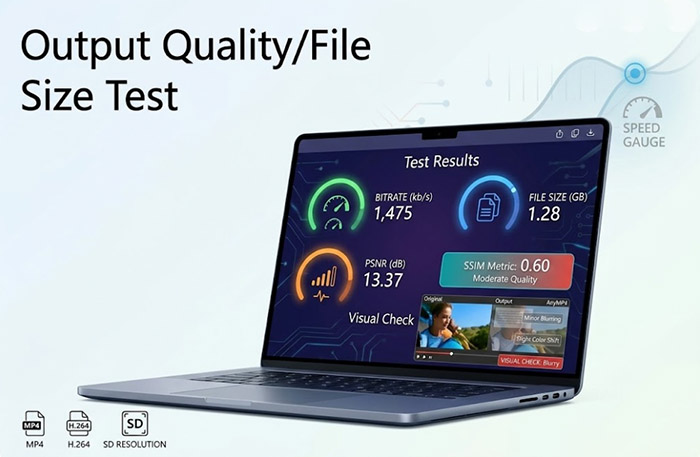
Speed would mean little if the resulting video looked noticeably worse. For the same test, AnyMP4 produced a 1.28 GB MP4 file at 1,475 kb/s, with a resolution of 852 × 478 and a frame rate of 29.97 fps.
| Quality Metric | Result |
|---|---|
| Output Format | MP4 H.264 |
| Resolution | 852 × 478 |
| Frame Rate | 29.97 fps |
| Bitrate | 1,475 kb/s |
| File Size | 1.28 GB |
| PSNR | 13.3657 |
| SSIM | 0.603 |
| VMAF | N/A |
| XPSNR | 5.9091 |
| Visual Check | Blurry |
The output file is considerably more convenient to store and play than the original DVD structure, but the visual inspection is important here. Our test notes described the resulting image as blurry. The objective measurements should therefore be read alongside the visual result rather than treated as a standalone quality score.
This is also where file size and quality need to be considered together. A 1.28 GB MP4 is much easier to store and stream than a full DVD backup, but converting a DVD into a smaller compressed video necessarily changes the relationship between storage efficiency and image fidelity. If preserving the original DVD as closely as possible is the priority, a compressed MP4 should not automatically be treated as the equivalent of a full disc backup.
Our Performance Verdict
Based on this test alone, AnyMP4 DVD Ripper handled the 1-hour-41-minute DVD title in a little over ten minutes and produced a 1.28 GB H.264 MP4. Hardware activity was measurable without pushing the GPU close to full utilization. The bigger caveat was output quality: our visual check found the result blurry, so users who care more about preserving DVD detail than reducing file size should choose their output settings carefully.
That makes the performance result more nuanced than simply calling AnyMP4 “fast.” It did the conversion in a reasonable amount of time, but the final choice between speed, file size, compatibility, and image quality matters just as much as the stopwatch.
Does AnyMP4 DVD Ripper Really Handle Copy-Protected DVDs?
This is where a DVD ripper review needs to go beyond the feature list. Supports protected DVDs sounds reassuring, but DVD copy protection is not a single technology. Different discs can use different protection methods, and even two releases of the same movie may behave differently because of their authoring structure, region, or protection scheme.
AnyMP4 says its DVD Ripper can handle commercial and protected DVDs, but we don't treat that as a blanket guarantee. For this AnyMP4 review protection handling is judged by actual disc behavior: whether the disc is detected, whether the correct title can be identified, whether the ripping process completes, and whether the resulting file contains the expected video and audio.
What DVD Protections Did We Test?
The table below separates protections we actually tested from those we did not. This distinction matters because a “Yes” in a software specification does not mean that every disc using that protection will necessarily rip successfully.
| DVD Type / Protection | Tested? | Result | Notes |
|---|---|---|---|
| CSS | Not tested | — | Requires a confirmed test result before drawing a compatibility conclusion. |
| Region Code | Tested | Good | Region behavior should be evaluated with a disc from a different region. |
| 99-title | Not tested | — | Requires a DVD with a known multi-title structure. |
| UOP | Not tested | — | Requires a disc containing user-operation restrictions. |
| ARccOS | Not tested | — | Should only be marked Pass/Fail after testing an appropriate commercial DVD. |
| Damaged Disc | Not tested | — | Physical disc condition can affect the result independently of copy protection. |
Only protection types tested on real discs should receive a Pass or Fail result. Untested protection methods are intentionally marked “Not tested” rather than inferred from AnyMP4's product specifications.
What Happens When AnyMP4 Cannot Read a DVD?
Failure does not always look the same. Based on the type of problem encountered, you may see one of several behaviors:
- The DVD is not detected or cannot be read correctly.
- The wrong title is selected when the disc contains multiple or misleading titles.
- DVD analysis takes unusually long before the available titles appear.
- Ripping starts normally but stops before the title is fully converted.
- The output is missing the expected audio or subtitle tracks.
- The converted file is corrupted, incomplete, or fails to play properly.
Our rule for judging copy-protection support:
We only call a protection method "supported" when we have a successful real-world test to back it up. If a protection type has not been tested, we leave it unconfirmed rather than turning a product-page claim into a test result.

AnyMP4 DVD Ripper Pros and Cons
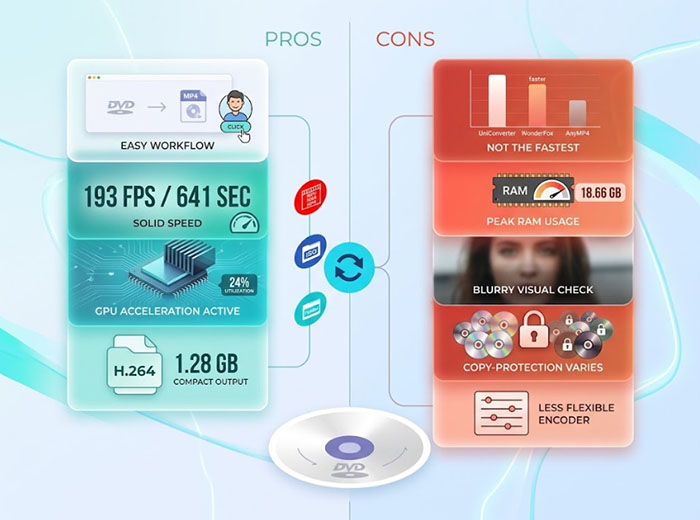
After testing AnyMP4 DVD Ripper with a 1-hour-41-minute DVD, its strengths are fairly clear: the workflow is simple, conversion speed is solid, and the output file is easy to manage. The trade-offs are equally worth noting, particularly its relatively high memory usage and the softness we noticed in the final MP4.
Pros
- Simple DVD-to-video workflow with an easy-to-follow interface.
- Solid speed: 641 seconds and 193.13 FPS in our 1h 41min test.
- GPU acceleration was active, averaging 24.13% GPU utilization.
- Compact output: the tested H.264 MP4 was 1.28 GB.
- Supports multiple formats, DVD sources, editing, Windows, and Mac.
Cons
- Not the fastest: UniConverter and WonderFox finished sooner in our test.
- Peak RAM usage reached 18.66 GB.
- The tested MP4 looked blurry during our visual check.
- Less flexible than dedicated encoders for advanced settings.
- Copy-protection compatibility can vary between discs.
Our take: AnyMP4 DVD Ripper is a convenient, capable DVD converter with respectable speed, but its biggest advantage is the straightforward workflow rather than class-leading performance or image quality.
AnyMP4 Review: Price
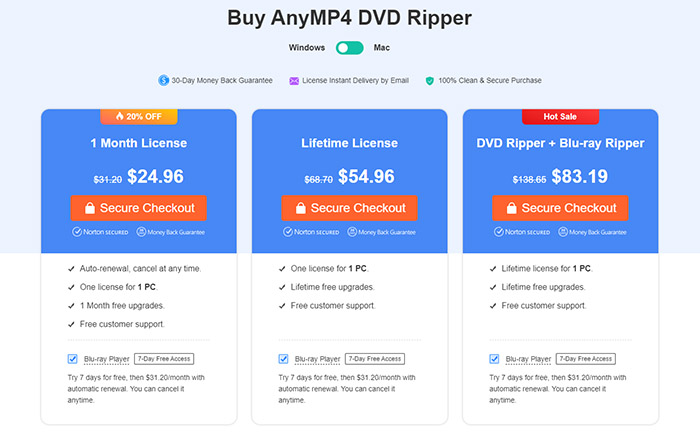
AnyMP4 DVD Ripper is sold as a paid desktop application, with monthly and lifetime options. At the time of our review, the 1-month plan is discounted to $24.96, while the lifetime license is $54.96. There is also a DVD Ripper + Blu-ray Ripper bundle for $83.19.
| Plan | Current Price | License | Upgrades |
|---|---|---|---|
| 1 Month | $24.96 | 1 PC | 1 month |
| Lifetime | $54.96 | 1 PC | Lifetime |
| DVD Ripper + Blu-ray Ripper | $83.19 | 1 PC | Lifetime |
The lifetime license is the more sensible option if you expect to rip DVDs regularly. At $54.96, it costs only a little over two monthly payments at the current discounted rate, so the monthly plan makes more sense mainly for short-term or occasional use.
The bundle is harder to justify if you only work with DVDs. Its higher price becomes worthwhile when Blu-ray ripping is also part of your needs; otherwise, the standalone lifetime license gives you the better value for a DVD-focused workflow.
All listed plans include customer support, while the lifetime option includes lifetime free upgrades. The purchase page also lists a 30-day money-back guarantee.
 FAQs About AnyMP4 DVD Ripper
AnyMP4 is an established software brand offering DVD, Blu-ray, video, and multimedia tools. Its DVD Ripper is sold as commercial desktop software with customer support and a 30-day money-back guarantee. As with any software, download it from the official AnyMP4 website rather than third-party download sites.
AnyMP4 DVD Ripper is generally safe when downloaded from the official website. Our review focuses on its ripping performance rather than treating third-party cracked or modified versions as the same software. Avoid unofficial “full version” downloads, which can introduce security risks.
No. AnyMP4 DVD Ripper is paid software, although a trial version is available for evaluation. The current purchase options include monthly and lifetime licenses, with the lifetime plan being more practical for users who regularly rip DVDs.
It is worth considering if you want an easy all-in-one DVD converter rather than a highly technical encoding tool. In our test, it converted a 1-hour-41-minute DVD to H.264 MP4 in 641 seconds, but it was not the fastest option and the output looked soft. The lifetime license makes more sense for regular use.
AnyMP4 advertises support for protected DVDs, but that should not be interpreted as a guarantee for every commercial disc. DVD protection varies between releases, so successful ripping can depend on the protection method, disc structure, and software version. We recommend judging compatibility from actual disc tests rather than the general support claim alone.
Yes. AnyMP4 offers a Mac version of DVD Ripper alongside its Windows version. However, our hands-on performance test was conducted on Windows, so we cannot use the Windows benchmark to represent Mac conversion speed.
They are better suited to different jobs. AnyMP4 is more convenient when you want to convert DVDs into MP4 and other playback-friendly formats, while MakeMKV is more focused on extracting DVD content into MKV with minimal processing. Choose AnyMP4 for conversion flexibility and MakeMKV when preserving the source is the priority.
There is no single best alternative for every user. MakeMKV is a strong choice for lossless-style DVD extraction, HandBrake is better for free encoding and detailed settings, while other commercial DVD rippers may offer different combinations of speed, compression, and copy-protection handling. The right alternative depends on whether your priority is quality, speed, flexibility, or price.


