 win
win

 Super Resolution
  Video Stabilization
  Frame Interpolation

 Denoise Image
  Restore Old Photo
  Unblur Image
  Recover Face
  Upscale Image
  Colorize Photo
 Video Conversion >
 Video Compression >
 Screen Recording >


Movavi Video Converter Activation Key: 2026 Guide
Looking for a Movavi Video Converter activation key to unlock the full version without paying for another subscription? Before trying codes shared on forums or third-party websites, check what your license includes and whether the code matches your installed version. An expired, reused, or unofficial serial number may fail during activation, even if it looks legitimate.
Movavi offers a trial so you can test its conversion features before purchasing, but trial restrictions may apply to exported videos. If you already own a license, you may be able to recover your activation details instead of buying another one. This page covers where to find a legitimate Movavi license key, how to activate the software, and what to do when a code fails.
Movavi Video Converter Activation Key: What You Need to Know in 2026
Searching for a free Movavi Video Converter activation key can lead to old serial numbers, copied license codes, and pages claiming that every code still works. There is no reliable way to confirm a key's validity from its format alone. A code may belong to an older release, have reached its activation limit, or have been disabled by the software publisher.
If you have already purchased Movavi Video Converter, start with the confirmation email or the account associated with your purchase. If you have never bought a license, check the official trial and pricing options before entering codes from unknown sources. A free code posted online is not necessarily an authorized license, and a successful-looking installation does not prove that the software is properly activated.
Before you try an activation key:
- Confirm that the code came from your purchase confirmation, Movavi account, or another authorized source.
- Check whether the license applies to your version of Video Converter and operating system.
- Find out whether the license is still active and whether it allows activation on another computer.
- Avoid installers or patches that ask you to disable antivirus protection or replace program files.
Related reading: Movavi Video Converter Review and Best Video Converters to Consider in 2026.
Note: A license key may have activation limits or version restrictions, so repeatedly trying random serial numbers is unlikely to resolve a licensing problem. If you purchased the software, recover the original license information first. If you need a no-cost option, compare the restrictions of the official trial with those of free video converters before committing to a paid plan.
[2026 Update] Movavi Video Converter Activation Keys
Struggling with expired keys or fake codes that simply don’t work? Here’s an updated list of valid Movavi Video Converter activation keys and get Movavi Video Converter running without endless trial and error.
- 123489-23578-14578-25679-01468-01256-02358 (Movavi Video Converter Premium 21.4.0)
How to Activate Movavi Video Converter with a Legitimate License Key
If you have a valid Movavi Video Converter license, use the activation option in the installed application. The exact labels may differ by version, so follow the instructions shown in your copy of the software.
- Download Movavi Video Converter from the official Movavi website and install the version covered by your license.
- Open the application and locate the registration, activation, or license option in its interface.
- Enter the license key exactly as it appears in your purchase confirmation or official license information.
- Follow the on-screen prompts to complete verification. Keep your internet connection enabled if the application requires online activation.
- Restart the application if prompted, then check the account or license status to confirm that activation succeeded.
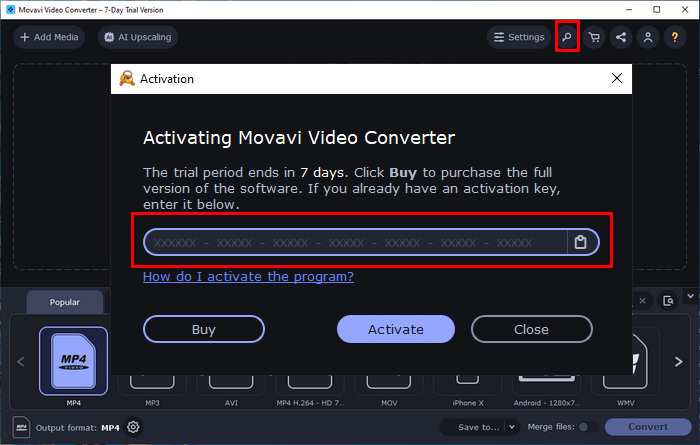
If the key is rejected, do not assume that disconnecting from the internet or reinstalling the program will fix the issue. First check the license details and the version you installed. The troubleshooting section below covers common causes of activation failure.
Movavi Video Converter System Requirements
Check the requirements for the specific version you plan to install. Operating system support and hardware recommendations can change between releases, so the following points should be treated as a checklist rather than a guarantee that every version supports every configuration.
- Operating system: Confirm compatibility with your Windows or macOS release on the official product page.
- Processor: Use a supported Intel, AMD, or Apple processor, depending on the operating system and software version.
- Memory: Check the published RAM requirements; high-resolution projects and multiple tasks may need more memory.
- Graphics: Updated graphics drivers may be necessary for supported hardware-accelerated conversion features.
- Storage: Leave enough free space for the application, source files, temporary data, and converted videos.
Movavi Video Converter Crack: What to Know Before Downloading
Some people search for a Movavi Video Converter crack, cracked installer, keygen, or patch when they want to remove trial restrictions without purchasing a license. These downloads are usually distributed through unofficial websites, file-sharing pages, and discussion forums. However, the presence of a download link or a list of serial numbers does not establish that a file is safe, authentic, or compatible with your version.
Cracked installers may alter the original program, disable license checks, or bundle additional software. Unlike an installer obtained from the publisher, a modified package may not receive normal updates or support. It can also be difficult to determine whether the files have been changed again after being uploaded to another site.
Common types of downloads advertised as Movavi Video Converter cracks include:
- Pre-activated installers that claim to unlock paid features before the application starts.
- Patch utilities or key generators that claim to bypass the normal license verification process.
- Repacked installation files distributed with scripts or additional executables.
- Modified older releases that may lack current compatibility fixes and product updates.
These descriptions explain what unofficial downloads may claim to do; they are not recommendations for obtaining or installing them. A file's name, download count, or positive comment does not establish that it is safe to run.
Risks of downloading a Movavi Video Converter crack
- Malware exposure: Modified installers can contain unwanted programs, credential-stealing malware, or other harmful code.
- Fake download links: Redirects, deceptive download buttons, and repeated pop-ups can send users to unrelated or unsafe websites.
- Activation and stability problems: A modified copy may stop launching, fail after an update, or behave differently from the official release.
- No dependable support: The publisher may not be able to troubleshoot a modified installation, and updates may overwrite its changes.
- Legal and licensing concerns: Bypassing software licensing restrictions may violate the publisher's terms and applicable law.
If you have already downloaded a suspicious installer, avoid running it. Delete the file if you do not need it, run a security scan if you opened it, and review any security alerts. If you only need to convert a few videos, an official trial or a reputable free converter is a safer starting point than a cracked copy.
Why Does My Movavi Video Converter Activation Key Not Work?
An activation error does not mean that a license key is valid. It means the application has not accepted the information provided. The cause could be a typing mistake, a mismatch between the license and installed version, an activation limit, an account issue, or a temporary verification problem. Use the following checks before purchasing another license or reinstalling the software.
1. Check the key and the installed version.
Compare the entered code with the original purchase email or license information. Watch for missing characters, extra spaces, and similar-looking letters or numbers. Then confirm that your license applies to the version of Movavi Video Converter installed on your computer. A code advertised for an older release may not activate a newer one.
2. Confirm your license status.
If the code was purchased previously, check the account or order details associated with that purchase. Some licenses have device or activation limits, and a key that has already been used may require deactivation on another computer or assistance from the publisher. Contact official support if you cannot determine the license status.
3. Check the activation connection.
If the software cannot verify the license online, make sure your internet connection is working and that security software or network restrictions are not blocking the application's legitimate connection. Do not disable your firewall or antivirus protection simply because an unofficial website recommends doing so.
4. Reinstall only when necessary.
If the application is damaged or will not open, download a fresh installer from the official source and follow the publisher's repair or reinstall instructions. Save any project files first. Reinstalling will not make an expired, revoked, or incompatible license valid.
5. Consider another converter if the license cost is not worthwhile.
If you do not own a valid license and only need basic conversion, compare free tools or trial versions that disclose their export restrictions. For frequent conversions, weigh the supported formats, processing speed, editing features, operating system compatibility, and total license cost rather than relying on unverified serial numbers.
Winxvideo AI vs. Movavi Video Converter
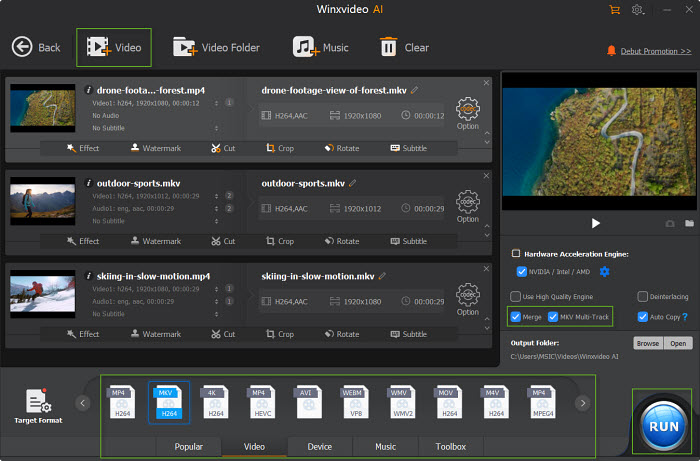
If your main goal is to convert, compress, or improve video, Winxvideo AI is one alternative to consider. It combines format conversion with AI-based video processing and editing features. Whether it is the better choice depends on the tasks you perform, the formats you need, and the current license terms. Check the latest product details before buying, especially if you need a particular codec, hardware acceleration option, or operating system version.
- Format conversion: Winxvideo AI supports a broad range of video formats and output profiles. Confirm that your required input and output formats are included.
- Hardware acceleration: Supported Intel, NVIDIA, and AMD hardware can accelerate compatible conversion tasks, depending on your device and settings.
- AI video tools: Available features include options for upscaling, stabilization, and frame-rate enhancement.
- Editing and compression: Video tasks may include trimming, cropping, merging, resizing, and subtitle handling, alongside file compression.
Before choosing a paid license, test your own files in the trial version. A tool that supports your codecs and preserves the output quality you need is more valuable than one with a longer feature list.
Check the Winxvideo AI pricing page for the current license price and terms. Compare the total cost with Movavi's current offer before deciding.
Here is a feature comparison to help you decide which product is closer to your needs. Features, supported formats, trial restrictions, and prices can change by version or offer, so verify the current details on each vendor's website before making a purchase.
Feature |
Movavi Video Converter |
Winxvideo AI |
Free Trial |
Trial available; export restrictions may apply |
Trial available; check current conversion limits |
License Model |
Check current subscription and license options |
Check current lifetime and multi-device license options |
Video Format Support |
Multiple common video and audio formats |
Broad format and output-profile support |
4K/HD Video Conversion |
Supported formats and output options vary by version |
Supported |
Hardware Acceleration |
Available for supported hardware and tasks |
Intel, NVIDIA, and AMD acceleration for compatible tasks |
AI Video Upscaling |
Check current version features |
Available |
AI Video Stabilization |
Check current version features |
Available |
AI Frame Interpolation |
Check current version features |
Available |
Audio Enhancement |
Check available audio tools |
Check available audio tools |
DVD Conversion |
Check supported disc and input formats |
Not a primary DVD conversion option |
Video Editing Tools |
Includes selected conversion and editing tools |
Includes trimming, cropping, merging, resizing, and subtitle options |
Screen Recording |
Check current version features |
Available |
If you want to test its conversion and enhancement tools, try Winxvideo AI with a sample file before choosing a license. Confirm that the trial can complete the tasks you need and that the output meets your quality requirements.
Can you get a Movavi Video Converter license for free?
Check Movavi's official website for any current trial, promotion, educational offer, or review program and read the eligibility requirements carefully. Do not assume that posting a review guarantees a free lifetime license. The terms of any promotion should state what product or license is provided and whether export restrictions remain.
Movavi Video Converter License Key and Activation FAQ
Do Movavi Video Converter activation keys found online work?
Some codes shared online may be expired, reused, incompatible with your version, or unauthorized. A code's format does not prove that it is valid. Use the license details provided with your purchase or contact Movavi support to verify its status.
Is Movavi Video Converter free to use?
Movavi offers a trial so users can test the software before purchasing. The trial may restrict exports or add other limitations. Check the current trial terms on the official website to confirm what is available in your version.
Why does my Movavi Video Converter license key not work?
The key may have been entered incorrectly, may not match the installed version, or may have reached an activation limit. Online verification or account issues can also prevent activation. Check your purchase information and contact official support if the license still fails.
Is it safe to use a cracked version of Movavi Video Converter?
Cracked installers come from unofficial sources and may contain altered program files, malware, or unwanted applications. They may also fail after updates and prevent access to normal support. An official trial or reputable free converter is a safer option.
What is a good free alternative to Movavi Video Converter?
HandBrake is a free, open-source option for converting video into supported formats, while other converters may offer a broader range of output profiles or editing features. Winxvideo AI is another option for users who want conversion and AI-based processing tools. Compare format support, export limits, operating system compatibility, and license terms before choosing.
Can I use a Movavi Video Converter key on more than one computer?
That depends on the license type and its device limit. Check the terms attached to your purchase before activating another computer. If you have replaced a device or reached the activation limit, ask Movavi support about the available transfer or deactivation procedure.