 win
win

 Super Resolution
  Video Stabilization
  Frame Interpolation

 Denoise Image
  Restore Old Photo
  Unblur Image
  Recover Face
  Upscale Image
  Colorize Photo
 Video Conversion >
 Video Compression >
 Screen Recording >


Freemake Video Converter Activation Key: Trial & License 2026
Many users search for Freemake Video Converter/Freemake Video Downloader activation keys after encountering watermarks or feature limitations in the free version. However, most keys shared online are unreliable and may create security risks. This guide explains Freemake's licensing options, activation issues, and safer alternatives.
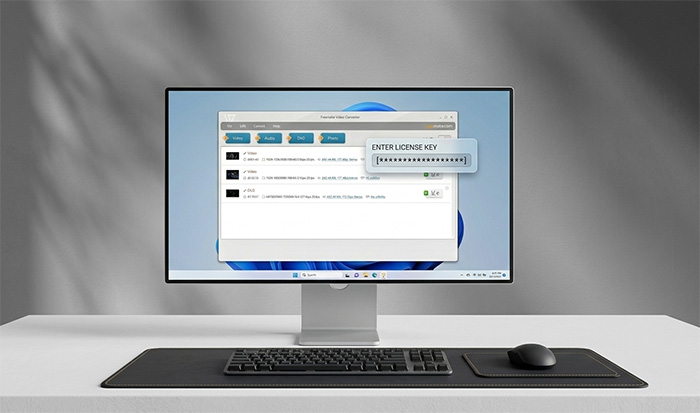
Table of Contents
- 1. Is Freemake Video Converter Free? What Does a License Key Unlock?
- 2. [Updated] Freemake Video Converter//Freemake Video Downloader Keys
- 3. How to Activate Freemake Video Converter with a Registration Code
- 4. How to Crack Freemake Video Converter
- 5. Which Is the Best Way to Unlock Freemake Video Converter
- 6. If Freemake Video Converter Free Key or Crack Doesn’t Work
Freemake Video Converter Alternative with Authorized Register Key
Freemake Video Converter keys not working? Try Winxvideo AI. It's a versatile AI video converter. It's able to convert HD/4K/8K videos in HEVC, MOV, MKV, MP4, AV1, WMV, MP3, and 370+ formats. It's 5x faster than Freemake Video Converter with untouched output quality. It will compress videos from GB to MB, download videos, edit, record, and more in one click.
More importantly, Winxvideo AI is avaible to upscale video to 1080p/4K, stabilize shaky footage, boost FPS from 24 to 60/120/higher with AI. Restore and enhance image to 4K/8K/10K. Download the Freemake alternative and check for license code to register it for full features.
Free Alternative to Freemake Video Converter for Ripping DVDs
Need a Freemake Video Converter key to rip DVD? Here's a more powerful Freemake alternative - WinX DVD Ripper [100% Safe]. It can rip any DVD (99-title/fake playlist/Disney/newly released DVDs, etc.) to MP4, MOV, AVI, WMV, MPEG, MKV, iPhone, iPad, Android, HDTVs, needless of third party help. It copy DVDs at a 5x faster speed than Freemake.
1. Is Freemake Video Converter Free? What Does a License Key Unlock?
Freemake Video Converter is available as a free download, and its core conversion features do not require a paid license. However, free access does not include every premium option. For example, Freemake's Remove Branding Pack removes the Freemake logo from converted videos, while its Mega Pack bundles additional features such as faster conversion and extra DVD and video presets.
This distinction matters when searching for a Freemake Video Converter activation key. A registration code is not necessarily required to use the basic converter; it may be intended for a particular paid pack. Before purchasing a key or entering one found online, identify the feature you need and check which Freemake pack covers it.
- Basic video conversion: Freemake offers core conversion features without an expiring free license.
- Watermark removal: The official Remove Branding Pack is intended for exporting videos without the Freemake logo.
- Additional premium features: Options included in packs such as Mega Pack require the relevant license.
- Commercial use: Check Freemake's business licensing terms if you use the software for paid or professional work.
For the current feature list and licensing terms, refer to Freemake Support, the Remove Branding Pack page, and the Freemake Video Converter license agreement.
2. [Updated] Freemake Video Converter/Freemake Video Downloader Keys
Below are some shared Freemake Video Converter/Freemake Video Downloader key formats found online. Please note that these codes are not guaranteed to activate Freemake Video Converter, as shared licenses can expire or be blocked at any time.
- 79CA12D9722F37E4CD0D67C32
- BCFF13D3452B654CB5B6080B
- JHWE8-KAHT0-LKAC8-GVZ6T
- L6HFD-E7GW3-ZDFGH-VCHJV
- GT5FRD-ESWZXD-FRTGH-YJU8
- QYQSP4-B56Y07-VNZG2G-FM9A
- F563EDA7896219AF6A7816C071C35019
- MNKJIOLIUYTHJ7890OIKHTDVTY67FB
Before trying any activation code found online, keep in mind that many shared keys are already invalid or used by multiple people. A safer option is to use an official Freemake license or choose a legitimate alternative that provides similar conversion features without activation problems.
[Warning!] Online Freemake Video Converter keys are often unauthorized and may not unlock the full version. Unverified activation tools or modified installers may also contain security risks. Always download software from trusted sources.
3. How to Activate Freemake Video Converter with A Key
Here's how to unlock Freemake Video Converter with a free acivation key. The process is the same as that using its official license key.
- Download Freemake Video Converter from its official site or other reliable software download sites. Install the program on your computer.
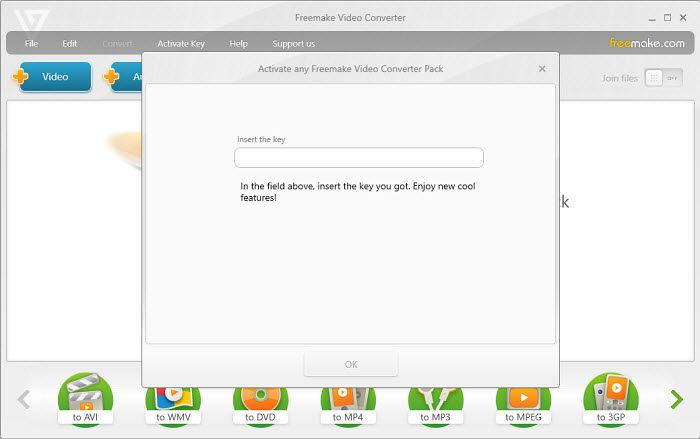
- Launch Freemake Video Converter and click the "Activate Key" button. From the Freemake Video Converter registration keys listed above, choose and copy one. Then paste it in the key box.
- If the Freemake Video Converter free key if valid, it will activate the tool and you can then enjoy the full function. If not, try another activation key for Freemake Video Converter.
4. Where to Find or Recover a Freemake Video Converter License Key
If you purchased a Freemake pack but cannot find the activation key, you may not need to buy another license. Start with the email address used for the order and check the following places.
- Check your purchase email. Search your inbox for Freemake, the pack name, or the order confirmation. Also check the Spam or Junk folder in case the license email was filtered.
- Confirm which pack you purchased. A key for one pack may not activate another. Compare the name in your purchase email with the pack you are trying to unlock.
- Enter the key in the correct field. Open Freemake Video Converter and go to the activation area for the relevant pack. Copy the key carefully, without extra spaces.
- Try the purchase email if the key is lost. Freemake's support instructions say you can try entering the email address used during purchase into the key field.
- Contact official support if activation still fails. Provide your order details and the exact error message so the support team can check the license.
Freemake states that one pack key is limited to one PC or laptop. If the key was already activated on another computer, it may not be available for activation on a second device. Check the official support page before purchasing another key.
5. How to Crack Freemake Video Converter
In addition to finding an activation key, some users are looking for Freemake Video Converter crack. It is technically possible to crack Freemake Video Converter 5.0, 4.1.14.1, and other versions, but be aware that cracked versions often carry risks such as malware or spam. Where to download Freemake Video Converter crack? We recommend platforms like ManageEngine, CRACKSurl, and Github. If you still choose to proceed, here is a typical approach used to download and set up a cracked version:
- Download Freemake Video Converter Crack version 2026 from a given link from sites such as SOFTKEYBOX, Freeprosoftz.
- Disable the internet connection and any antivirus program.
- Click the Set Up file with the Setup file.
- Click the Produce License Program code to get the code in the setup document.
⚠ Note: Cracking software is illegal and unsafe. It is always safer to use the official activation key or purchase a legitimate license.
Freemake Video Converter System Requirements
- Operating System: Windows 10/11 (64-bit recommended)
- Processor: Intel or AMD processor, 1 GHz or faster
- Memory: 4 GB RAM or more recommended for HD video conversion
- Storage: At least 50 MB free space for installation, plus additional space for converted files
- Internet: Required for certain online features and software activation
6. Which Is the Best Way to Unlock Freemake Video Converter?
There are several ways users try to unlock Freemake Video Converter, including official licenses, free activation keys, and alternative tools. Before choosing an option, it's important to consider whether it is safe, removes the watermark, and continues working after updates.
Official License |
✅ Yes |
✅ Full access |
✅ Regular updates and support |
Low |
Users who need stable performance and complete features |
Free Version |
✅ Yes |
⚠ Some features may be limited |
✅ Works with official updates |
Low |
Users who only need basic video conversion |
Online Activation Keys |
⚠ Unverified |
⚠ May not work |
❌ May become invalid after verification |
Medium |
Users troubleshooting activation issues |
Cracked Versions |
❌ Not recommended |
⚠ Uncertain |
❌ No reliable updates or support |
High (security risks) |
Users should avoid unofficial copies |
Alternative Software |
✅ Yes |
✅ Full features |
✅ Supported and regularly updated |
Low |
Users looking for more features or better value |
7. If Freemake Video Converter Free Key or Crack Doesn’t Work
Many users encounter issues when trying to use a free activation key or crack for Freemake Video Converter—codes may be invalid, or cracked versions may carry security risks. If that happens, you have a few options:
1. Purchase the Official Version
Buying a legitimate license from the official website ensures a safe and stable experience with all features unlocked.
2. Choose a More Powerful, Cost-Effective Alternative
For example, Winxvideo AI offers a lower price and more advanced features, including video format conversion, video enhancement, and batch processing.
Software |
Freemake Video Converter |
Winxvideo AI |
Price |
Lifetime license - $59.95 |
Lifetime license - $54.95 |
Convert video |
Yes |
Yes |
Convert audio |
Yes |
Yes |
Rip DVD |
Yes |
No |
Photo slideshow |
Yes |
No |
Download online videos |
Yes |
Yes |
AI video enhancement |
No |
Yes (upscaling, stabilization, frame interpolation) |
Audio noise reduction |
No |
Yes |
Screen/webcam recording |
No |
Yes |
Video editing |
Cut, rotate |
Cut, rotate, merge, split, compress, resize, etc. |
To convert videos with Winxvideo AI, just follow the steps below.
Step 1: Free download Winxvideo AI on your computer and launch the program. Activate the software with a key.
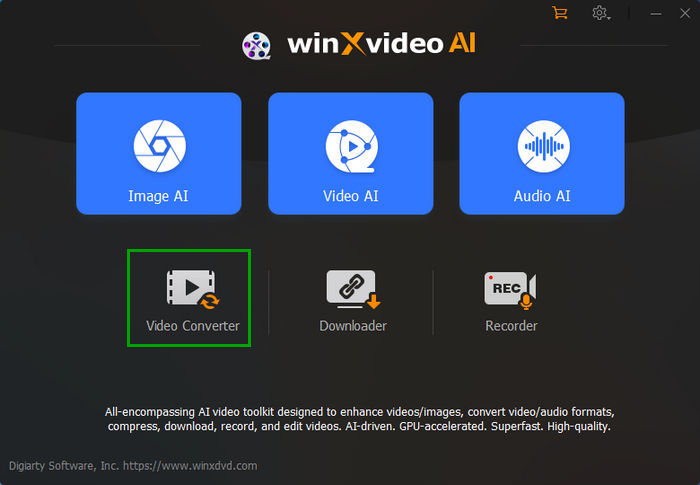
Step 2: Open Winxvideo AI and select Video Converter.
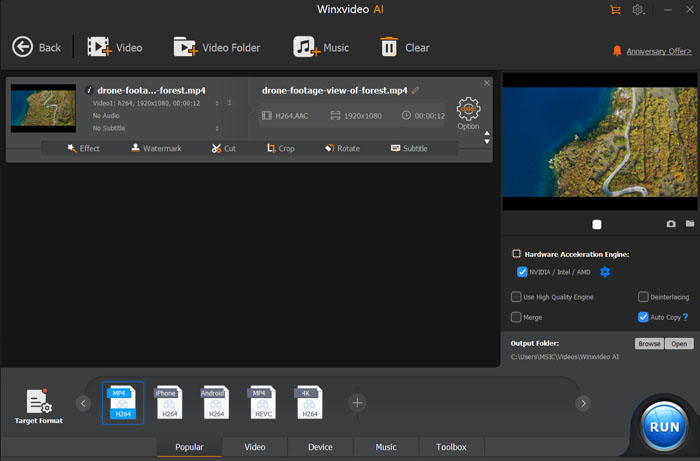
Step 3: Click the +Video button to load a source video. The video will be loaded quickly.
Step 4: Choose an output format. You can click any tab at the bottom or Target Format to choose an output format.
Step 5: Click the RUN button to process the video conversion.
Freemake Video Converter Key FAQ
Do Freemake Video Converter activation keys found online work?
Most Freemake activation keys shared online are unreliable because they may be expired, reused, or blocked during license verification. For a stable experience, using an official license or a trusted alternative is recommended.
Is it safe to use a Freemake Video Converter crack?
Cracked versions from unofficial sources may contain modified files, malware, or unwanted programs. They can also prevent software updates and technical support, so using official software or a legitimate alternative is a safer choice.
Why does my Freemake Video Converter key not work?
An activation key may stop working because it is expired, invalid, already used, or unable to pass license verification. Checking your official license status is the best way to confirm whether the activation is valid.
Can I remove the Freemake watermark for free?
The free version of Freemake Video Converter includes limitations such as branding or watermarks on exported videos. Removing these restrictions usually requires an official license or choosing another converter that supports watermark-free output.
Does Freemake Video Converter have a free version?
Yes. Freemake Video Converter offers a free version for basic conversion tasks, but some features may be limited, including watermark removal, faster conversion options, and certain online video functions.
Do Freemake Video Downloader keys work for activation?
Freemake Video Downloader keys found online are often outdated, shared, or unavailable for verification. Since activation depends on valid licensing, unofficial keys may fail to unlock premium features or stop working after updates.
Can I use the same license key for Freemake Video Converter, Video Downloader, and Audio Converter?
Not necessarily. Freemake Video Converter, Video Downloader, and Audio Converter are separate products, and a license or registration code for one should not be assumed to work with another. Check the product and pack listed in your purchase confirmation, and contact Freemake Support if you are unsure which license applies.