





-
8 Ways to Convert DVD to ISO
- 1. WinX DVD Ripper Platinum
- 2. DVD to ISO
- 3. CDBurnerXP
- 4. PowerISO
- 5. AnyBurn
- 6. Disk Utility
- 7. WinX DVD Copy Pro
- 8. BurnAware
How to Create ISO from DVD on Windows 11/10/8/7 and Mac
Summary: Copying DVDs to ISO helps preserve all content in a single, convenient disk image, protect your media, saves space, and makes playback and sharing easier. Here are 8 ways to create ISO from DVD on Windows and macOS.
There are just many situations where we need to create ISO from DVD disc. ISO file is a disk image of an optical disk, which contains everything written on DVD, but more handy. You know, DVD discs are frail and could be easy to go unplayable and damaged. And with the drastically decreasing of optical drives, DVD becomes not such a good option for playback and sharing. Copying DVD to ISO can keep you out of these troubles and help you free up storage space in your room. How can you make an ISO file from DVD? Scroll down!
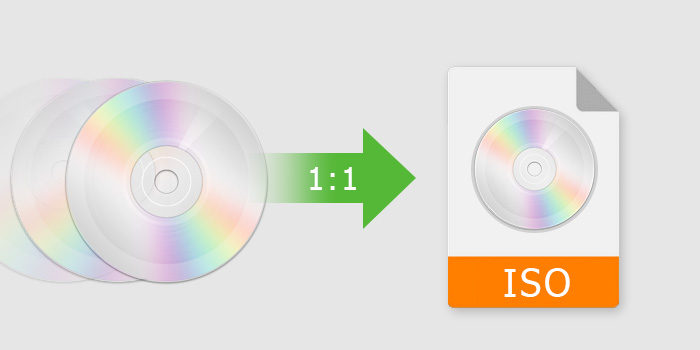
Quick Comparison - Top 8 Ways to Copy DVD to ISO
With so many tools claiming to copy DVDs to ISO, choosing the right one can be confusing, especially if you’re dealing with copy-protected discs, old or scratched DVDs, or you simply want the fastest and safest solution. To save you time, we’ve compared 8 popular DVD-to-ISO solutions based on what really matters to users: copy protection support, best use case, and platform compatibility.
Name |
Best for |
Copy Protection |
Platform |
Copy protected DVD to ISO and more formats at NO.1 fast speed. |
Yes |
Windows, Mac |
|
DVD to ISO |
Create ISO image from DVDs for a digital archive easily and hassle-free. |
No |
Windows, Mac |
CDBurnerXP |
Copy unencrypted data DVD to ISO. |
No |
Windows, Mac |
PowerISO |
Create ISO file from DVD, CD, and Blu-ray. |
No |
Windows, Mac |
AnyBurn |
Create ISO file from DVD, CD, and Blu-ray, and hard disk files. |
No |
Windows |
Disk Utility |
Copy non-protected DVD. Set ISO format and adding encryption to ISO. |
No |
Windows, Mac |
WinX DVD Copy Pro |
Provide 9 copy modes. Support damaged DVDs. |
Yes |
Windows |
BurnAware |
Convert non-protected DVD to ISO image. |
No |
Windows, Mac |
Quick pick: For copy-protected DVDs, WinX DVD Ripper Platinum delivers the fastest speed and reliable decryption; for damaged discs, WinX DVD Copy Pro offers better error tolerance; for unprotected DVDs, DVD to ISO, CDBurnerXP, or BurnAware are sufficient; and for basic ISO creation across DVD, CD, or Blu-ray, PowerISO or AnyBurn can work but do not support copy protection.
Method 1. How to Create ISO from DVD with WinX DVD Ripper Platinum?
WinX DVD Ripper Platinum offers a 3-click solution to make ISO from video DVDs on Windows/Mac. It is fully compatible with both 32-bit and 64-bit versions of Windows 11, 10, 8, and 7, and has a Mac version supporting macOS Ventura and earlier.
Main Features:
- Create ISO from copy-protected DVDs, including region codes, CSS, UOPs, fake titles, corrupted sectors, etc.
- 4 DVD backup modes: 1:1 clone video DVD to ISO image, Video_TS folder, and extract full or main DVD title to MPG.
- Rip DVD to ISO image, as well as MP4, MKV, H.264, MOV, TVs, NAS, Plex, mobiles, and 350+ preset profiles.
- 80% smaller. Generally, a 7.5GB DVD can be ripped ISO image in slightly smaller size, but 1-1.4GB or so in MP4 format.
- Supports multi-core CPU, Hyper-threading tech, and hardware acceleration.
For mobile user, please go to mobile page.
Please DO NOT use WinX DVD Ripper to rip rental DVDs.
Now let's check how to copy DVD to ISO on Windows 11/10/macOS within 3 steps with WinX DVD Ripper Platinum:
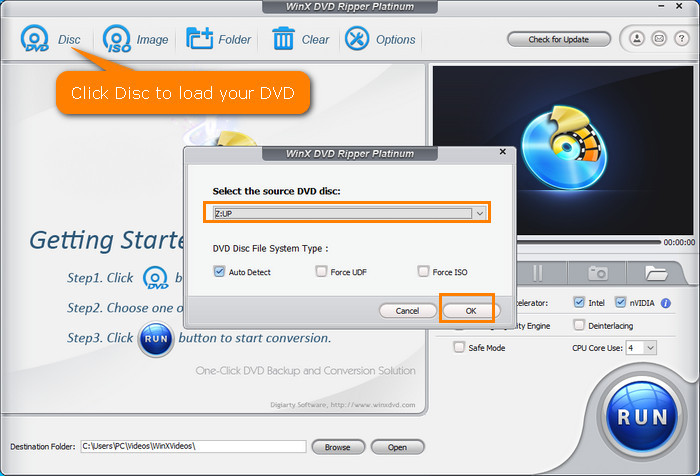
Step 1. Insert the source DVD to DVD-ROM. Next, launch the DVD to ISO creator and click "DVD Disc" button to load the DVD you just inserted. Simply hit OK to scan your DVD.
Step 2. Click as the following path: Output Profile -> DVD Backup Profile -> DVD Backup -> Clone DVD to ISO Image.
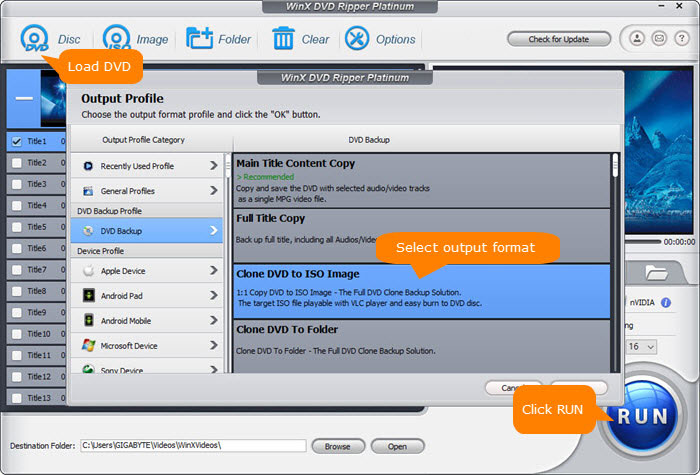
Step 3. Select a destination folder to store the converted DVD ISO image file and click "RUN" button to begin ripping ISO image from DVD. (Here please make sure the destination folder you chose has enough space to store the converted ISO image file. DVD 9: 9 GB; DVD 5: 5GB.)
Tips: You can further use WinX DVD Ripper Platinum to convert ISO image file to MP4, AVI, WMV, MOV for easy playback on iPhone iPad Android and other portable devices wherever you want. Or copy DVD ISO file to USB drive for backup or convenient use.
[Video Tutorial] How to Create ISO from DVDs on Windows 11/10/8/7/Mac
Legal Disclaimer: WinXDVD, developed by Digiarty Software, is designed strictly for personal, non-commercial media backup under fair use. Digiarty Software strictly respects copyright laws and does not condone, facilitate, or support copyright infringement or unauthorized copying. Users are advised to check and comply with their local DVD copyright laws and regulations before use.
Method 2. How to Create ISO from DVD Free with DVD to ISO?
DVD to ISO is a free and easy DVD ISO creator. It's able to make ISO image files from DVDs and CDs on Windows 11, Windows 10, 7, and earlier. It has a friendly interface and the operation is easy as there are no complex menus or configurations. But there are two things to note: first, it offers no options to control the writing speed or other parameters related to the ISO generation; second, it can't convert a protected DVD to ISO image.
Main features:
- Create ISO images from DVDs and CDs.
Now, let's check how to create an ISO file from a DVD with it:
Step 1. Download and install the free DVD to ISO ripper. The installation procedure is quick and should complete immediately. To install the program successfully, you need to get the .NET Framework on Windows.
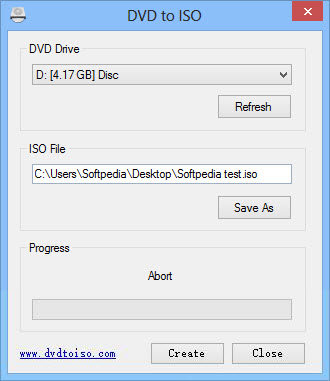
Step 2. Open the program and insert the source DVD into your computer. There are only two things that need you to customize: click on DVD Drive to select the source DVD and click Save As to set where you want to store the created ISO image.
Step 3. Click Create and the DVD to ISO conversion process will begin immediately. You can see it's writing data to file. Wait until it finish.
Method 3. How to Create ISO from DVD with CDBurnerXP
In addition to working as a CD/DVD burner, CDBurnerXP is also a free DVD to ISO converter for Windows 10 and earlier Windows systems. It's able to create ISO images in ISO-9660 and UDF formats from bootable data discs that don't come with copy protections. That means, you can use it to can creating ISO backup copies of your operating system or software DVDs, but you can't make ISO image files from video DVDs.
Main features:
- Burn ISO files to CD.
- Convert bin- and nrg-files to ISO.
- Burn any data on CD, DVD, Blu-ray, and HD-DVD.
- Burn MP3, WAV, OGG, FLAC, and other audio formats to CD.
Now let me show you how to copy data DVD to ISO with CDBurnerXP.
Step 1. Download and install this free DVD to ISO creator on Windows 10 PC. Then open it.
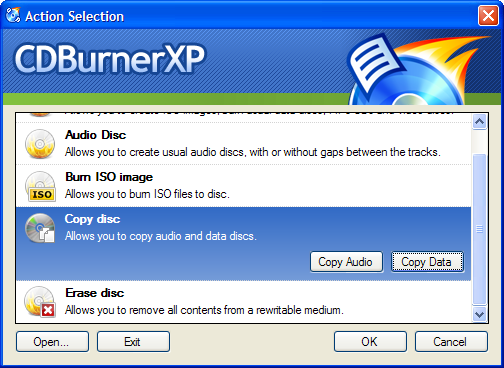
Step 2. On the startup screen, choose Copy disc and Copy Data.
Step 3. On the pop-up Copy ISO Disc window, select the source device and the target device. You can set your hard disc as target device to save the ISO image.
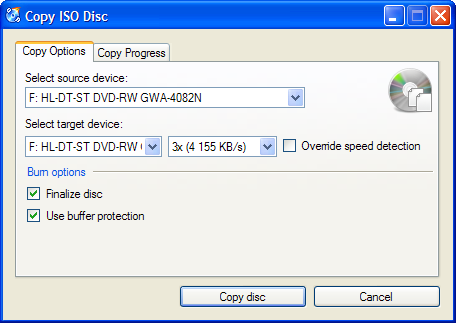
Step 4. Click Copy disc. Then, CDBurnerXP will begin the ISO creating process.
Method 4. How to Create ISO from DVD with PowerISO?
PowerISO is also one of the best ISO creators for Windows 11, 10, 8, 7 and older. It is a multifunctional CD/DVD/BD image file processing tool that can make DVD ISO image files and burn DVDs. There is a free version which is limited in functionality and contains advertisements. Also, the free DVD to ISO creator doesn't support DVDs with copy protections.
Main features:
- Create ISO file from DVD, CD, and Blu-ray.
- Burn ISO file and other image file to DVD, CD, and Blu-ray.
- Extract files from ISO file.
- Mount ISO file as a virtual drive.
- Burn audio files such as MP3 to CD.
- Rip audio CD to MP3, WMA, and other formats.
- Convert BIN, DMG, and other popular image files to ISO.
- Convert ISO and other popular image files to BIN.
Now let me show you how to turn a DVD into an ISO file with PowerISO.
Step 1. Download and install PowerISO on your computer. This tool has a 32-bit and a 64-bit version to choose. Once you finish installation, open it.
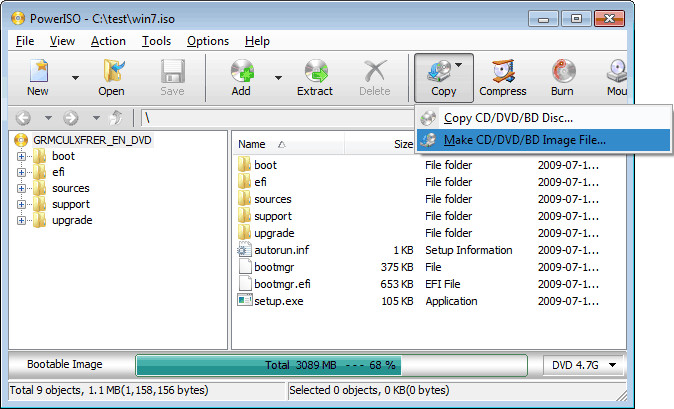
Step 2. Click the "Copy" button on the toolbar and then choose "Make CD/DVD/BD Image File…"
Step 3. Under Source drive, choose the DVD you want to convert to ISO.
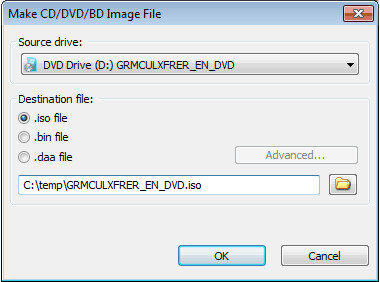
Step 4. Under Destination file, choose ".iso file" and specify the destination folder.
Step 5. When all settings are done, just hit "OK" to start making ISO image file from DVD.
Method 5. How to Create ISO from DVD with AnyBurn?
AnyBurn is a free and versatile DVD to ISO converter software available for Windows computers. AnyBurn goes beyond DVD to ISO conversion. It allows burning various file types to CDs, DVDs, and Blu-rays, making it a multi-purpose tool. The overal conversion speeds are fast compared to some competitors. However, AnyBurn might lack advanced features for experienced users who require more control. Most of its features are available for free. But if you want to convert audio files and install Windows to USB drive, you need to pay USD 29.95 to get AnyBurn Pro.
Note that AnyBurn might not be able to bypass copy protection on commercial DVDs and let you copy ISO from protected DVDs.
Main features:
- Create ISO images from DVD, CD, BD discs, or hard disk files.
- Burn all CD / DVD / Blu-ray disc image files.
- Burn Audio CD from audio files in different formats.
- Rip Audio CD into various audio files.
- Create bootable USB drive for Windows 7, 8, 10, or Linux.
Now, let's check how to make ISO from DVD using AnyBurn?
Step 1. Insert the DVD into the DVD drive of your Windows computer. Then download AnyBurn. Once downloaded, open it, and click "Create image file from disc" or "Copy disc to image file".
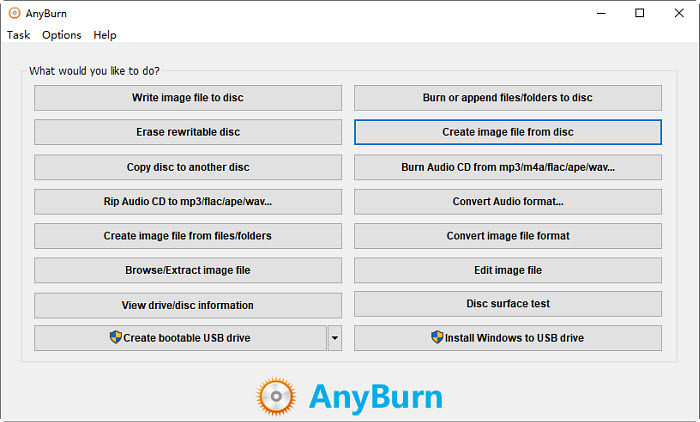
Step 2. The DVD to ISO converter should automatically detect the DVD in your optical drive and display it as the source. Choose the destination folder where you want to save the converted ISO file. You can click the "Browse" button to navigate to your desired location. Make sure the "Destination image file type" is set to the standard ISO format (".iso").
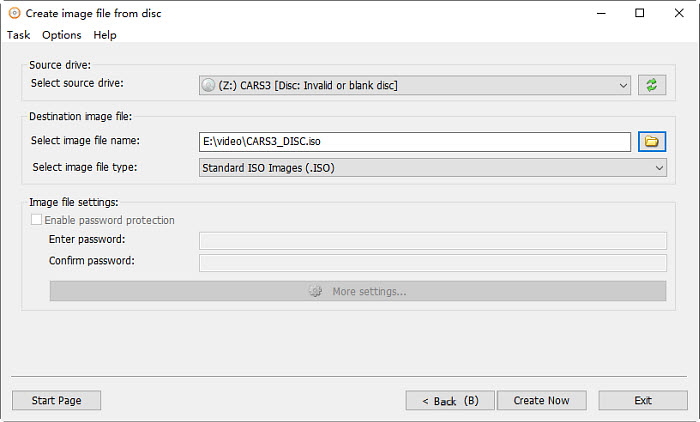
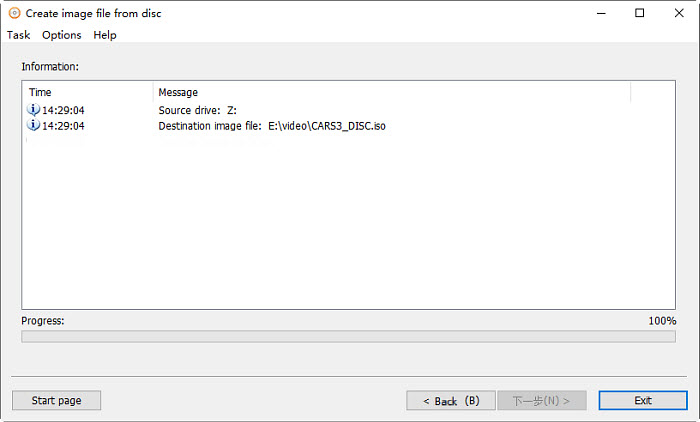
Step 3. Click the "Create Now" button to begin copying the DVD to an ISO file. AnyBurn will display a progress bar so you can monitor the conversion process. Once the conversion is complete, you should see a message like "Creating image file finished successfully."
Method 6. How to Create ISO from DVD on Mac with Disk Utility?
If you want to convert DVD to ISO on a Mac, you may not need a third-party program. This is because Mac's built-in Disk Utility is able to create images from discs. The Disk Utility app can only copy ISO images from unprotected DVDs. It can't bypass certain types of copy protection, resulting in incomplete or unusable ISO files. You have limited control over compression settings, output formats, and other parameters that can affect the quality and compatibility of the output ISO file.
Main features:
- Create a blank disk image, add data to it, and then burn it to CDs or DVDs.
- Create a disk image from a physical disk or a connected device like a USB device.
- Create a disk image from a folder or connected device.
- Create an encrypted disk image to protect your data.
Now, let's check how to create an image file from a DVD with Disk Utility.
Step 1. Insert the DVD into the DVD drive connected to your Mac.
Step 2. Open the Spotlight search box by pressing Command + Space, and then enter "Disk Utility" to find and open it.
Step 3. click the File menu, click New or New Image, and choose "Disk Image from (device name)" or "Image from (device name)".
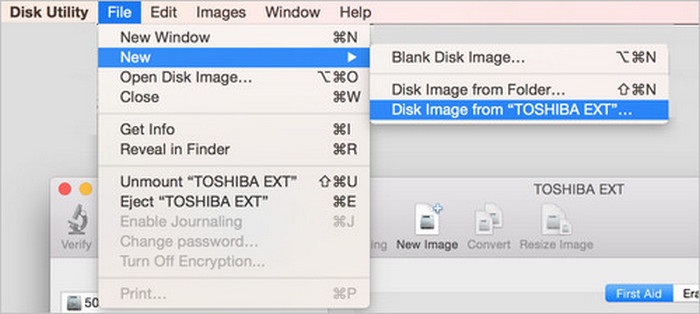
Step 4. Then, you'll see a small window like below. What you need to do now is to:
Enter a filename for the disk image in the Save As field.
Add tags if necessary.
Choose where to save the disk image.
Specify format: read-only, compressed, read/write or DVD/CD master.
- Read-only: The disk image can't be written to, and is quicker to create and open.
- Compressed: Compresses data, so the disk image is smaller than the original data. The disk image is read-only.
- Read/write: Allows you to add files to the disk image after it's created.
- DVD/CD master: Can be used with third-party apps. It includes a copy of all sectors of the disk image, whether they're used or not. When you use a master disk image to create other DVDs or CDs, all data is copied exactly.
- Set encryption to none or choose an encryption option.
When all settings are done, click Save.
Step 5. Creating disk image from DVD. Once done, you’ll find a .cdr file in the destination you set before.
Step 6. Convert .cdr to .iso.
.cdr file is as good as .iso on Mac. But if you want to convert it to an ISO file to use on other OS, simply open a terminal window and run the following command:
hdiutil convert /home/username/original.cdr -format UDTO -o /home/username/destination.iso
Replace "/home/username/original.cdr" with the path to the CDR file and "/home/username/destination.iso" with a path for the ISO file you want to create.
Method 7. How to Make ISO from DVD on Windows 11/10/8/7 with WinX DVD Copy Pro?
WinX DVD Copy Pro is a professional Windows-based DVD copy program. It comes with 9 copy modes, including making an ISO copy of your DVD. Like WinX DVD Ripper Platinum, it can read copy-protected DVDs and even slightly damaged DVDs.
Main features:
- Copy entire DVD to ISO image and VIDEO_TS folder.
- Copy a DVD to a blank DVD.
- Copy main title to a single MPEG2 file.
- Copy certain DVD chapter.
- Extract video or audio only for special purpose.
- Mount ISO as a virtual drive.
- Burn your ISO image or VIDEO_TS folder to a DVD disc.
Now let's check how it creates an ISO image from your physical media.
Step 1. Download and install WinX DVD Copy Pro on PC. It is compatible with all popular Windows operating systems.
Step 2. Insert the DVD into your computer. Then, open WinX DVD Copy Pro and choose Clone DVD to ISO on the left side bar. Now, you should see your DVD in the field of the Source DVD.
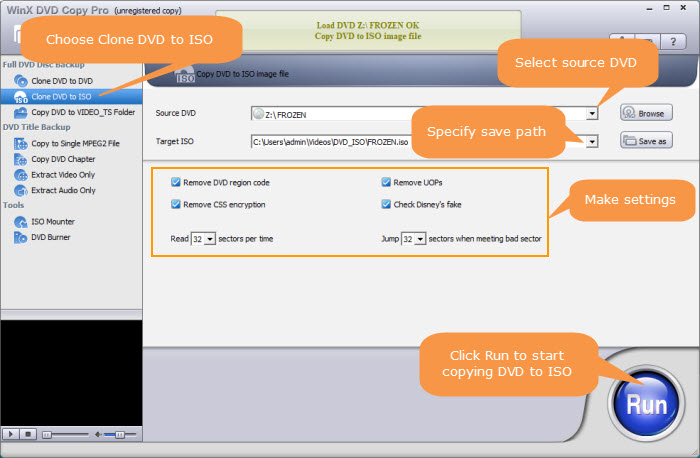
Step 3. Click the Save as button to specify where you want to store the ISO file. Make sure there is enough space.
Step 4. Click the Run button to begin converting DVD to ISO.
Method 8. How to Create ISO from DVD with BurnAware?
BurnAware is a versatile and free DVD burning software that caters to both novice users and professionals looking for a reliable tool to burn, copy, and manage optical discs. It offers the ability to create ISO image from DVDs on Windows 11/10/7/8/7/Vista. In addition, you can also create ISO image from files, CDs, and Blu-ray discs. The whole DVD to ISO conversion process is extremely simple. However, you can't use it to make ISO image from protected DVDs.
Main features:
- Copy DVD to ISO, burn ISO to image, make ISO from videos, create boot ISO.
- Copy Data and Audio discs, save discs to ISO and BIN disc images.
- Burn files and folders to CD, DVD, or Blu-ray discs.
- Burn Audio CDs, Video DVDs, Blu-ray Video discs and MP3 discs.
- Extract files and folders from ISO images, burn Disc Images.
- Verify and recover data from multisession or unreadable discs.
Now let me show you how to copy a DVD into an ISO file with BurnAware.
Step 1. Download the free DVD to ISO converter on your Windows 11/10 computer and install it as prompts. Open it and insert the source DVD into the optical drive. Then click on the Copy to ISO icon in the main interface of the ISO video creator.
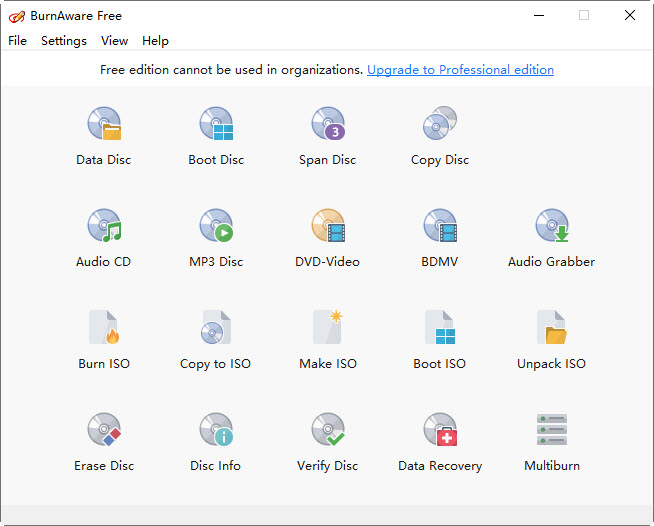
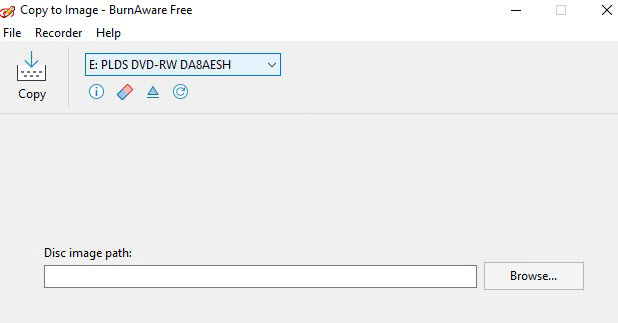
Step 2. It will start to detect the DVD drive. If there are multiple optical drive, the drop-down and choose your DVD.
Step 3. Next, click Browse and you need to specify a destination file on your PC to store the copied ISO image file.
Step 4. Click on the Copy button to start copying DVD to ISO image. When you see the message 'Copy process completed successfully,' the process has completed.
FAQs on How to Convert DVDs to ISO
No, you can't create ISO from DVD with HandBrake. It only converts DVD to MP4, MKV, M4V, or WebM formats.
No. Like HandBrake, VLC converts DVDs to digital files in MP4 and other formats, but cannot create ISO images.
Imgburn may show a multi-track error. In that case, start the program and select "Create image file from files/folders". Set input mode to Standard, add your optical drive's letter as the Source, and click the big "Build" button. Or, use WinX DVD Ripper Platinum to copy DVDs with multiple tracks to ISO or MPEG2 format.
Linux lets you do this natively. Insert your DVD, open Terminal, enter cd /home/username/. Then run dd if=/dev/dvdrom of=/home/username/iso-name.iso, replacing /dev/dvdrom with your DVD drive path. Press Enter to create the ISO in your home directory.
No. You must first burn the ISO image to a DVD-R/RW disc to play it on a standalone DVD player. Alternatively, play the ISO file on a computer using media players like 5KPlayer or VLC.
Yes. DVDFab DVD Copy can create a 1:1 identical DVD ISO or folder copy on your hard drive with fast speed and high quality. DVD Cloner is another option, letting you copy DVDs to ISO images or folders while removing protections and region codes. It can also burn ISO files or DVD folders to blank discs efficiently.
After creating an ISO file from a DVD, connect a USB drive with at least 4GB of free space to your computer. Transfer the ISO to your USB by dragging and dropping it. To make a bootable USB from the ISO, use tools like Rufus or dd.