





5 Best DVDFab Alternatives in 2026 (Free & Paid Picks)
Summary: Tired of DVDFab's high prices and glitches? The best DVDFab alternative in 2026 for most users is WinX DVD Ripper Platinum due to its superior DVD to MP4 ripping speed and 99-title decryption. For lossless 1:1 DVD and Blu-ray backups, MakeMKV is the top choice, while HandBrake remains the gold standard for free DVD transcoding. This article shares the top 5 alternatives to help you digitize and backup DVDs without the bloat.
For decades, DVDFab has been the go-to suite for physical media enthusiasts. However, the software landscape has changed. In 2026, many users find themselves at a crossroads: stay with an increasingly complex and expensive tool, or switch to a more streamlined solution. If you’re searching for a DVDFab alternative that is faster, cheaper, or simply more reliable, you’ve come to the right place.

Why Users are Swapping DVDFab for Alternatives in 2026
While DVDFab is powerful, it’s no longer the "magic bullet" it once was. Most users look for DVDFab alternatives because they want a more affordable, lightweight, and DVD-focused solution. The most common reasons include:
- Expensive lifetime/module pricing: A Lifetime All-In-One license often costs $279.99, yet new features (like 4K UHD or AI) are frequently released as separate, paid add-ons.
- 99-Title DVD compatibility issue: Disney and Lionsgate discs use "fake titles" to confuse rippers. Users report DVDFab occasionally selects the wrong track, resulting in scrambled movie playback.
- Cinavia Persistence: Despite the "Cinavia Removal" marketing, many users find the protection remains active on newer Sony titles, leading to muted audio mid-movie.
- Heavy software ecosystem: Modern DVDFab versions include heavy background processes and intrusive "upsell" pop-ups that slow down your PC.
You may be interested in: DVDFab Review- Features, Pricing, Pros & Cons
Table of Contents
Part 1. 5 Best DVDFab Alternatives: 2026 Technical Review
1. WinX DVD Ripper Platinum - Best Overall DVDFab Alternative
Best For: Speed-conscious users who need to rip protected DVDs (including Disney 99-title) into MP4/HEVC.
WinX DVD Ripper Platinum is the best all-in-one DVDfab alternative for fast protected DVD backup, ripping and conversion. It excels in solving the "slow rip" problem by utilizing Level-3 Hardware Acceleration. While DVDFab can feel bloated with its AI and streaming downloader modules, WinX DVD Ripper Platinum stays focused on being both a dedicated DVD backup solution and a professional DVD digitizer.
It is particularly effective at handling the 99-title protection, the bad sectors and intentional DRM traps that cause other rippers to crash. For those with massive physical libraries, its ability to convert a full DVD to a high-quality MP4 in minutes is a game-changer.
Pros:
- 1:1 Lossless backup to ISO/Folder; Ultra-fast GPU acceleration.
- Handles virtually all encryption including Disney 99-title and Sony ArccOS.
- Much more affordable than DVDFab's All-In-One suite.
Cons:
- Not a free tool; Interface focuses on utility over flashiness.
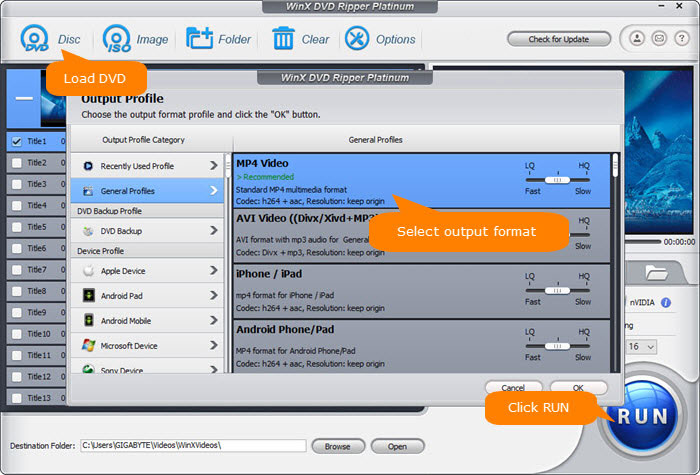
In our hands-on testing of Wreck It Ralph, WinX DVD Ripper Platinum delivered one of the best overall balances of speed, compatibility, and stability among the tested tools. It completed DVD structure analysis in 5 seconds and reached up to 177.14 FPS during DVD to MP4 H.264 conversion, outperforming several alternatives in speed (DVDFab: 109.92 FPS) while maintaining flexible output options such as MP4, HEVC, MKV, ISO, and Folder backup. These results make WinX DVD Ripper a strong DVDFab alternative for users who need fast, reliable DVD digitization without investing in a complex multi-module suite. See the full DVD Ripper benchmark results and detailed test methodology here >>
You can also have a detailed look at how WinX DVD Ripper stack up against DVDFab >>
2. HandBrake - Best Free Alternative to DVDFab
Best For: Advanced users who want a free, open-source tool to compress homemade DVDs and videos for specific devices.
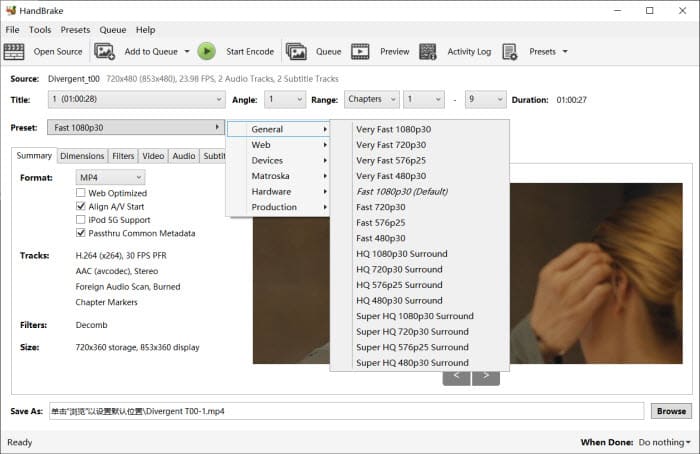
HandBrake is a legendary open-source transcoder. Unlike DVDFab, it is entirely free and offers deep granular control over video bitrates, codecs, and filters. It is the perfect tool if you already have a video file and want to shrink it for an iPhone or tablet without losing noticeable quality.
However, a common "trap" for beginners is assuming HandBrake can rip protected DVDs out of the box. It cannot. To function as a DVDFab alternative, you must manually install the libdvdcss library to bypass basic encryption like CSS.
Pros:
- 100% Free and open-source.
- Huge library of device-specific presets.
Cons:
- Cannot bypass modern copy protections (99-title) without 3rd-party plugins like libdvdcss.
- Steep learning curve.
Read More: See how to rip DVD with Handbrake >>
3. MakeMKV - Best for Lossless Backup
Best For: Movie purists who want lossless bit-for-bit digital copies.
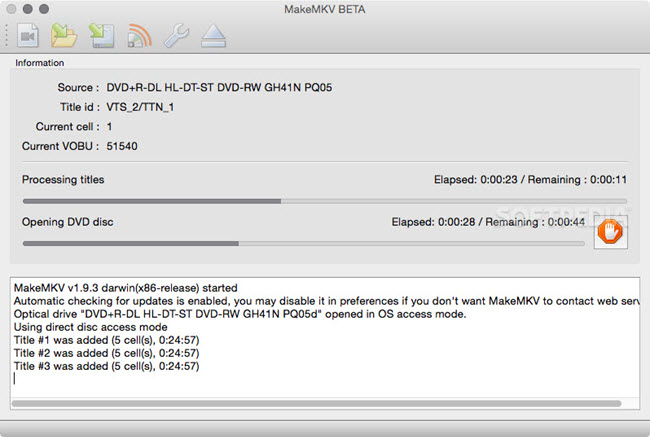
MakeMKV is the gold standard for "remuxing." Instead of re-encoding and compressing the video like DVDFab does, MakeMKV simply "unwraps" the data from the disc and places it into a high-quality MKV container. This preserves every bit of the original video and audio quality, including all subtitle tracks and chapters. So if you only need to rip DVD or Blu-ray into MKV file for plex, MakeMKV is a popular DVDFab alternative.
It is currently the most reliable tool for handling AACS v82+ and 4K UHD encryption where others fail. This is a frequent pain point for DVDFab users who find the "UHD Ripper" module hit-or-miss.
Pros:
- Lossless quality.
- Currently handles AACS v82+ and 4K UHD encryption more reliably than DVDFab.
- Remains free while in "Beta" (which has lasted over a decade.
- Preserves all metadata.
Cons:
- Output files are massive (DVDs ~8GB, Blu-rays ~30GB+).
- MKV format only.
Read More: DVDFab vs MakeMKV: Our Hands-On Comparison After Real Tests
4. VLC Media Player - Best Basic DVD Playback Option with Conversion
Best For: Casual users who only need to rip an occasional, unprotected disc without installing new software.
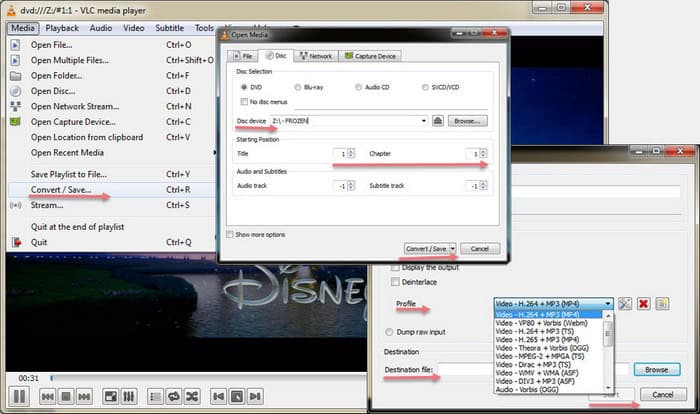
Most people know VLC as the "play anything" app, but it hides a surprisingly capable (though basic) ripping engine under its "Convert/Save" menu. It is a solid DVDFab alternative for someone who already has the app installed and doesn't want to buy a dedicated suite for a single project.
The process is "real-time," meaning it takes longer than dedicated rippers, and it lacks the ability to handle complex multi-angle discs or 99-title protections. Use this for home movies or older, unprotected discs.
Pros:
- Completely free.
- No ads.
- Available on every operating system (Windows, Mac, Linux).
Cons:
- Very slow ripping spee.
- Poor handling of copy-protected commercial DVDs.
- Non-intuitive workflow.
Read More: See how to rip DVD with VLC >>
5. AnyDVD HD (RedFox) / Xreveal - Best Decryption Campanion
Best For: Users who want "invisible" background decryption for pre-2024 titles or need a lightweight successor.
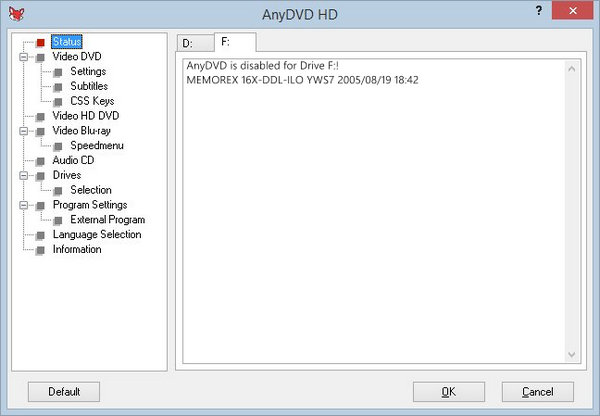
AnyDVD HD was once the undisputed king of background decryption. It sits in your system tray and "unmasks" the disc as soon as it's inserted, making it appear unprotected to Windows. However, since the RedFox servers went offline in June 2024, AnyDVD HD can no longer access the online database required to decrypt discs released in 2025 and 2026.
If you love this "invisible" workflow, we recommend switching to Xreveal. It is the modern spiritual successor to AnyDVD, featuring a nearly identical interface and active updates for the latest 2026 DRM. It is much leaner than DVDFab and works perfectly in tandem with HandBrake.
For more options, check out the guide on AnyDVD HD alternatives >>
Pros:
- Works automatically in the background.
- Removes annoying forced trailers and region codes instantly.
- Xreveal provides active support for 2026 releases.
Cons:
- Windows-only.
- Requires a paid license.
- Does not convert video to different formats (output is ISO or folder).
 The Legacy Corner: Is DVD Shrink Still an Alternative to DVDFab in 2026?
Many veteran collectors still have a soft spot for DVD Shrink. Back in the mid-2000s, it was the king of fitting a Dual-Layer (DVD-9) disc onto a cheaper Single-Layer (DVD-5) disc.
However, in 2026, we do not recommend using it as your primary DVDFab alternative. Since its development stopped in 2004, it cannot handle modern copy protections, often leading to "Navigation Error" or "Cyclyic Redundancy Check" crashes. If you loved DVD Shrink's compression: Use WinX DVD Ripper or HandBrake instead. If you loved its simplicity: MakeMKV offers the same 1-click experience without quality loss. If you want a broader comparison of DVD ripping software, check our complete guide to the best DVD ripper software.
Part 2. Comparison Table: Which Alternative Replaces Your DVDFab Module?
Features |
WinX DVD Ripper |
MakeMKV |
HandBrake |
VLC |
AnyDVD HD |
DVDFab |
1:1 Lossless Backup |
Yes (ISO/Folder/MPEG) |
Yes (MKV) |
No (Encode only) |
No (Basic extraction only) |
Yes (ISO/Folder) |
Yes (MKV/VOB Passthrough) |
99-Title Disc Support |
Excellent |
Good |
None (Native) |
Weak |
Moderate |
Good |
Bypass Region Code |
Yes |
Yes |
No (Native) |
Yes (Basic. VLC requires libdvdcss) |
Yes |
Yes |
Main Movie Copy |
Yes |
Yes |
Yes |
Yes |
No |
Yes |
Rip DVD to MP4/HEVC |
Yes (Fast) |
No (MKV only) |
Yes |
Yes (Slow) |
No |
Yes (Bloated) |
Value for Money |
Excellent |
Excellent (Free Beta) |
Good (Free) |
Good (Free) |
Moderate |
Very Low |
Best for |
Fastest DVD to MP4 Conversion |
Lossless MKV Remux |
Best Free Compression |
Basic "One-Off" Rips |
Background Decryption |
Comprehensive ecosystem |
Part 3. Frequently Asked Questions about DVDFab Alternatives
1. Is it legal to use a DVDFab alternative to rip DVDs?
In many regions, it is considered "Fair Use" to create a backup of a physical disc you own for personal use. However, bypassing DRM is a legal gray area in some countries. Always check local laws before digitizing your collection.
2. Can HandBrake remove DVD copy protection like DVDFab?
Not natively. Unlike DVDFab or WinX DVD Ripper, HandBrake does not include the code to bypass DRM (Digital Rights Management). To make it work, you must manually install a helper file called libdvdcss. If you want a tool that handles encryption automatically, WinX DVD Ripper or MakeMKV are better choices.
3. Why does my DVDFab alternative fail on new Disney movies?
Newer releases from Disney, Marvel, or Lionsgate often use 99-title protection. This creates dozens of fake video tracks to confuse the software. If your tool isn't updated frequently, it will rip the wrong track. WinX DVD Ripper Platinum is currently the most reliable for correctly identifying the "Main Title" in these scenarios.
4. How do I fix the "Cinavia" muted audio issue without DVDFab?
Cinavia is a tough watermark. While DVDFab sells a specific (and expensive) module for this, the most reliable "free" way to bypass it is to use MakeMKV to rip the disc and then play the file through a media player that doesn't recognize Cinavia, such as VLC Media Player or a dedicated HTPC.
5. Can I still use DVD Shrink on Windows 11 in 2026?
Technically, yes, but we don't recommend it. DVD Shrink hasn't been updated since 2004 and struggles with modern multi-core processors and hardware-accelerated decryption. You will likely encounter "Out of Memory" errors or "CRC" crashes. WinX DVD Ripper is the modern spiritual successor that offers the same shrinking features with 2026-level stability.
6. What is the best DVDFab alternative for protected DVDs?
WinX DVD Ripper Platinum is one of the best DVDFab alternatives for protected DVDs because it is specifically designed for DVD decryption and digitization. It can handle various DVD protections, including region codes, CSS encryption, and difficult multi-title DVDs, while converting DVDs to popular formats like MP4, HEVC, and MKV.