











DVD Copy Protection: How CSS, ARccOS & 99-Title Schemes Work
 Donna Peng
Updated on
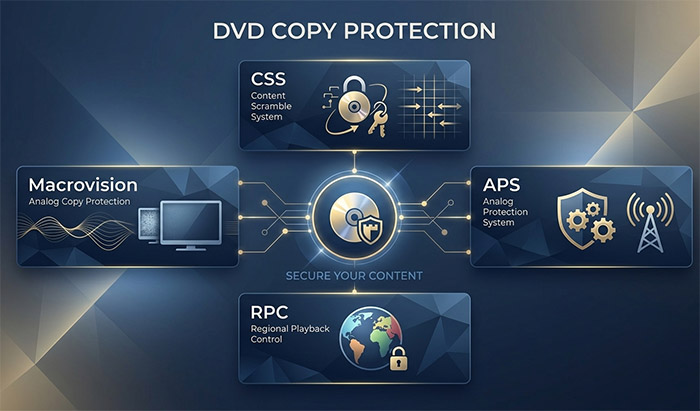
DVD copy protection has never been just one technology. Over the years, movie studios and content publishers have used different methods to control how DVD content can be accessed, played, copied, or recorded. Some work through encryption, while others rely on region restrictions, navigation controls, or unusual disc structures.
CSS is probably the best-known example, but it is only part of the picture. 99-title protection, Sony ARccOS, CPRM, DVD region codes, UOPs, and RCE all address different aspects of DVD content protection. Some can be used together on the same disc, which is why two protected DVDs can behave very differently when read by a computer or DVD ripping program.
This guide explains the major types of DVD copy protection, how the underlying mechanisms differ, and how they affect DVD playback and copying. It also puts commonly confused technologies such as CSS, region coding, UOPs, and ARccOS into context, so you can understand what is actually protecting the content on a DVD.
Quick Definition: What Is DVD Copy Protection?
DVD copy protection refers to technologies and techniques designed to restrict unauthorized copying, access, or use of content stored on a DVD. Unlike a single encryption system, DVD copy protection is an umbrella term covering several different mechanisms. Some protect the content itself, while others restrict playback, control DVD navigation, or deliberately alter the disc structure to interfere with copying.
| DVD Protection | How It Works | Main Purpose |
|---|---|---|
| CSS | Encrypts DVD video content using the Content Scramble System. | Restrict unauthorized access to protected DVD content. |
| 99-Title | Introduces numerous misleading, duplicate, or invalid titles into the DVD structure. | Make it harder for copying software to identify the correct movie title. |
| Sony ARccOS | Uses deliberately problematic sectors and disc structures that can cause read errors in some copying software. | Interfere with direct disc copying and extraction. |
| CPRM | Uses encryption and device/media-specific key information to control copying of protected recorded content. | Protect content recorded on supported recordable media. |
| Region Code | Assigns a geographic region to a DVD and compatible playback equipment. | Limit playback of certain DVDs to designated regions. |
| UOPs | Stores restrictions in the DVD navigation information that can disable operations such as skipping or menu access. | Control what viewers can do during DVD playback. |
| RCE | Adds additional region checks to certain DVDs beyond standard region coding. | Prevent playback on unauthorized region configurations. |
These protections do not all prevent the same thing. CSS primarily protects access to encrypted content, region codes control geographic playback, UOPs restrict certain player operations, while 99-title and ARccOS use disc structure or data patterns that can interfere with copying software. A commercial DVD may also combine several of these methods, so identifying one protection does not necessarily mean it is the only protection on the disc.
How Does DVD Copy Protection Work?
DVD copy protection does not rely on a single method. Different protection systems control different parts of the DVD experience: some encrypt the content, some restrict where or how a disc can be played, and others modify the disc structure or data in ways that can confuse copying software. A protected DVD can use one method or combine several of them.
The major approaches fall into six categories: encryption, region restrictions, navigation restrictions, structural protection, deliberately problematic data, and protection for recorded media. Understanding these categories makes it easier to distinguish technologies such as CSS, region codes, UOPs, 99-title protection, Sony ARccOS, and CPRM.
Encryption
Encryption protects the actual content stored on a DVD by transforming it into data that requires the appropriate cryptographic information to be read correctly. On commercial video DVDs, the best-known example is CSS (Content Scramble System).
With CSS, the video content is stored in scrambled form rather than as directly readable video files. A compatible DVD player or authorized playback system uses the necessary keys to descramble the content during playback. When computer software attempts to access a CSS-protected disc, it therefore needs to understand the protection mechanism rather than simply copy the underlying video data.
- Protection type: Content encryption and scrambling
- Typical example: CSS
- What it protects: Access to the DVD's encrypted content
- Important distinction: Encryption is only one form of DVD copy protection; not every DVD protection mechanism encrypts the video.
Region Restrictions
DVD region coding controls where a DVD is intended to be played rather than encrypting the movie itself. A DVD can contain a region designation, and compatible DVD players or computer drives may check that designation against their own configured region.
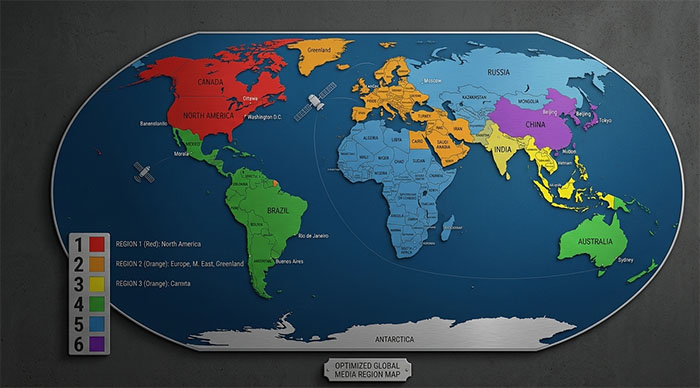
Standard DVD regions divide the world into numbered geographic zones. For example, Region 1 is associated primarily with the United States and Canada, while Region 2 covers markets including Europe and Japan. A DVD marked for one region may therefore be restricted from playback on equipment configured for another region.
Region coding is not the same as CSS. CSS protects access to encrypted content, whereas a region code is primarily a playback restriction. Some DVDs can use both at the same time. Certain discs may also use RCE (Region Code Enhancement), which adds additional region checks to make region restrictions more difficult to bypass.
- Protection type: Geographic playback restriction
- Typical examples: Region 1, Region 2, Region 3, and other DVD regions
- What it controls: Whether compatible playback equipment accepts the disc
- Related technology: RCE can add additional region verification on some DVDs
Navigation Restrictions
Some DVD protections do not attempt to encrypt or hide the movie at all. Instead, they restrict what the viewer can do through the DVD's navigation system. These restrictions are commonly known as UOPs (User Operation Prohibitions).
UOPs can be used to disable operations such as skipping a warning, jumping directly to another chapter, fast-forwarding through certain sections, or accessing particular menu functions. The disc can still play normally in a compatible DVD player because the player follows the navigation commands encoded in the DVD structure. Luckily, you still have tools to rip copy protected DVDs.
UOPs do not encrypt the video. Their purpose is to control permitted player operations during playback. This is why a DVD can play perfectly while still preventing certain buttons or navigation commands from working.
- Protection type: Playback and navigation restriction
- Typical example: UOPs
- What it controls: Skip, menu, chapter, and other user operations
- Common symptom: Certain player controls appear disabled during specific parts of a DVD
Structural Protection
Structural protection works by making the DVD's logical structure more difficult for copying software to interpret correctly. Instead of relying primarily on encryption, the disc can contain misleading titles, unusual navigation structures, or other elements that make it harder to determine which title contains the actual movie.
The 99-title protection approach is a well-known example. A DVD may present copying software with a large number of titles, including misleading or invalid entries, rather than making the main feature immediately obvious. The software must distinguish the genuine movie title from the irrelevant entries before extracting the correct content.
This type of protection can be especially confusing because the DVD may behave normally in a standalone player. A player follows the disc's programmed navigation, while copying software may inspect the underlying title and program structure more directly.
- Protection type: Disc structure manipulation
- Typical example: 99-title protection
- What it targets: Title detection and disc-structure analysis
- Common symptom: An unusually large number of titles or difficulty identifying the correct main feature
Deliberately Problematic Data
Another approach is to introduce data or disc structures that can cause problems for software attempting to read or copy the DVD sequentially. Sony ARccOS is a notable example. ARccOS was designed around intentionally problematic sectors and structures that can interfere with certain copying processes.
A normal DVD player can often continue playback because it does not necessarily read the disc in the same way as copying software. A ripping program, however, may encounter read errors, problematic sectors, or unexpected disc structures while attempting to extract the content.
ARccOS is therefore different from CSS. CSS primarily uses encryption and scrambling to control access to content, while ARccOS uses problematic disc data and structure to interfere with copying. A DVD can contain both types of protection at the same time.
- Protection type: Problematic sectors and disc structures
- Typical example: Sony ARccOS
- What it targets: Disc-reading and copying processes
- Common symptom: Read errors, sector errors, or copying failures on certain protected discs
Copy Protection for Recorded Media
Not all DVD copy protection is aimed at commercially pressed movie DVDs. CPRM (Content Protection for Recordable Media) is designed for supported recordable media and recorded content. It uses encryption together with media- and device-related information to control how protected content can be copied.
CPRM is therefore different from CSS even though both involve cryptographic protection. CSS is closely associated with commercially distributed DVD-Video content, while CPRM was developed for protecting content recorded onto compatible recordable media. Treating CPRM simply as another form of CSS can lead to confusion about which discs and recording workflows it actually applies to.
- Protection type: Cryptographic copy control for supported recordable media
- Typical example: CPRM
- What it protects: Content recorded on compatible protected media
- Key distinction: CPRM and CSS use different protection systems and target different media/content scenarios
These six approaches explain why the term DVD copy protection covers much more than encryption alone. A single disc may combine CSS with a region code and UOPs, or use additional structural or data-level protections. The protection mechanism determines what part of the DVD is restricted and, consequently, what a DVD player or computer software needs to interpret correctly.

DVD Copy Protection Types Explained
DVD copy protection has evolved through several different approaches rather than one universal system. Some technologies protect the movie through encryption, while others restrict playback, control DVD navigation, or manipulate the disc structure to interfere with copying. The following are the major DVD copy protection systems and related technologies you may encounter on commercial or recorded discs.
CSS — Content Scramble System
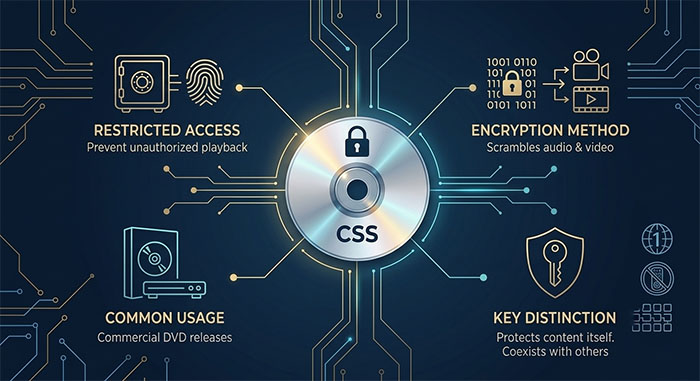
CSS (Content Scramble System) is a content-scrambling and encryption system developed for commercially distributed DVD-Video discs. It was designed to prevent unauthorized access to the digital video and audio stored on a DVD by requiring compatible playback systems to use cryptographic keys to descramble the protected content.
CSS is one of the most widely recognized forms of DVD copy protection. When a CSS-protected disc is read by software that does not properly handle the protection, the encrypted content may not be accessible as normal DVD video data. DVD playback software can instead perform the required descrambling during playback.
- Protection method: Content scrambling and encryption
- Primary purpose: Restrict unauthorized access to DVD-Video content
- Commonly found on: Commercial DVD-Video releases
- Key distinction: CSS protects access to the content itself, unlike region codes or UOPs, which impose playback or navigation restrictions
CSS can also coexist with other protections. A commercial DVD may use CSS for content protection while simultaneously using a region code, UOPs, or additional structural protections.
99-Title DVD Protection
99-title protection is a disc-structure technique designed to make it harder for copying software to identify the correct movie title. Instead of presenting a straightforward title structure, the DVD can contain numerous misleading, duplicate, or invalid title entries, while the actual feature remains only one part of the overall structure.
The term "99-title" comes from the large number of title entries that can appear when the disc is analyzed. The important point is not that every protected DVD literally contains 99 titles, but that an unusually large number of titles can make automatic title detection unreliable.
This protection can be confusing because a normal DVD player follows the disc's programmed navigation and can play the intended movie without exposing the underlying complexity to the viewer. Copying software, however, may inspect the title structure directly and therefore encounter many possible candidates.
- Protection method: Misleading or unusual DVD title structure
- Primary purpose: Make automatic identification of the correct title more difficult
- Common symptom: An unusually large number of titles during disc analysis
- Key distinction: It does not primarily encrypt the video like CSS
Sony ARccOS
Sony ARccOS is a DVD copy-protection system associated with certain Sony commercial DVD releases. It uses deliberately problematic sectors and disc structures that can interfere with software attempting to read or copy the disc in a straightforward manner.
The resulting behavior can differ between a standalone DVD player and computer-based copying software. A player may follow the intended DVD navigation and continue playback, while software performing a more direct or sequential read may encounter problematic sectors, read errors, or unexpected structures.
ARccOS is therefore fundamentally different from CSS. CSS relies on cryptographic scrambling of content, whereas ARccOS uses problematic disc data and structure to interfere with copying processes. Both can appear on the same commercial DVD.
- Protection method: Deliberately problematic sectors and disc structures
- Primary purpose: Disrupt straightforward disc copying and extraction
- Common symptom: Read errors, sector errors, or unusual behavior during disc analysis
- Key distinction: ARccOS is a structural/data-level protection rather than a conventional encryption system
CPRM
CPRM (Content Protection for Recordable Media) is a copy-control technology developed for protecting content recorded on supported recordable media. Unlike the protection systems most commonly associated with pressed commercial DVD-Video releases, CPRM is primarily relevant to compatible recordable media and recording workflows.
CPRM uses cryptographic protection together with information associated with the recording media and authorized devices. This creates a controlled relationship between the protected content, the media, and compatible equipment, making unauthorized duplication more difficult.
CPRM is often confused with CSS because both involve cryptographic protection, but they serve different purposes and apply to different media scenarios. CPRM is not simply a newer version of CSS.
- Protection method: Cryptographic copy control tied to supported media and devices
- Primary purpose: Protect recorded content against unauthorized copying
- Commonly associated with: Supported recordable media and recording devices
- Key distinction: CPRM and CSS are separate protection systems designed for different content and media scenarios
DVD Region Code
A DVD region code is a geographic playback restriction that determines which DVD regions a disc is intended to work with. Unlike CSS, a region code does not encrypt the movie content. Instead, the DVD and playback equipment can compare their region settings before allowing playback.
Commercial DVD releases can be assigned different region numbers, such as Region 1 for the United States and Canada or Region 2 for markets including Europe and Japan. Some discs are distributed as Region 0, commonly described as having no standard region restriction, although actual playback behavior can still depend on the disc and equipment.
Region coding can exist alongside other protections. For example, a DVD can be both CSS-protected and region-coded. In that situation, successful playback may require the player to satisfy the region restriction while also handling the disc's encrypted content.
- Protection method: Geographic playback restriction
- Primary purpose: Control where a DVD is intended to play
- Common examples: Region 1, Region 2, Region 3, Region 4, Region 5, and Region 6
- Key distinction: Region coding restricts playback but does not encrypt the DVD video itself
RCE — Region Code Enhancement
RCE (Region Code Enhancement) is an additional region-checking technique developed to make certain region restrictions more difficult to circumvent. Rather than relying solely on the standard region information, an RCE-protected DVD can perform additional checks during the disc's startup or navigation process.
RCE is therefore best understood as an extension of region-based protection rather than a completely separate form of DVD encryption. It is also not present on every region-coded DVD.
- Protection method: Additional region verification
- Primary purpose: Reinforce regional playback restrictions
- Relationship to region codes: RCE supplements standard region coding
UOPs — User Operation Prohibitions
UOPs (User Operation Prohibitions) are DVD navigation restrictions that tell a compatible DVD player which user operations are not permitted at particular points in the disc's playback or menu structure. They are commonly encountered on commercial DVDs, especially during copyright warnings, studio logos, or other controlled sections.
Depending on how the disc is authored, UOPs can restrict actions such as skipping chapters, jumping to another menu, fast-forwarding, or accessing certain navigation functions. The movie itself does not have to be encrypted for these restrictions to work.
UOPs are therefore a navigation-control mechanism, not an encryption method. They can also coexist with CSS, region coding, and other DVD protections on the same disc.
- Protection method: DVD navigation and user-operation restrictions
- Primary purpose: Control which playback commands are permitted
- Common examples: Skip, menu navigation, chapter jumping, or fast-forward restrictions
- Key distinction: UOPs restrict player operations rather than encrypting the video content
APS / Macrovision
APS (Analog Protection System), commonly associated with Macrovision, is a copy-control technology designed primarily to interfere with unauthorized analog recording from protected video sources. It works by adding signals to the analog video output that can confuse or disrupt the automatic gain-control and synchronization systems used by certain recording equipment.
This makes APS different from digital DVD protections such as CSS. CSS protects digital content stored on the disc, while APS/Macrovision addresses copying through an analog video output. As digital playback and distribution have become more common, APS/Macrovision is primarily of historical importance when discussing DVD-era copy protection and legacy analog workflows.
- Protection method: Analog video copy-control signals
- Primary purpose: Interfere with unauthorized analog recording
- Commonly associated with: Commercial video releases and legacy analog outputs
- Key distinction: APS/Macrovision targets analog copying rather than directly encrypting digital DVD content
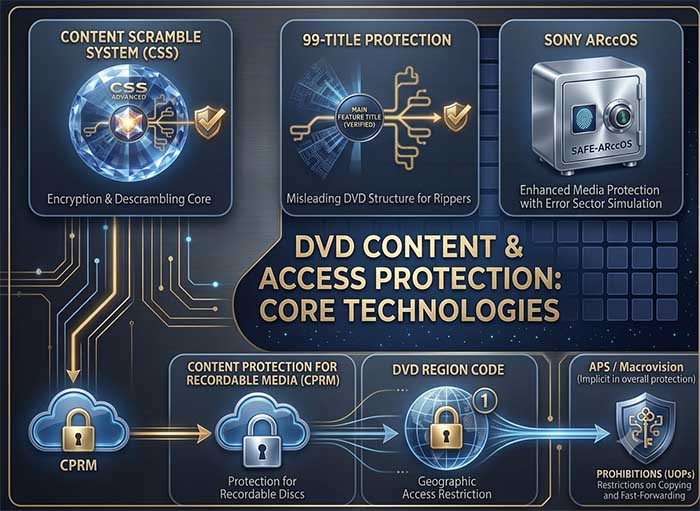
The important takeaway is that DVD copy protection is a broad category, not a single technology. CSS, 99-title protection, ARccOS, CPRM, region coding, UOPs, RCE, and APS/Macrovision operate at different layers of the DVD system. A single disc can combine several of them, which explains why protected DVDs can produce very different playback and copying behavior.
How to Identify DVD Copy Protection
Identifying DVD copy protection is usually a process of elimination rather than a matter of looking for one obvious label on the disc. The same DVD can use multiple protection mechanisms, and the symptoms can vary depending on whether you are playing the disc in a standalone DVD player, opening it on a computer, or analyzing it with DVD ripping software.
Start with the simplest clues: what the disc does during playback, what its structure looks like when analyzed, and what error appears when dvd ripper software tries to read or copy it. These clues can help distinguish encryption such as CSS from region restrictions, navigation controls, structural protection, and problematic sectors.
| What You Notice | What to Check | Possible Protection | What It Usually Indicates |
|---|---|---|---|
| The DVD plays normally in a DVD player but copying software cannot access the video correctly. | Check whether the disc is identified as encrypted or scrambled during disc analysis. | CSS | The video content may be protected by the Content Scramble System rather than stored as directly accessible DVD video data. |
| The disc shows an unusually large number of titles, sometimes with many titles having similar lengths. | Compare the title list and look for multiple misleading, duplicate, or invalid entries instead of one obvious main feature. | 99-title protection | The DVD structure may be designed to make automatic identification of the correct movie title more difficult. |
| Disc analysis encounters unreadable sectors, repeated read errors, or unexpected problems at particular locations. | Check whether errors occur at specific sectors or during sequential reading of the disc. | Sony ARccOS or other structural/data-level protection | The disc may contain deliberately problematic sectors or structures that interfere with straightforward copying. |
| A DVD refuses to play on a player or drive configured for a different geographic region. | Check the region setting of both the disc and the playback device. | DVD Region Code | Playback is being restricted by the DVD's geographic region designation rather than by content encryption alone. |
| The DVD plays, but certain controls such as skipping, menu navigation, or fast-forwarding do not work during specific sections. | Check whether the restriction occurs only at particular points in the DVD's programmed navigation. | UOPs | User Operation Prohibitions may be disabling selected player commands. |
| A recorded DVD cannot be copied even though it is not a typical commercial movie disc. | Determine whether the content was recorded on compatible recordable media and whether the recording device supports protected content. | CPRM | The recorded content may be protected using Content Protection for Recordable Media. |
| A disc uses region restrictions but behaves differently from a standard region-coded DVD when started on incompatible equipment. | Examine the disc's startup and navigation behavior in addition to its standard region information. | RCE | Additional region verification may be present beyond the standard DVD region setting. |
| A DVD plays normally on a television but produces unstable or distorted results when its analog output is recorded. | Check whether the recording path uses an analog video connection. | APS / Macrovision | Analog copy-control signals may be interfering with the recording equipment's synchronization or gain-control circuitry. |
Use the Disc Structure as a Clue
The DVD structure can reveal more than the disc's printed label. When a disc is opened with compatible DVD analysis software, pay attention to the number of titles, their running times, chapter layouts, and the presence of unusual or apparently redundant entries.
A normal movie DVD often has a relatively understandable structure: one or more main feature titles, menus, extras, and chapters. An unusually complicated title list can point toward structural protection such as 99-title, although title count alone is not sufficient to prove that a particular protection system is present.
Similarly, repeated read failures at specific locations can provide a clue about ARccOS or other problematic disc structures, but a read error does not automatically mean the disc is copy-protected. Scratches, manufacturing defects, a dirty disc, or a failing optical drive can produce similar symptoms.
Use the Error Message as a Clue
Error messages can narrow down the problem, but they should be treated as evidence rather than definitive proof of a specific protection system. For example, an encryption-related error may point toward CSS, while repeated read or sector errors can suggest a structural or data-level problem.
| Error or Symptom | Likely Area to Investigate | Do Not Assume |
|---|---|---|
| CSS or decryption-related message | Content encryption or scrambling | That every playback problem is caused by CSS |
| "Cannot read sector" or repeated read errors | Disc condition, optical drive, problematic sectors, or structural protection | That the disc is definitely protected by ARccOS |
| Too many titles or difficulty identifying the main feature | DVD title and navigation structure | That every DVD with many titles uses 99-title protection |
| "Wrong region" or incompatible-region message | Disc and drive/player region settings | That the movie is encrypted because playback is blocked |
| Skip or menu commands are unavailable | DVD navigation rules and UOPs | That the video itself is copy-protected |
| Protected recorded content cannot be duplicated | Recording media, device compatibility, and CPRM | That the disc uses commercial DVD-Video protection such as CSS |
Check the Disc Before Blaming Copy Protection
Not every failed DVD copy is caused by copy protection. A scratched or dirty disc, damaged sectors, an aging optical drive, incompatible media, incorrect region settings, or software compatibility problems can produce remarkably similar symptoms.
A useful identification sequence is therefore: check playback first, inspect the disc structure next, review the exact error message, and then compare the symptoms with known protection mechanisms. If several clues point in the same direction, you have a much stronger basis for identifying the protection than relying on a single error message or the number of titles alone.
| Identification Step | What to Look For | Why It Matters |
|---|---|---|
| 1. Test playback | Region errors, normal playback, restricted controls, or analog-copy problems | Separates playback and navigation restrictions from disc-reading problems. |
| 2. Inspect the structure | Title count, running times, chapters, and unusual DVD structures | Can reveal structural techniques such as 99-title protection. |
| 3. Record the exact error | Decryption messages, sector errors, region warnings, or read failures | Provides a more useful diagnostic clue than a generic "copy failed" message. |
| 4. Rule out hardware issues | Disc scratches, dirt, drive condition, and repeated errors on other discs | Prevents normal media or hardware failures from being mistaken for copy protection. |
| 5. Compare multiple clues | Protection symptoms that occur consistently across the same disc | Provides stronger evidence than any single symptom in isolation. |
The most reliable way to identify DVD copy protection is to combine symptoms, disc structure, and error behavior. No single symptom proves that a particular protection system is present, but the combination of these clues can usually narrow the possibilities considerably.
Frequently Asked Questions
Yes, but the DVD copy-protection landscape in 2026 is different from the peak era of commercial DVD releases. CSS, UOPs, region coding, and other DVD-era technologies remain relevant when dealing with older commercial discs, while some protection systems are now primarily of historical or legacy interest. CPRM also remains relevant to supported recordable-media workflows. The important distinction is that a protection technology can still exist on a disc even if it is no longer widely used on newly released DVDs.
DVD copy protection is a group of technologies used to restrict copying, access, playback, or recording of DVD content, while DRM (Digital Rights Management) is a broader system for controlling how digital content can be accessed and used. CSS, region codes, UOPs, ARccOS, and related DVD mechanisms are examples of disc-level protection. DRM can extend beyond physical media and may involve account authentication, device authorization, licensing servers, encrypted files, application controls, or usage policies. In other words, DVD copy protection can be considered a specific, media-oriented form of content protection, but it is not synonymous with modern DRM.
No. CSS is one type of DVD copy protection, not a synonym for all DVD copy protection. CSS protects DVD-Video content through scrambling and encryption, while other mechanisms work differently. Region codes restrict geographic playback, UOPs restrict selected player operations, 99-title protection complicates title identification, and ARccOS uses problematic disc structures or sectors to interfere with copying. A single DVD can contain more than one of these mechanisms.
Yes. DVD copy protections can be combined on the same disc. For example, a commercial DVD may use CSS to protect its content while also applying a region code and UOPs. Some releases may include additional structural or data-level protections. This is why two DVDs can behave differently even when both are described simply as "copy-protected."
Not by itself. A DVD region code is primarily a playback restriction, not an encryption system. It is designed to control whether a disc is accepted by compatible playback equipment configured for a particular region. A DVD can be region-coded and also use CSS or other copy-protection mechanisms, so region coding should not be confused with protection of the digital video data itself.
An unusually large number of titles can be a sign of 99-title DVD protection, which uses a complicated title structure to make it harder for copying software to identify the actual feature. However, title count alone does not prove that a disc uses 99-title protection. Some DVDs legitimately contain many titles, so the title structure, running times, navigation information, and other symptoms should be considered together.
Playback and copying do not necessarily access a DVD in the same way. A standalone DVD player follows the disc's programmed navigation and handles supported protection during playback, while copying software may analyze titles, sectors, encryption, and disc structures directly. Protection such as CSS, 99-title structures, or ARccOS can therefore interfere with copying even when the disc plays normally. Physical damage, a dirty disc, or a failing optical drive can cause similar symptoms and should also be ruled out.
No. CPRM and CSS are separate copy-protection systems designed for different media and content scenarios. CSS is associated primarily with commercially distributed DVD-Video content, whereas CPRM is designed to protect content recorded on supported recordable media. Both use cryptographic protection, but their purposes, implementation, and applicable media are different.
Yes, primarily when dealing with older commercial DVD collections. Sony ARccOS is largely a legacy DVD copy-protection technology, but protected discs that use it still exist and can be encountered when archiving older physical media. Its relevance in 2026 is therefore mainly practical and historical rather than an indication that it is a major protection technology for newly produced media.
External Sources:
1. DVD Copy Control Association — Content Scramble System (CSS) : The official DVD CCA CSS resource explains the licensing and technical role of the Content Scramble System, including its use in DVD hardware, software, content authoring, and disc replication.
2. DVD Copy Control Association — About CSS : Provides background on CSS, its purpose in protecting DVD motion pictures, and its relationship with licensed DVD players, drives, and decryption technologies.
3. 4C Entity — CPRM Specification : The official CPRM specification explains Content Protection for Recordable Media, including its cryptographic protection model, media-based key management, and application to supported physical media such as recordable DVD.
4. 4C Entity — CPRM/CPPM Frequently Asked Questions : Provides official explanations of CPRM and CPPM, their differences, supported media, and how these technologies fit into the broader Content Protection System Architecture.
5. Google Patents — ARccOS DVD Copy Protection : Patent documentation describing the ARccOS copy-protection system and how modified navigation data, disc structures, and problematic data access paths can make straightforward DVD copying more difficult.
6. U.S. Copyright Office — DVDs, CSS, and Technological Protection Measures : Provides government documentation discussing CSS, DVD region coding, Macrovision, and other technological measures used with DVD audiovisual content.
7. U.S. Copyright Office — DVD Region Coding and CSS : Technical and regulatory background explaining the relationship between DVD region information, licensed players, and CSS-protected DVD content.
8. U.S. Copyright Office — DVD UOP Blocking : Discusses DVD User Operation Prohibitions (UOPs), including restrictions on operations such as fast-forwarding and other user controls during playback.


 Free Download
 Free Download