






 win
win

 Super Resolution
  Video Stabilization
  Frame Interpolation

 Denoise Image
  Restore Old Photo
  Unblur Image
  Recover Face
  Upscale Image
  Colorize Photo
 Video Conversion >
 Video Compression >
 Screen Recording >



Subtitle Extractor: How to Export Clean, Accurate Subtitles from Any Video
 Jack Watt
Updated on
Summary: Here are top 7 subtitle extractor tools include software, browser extensions, and online services that let you extract SRT, ASS, and VTT from videos. Common features include various format support, subtitle stream selection, customization, and hardcoding options.
Extracting subtitles from videos has never been simpler, yet many creators and media enthusiasts struggle with mismatched tracks, hidden formats, or burned-in text. A reliable subtitle extractor helps you pull clean SRT, ASS, or VTT files from MP4, MKV, and MOV, automatically handling soft and hard subtitles while keeping timing precise—even on variable frame rate videos. Check out the best subtitle extractors to quickly pull SRT, ASS, or VTT files from your videos.
Best Subtitle Extractor: Extract SRT, ASS & VTT from Videos
Looking for the best tools to handle subtitles? Here’s a curated list of the top 7 subtitle extractors that let you extract, edit, and manage SRT, ASS, and VTT files effortlessly from any video.
Winxvideo AI
- Supported Formats: MKV, MP4, MOV and other many other video containers; supports both soft and hard subtitles
- Subtitle Features: Search, download, extract, add subtitles; adjust font, position; hardcode or softcode external subtitles
- Video Features: Video conversion, compression, recording, editing, AI image/video enhancement
Winxvideo AI is a versatile media toolkit that combines comprehensive subtitle management with powerful video processing. Users can extract subtitles from MKV, MP4, MOV, and other video files, merge them with higher-resolution videos, or adjust the subtitle appearance. The software also allows searching and downloading subtitles for movies or TV series, selecting preferred tracks, and hardcoding or softcoding external subtitle files. Beyond subtitles, Winxvideo AI includes conversion, compression, screen recording, editing, and AI-based enhancement for low-quality videos, making it an all-in-one solution for content creators and video enthusiasts.
User feedback highlights its convenience in managing multiple subtitle tracks. While advanced users can benefit from the AI-enhanced video improvements. The main limitation is the need to install the software, unlike browser-based or online tools, but for users seeking a comprehensive desktop solution, Winxvideo AI offers a balanced combination of subtitle and video capabilities.
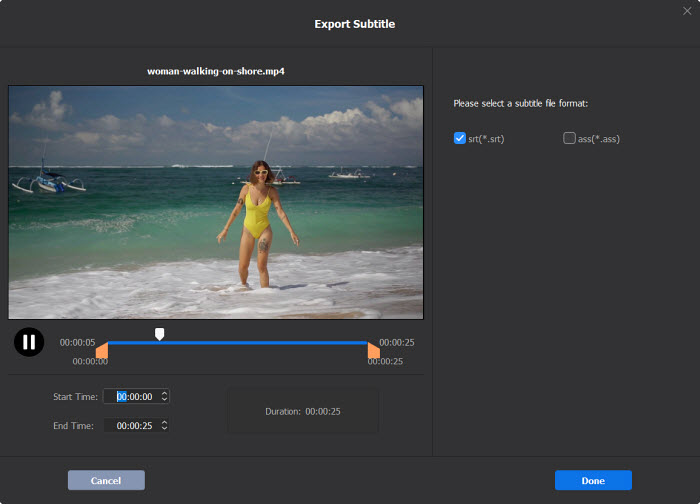
- Handles both soft and hard subtitles across popular video formats
- Supports searching, downloading subtitle tracks
- Flexible subtitle customization: font, position, and track selection
- Comprehensive video features including conversion, editing, and AI enhancement
- Requires software installation; not browser-based
CCExtractor
- Supported Formats: MP4, MKV, MOV, MPEG-2, AVI, WebM – handles embedded soft subtitles reliably
- Subtitle Types: Soft (embedded) subtitles; closed captions (CEA‑608/708); outputs SRT, WebVTT, SAMI
- Extraction Accuracy: Maintains precise timing, works with variable frame rate (VFR) videos
CCExtractor is a specialized subtitle extraction tool designed to retrieve embedded captions from a wide range of video formats, including MP4, MKV, MOV, and MPEG-2. Unlike generic subtitle tools, CCExtractor excels at handling soft subtitles from both standard videos and TV recordings, maintaining precise timing and format integrity. Its ability to process multiple formats and output clean SRT, WebVTT, or SAMI files makes it a preferred choice for content creators, media archivists, and educators who need reliable subtitle extraction without compromise.
Community testing and user reports highlight CCExtractor’s stability and accuracy. The subtitle extractor software reliably detects subtitle streams in complex video files, preserves timestamps even in variable frame rate videos, and avoids corruption in multi-track sources. Advanced users appreciate its CLI support for batch processing, while its GUI version offers accessibility for beginners. Users frequently note that the open-source nature allows customization and troubleshooting with minimal technical barriers.

- Highly accurate extraction of embedded subtitles from diverse video formats
- Maintains timing precision, even on variable frame rate videos
- Outputs multiple subtitle formats: SRT, WebVTT, SAMI
- Open-source and free, with active community support
- CLI support allows batch processing and automation
- Cannot extract burned-in (hardcoded) subtitles
- GUI version has limited advanced options compared to CLI
FFmpeg
- Supported Formats: MP4, MKV, MOV, AVI, MPEG, WebM – works with embedded subtitle tracks in almost any video container
- Subtitle Types: Soft subtitles / closed captions; can extract text-based tracks to SRT, ASS, or VTT
- Extraction Accuracy: Maintains perfect timing on variable frame rate (VFR) videos; reliable for multi-track sources
FFmpeg is a versatile command-line media toolkit widely used for video and audio processing, and it includes robust subtitle extraction capabilities. Unlike GUI-based tools, FFmpeg allows precise control over subtitle streams, enabling users to select specific tracks, extract multiple languages, or export in different formats without re-encoding the video. This makes it ideal for content creators, media librarians, and translators who need a reliable, scriptable solution for large video collections.
Users frequently praise FFmpeg subtitle extractor for its speed, reliability, and ability to handle complex containers with multiple subtitle tracks. When extracting embedded soft subtitles, timing remains accurate even in variable frame rate videos, and outputs are clean without extra formatting issues. While command-line usage has a learning curve, the extensive community support, tutorials, and active forum discussions provide ample guidance for beginners and advanced users alike.
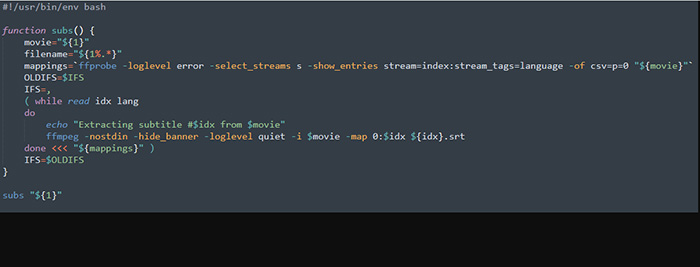
- Handles almost all video containers with embedded subtitles
- Supports extracting multiple tracks and languages without re-encoding
- Maintains timing accuracy, even with variable frame rate (VFR) videos
- Lightweight, open-source, and cross-platform
- Extensive documentation and active community support
- Command-line interface can be intimidating for beginners
- Does not support hardcoded (burned-in) subtitles without OCR
Aegisub
- Supported Formats: MKV, MP4, AVI, MOV, and video containers with embedded subtitle tracks; supports importing/exporting SRT, ASS, SSA
- Subtitle Types: Soft subtitles (text-based), Advanced ASS styling, karaoke timing; not for burned-in subtitles without OCR
- Extraction & Timing: Precise frame-level timing, audio waveform visualization for accurate syncing, supports variable frame rate (VFR) videos
Aegisub is a professional subtitle editing and timing tool that allows precise extraction, creation, and adjustment of subtitles. Its strength lies in the advanced ASS/SSA subtitle support, which enables rich styling, positioning, and karaoke effects. Users can accurately align subtitles to audio using waveform visualization, making it highly suitable for translators, subtitling groups, and video editors who demand precision and aesthetic control over their subtitle tracks.
Forum discussions and user experiences indicate that Aegisub excels at creating and editing soft subtitles, with accurate timing even for high-frame-rate or variable frame rate videos. The open source subtitle extractor does not extract hardcoded subtitles, its powerful interface allows users to import existing SRT/ASS files, adjust timings, and export ready-to-use subtitles for media players, streaming libraries, or video editing software. Advanced users appreciate the Lua scripting support for automating repetitive tasks.
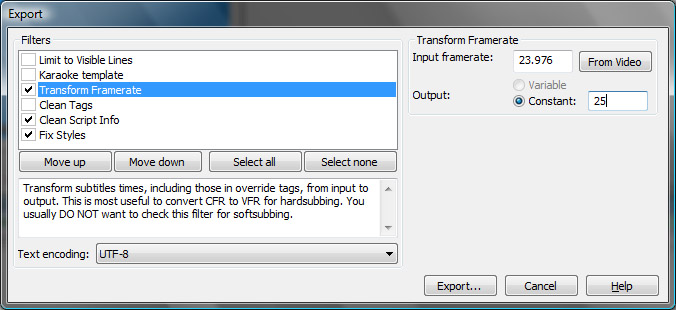
- Frame-level precision for subtitle timing and syncing
- Rich ASS/SSA styling, positioning, and karaoke effects
- Audio waveform and video preview for accurate alignment
- Open-source with extensive community support and tutorials
- Lua scripting for batch editing and automation
- Does not support extraction of hardcoded subtitles
- Interface can be complex for beginners without prior subtitle editing experience
Subtitld
- Supported Formats: SRT, ASS/SSA, VTT, TTML, SBV, DFXP, SAMI, XML – works with most text-based subtitle files and common video containers
- Subtitle Editing & Timing: Frame-level adjustment, drag-and-drop timeline, start/end/duration control, and timeline snapping for precise synchronization
- Usability & Workflow: Clean GUI with keyboard shortcuts, unlimited undo, transcript import for quick subtitle generation
Subtitld is a modern subtitle editor designed to give users full control over subtitle timing, layout, and formatting. Its frame-accurate timeline, combined with waveform visualization and snapping features, allows for meticulous alignment of text to video. The tool excels when working with pre-existing transcripts, enabling fast generation of subtitle tracks and fine-tuning for multi-language projects. It caters well to subtitling teams, translators, and video editors who demand precision and flexibility without relying on paid software.
User feedback emphasizes Subtitld’s strengths in handling diverse subtitle formats and languages, along with its timeline precision for synchronization. While the free subtitle extractor cannot extract hardcoded subtitles from video, it provides a powerful environment for editing, re-timing, and converting existing subtitle files. Advanced users benefit from its script-friendly structure for batch processing and automation, while beginners can rely on the intuitive GUI and shortcuts for efficient workflow.
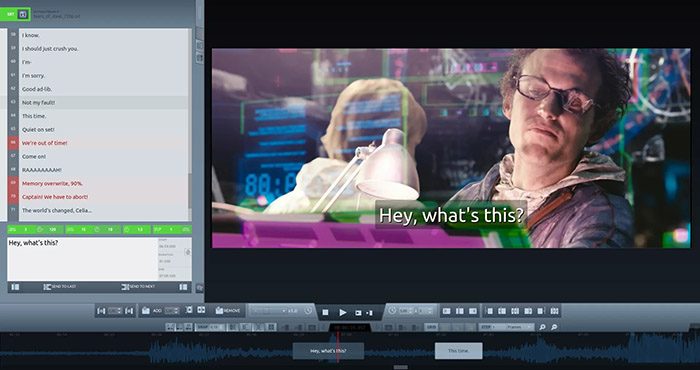
- Supports a wide range of subtitle formats and video containers
- Frame-level precision ensures accurate synchronization
- Intuitive GUI with workflow-friendly features like drag-and-drop and shortcuts
- Flexible import, edit, and export options for multiple subtitle formats
- Completely free and open-source, suitable for teams and individuals
- Cannot automatically extract burned-in (hardcoded) subtitles
- Requires existing subtitle files or transcripts for full functionality
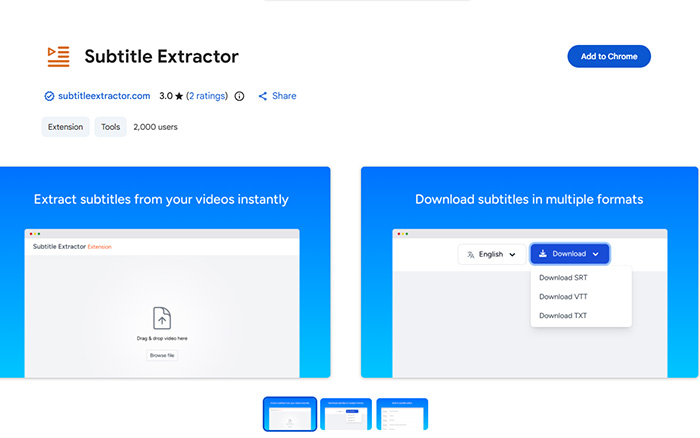
Subtitle Extractor (Chrome Extension)
- Supported Formats: MP4, MKV, MOV – extracts embedded (soft) subtitle tracks
- Subtitle Output: SRT, VTT, or plain text; includes built-in preview and editor for quick adjustments
- Privacy & Workflow: All processing happens locally; no video files are uploaded; fast and user-friendly for non-technical users
This Chrome subtitle extractor extension provides a simple, browser-based solution to extract embedded subtitles from videos without installing additional software. Users can drag and drop their local MP4, MKV, or MOV files directly into the extension, preview the extracted subtitles, make quick edits, and export them as SRT, VTT, or plain text. The local processing ensures privacy and eliminates the need for internet upload/download, making it ideal for users who value speed and confidentiality.
User feedback highlights its convenience and ease of use, especially for those who only need to quickly extract existing soft subtitles from videos. It is particularly useful for content creators, translators, or media enthusiasts who want to obtain subtitle tracks without complex setup. However, it is limited to soft-coded subtitles and cannot extract burned-in (hardcoded) subtitles.
- Extremely easy to use with drag-and-drop interface
- Processes videos locally, ensuring privacy and speed
- No additional software installation required
- Supports quick preview and on-the-fly subtitle editing
- Free and lightweight, ideal for casual users
- Only supports soft-coded (embedded) subtitles
- Cannot extract hardcoded (burned-in) subtitles
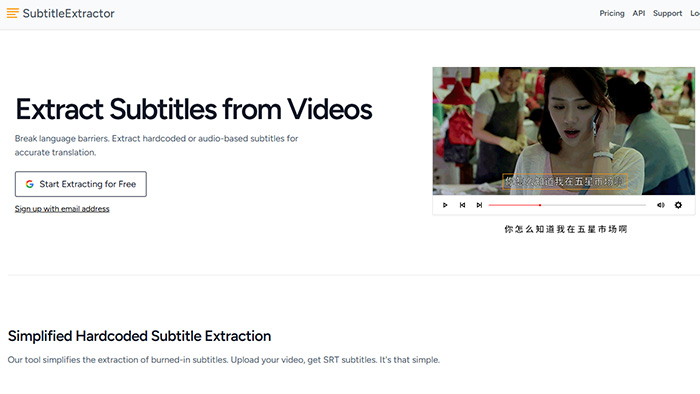
SubtitleExtractor.com
- Type & Platform: Web-based online tool; AI-powered subtitle extractor; no software installation required
- Supported Subtitles: Extracts both burned-in (hardcoded) and soft subtitles; supports OCR and ASR for automatic subtitle generation
- Usability & Workflow: Extremely user-friendly; ideal for one-time or occasional subtitle extraction/generation; supports multiple languages
SubtitleExtractor.com is an online solution designed for users who want to quickly extract or generate subtitles without installing any software. It combines AI, OCR, and ASR technology to handle both embedded and burned-in subtitles. Users simply upload a video, and the platform automatically produces subtitle files in SRT or other formats. The fully automated workflow is suitable for casual users, content creators, translators, or educators who need subtitles for translation, editing, archiving, or review purposes.
User feedback highlights its ease of use and accessibility, particularly for those unfamiliar with command-line tools or complex subtitle software. While it excels in convenience, limitations include potential errors with low-quality videos or complex subtitle layouts, and restrictions on very large or long videos. Despite these caveats, it remains a practical tool for quick, occasional subtitle extraction or generation.
- Fully web-based; no installation required
- Supports both burned-in (hardcoded) and soft subtitles
- AI-powered OCR/ASR allows automatic subtitle generation
- Multiple language support; user-friendly interface
- Quick and convenient for casual or one-time use
- May struggle with low-quality videos or complex subtitle layouts
- File size and duration limits for large or long videos
- AI/OCR may not perfectly recognize all hardcoded subtitles
Top 7 Subtitle Extractor Tools: Quick Overview
These top subtitle extractors offer fast SRT, ASS, and VTT extraction across software, extensions, and online tools. A quick overview for users who want simple, accurate, and flexible subtitle handling.
| Winxvideo AI | CCExtractor | FFmpeg | Aegisub | Subtitld | Extension | Online Tool | |
|---|---|---|---|---|---|---|---|
| Formats | All formats | Multi-format | All formats | MP4/MKV/AVI | Text subs | MP4/MKV | Web upload |
| Sub Types | Soft & Hard | Soft only | Soft only | Soft only | Soft only | Soft only | Soft & Hard |
| Extraction | Stable | High accuracy | Precise | Frame-level | Accurate | Fast | AI auto |
| Editing | Font/position | None | CLI only | Advanced styles | Basic edit | Quick edit | Limited |
| Ease of Use | Easy GUI | Easy/CLI | Hard | Medium | Easy | Very easy | Very easy |
| Extras | Convert, Edit, Record, Enhance | Open-source | Scripting | Waveform | Free | Local extract | AI OCR |
Based on the comparison above, Winxvideo AI offers broad format support, both soft and hard subtitle extraction, and a range of additional video features. In contrast, tools like CCExtractor and FFmpeg focus mainly on soft-subtitle extraction, while Aegisub and Subtitld provide more specialized timing and styling controls. Browser extensions and online tools remain the simplest options for quick, lightweight extraction.
 FAQs about Subtitle Extractor Tools
Some videos include hardcoded subtitles that are burned into the image, which most extractors cannot separate. Other files may use unsupported subtitle tracks or unusual containers. In these cases, you’ll need OCR-based tools or a program that supports both soft and hard subtitle extraction.
Soft subtitles can be turned on or off in players like VLC or Plex. Hard subtitles always appear because they are baked into the video image. Checking the track list in a player or mediainfo tool helps confirm which type your video contains.
Subtitle timing issues usually occur when the source video has variable frame rate, damaged timestamps, or multiple subtitle tracks. Tools like Aegisub or Subtitld allow manual timing fixes, while AI-based extractors can re-align subtitles automatically when dealing with inconsistent source timing.
SRT is the most compatible for players and editors, while ASS is preferred when you need styling, colors, or karaoke effects. VTT is common for web playback and YouTube. The best format depends on whether you need simple text, advanced styling, or browser support.
FFmpeg provides deeper access to subtitle tracks, making it reliable for batch extraction, damaged files, or uncommon containers. Many GUI extractors simply act as front-ends for FFmpeg. While less user-friendly, command-line tools offer better control and compatibility for advanced tasks.
Web-based subtitle extractors and browser extensions are the simplest options. They work directly in your browser and handle basic soft-subtitle extraction. However, online tools may struggle with hardcoded subs or large files, where desktop software or AI-based extractors offer more reliable results.


