






 win
win

 Super Resolution
  Video Stabilization
  Frame Interpolation

 Denoise Image
  Restore Old Photo
  Unblur Image
  Recover Face
  Upscale Image
  Colorize Photo
 Video Conversion >
 Video Compression >
 Screen Recording >

Is JDownloader Safe and Legal to Use? Security Breakdown
 Kaley Torres
Updated on
Questions about "is JDownloader safe" often show up in forums, especially from users who want a reliable way to manage bulk downloads. JDownloader is generally safe to use when downloaded from its official source, but the safety concerns people talk about online are not completely baseless. Most issues raised on Reddit and forums come from fake installers, bundled software during setup, or users grabbing modified versions from unofficial sites. In normal use, the tool itself is not malware, but how you download and install it directly determines whether it feels safe or risky.
Where Real Risks of JDownloader Come From
If you’ve searched "is JDownloader safe," you’ve probably seen mixed opinions, some users swear by it, others warn you to stay away. Here’s the reality: the actual risks rarely come from JDownloader itself, but from how and where people download and install it.
JDownloader, especially the official version from jdownloader.org, is an open-source download manager that’s been around for years and is widely used. It doesn’t contain malware in its core build. However, things can go sideways when users don’t install it carefully.
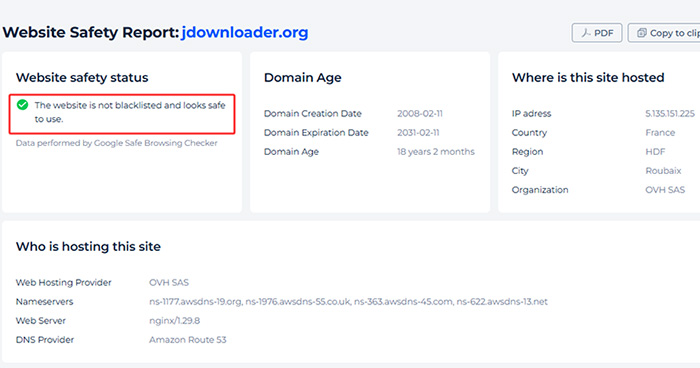
The real risks usually come from these three sources:
1. Fake websites and bundled installers
Not every "Download JDownloader" button leads to the real thing. Some third-party sites repackage the installer with adware, browser hijackers, or extra tools you never asked for. These versions look legit at first glance, which is why so many users get caught off guard.
2. Unofficial plugins or cracked versions
JDownloader supports plugins, but not all of them are safe. Modified builds or "pre-unlocked" versions floating around forums often come with hidden scripts or trackers. If something promises “premium features for free,” that’s usually your red flag.
3. Accidental installs and misleading options
Even the official installer has, at times, included optional offers (like partner software). If you rush through setup and click "Next" without reading, you might install extra programs unintentionally. That’s where many complaints come from—not malware, but unwanted software.
 What users often get wrong
“I downloaded JDownloader and suddenly my browser changed and I got ads everywhere.”
This kind of feedback shows up a lot—but in most cases, it traces back to downloading from unofficial sources or skipping through installation steps. The core app gets blamed, even when it wasn’t the actual cause.
So why do negative reviews feel so common? Because when something goes wrong, users rarely distinguish between the official software and the version they installed. A bundled installer from a shady site still gets labeled as “JDownloader,” even if it’s been modified.
Bottom line: JDownloader itself isn’t the main risk. The real danger comes from fake download sources, unofficial builds, and rushed installation habits. Stick to the official site, pay attention during setup, and you’ll avoid 90% of the issues people complain about.
How to Use JDownloader Safely (Practical Steps)
JDownloader can be perfectly safe to use—but only if you install and run it the right way. Most problems people run into are preventable with a few simple habits. Here’s how to avoid the common traps.
1. Download only from the official website
Always get JDownloader from jdownloader.org. Avoid mirror sites, cracked software pages, or random download portals. Even if they look identical, they can bundle extra software into the installer.
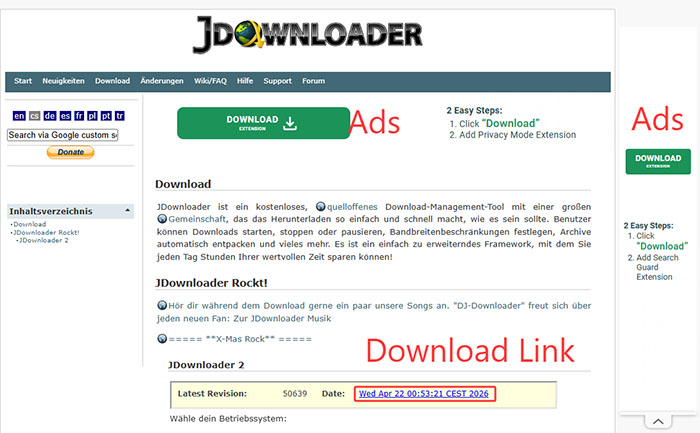
2. Pay attention during installation
Don’t just click "Next" through the setup. If any optional offers or additional software appear, decline them. These aren’t viruses, but they’re usually unnecessary and can clutter your system or change browser settings.
3. Stay away from cracked or modified versions
JDownloader is already free, so there’s no real reason to download premium unlocked versions. These are often modified builds that can include hidden scripts, trackers, or worse. If something promises extra features for free, it’s usually not worth the risk.
4. Keep the software updated
JDownloader updates frequently to fix bugs, improve compatibility, and patch potential vulnerabilities. Let it update automatically or check for updates regularly to stay on the safe side.
5. Use basic security hygiene
After installing, it’s a good idea to run a quick scan with Windows Defender or your antivirus tool—especially if you’re not 100% sure where the file came from. Also, avoid pasting unknown or suspicious links into JDownloader, as some file hosts may contain harmful downloads.
In short: Stick to the official source, read what you click during setup, and avoid anything that looks "too good to be true." Follow these basics, and JDownloader is no more risky than any other mainstream download tool.
Frustrated with JDownloader’s Experience?
JDownloader gets the job done, but let’s be honest, it’s not always smooth. The interface can feel outdated, link parsing isn’t always reliable, and you sometimes end up dealing with captchas, broken downloads, or plugins that suddenly stop working. For casual users who just want a quick, clean download, it can feel like overkill.
That’s why many users start looking for alternatives to JDownloader. Not because JDownloader is unsafe, but because it can be unnecessarily complicated for everyday use. If you’re tired of tweaking settings or troubleshooting downloads, tools like Winxvideo AI offer a more straightforward approach:
- Simpler workflow: Paste a link and download instantly—no need to manage link grabbers or deep settings.
- No plugin: Built-in support means you don’t have to worry about extensions breaking or needing updates.
- Cleaner interface: Modern, beginner-friendly design that doesn’t feel overwhelming.
- Stable downloads: No interruptions from captchas or failed parsing compared to complex download managers.
- Safe installation: No bundled extras or confusing install steps—what you download is what you get.
 Free Download
 Free Download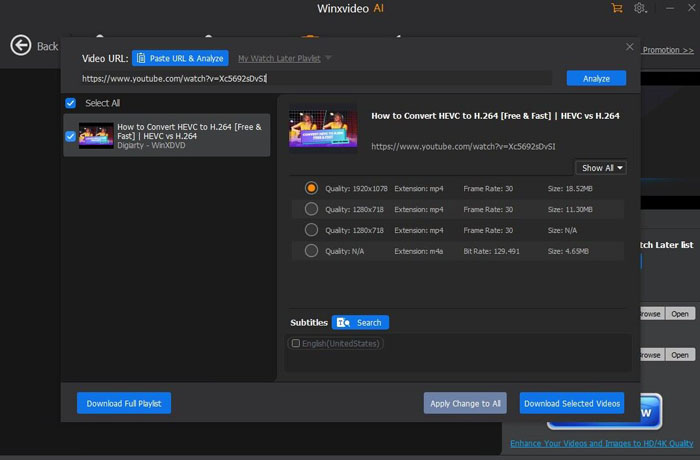
 FAQs about JDownloader Safety & Common Concerns
Yes—if you download it from the official website, JDownloader is generally safe. The core software itself is not malware and is widely used. Most security issues reported by users come from unofficial sources or bundled installers, not the original program.
Many negative claims come from users who downloaded modified versions or installed extra bundled software by mistake. When browser settings change or ads appear, people often blame JDownloader itself—even though the issue usually comes from how it was installed.
The official version does not contain viruses. However, fake download pages and cracked versions may include adware, spyware, or malicious scripts. That’s why it’s critical to avoid third-party download sites and stick to the official source.
Yes, the software itself is legal. However, legality depends on how you use it. Downloading copyrighted content without permission may violate local laws or the terms of the website you’re downloading from. Always check the rules in your region.
Download only from the official website, read each installation step carefully, avoid cracked versions, and keep the software updated. Running a quick antivirus scan and avoiding suspicious links will also reduce your risk significantly.


