






 win
win

 Super Resolution
  Video Stabilization
  Frame Interpolation

 Denoise Image
  Restore Old Photo
  Unblur Image
  Recover Face
  Upscale Image
  Colorize Photo
 Video Conversion >
 Video Compression >
 Screen Recording >

Is 4K Video Downloader Safe to Use in 2026?
 Kaley Torres
Updated on
4K Video Downloader has been around for years and is often one of the first tools people try for downloading YouTube videos. It looks clean and easy to use, with no obvious red flags. But once you dig deeper, opinions start to split—some users have no issues, while others question its limits and updates. So, is it safe? Yes, but only partly. The official version is generally free from malware, but that doesn’t mean it’s fully trustworthy. Ongoing concerns around restrictions and licensing have made some users cautious.
In short: 4K Video Downloader safe to install, but not fully trusted by everyone.
Is It Safe to Download and Install 4K Video Downloader?
For many, the first question about 4K Video Downloader is straightforward: can I download and use it without risking my PC? Technically speaking, yes, if you stick to the official 4Kdownload website. The installer is digitally signed by Open Media LLC, uses SHA256 hashing, and scans clean in Windows Defender and most antivirus software. This means, under normal conditions, it’s free from malware or viruses, and the core program functions reliably for simple YouTube downloads. Checking with SSL verification tools confirms that the official 4K Video Downloader website is secure and uses valid encryption, indicating it’s safe to access.
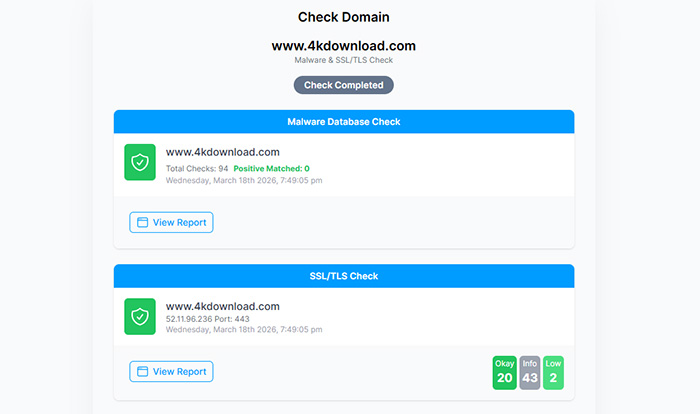
"Safe" doesn’t automatically mean "trustworthy." Over the years, users have flagged several issues: the free version’s daily download limits are often reduced without clear notice, and older licenses may become invalid when the company pushes the "Plus" upgrade. This has led to reports of unexpected charges and frustration, which are less about viruses and more about company practices undermining user confidence. In other words, while your system remains protected, the overall user experience can feel unpredictable.
 4K Video Downloader User Review
I bought the original 4k Video Downloader, and a "LIFETIME" license. But then they killed it and started 4k Video Downloader + (with the PLUS sign being the only difference). And I tried my "lifetime" license key and they said no, no, no, this is the PLUS product. - by Solomon Powell at Trustpilot
Other risks stem from third-party download sites. These unofficial sources sometimes offer modified installers bundled with adware or spyware. Users who unknowingly install these versions can face malware infections or data collection issues. Forum discussions highlight that even technically competent users have been caught off guard by such scams, reinforcing the importance of downloading from verified sources rather than chasing convenience.
In short: installing 4K Video Downloader from its official site is generally safe in terms of system security—your PC won’t get infected just by running the installer. But safety at the technical level doesn’t always translate into a smooth or predictable user experience. Being cautious about where you download it, how licenses are handled, and what updates might change is key to avoiding issues beyond malware risks.
Why Some Users Don’t Trust 4K Video Downloader Anymore
While 4K Video Downloader is generally safe to install, many users have grown wary—not because of viruses, but because of how the experience evolves over time. The concern isn’t just about specific limitations, but about how those limitations are introduced and changed. When features shift, licenses behave differently than expected, or updates alter what users can do, it creates a sense of uncertainty that goes beyond any single issue.
For long-term users, this uncertainty adds up. What initially feels like a reliable, one-time setup gradually turns into something that requires constant attention—checking updates, re-evaluating access, or figuring out what still works. Even small changes, when repeated over time, can make the software feel less stable and harder to rely on for everyday use.
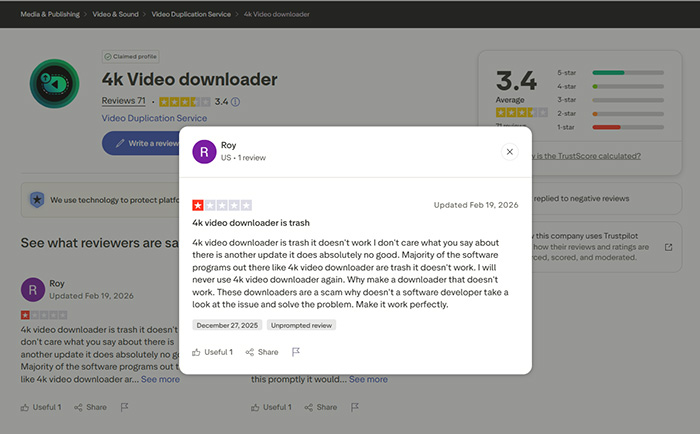
User Review
The free functionality is fine, but don't buy a premium license. It says the license is lifetime, but they'll make another app that does the same thing and stop supporting the 4k downloader. Not only that, but they'll break the app so it's useless. If you want to mass download, there are open source libraries that will do that for you.- from Microsoft Store
In essence, the issue comes down to reliability and transparency. Users aren’t questioning whether the software is safe to run—they’re questioning whether it will remain consistent and trustworthy over time. When expectations around access and functionality don’t match reality, trust naturally erodes, even if the software itself remains technically sound.
This is also why discussions around alternatives often go beyond features or price. Users are not just looking for something that works today, but something that will continue working in the same way tomorrow, without unexpected changes or extra friction.
Key takeaway: Safety ≠ trust. Even a malware-free program like 4K Video Downloader can become frustrating if the overall experience feels inconsistent or difficult to rely on over time.

4K Video Downloader is more acceptable when it's free. Options like 4K Video Downloader key or 4K Video Downloader crack are often mentioned as ways to access full features of 4K Video Downloader Plus without paying.
Not Sure You Can Trust 4K Video Downloader Anymore?
If you’ve used 4K Video Downloader for a while, you’ve probably noticed the changes, daily download limits getting tighter, features moving behind paywalls, and constant prompts to upgrade to the Plus version. While the software itself is generally safe, these restrictions and licensing issues have pushed many users to look elsewhere.
That’s where tools like Winxvideo AI come in. It’s powerful, free, and doesn’t impose artificial limits. But for many users, it introduces a different kind of friction: command-line setup, frequent updates, and a steeper learning curve that isn’t ideal for quick, everyday downloads. If you want something that avoids both the restrictions of 4K Video Downloader, Winxvideo AI offers a more balanced option:
- No daily limits or forced upgrades: Download videos freely without sudden restrictions or paywalls.
- Beginner-friendly: Simple interface with one-click downloads—no commands or technical setup required.
- Stable performance: Regular updates help keep downloads working even when platforms like YouTube change.
- Wide compatibility: Supports 1000+ sites, including YouTube, Facebook, and more.
- Safe and transparent: No bundled extras, no hidden charges, and no confusing license changes.
 Free Download
 Free Download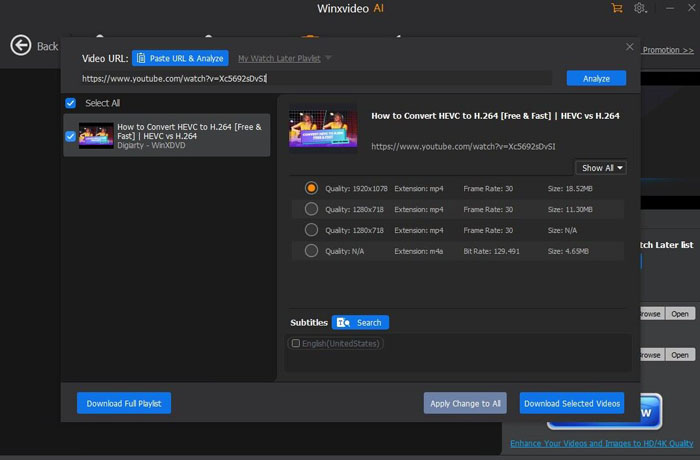
 FAQs about 4K Video Downloader Safety & Trust Issues
If downloaded from the official website, 4K Video Downloader is generally safe and not considered malware. It uses a signed installer and typically passes antivirus checks. However, users should avoid third-party download sites, as these may bundle adware or modified installers that can pose real security risks.
The main concerns are not about viruses but about licensing and restrictions. Users have reported reduced free download limits, frequent upgrade prompts, and issues with lifetime licenses after the release of the Plus version. These changes have led to frustration and reduced trust over time.
The official version is not known to contain viruses. Most malware risks come from fake download pages or cracked versions shared on third-party sites. Sticking to the official source and avoiding modified builds is the best way to stay safe.
The software itself is legal, but how you use it matters. Downloading videos for personal use may be allowed in some regions, while downloading copyrighted content without permission can violate platform terms or local laws. Always check the rules in your country and the platform’s policies before downloading.
Over time, the free version has introduced stricter daily download limits and feature restrictions. Many users feel these limits push them toward paid upgrades, which is one of the main reasons behind the tool’s declining trust among long-time users.
Start by downloading only from the official website. Check if the installer is digitally signed, scan it with antivirus software, and read recent user reviews for any red flags. Avoid cracked versions, unknown mirrors, or sites that force additional downloads, as these are common sources of malware.


