




Vudu Disc to Digital vs WinX DVD Ripper for Digitizing DVDs?
Digitizing DVDs is a convenient way to preserve physical collections and watch movies without carrying discs. Vudu's Disc to Digital service introduced a simple barcode-based approach, while traditional DVD rippers such as WinX DVD Ripper Platinum give users direct control over their digital copies.
But they work in completely different ways. Vudu relies on supported movie titles, online verification, and cloud-based playback, while WinX DVD Ripper Platinum converts your own DVDs locally with broader disc support and more output options. This comparison covers their differences in price, supported discs, quality, limitations, and ease of use to help you choose the right solution.
Table of Contents
Vudu vs WinX DVD Ripper Platinum: Comparison Chart
The comparison table below highlights the key differences between Vudu and WinX DVD Ripper Platinum, including supported discs, pricing, device compatibility, output formats, conversion limits, and overall flexibility.
VUDU Mobile Disc to Digital vs WinX DVD Ripper Platinum |
||
Release date |
2017 |
2006 |
Introduction |
VUDU's Mobile Disc to Digital is a feature that allows users to convert Blu-ray and DVD discs to digitals by using Android or iPhone to scan barcodes on the disc cases. It makes disc to digital conversion much easier. |
WinX DVD Ripper Platinum is specially designed to convert any DVD discs (incl. new and old discs) to any popular formats or devices on computer. It is well known for superfast digitizing speed (Level-3 GPU hardware acceleration) and solid support for a wide range of discs. |
Compatible platform |
Android & iOS |
Windows 10 (32 bit/64 bit) and lower |
Price |
DVD: $2 SD; $5 HDX |
Lifetime license for 1 PC: $59.95 |
Limit |
Up to 100 discs per year ($200-$500) |
No limitations ($59.95) |
Supported disc titles |
Nearly 8,000 so far, from a few major film studios |
Nearly all DVDs, no matter which studio produces. |
Disney disc |
No |
Yes |
Home-made DVD |
No |
Yes |
Workout DVD |
No |
Yes |
Old/damaged DVD |
Yes if your barcode is usable |
Yes |
Permission to camera |
Required |
No |
Permission to GPS |
Required |
No |
DVD/Blu-ray drive |
No |
Required |
Disc type |
DVD & Blu-ray |
DVD |
Output format/profile |
MP4 |
MP4, MOV, AVI, MKV, MPEG2, MP3, iPhone, iPad, Android Samsung, PS4, Xbox, Apple TV, Chromecast... |
Output quality |
SD (480p), HDX (1080p) |
It will keep the original quality by default. Certainly, you can adjust it based on your own needs. |
Convert ISO/DVD Folder |
No |
Yes |
Edit DVD |
No |
Yes |

 Visit Vudu.com/disc on iPhone
Choose Vudu if: You only have a small number of supported movie titles and prefer a simple barcode-scanning method without using a DVD drive. Vudu is convenient, but it depends on title availability, internet access, and account restrictions.
Choose WinX DVD Ripper Platinum if: You own a large DVD collection, want offline digital files, need more output formats, or have discs that Vudu does not support, such as many Disney DVDs, homemade DVDs, workout DVDs, or older discs.
Vudu vs WinX DVD Ripper Platinum: Side by Side Comparison
Below is a detailed side-by-side comparison of Vudu and WinX DVD Ripper Platinum based on real-world factors including cost, supported discs, output quality, speed, and long-term usability.
1. VUDU vs WinX DVD Ripper Platinum: Supported Platform
VUDU App is currently available to use on Android and iOS. However, VUDU's Mobile Disc to Digital is not supported within the iOS app. To perform d2d on iPhone, you should visit vudu.com from your iPhone browser. WinX DVD Ripper Platinum is a desktop-based program compatible with Windows and Mac.
Therefore, try VUDU if you prefer to working on mobiles. If you'd like to do this on a computer, WinX DVD Ripper Platinum will do you a favor.
VUDU |
WinX DVD Ripper Platinum |
Compatible OS: iOS & Android |
Compatible OS: Windows & Mac |
2. VUDU vs WinX DVD Ripper Platinum: Price
VUDU's disc to digital feature seems much cheaper than WinX DVD Ripper Platinum. Don't hurry to a conclusion. Let's inspect the pricing rules carefully. Disc to digital service VUDU charges users based on the quantity of discs and quality they choose, which is quite different from WinX DVD Ripper Platinum and the like. Purchasing a lifetime license code of DVD ripper and you are allowed to convert as many discs as you like and choose favorite output quality without extra fees. Additionally, you will get complimentary upgrade service and tech support.
From this aspect, if you only have a few discs to digitize, try VUDU. If you have dozens or hundreds of discs, WinX DVD Ripper Platinum is a better choice because $59.95 only allows you to convert up to 34 discs on VUDU.
VUDU |
WinX DVD Ripper Platinum |
DVD: $2 SD; $5 HDX |
Lifetime license for 1 PC: $59.95 |
3. VUDU vs WinX DVD Ripper Platinum: Limits
Each VUDU account is restricted to convert up to 100 discs, where there's no such limitation on WinX DVD Ripper Platinum. Although the average movie collector possesses nearly 100 DVDs and Blu-rays, there're a fair number of people holding hundreds of discs for digitizing. So this Vudu disc to digital limit possibly brings inconvenience to those guys.
VUDU |
WinX DVD Ripper Platinum |
Up to 100 discs per year |
As many as you like |
4. VUDU vs WinX DVD Ripper Platinum: Supported Discs
Disney discs are not supported by VUDU's Mobile Disc to Digital. It only contains about 8,000 movies from Lionsgate, Paramount, Sony Pictures, 20th Century Fox, Universal Pictures and Warner Bros. So, don't be surprised with 'unable to identify this disc' and failure to digitize some discs, even if when you convert pretty mainstream titles.
WinX DVD Ripper Platinum supports DVD discs from all film studios, including Disney. This DVD converter is one of the few similar programs that support to rip Disney DVDs without problem. It will also convert workout and Japan DVDs that apply special encryption technologies which most DVD rippers in the market can't handle, home-made DVDs, old or damaged DVDs, ISO file, and VIDEO_TS folder.
Give WinX DVD Ripper Platinum a shot if you have different kinds of DVD discs, especially when you need to convert Disney disc to digital. If your source disc is eligible and you want to process Blu-ray, download VUDU.
VUDU |
WinX DVD Ripper Platinum |
Disc type: DVD & Blu-ray |
Disc type: DVD |
5. VUDU vs WinX DVD Ripper Platinum: Output Format & Quality
After scanning UPC, VUDU gives you two quality options - SD (480p) and HDX (1080p) - for DVD, and HDX for blu-ray. Files downloaded from VUDU are in MP4 format. That's the full options you get with the output video.
Different from VUDU, WinX DVD Ripper Platinum offers a wide range of video and audio formats. Not only can you convert DVD to MP4, MOV, AVI and other video formats for playback on any devices, but also you are able to extract audios from DVDs and save as MP3, AAC, iPhone ringtone, etc. Different output profiles provide different qualities. You can choose to keep original resolution, aspect ratio and other parameters, or change as required. 1080p resolution is selectable, but it isn't suggested to do upscaling.
VUDU |
WinX DVD Ripper Platinum |
Format: MP4 |
Format: All mainstream formats - MP4, MOV, AVI, MP3 ... |
6. VUDU vs WinX DVD Ripper Platinum: Conversion Speed
VUDU will finish conversion quickly if there is no error in the process. However, if you want to download converted digitals for offline playback, it may take longer because it mainly relies on your internet connection. Some users online reported that they even takes one or two or even longer to complete a download.
Unlike VUDU, WinX DVD Ripper Platinum will copy DVD digitals to local computer directly. So the speed depends on your computer configuration. Thanks to the support for Intel QSV, NVIDIA NVENC/CUDA GPU acceleration, Multi-core CPU & Hyper-threading, you can finish the disc to digital conversion is within 5 minutes on an advanced computer. Start to digitize DVD now >>
VUDU |
WinX DVD Ripper Platinum |
Conversion is fast, but download speed varies with internet connection. |
It may only take 5 minutes to convert and save digital copies to local drives directly. |
Want to know the detailed review? Click here to check the full review of WinX DVD Ripper Platinum
How to Convert Disc to Digital with VUDU and WinX DVD Ripper Platinum?
VUDU and WinX DVD Ripper Platinum work quite different. Detailed instructions are as follow.
How to convert disc to digital on mobile with VUDU?
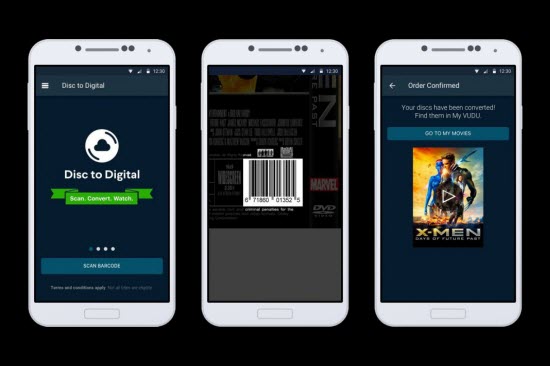
Step 1. For Android users, download VUDU app from your app store; for iPhone users, open vudu.com/disc from the browser of your iPhone.
Step 2. Sign in or sign up your VUDU account.
Step 3. Turn on GPS on your mobile device, which helps VUDU to verify your location which must match the address on file. Otherwise, you will fail to create digital copy from DVDs. What's more, iPhone users may need to allow full-time access instead of "while using the app" to make sure that it properly registers your location.
Step 4. Choose Disc to Digital option, and then tap Scan Barcode to scan the UPC on your physical disc.
Step 5. Select output quality, SD or HDX (Blu-ray is HDX), and then tap Submit List. Before check out and conversion, you may need to wait for a confirmation email.
Step 6. Once your discs are converted to digital copies, you can find them in your VUDU library and watch on any VUDU-enabled devices, including televisions, Blu-ray disc players, gaming consoles, streaming players, and phones and tablets with the Vudu app. Additionally, if you have your VUDU account synced with Movies Anywhere, you are also able to watch them through iTunes, Amazon Video, and Google Play.
VUDU's Mobile Disc to Digital is awesome, but there's one more thing you gotta know. The digital copy can only play on 8 Vudu-linked devices. On the other hand, there're still many complaints about Vudu, e.g."Location must match billing address", "Cart needs to be cleared", "I tried scanning 2 movies but it says movies are already in cart". If disc to digital converting performance matters you most, you can try WinX DVD Ripper Platinum.
How to Convert DVD to Digital Using WinX DVD Ripper Platinum?
Step 1.Download and install WinX DVD ripper on your PC or Mac. Activate this program with your licensed email and code.
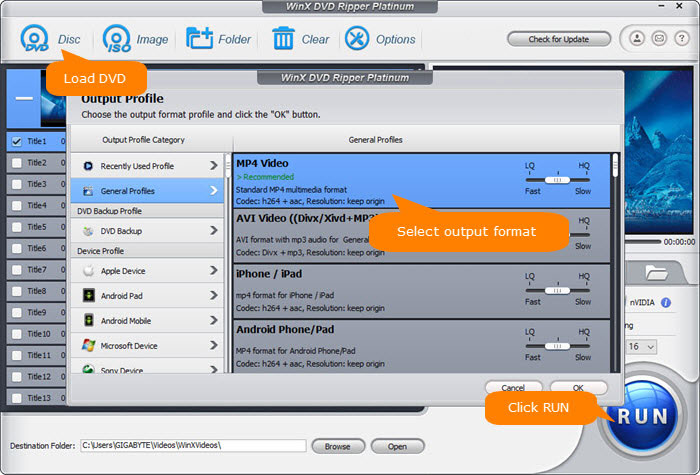
Step 2. Launch it, and insert your DVD into DVD drive. Then, click Disc button at the top left corner to load source DVD disc. Keep DVD Disc File System Type as default and hit OK.
Step 3. Choose output profile. WinX DVD ripper offers 350+ output profiles to address various user needs. You can 1:1 convert disc to ISO image or DVD folder, or convert DVD to MP4, MPEG2, MOV, AVI, WMV, FLV, etc. Just choose one depending on your own needs.
Step 4. Hit RUN button and it will begin converting DVD disc to digital. Probably within 5 minutes, we can convert a feature-length DVD to high-quality MP4 (H.264) with the help of Intel CPU, Nvidia GPU, Multi-core CPU & Hyper-threading.
Legal Disclaimer: WinXDVD, developed by Digiarty Software, is designed strictly for personal, non-commercial media backup under fair use. Digiarty Software strictly respects copyright laws and does not condone, facilitate, or support copyright infringement or unauthorized copying. Users are advised to check and comply with their local DVD copyright laws and regulations before use.
What Are the Strengths and Weaknesses of VUDU and WinX DVD Ripper Platinum?
Before choosing between VUDU and WinX DVD Ripper Platinum, it's important to understand their trade-offs. Here are the main strengths and weaknesses of each solution to help you determine which one better matches your disc collection and playback needs.
VUDU |
WinX DVD Ripper Platinum |
Pros: Cons: |
Pros: Cons: |
To sum up: So, VUDU or WinX DVD Ripper Platinum? Now it's time for you to make a decision after reading their advantages and disadvantages. If you like the way that VUDU offers, download VUDU from your app store. If you prefer WinX DVD Ripper Platinum, simply click the download buttons below. Trial before purchase is also permitted.