









AnyDVD Review 2026: Features, Limitations & Alternatives
 Donna Peng
Updated on
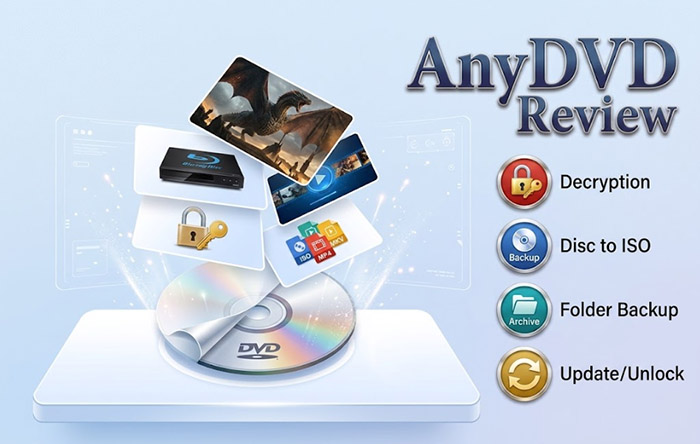
AnyDVD was once a familiar name among DVD and Blu-ray collectors. Its background operation, region-code handling, and ability to digitize DVDs to other Windows programs made it a convenient companion for playback and disc backup. However, its position changed significantly after the RedFox website disappeared in June 2024. With no verified official update channel or new product release, the question in 2026 is no longer simply what AnyDVD can do, but how much of its original functionality remains useful.
In this AnyDVD review, we examine its original features, supported disc types, offline key handling, Windows compatibility considerations, licensing uncertainty, and user feedback. We also compare it with WinX DVD Ripper, MakeMKV, DVDFab, and HandBrake to clarify which tools can replace particular parts of the AnyDVD workflow and which cannot.
AnyDVD HD at a Glance: Features, Version Status & Availability
Short answer: AnyDVD can still be useful on some previously activated installations, particularly when working with older DVDs and Blu-rays whose protection data is already available locally. However, RedFox's disappearance in June 2024 left the software without a verifiable official update and support channel. Its ability to handle newer discs, activate fresh installations, and receive protection updates should not be assumed.
That distinction matters. AnyDVD did not necessarily stop functioning on every existing computer when its developer's website became inaccessible. Some users reported that activated copies continued to work, and older titles could still be processed using locally stored keys. The problem is the lack of a reliable way to keep the software current as disc protection changes.
| Evaluation | 2026 Assessment |
|---|---|
| Software Type | Windows-based DVD and Blu-ray background decryption tool |
| Developer | RedFox (formerly SlySoft) |
| Latest Verified Stable Version | 8.7.1.0, April 3, 2024 |
| Latest Listed Beta | 8.7.1.1 Beta, May 28, 2024 |
| DVD Support | Supported by historical releases; results vary by disc |
| Blu-ray Support | Supported by historical releases; newer protection may be unsupported |
| UHD Blu-ray | Hardware, firmware, and available key dependent |
| Background Operation | Yes |
| Region Code Handling | Available, subject to disc and drive limitations |
| Video Encoding | Not a full video conversion or compression solution |
| Official Updates | No verified current update channel |
| New License Availability | No verified official purchase channel |
Our assessment:
AnyDVD remains relevant mainly to existing users who have a working installation and need its particular background disc-access behavior. It is a much less dependable choice for someone starting a new DVD or Blu-ray backup project in 2026. Before relying on it, check the installation, license status, drive compatibility, and the actual discs you intend to process.
What Is AnyDVD HD and How Does It Work?
AnyDVD HD is a Windows application developed by RedFox that works in the background to process supported DVD, Blu-ray, and UHD Blu-ray disc restrictions. Once a compatible disc is inserted, the software handles supported restrictions at the drive-access level, allowing Windows applications to read the disc contents without requiring users to manually decrypt each file first.
This background approach is what made AnyDVD different from conventional DVD ripper tools. Rather than concentrating on converting a movie into MP4 or another playback format, it makes supported disc contents accessible to other programs. A compatible player can then read the disc, while backup applications can use the accessible source for further processing.
AnyDVD vs. AnyDVD HD: What's the Difference?
AnyDVD originally focused on DVD media. The HD edition expanded the product's capabilities to include HD DVD and Blu-ray, with later releases adding UHD Blu-ray-related functionality. The two names are closely related, but the HD edition is the relevant version when evaluating support for modern optical disc formats.
AnyDVD HD also incorporated features beyond basic DVD access, including Blu-ray protection handling, region-related options, playback adjustments, and integration with compatible backup software. Its actual capabilities depended on the installed version, supported drive hardware, and available protection data.
How AnyDVD Works in the Background
AnyDVD does not follow the usual import-and-convert process of a DVD ripper. Its operation can be understood through the following sequence:
1. Insert a DVD or Blu-ray
A compatible optical drive detects the inserted disc.
2. AnyDVD Processes the Disc
Its background driver handles supported access restrictions and applies available settings or protection data.
3. Other Windows Applications Read the Disc
Compatible media players and backup applications can access the processed disc contents.
4. Play or Back Up the Content
The selected application handles playback, disc backup, file extraction, or subsequent video conversion.
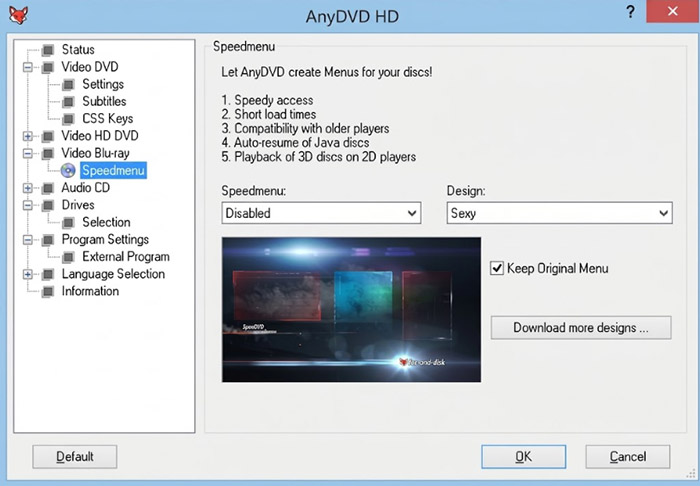
For example, a user might run AnyDVD in the background and then use a compatible backup program to create a disc image. Another user might use a supported player to watch a DVD without certain playback restrictions. AnyDVD handles the disc-access stage; it does not automatically perform every subsequent task.
AnyDVD Features Reviewed: What Can It Actually Do?
AnyDVD's main appeal was never the number of output formats it supported. Its value came from handling several disc-related restrictions automatically and making the resulting content accessible to other applications. The following sections examine its most relevant capabilities and their practical limitations.
1. DVD and Blu-ray Copy Protection Handling
DVD and Blu-ray discs can use different protection technologies. AnyDVD was developed to recognize and process a range of these mechanisms, reducing the need to handle each restriction manually before playback or backup.
Its historical DVD-related capabilities included handling technologies such as:
- CSS: Content Scramble System, a widely used encryption technology on commercial DVDs.
- ARccOS: A structural protection technique that can introduce problematic or deliberately misleading disc structures.
- RipGuard: Another DVD protection approach intended to interfere with copying.
- Macrovision: Analog copy-control technology associated with video output.
- UOP: User Operation Prohibitions that restrict certain navigation or playback actions.
For Blu-ray discs, historical AnyDVD HD versions also included support for AACS and BD+ handling, along with other disc-specific processing features.
However, listing a protection technology does not establish universal compatibility. New disc releases can introduce updated protection data, different authoring structures, or keys that are unavailable to an older installation. A feature that worked with one release does not guarantee the same result with every regional edition or later pressing.
2. DVD and Blu-ray Region Code Handling
Region restrictions are another reason users chose AnyDVD. Commercial DVDs and Blu-rays may be assigned regional restrictions that affect playback on incompatible players or drives.
AnyDVD HD historically offered options to remove or work around supported region restrictions at the software level. This could make a disc more accessible to compatible Windows applications without requiring the user to change the optical drive's firmware.
However, region handling has several technical limitations:
- DVD region settings and Blu-ray region settings use different systems.
- RPC-2 drive firmware can maintain its own region setting and change counter.
- RCE-protected DVDs may require additional handling beyond ordinary region-code removal.
- Some Blu-ray players and standalone devices impose their own restrictions.
Therefore, software-level region handling should not be confused with permanently converting an optical drive into an unrestricted RPC-1 device. The result also depends on the player, drive, and disc.
3. Remove Unwanted Playback Restrictions
AnyDVD offered several playback-related options intended to reduce interruptions and restrictions when watching DVDs and Blu-rays on a PC.
Depending on the disc and version, users could configure the handling of features such as:
- Forced subtitle restrictions.
- Forced playback delays.
- No-skip marks and certain navigation restrictions.
- Unwanted trailers and introductory material.
- Other disc-specific playback limitations.
These options were particularly relevant to users who preferred direct disc playback but did not want to navigate through repeated trailers, warnings, or restrictions before reaching the main feature.
There is an important distinction between changing how a disc behaves during playback and editing its actual video content. Removing a playback restriction does not necessarily cut those scenes from the underlying video stream or create a newly edited movie file.
4. Drive Speed Control and Noise Reduction
Optical drives can become noticeably loud when reading DVDs or Blu-rays at high speeds. AnyDVD included drive-speed controls that allowed users to reduce reading speed and lower mechanical noise during playback.
This is a relatively small feature, but it addresses a genuine inconvenience for people who watch movies directly from a PC-connected optical drive. Lowering drive speed can reduce noise, although it may also increase disc reading time. It does not improve the source video quality or eliminate noise from other hardware components.
Feature takeaway:
AnyDVD's strongest feature was its ability to process supported optical disc restrictions transparently in the background. Its main limitation is that the usefulness of those features depends on the version, local protection data, drive compatibility, and the availability of newer disc keys.
AnyDVD Compatibility: What Should You Check Before Using It?
With no verified current development channel, compatibility is a bigger concern than it was when AnyDVD was actively maintained. Rather than treating DVD, Blu-ray, and UHD support as a single yes-or-no feature, it is more useful to examine the disc, software, and hardware separately.
Can AnyDVD Work on Windows 11?
AnyDVD HD was developed for Windows, but its last verified releases date from 2024. There is no verified 2026 compatibility statement from an active official developer channel.
A previously working installation may continue to operate on a Windows 11 computer, but this should not be treated as a guarantee for every system. Driver loading, Windows security settings, optical-drive hardware, and conflicts with other disc utilities can all affect the result.
In particular, a successful application launch does not prove that its background driver has loaded correctly or that it can process a particular disc. Users should check the application's status information and verify actual disc access rather than relying on the tray icon alone.
Can AnyDVD Still Handle New DVDs and Blu-rays?
There is no universal answer because disc compatibility depends on more than the age of the software.
| Disc Type | What Affects Compatibility? | 2026 Assessment |
|---|---|---|
| Older DVDs | Stored CSS keys, existing protection support, and disc condition | May remain usable |
| Newer DVDs | Protection scheme, authoring structure, and available processing data | Not guaranteed |
| Older Blu-rays | Local AACS keys and previously supported BD+ handling | May remain usable |
| Newer Blu-rays | New protection data and disc-specific keys | Higher uncertainty |
| UHD Blu-rays | Drive firmware, LibreDrive compatibility, AACS version, and available keys | Hardware and key dependent |
For example, AnyDVD 8.7.0.0 included keys for nearly 10,000 UHD discs, allowing those particular titles to be processed without an online lookup. That was a substantial feature at the time, but it should not be interpreted as a complete or permanently updated UHD database.
Why Can an Old Disc Work While a New One Fails?
Optical disc protection is not a fixed list of rules that remains unchanged for the lifetime of a software installation. Blu-ray protection systems can use disc-specific keys and different versions of AACS. A software release that already contains the required information may process an older title without contacting an online service.
When a newer title requires information that is not present locally, an outdated application may be unable to proceed. This is why the loss of RedFox's update infrastructure matters even to users whose existing copies still launch normally.
What About UHD Blu-ray Drives?
UHD Blu-ray support involves additional hardware considerations. Not every optical drive can access UHD content in the same way, and firmware compatibility can affect the available backup methods.
AnyDVD HD's later versions incorporated MakeMKV LibreDrive integration for certain workflows. However, the presence of that feature does not make every UHD drive compatible. Users must consider the exact drive model, firmware, available key information, and the capabilities of the software being used alongside AnyDVD.
Compatibility takeaway:
Do not judge AnyDVD's current usefulness solely by whether it opens on Windows 11. The more meaningful test is whether your particular drive recognizes the disc, the installed version can process its protection, and the intended playback or backup application can read the resulting content.
AnyDVD Pros and Cons Based on Real User Experiences
AnyDVD's long history helps explain why its discontinuation caused frustration among DVD and Blu-ray collectors. Its reputation was built not only on protection handling but also on the convenience of having disc processing happen automatically in the background.
Historical user feedback on VideoHelp and discussions following the RedFox disappearance provide a useful perspective on what people valued and what became difficult after the service went offline. These experiences should be treated as individual reports rather than a controlled test of every version and disc.
Why Long-Time Users Liked AnyDVD
- Broad historical disc support: The software handled a range of DVDs and Blu-ray during active period.
- Convenient region handling: Its software-level options reduced some of the complications associated with regional playback restrictions.
- Third-party integration: It worked alongside established disc playback and backup applications.
For collectors with hundreds of discs, the last point can be particularly important. A familiar background utility may be part of a backup process that has worked for years. Replacing it is not necessarily as simple as installing another program with a similar feature list.
- Missing updates: Newly released discs may require protection information unavailable in an older version.
- Activation uncertainty: Fresh installations and computer changes can create problems for customers who cannot reach the former activation service.
- Uncertain compatibility: A disc that worked previously may not behave the same way.
- Download concerns: Users have fewer ways to verify installers and distinguish from modified packages.
- No reliable official support: Troubleshooting questions no longer have a verified support channel.
What Do Users Miss Most About AnyDVD?
The main difference between AnyDVD and many modern disc backup tools is its original operating style. Users could insert a disc, allow AnyDVD to process supported restrictions in the background, and continue working in their preferred player or backup application.
MakeMKV, for example, is more focused on extracting disc content into MKV files. HandBrake concentrates on video encoding. Neither follows precisely the same background-driver approach as AnyDVD.
This explains why some users who moved to another program still looked for a similar experience rather than simply choosing the application with the longest feature list. They were replacing a familiar way of accessing discs, not just a particular decryption function.
On the other hand, the shutdown also exposed the disadvantages of depending on a single proprietary tool. When its developer and update infrastructure disappear, even a well-established workflow becomes harder to maintain.
VideoHelp maintains historical user reviews and ratings for AnyDVD HD. TorrentFreak also documented the uncertainty surrounding RedFox and reported that some existing installations continued working after the website disappeared:
AnyDVD Pros and Cons
| Pros | Cons |
|---|---|
| Automatic background disc processing | No verified official development or update channel |
| Broad historical DVD and Blu-ray capabilities | Newer disc compatibility cannot be guaranteed |
| Region-related playback options | Activation and license recovery are uncertain |
| Integration with compatible third-party applications | Modern Windows driver compatibility is not guaranteed |
| Local keys can remain useful for supported older discs | Unverified downloads create security concerns |
Our take: AnyDVD's original convenience remains its biggest strength, but its lack of continued maintenance is now its most serious weakness. The software may still serve some existing users, yet it is difficult to recommend as the foundation of a new long-term disc backup system.
AnyDVD vs. WinX DVD Ripper vs. MakeMKV vs. DVDFab
Choosing an AnyDVD alternative is not simply a matter of finding another application that claims to remove DVD or Blu-ray restrictions. The alternatives differ in how they access discs, extract video, create backups, and prepare files for playback.
For example, a user who wants to preserve a movie as an MKV file has different requirements from someone who wants a background tool that makes a disc accessible to an existing media player. A video encoder also solves a different problem from either of these applications.
AnyDVD vs. Its Main Alternatives: Feature Comparison
| Feature | AnyDVD HD | WinX DVD Ripper | MakeMKV | DVDFab | HandBrake |
|---|---|---|---|---|---|
| DVD handling | Yes | Yes | Yes | Yes, by module | Accessible sources |
| Blu-ray handling | Yes, version dependent | No | Yes | Yes, by module | Accessible sources |
| UHD support | Hardware/key dependent | No | Hardware/key dependent | Product dependent | Not a UHD decryption tool |
| Region handling | Yes, with limitations | Supports DVD region-code handling | Not equivalent | Module dependent | No |
| MKV extraction | Not its main purpose | Yes | Yes, without re-encoding | Yes, by module | Yes, through encoding |
| MP4 conversion | No full transcoding workflow | Yes | No | Yes, by module | Yes |
| ISO/folder backup | Historical ripper function | Yes | No direct full-disc ISO workflow | Yes, by module | No |
| Current development | No verified updates | Version 8.22.4 recorded in Nov. 2025 | Check current release | Check current releases | Yes |
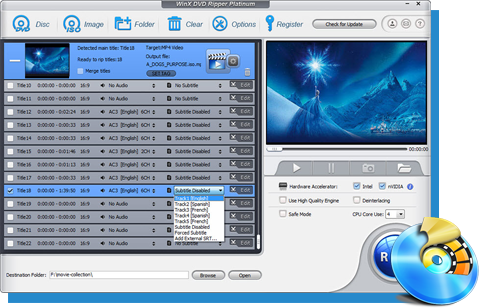
If you mainly use AnyDVD to access DVDs and want to turn your disc collection into digital files, WinX DVD Ripper is a good alternative. In our tests, it ripped a 41-minute NCIS episode in 280 seconds, compared with 519 seconds for MakeMKV. It also finished ripping Wreck-It Ralph in 648 seconds, slightly ahead of HandBrake at 656 seconds. WinX supports MP4, MKV, and other output formats, making it easier to play DVD content on a TV, computer, or mobile device. It does not offer AnyDVD's background processing or Blu-ray support, but for DVD ripping and format conversion, it is a more direct option.
AnyDVD in 2026: What Happened After RedFox Shut Down?
The biggest change affecting AnyDVD users was the disappearance of RedFox's website and online services in June 2024. This disrupted access to the company's products and left existing customers uncertain about software updates, license activation, and technical support.
On June 13, 2024, DVDFab published a statement describing the RedFox shutdown and discontinuation of AnyDVD and AnyStream. However, the company also stated that it had no knowledge of the specific circumstances behind RedFox's closure. TorrentFreak's earlier reporting likewise noted that the website and email services had become inaccessible, without establishing a confirmed cause.
It is therefore more accurate to describe AnyDVD as discontinued and unsupported through its former official channels than to claim that a particular legal action definitively caused its disappearance.
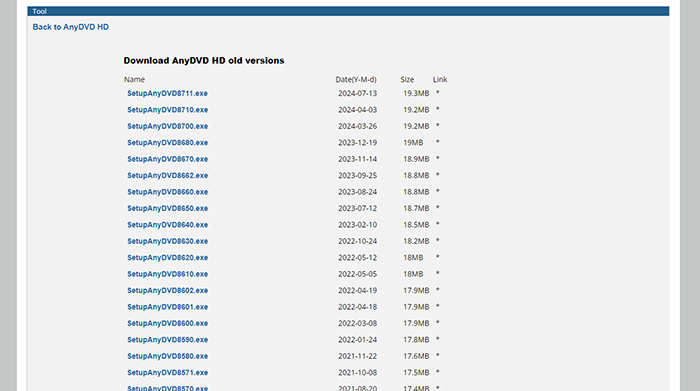
AnyDVD Latest Version: Is There a 2026 Update?
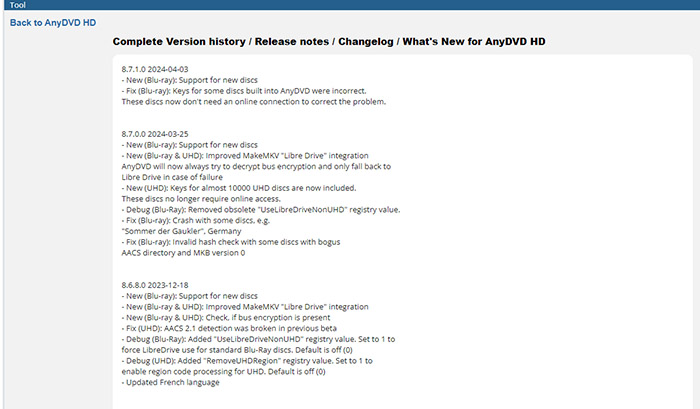
Available version-history records show that the last verified stable release was AnyDVD HD 8.7.1.0, dated April 3, 2024. A subsequent 8.7.1.1 Beta appeared on May 28, 2024.
The final stable release added support for new Blu-ray discs and corrected some previously incorrect built-in keys. The May beta included further Blu-ray support and a fix for bus-encryption detection problems affecting some discs.
| Version | Release Date | Notable Changes |
|---|---|---|
| 8.7.0.0 | March 25, 2024 | New Blu-ray support, improved LibreDrive integration, and nearly 10,000 included UHD disc keys |
| 8.7.1.0 | April 3, 2024 | Additional Blu-ray support and corrected built-in keys |
| 8.7.1.1 Beta | May 28, 2024 | New Blu-ray support and improved bus-encryption detection |
These release notes show that AnyDVD was still receiving development work shortly before RedFox disappeared. However, no verified official 2026 release has been established. A third-party website listing an installer or describing it as the latest version does not prove that the developer has resumed development.
For reference, see the AnyDVD version history on VideoHelp and its software listing.
Does AnyDVD Still Work After RedFox Shut Down?
Potentially, yes. The disappearance of RedFox did not automatically make every installed copy unusable. TorrentFreak's June 2024 follow-up reported that already activated copies could continue working and that older AnyDVD HD installations with offline key databases could still handle some older titles.
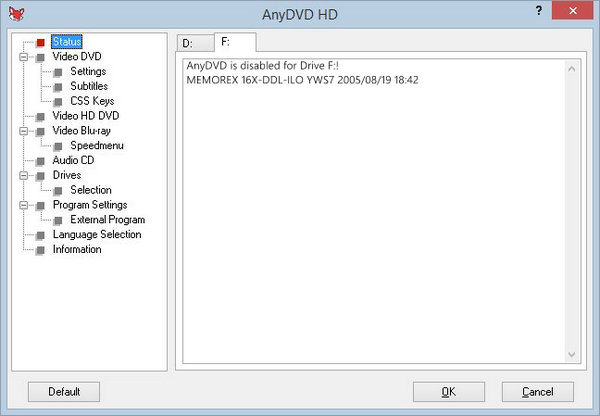
However, the shutdown has created significant limitations for new installations and users who need to activate the software. For example, when testing AnyDVD HD 8.7.1.1, the program displayed a License Information prompt after installation. The Order page was inaccessible, and clicking Request Trial returned HTTP Error 12007. This Windows error indicates that the requested server hostname could not be resolved through DNS, preventing the software from reaching its trial licensing service.
Three separate issues should be considered:
- Existing installation: A previously activated copy may continue to run, depending on its installation and licensing state. However, reinstalling the software or moving it to another PC may require activation that is no longer available.
- Local protection data: An existing key or protection database may allow the software to process certain discs without contacting an online service. This does not guarantee compatibility with every DVD or Blu-ray.
- New disc compatibility: A missing key or newly introduced protection can prevent an old version from handling a disc successfully. Without ongoing key database updates, support for newer releases may be limited.
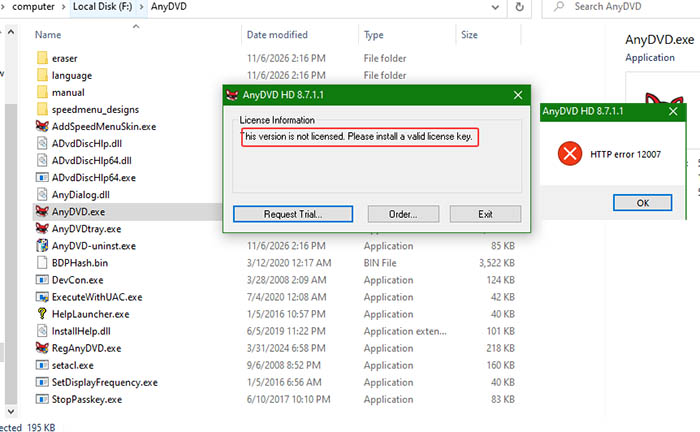
It's also important to distinguish installation from actual usability. AnyDVD HD 8.7.1.1 may install and launch successfully, but that does not mean its license is valid or its disc decryption features are available. Once properly activated, AnyDVD runs in the Windows background, detects inserted discs, and processes supported protection restrictions. Other applications, such as MakeMKV or HandBrake, can then access the disc content for backup or conversion. AnyDVD itself does not directly convert DVDs or Blu-rays into MP4 or MKV files.
Bottom line: AnyDVD may remain usable on previously activated systems, but new users face a major obstacle: the RedFox shutdown has left the official ordering and trial activation services unavailable. Our test of version 8.7.1.1 encountered HTTP Error 12007 when requesting a trial license, so a successful installation alone is not sufficient to establish that the software still works.
Can AnyDVD Still Activate an Old License?
This is one of the most difficult questions for former AnyDVD customers. RedFox's disappearance left no verified official customer portal or activation channel that new users can rely on.
It is important to distinguish an already activated installation from an unused license key. A working installation may retain the state needed to run locally, while a fresh installation may require an activation process that is no longer available. A previously purchased license does not, by itself, guarantee that reactivation will work today.
The same uncertainty applies when moving to a new computer, replacing a system drive, or reinstalling Windows. Before making system changes, existing users should preserve their legitimate license records, installation information, and personal configuration files. This does not guarantee successful reactivation, but it avoids losing information that may be difficult to recover.
Can You Still Download AnyDVD?
Historical installers remain listed by third-party software archives, including VideoHelp. However, the presence of an installer does not establish that it is an official, currently supported release.
Before running an old AnyDVD installer, consider the following:
- Check whether the file comes from a source with a verifiable download history.
- Compare the installer version and release date with historical version records.
- Check the file's digital signature and security reputation where available.
- Scan the file with reputable security software before installation.
- Avoid modified installers that claim to restore activation or provide unrestricted access.
A third-party archive can be useful for historical reference, but it should not be presented as an official replacement for the former RedFox download service.
Is AnyDVD Safe to Use in 2026?
The answer depends on which aspect of safety you mean. A legitimate, previously installed copy is not automatically malicious because its developer has disappeared. However, an old installer obtained from an unverified source carries a different level of risk.
There are also maintenance concerns. AnyDVD uses low-level Windows driver components to interact with optical drives. An unsupported driver may encounter compatibility issues with newer Windows security updates, hardware, or other disc software. That does not establish that every old installation is unsafe, but it makes routine maintenance and troubleshooting less predictable.
For a computer used for everyday work, installing an unknown modified build simply to recover AnyDVD functionality is difficult to justify. Use a verified installer if one is available, retain a backup of important data, and avoid granting unnecessary privileges to untrusted software.
Important distinction:
Software availability, license activation, protection-key availability, and technical compatibility are separate issues. A successful installation does not prove that online services are available, and an activated copy does not guarantee support for newly released discs.
FAQs About AnyDVD
AnyDVD no longer has a verified active official distribution and support channel. Historical installers remain listed by third-party archives, but these should not be confused with official downloads or newly maintained releases.
The last verified stable version listed in the historical release records is AnyDVD HD 8.7.1.0, released on April 3, 2024. Version 8.7.1.1 was listed as a beta release dated May 28, 2024. No verified official 2026 release has been established.
Some previously activated installations may continue working, especially with older discs supported by locally stored keys. However, newer discs may require protection data that an unsupported version does not have. Results depend on the installation, license state, disc, and optical drive.
AnyDVD is a Windows application, but its last verified releases date from 2024. Some existing installations may work on Windows 11, but there is no verified current compatibility guarantee. Driver loading, Windows security settings, and optical-drive hardware can affect operation.
Historical AnyDVD HD versions included Blu-ray and UHD-related protection handling. Successful processing depends on the disc's protection, available keys, software version, optical-drive model, and firmware. Its discontinued status means newer disc compatibility cannot be guaranteed.
No. AnyDVD primarily processes supported disc restrictions in the background, allowing other applications to access the disc. Although historical versions included a disc-to-folder ripping function, it is not a full video transcoder with the same MP4 conversion and compression controls as a dedicated DVD Ripper.
A third-party archive may retain an original historical installer, but its availability does not guarantee authenticity or safety. Check the file's provenance, digital signature, and security reputation. Avoid modified installers that promise to restore activation or provide an unofficial full version.
There is no verified official activation channel available through the former RedFox service. Some previously activated installations may continue to work, but a fresh installation or computer replacement may create activation difficulties. An old license key does not guarantee successful reactivation.


