











MakeMKV Support - If MakeMKV Won't Rip DVDs and Blu-rays
Many users have reported MakeMKV not working issues - DVDs won't load/open/read/recognize in MakeMKV, "no disc inserted" error, playlist Obfuscation/fake playlist, etc. It's possibly a problematic disc, like dust, scratches, an outdated firmware/hardware, copy protection methods MakeMKV can't handle. Check typical cases and figure out troubleshooting tips below.
Hot reading: Latest MakeMKV Beta Key/Lifetime Key
Most Common MakeMKV Errors When Ripping DVDs (Forum Reports)
We analyzed hundreds of discussions from the MakeMKV forum, Reddit, and DVD backup communities to identify the most frequently reported reasons why MakeMKV fails to rip DVDs. The table below summarizes the most common errors, their typical messages, and the likely causes.
Rank |
Error |
Typical Message |
Frequency |
Likely Cause |
#1 |
"Failed to open disc" |
★★★★★ |
Unsupported protection, damaged DVD, failing optical drive, USB connection issues. |
|
#2 |
"No disc inserted" / "Drive appears empty" |
★★★★★ |
Drive detection problems, firmware issues, bad disc readability. |
|
#3 |
"MEDIUM ERROR" / "HARDWARE ERROR" |
★★★★★ |
Scratched DVDs, bad sectors, optical drive read failures. |
|
#4 |
"The I/O device reported an I/O error" |
★★★★☆ |
USB instability, failing drive, damaged disc sectors. |
|
#5 |
"Title skipped due to navigation error" |
★★★★☆ |
DVD structural protection, Disney DVDs, Sony ARccOS, fake titles. |
|
#6 |
"The source file is corrupt or invalid" |
★★★★☆ |
Disc damage, manufacturing defects, unreadable sectors. |
|
#7 |
Dozens of similar titles appear |
★★★☆☆ |
Playlist protection used on newer commercial DVDs and Blu-rays. |
|
#8 |
"Cannot decrypt disc" |
★★★☆☆ |
Newly released discs not yet supported by MakeMKV. |
|
#9 |
"Audio out of sync with video" |
★★★☆☆ |
Incorrect timestamps, damaged source discs, or playback compatibility issues. |
|
#10 |
"Some titles are missing or skipped" |
★★★★☆ |
Playlist obfuscation, unsupported copy protection, or MakeMKV failing to detect the correct title. |
How to Fix Common MakeMKV DVD Ripping Errors
Based on reports from the MakeMKV forum, Reddit, and DVD backup communities between 2023 and 2026, the majority of DVD ripping failures fall into a handful of recurring categories. Below are the most common MakeMKV errors and the troubleshooting steps that have helped users resolve them.
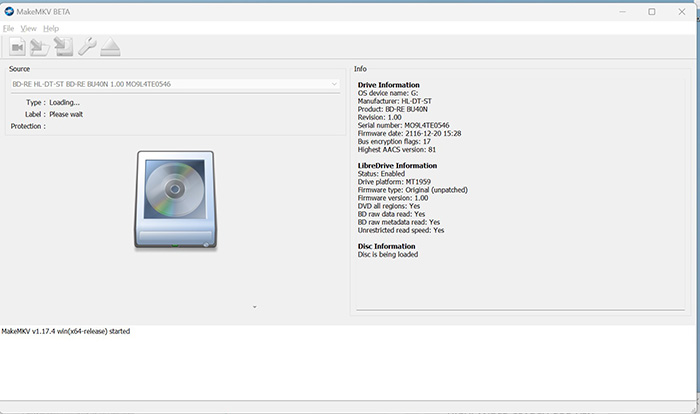
1. Failed to Open Disc: MakeMKV Won't Read or Recognize DVDs
Q: MakeMKV detects my DVD drive, but when I click the disc icon, it says "Failed to open disc". What causes this?
"Failed to open disc" is the most frequently reported MakeMKV DVD error. In most cases, the problem is not MakeMKV itself but a damaged disc, unreadable sectors, drive compatibility issues, or copy-protection schemes that the drive struggles to read.
Troubleshooting tips:
- Test the DVD in VLC or another DVD player to verify that the disc can be read.
- Inspect the disc surface for scratches, fingerprints, or dirt.
- Clean the DVD with a microfiber cloth from the center outward.
- Try a different DVD drive if available.
- Update your drive firmware and MakeMKV to the latest version.
- If the disc is heavily protected, test it with another MakeMKV alternative DVD ripper to determine whether the issue is disc-specific.
2. Random "No Disc Inserted" Error
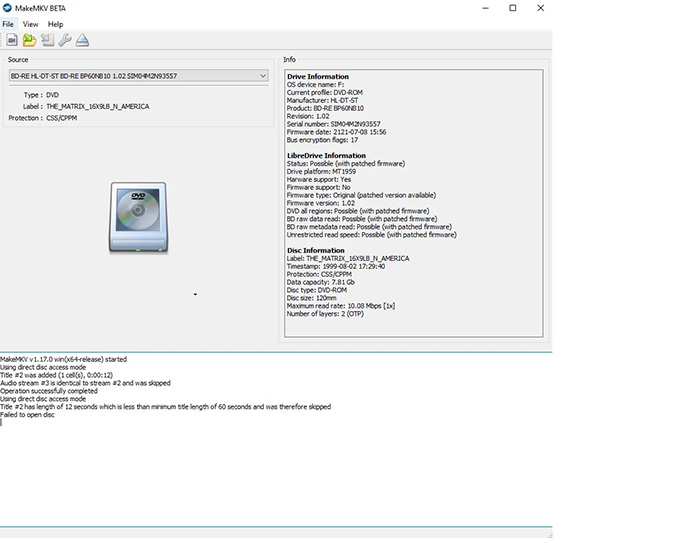
Q: The DVD is inside the drive and Windows can see it, but MakeMKV suddenly reports "No disc inserted".
This error usually occurs before MakeMKV begins reading the disc. The operating system or optical drive loses communication with the DVD, causing MakeMKV to believe no media is present.
Troubleshooting tips:
- Remove and reinsert the DVD.
- Restart MakeMKV and reconnect external drives.
- Connect the drive directly to the computer instead of a USB hub.
- Verify that the DVD appears correctly in Windows Explorer.
- Try another DVD to rule out disc-specific issues.
- Update the optical drive firmware if available.
3. SCSI Error While Loading or Ripping DVDs
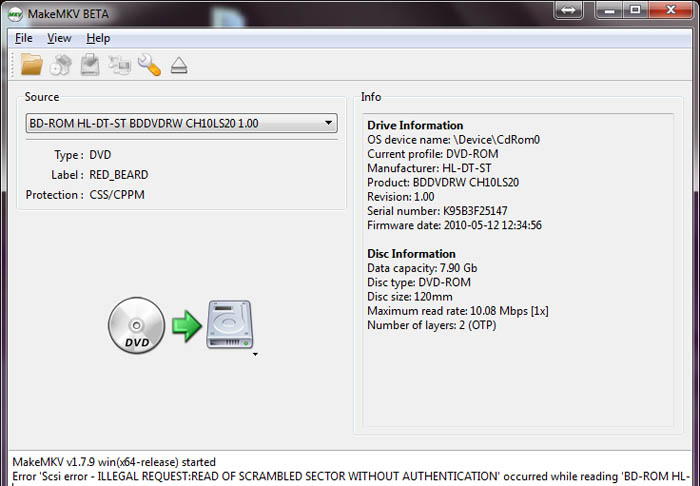
Common messages include: "MEDIUM ERROR", "HARDWARE ERROR", "ILLEGAL REQUEST", or "TIMEOUT ON LOGICAL UNIT".
SCSI errors are among the most common MakeMKV failures reported in recent years. They usually indicate that the drive cannot successfully read certain sectors from the DVD.
Typical causes:
- Scratched or damaged DVDs
- Bad sectors
- Aging optical drives
- Drive timeout issues
- Read errors caused by copy protection
Troubleshooting tips:
- Inspect and clean the DVD.
- Retry the ripping process.
- Use another optical drive if possible.
- Reduce background system load.
- Update the drive firmware.
4. I/O Device Error During DVD Ripping
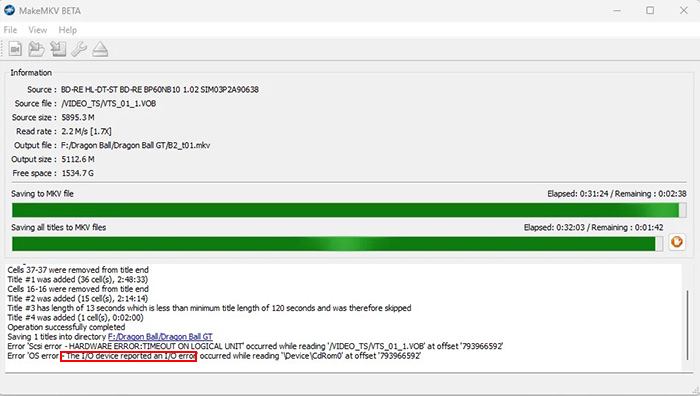
Q: MakeMKV starts ripping normally but eventually stops with an I/O error.
An I/O device error usually appears when MakeMKV encounters unreadable sectors during the ripping process. The error may occur halfway through a movie or near the end of the conversion.
Troubleshooting tips:
- Check the DVD carefully for scratches.
- Try another USB port or SATA connection.
- Use a powered USB hub for external drives.
- Allow the drive to cool down if it becomes hot during long ripping sessions.
- Retry the rip using another optical drive.
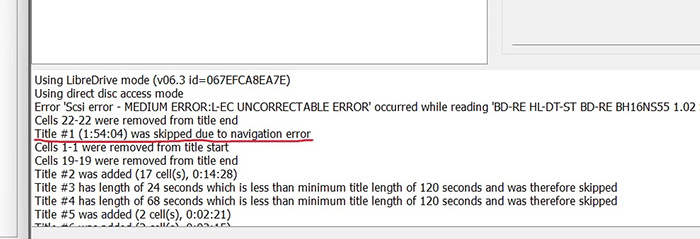
5. Navigation Error: Title Skipped Due to Navigation Error
Q: MakeMKV opens the DVD, but some titles are skipped because of navigation errors.
Navigation errors are often associated with DVD structural protection systems. The disc intentionally contains misleading navigation data to confuse ripping software.
Troubleshooting tips:
- Update MakeMKV to the latest release.
- Select the longest title manually.
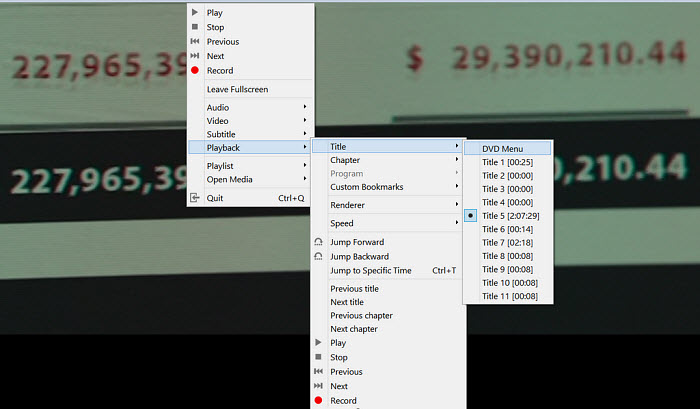
- Verify the correct title using playback software.
- Try alternative DVD backup software for comparison.
6. Source File Is Corrupt or Invalid
Q: MakeMKV reaches 90% or 99% completion and then reports "The source file is corrupt or invalid".
This error generally indicates unreadable content on the disc rather than a software malfunction.
Troubleshooting tips:
- Inspect the DVD for physical damage.
- Test the disc in another drive.
- Try creating an ISO backup first.
- Reattempt the rip after cleaning the disc.
7. Playlist Obfuscation and Fake Playlists
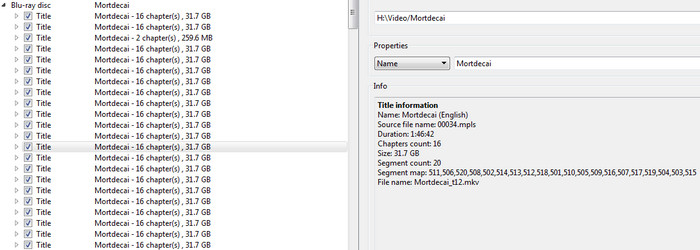
Q: Why does MakeMKV show dozens of titles that all look similar?
Some commercial DVDs and Blu-rays intentionally create fake playlists to make it difficult to identify the real movie title. This protection method is commonly seen on Lionsgate releases and certain newer studio discs.
Troubleshooting tips:
- Select the title with the correct runtime.
- Compare chapter counts.
- Check community databases and forum reports.
- Preview titles before ripping.
8. Cannot Decrypt New DVDs
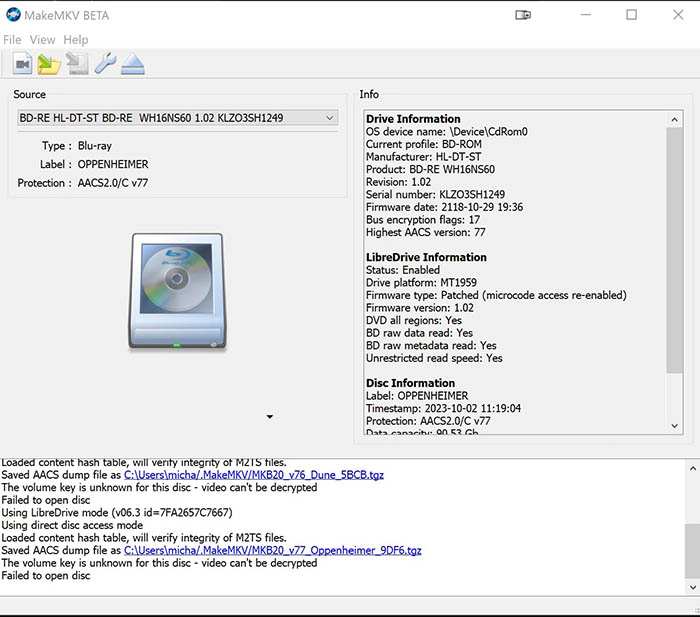
Q: Older DVDs work fine, but newly released discs fail to rip.
New DVD releases occasionally introduce updated protection mechanisms. When this happens, MakeMKV may require a future update before full support becomes available.
Troubleshooting tips:
- Update MakeMKV to the latest version.
- Check the MakeMKV forum for support status.
- Submit dump files if requested by the developers.
- Wait for a future decryption database update.
9. MakeMKV Audio and Video Out of Sync
Q: The ripped video plays, but the audio gradually falls out of sync.
Audio sync problems are usually caused by damaged source discs, read errors during ripping, incorrect timestamps, or playback compatibility issues. In some cases, the issue appears only in certain media players rather than in the ripped file itself.
Troubleshooting tips:
- Update MakeMKV to the latest version, as newer releases fix known AV sync issues.
- Verify the source disc isn't damaged or poorly authored before ripping again.
- Try a different audio track, especially if the selected Dolby Atmos track causes sync problems.
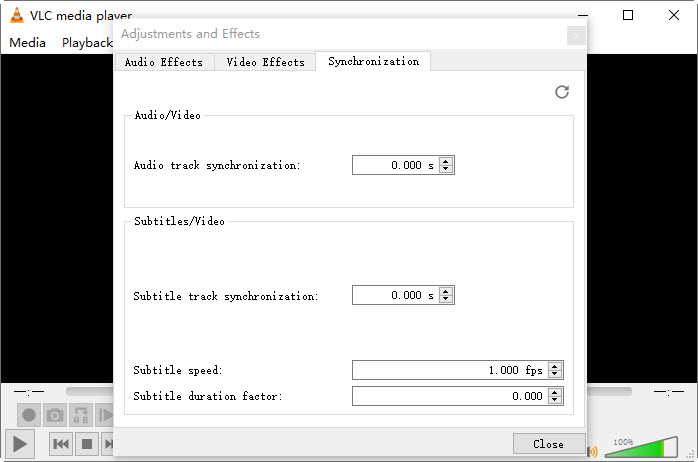
- If the MKV is already created, adjust audio synchronization in VLC or remux the file with MKVToolNix.
10. MakeMKV Skips Titles or Can't Find the Main Movie
Q: MakeMKV skips some titles or doesn't detect the main movie correctly.
Some DVDs and Blu-rays use playlist obfuscation or newer copy protection to confuse ripping software. As a result, MakeMKV may skip valid titles or select the wrong playlist instead of the main feature.
Troubleshooting tips:
- Use Manual DVD Mode to select the correct title instead of automatic navigation.
- Set the Minimum title length to 0–2 seconds to include short or missing titles.
- Rip all possible main titles if MakeMKV filters out duplicates incorrectly.
- Create a full disc backup and reload it when Blu-ray playlist errors occur.
MakeMKV Website Down? Try This Tested Methods
Frequently Asked Questions
Why does MakeMKV open the disc but not show any titles?
This usually happens when the disc uses advanced protection or unusual structure. MakeMKV may read the disc but fail to detect titles due to encryption, fake playlists, or damaged metadata.
Why does MakeMKV stop ripping halfway through?
Ripping can stop mid-process if the DVD has unreadable sectors, heavy scratches, or if the drive loses stable read speed under disc stress.
Why is MakeMKV ripping only a few seconds of video?
This issue often occurs when the wrong title is selected, or the disc uses protection that confuses title length detection, causing incomplete extraction.
Why does MakeMKV show 0 titles or empty DVD structure?
Some DVDs use strong encryption, fake structures, or damaged file systems, which prevents MakeMKV from correctly parsing the title list.
Why is MakeMKV unable to read certain DVDs but VLC can play them?
VLC can sometimes bypass minor disc issues using playback heuristics, while MakeMKV requires a more complete structure for ripping, making it more sensitive to disc errors.


