











WinX DVD Copy Pro Review: Is It Worth Buying for DVD Backup?
 Donna Peng
Updated on
For many DVD collectors, the real concern isn’t video quality upgrades or fancy formats, it’s simply keeping discs safe and playable. Scratches, disc rot, region locks, and copy protections make long-term storage tricky. WinX DVD Copy Pro positions itself as a straightforward solution for users who want a reliable 1:1 DVD backup without a steep learning curve. In this review, we’ll focus on what matters most in real-world use: compatibility with protected discs, stability, limitations, and whether it actually solves the problems DVD owners search for before buying.
What Is WinX DVD Copy Pro?
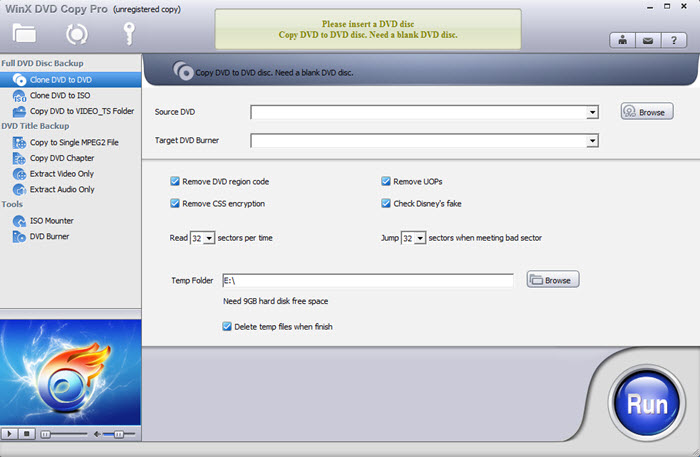
This WinX DVD Copy Pro review focuses on a simple but common need: making reliable DVD backups without dealing with complex settings or unstable workflows. The software is built for Windows users who want to preserve their DVD collections against disc aging, scratches, region locks, or accidental loss, while keeping the original structure intact.
- Lossless 1:1 DVD backup to blank discs, ISO images, or VIDEO_TS folders.
- Multiple copy modes for full discs, main titles, or selected chapters.
- Handles region-locked and structurally complex DVDs with minimal manual input.
- Built-in DVD burning and ISO mounting for an all-in-one workflow.
- Strong compatibility with scratched, aging, and 99-title DVDs.
WinX DVD Copy Pro Supported Systems & Formats
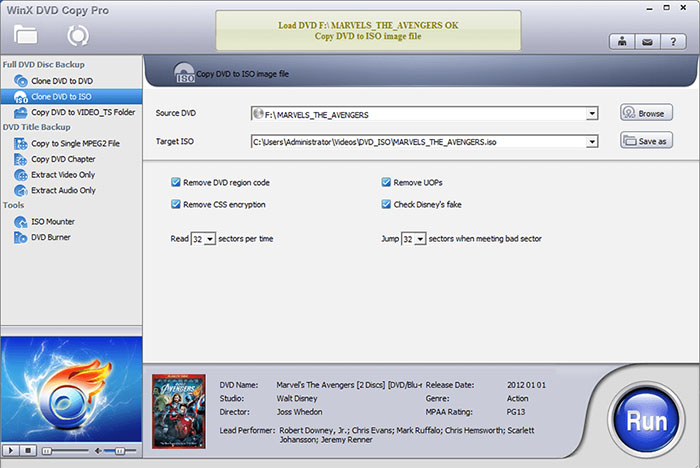
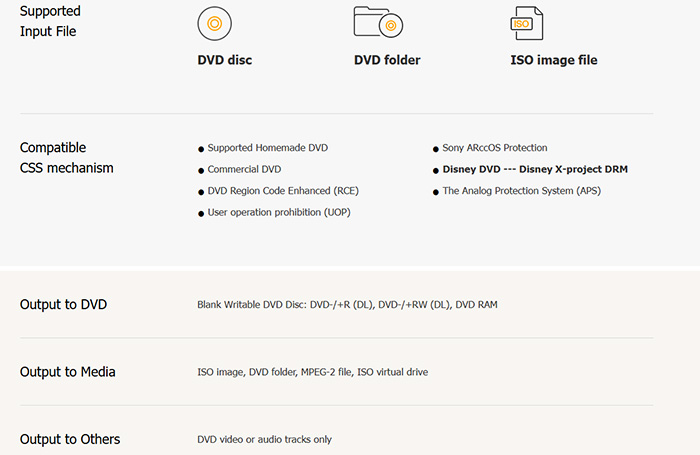
WinX DVD Copy Pro tech specs and compatibility is where the software quietly does a lot of heavy lifting. Many DVD copy tools fail not because of speed, but because they stumble on disc structure, protection schemes, or aging media. WinX DVD Copy Pro takes a practical approach, focusing on broad DVD support rather than chasing niche formats.
| Category | Details |
|---|---|
| Input Formats | DVD disc, DVD folder, ISO image file |
| DVD Compatibility | Homemade DVDs, commercial releases, and region-coded discs |
| Protection Handling | CSS, RCE, UOP, Sony ARccOS, Disney X-Project DRM, and APS |
| DVD Output | Blank writable discs including DVD±R/RW (DL) and DVD RAM |
| Media Output | ISO images, DVD folders, MPEG-2 files, and ISO virtual drives |
| Selective Output | Extract DVD video titles or audio tracks only |
| Supported Platforms | Windows 11, 10, 8/8.1, 7, Vista, XP, Windows 2003, Windows 2000 (32 & 64-bit) |
WinX DVD Copy Pro: Core Features & Real-World Performance
In this WinX DVD Copy Pro review, we focus on real-world performance rather than just feature lists. The software is built to handle a wide range of DVD collections, from old, scratched movies to complex TV series discs with dozens of titles. We tested it under Windows 10 and 11, examining speed, accuracy, system load, and practical usability in scenarios typical DVD owners encounter.
1:1 DVD Copy (Lossless Backup)
The core strength of WinX DVD Copy Pro is its ability to make true 1:1 copies. Every copy retains:
- Menus, chapter markers, and navigation structure
- Multiple audio tracks including surround sound
- Subtitle streams and special features
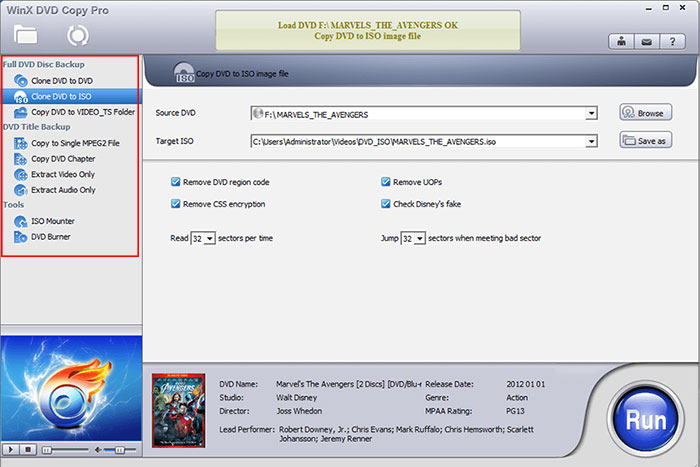
9 Copy Modes for Every Situation
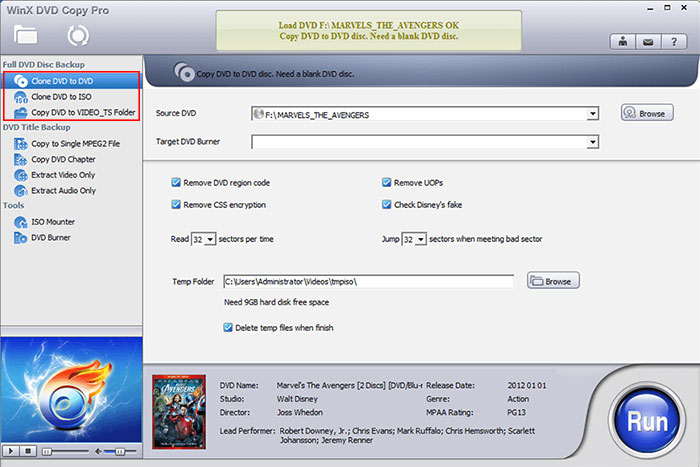
WinX DVD Copy Pro provides nine distinct copy modes to accommodate various backup needs. These include:
- Full disc 1:1 backup
- DVD-to-DVD duplication
- ISO image creation
- VIDEO_TS folder export
- Main movie or selected chapter copying
- DVD video or audio extraction
Region Code & Copy Protection Handling
One of WinX DVD Copy Pro’s most valuable features is its ability to bypass common copy protections and region restrictions automatically. Tested protections include:
- CSS (Content Scramble System)
- UOPs (User Operation Prohibitions)
- RCE (Region Code Enhanced)
- Sony ARccOS and Disney X-Project DRM

ISO Mounting & DVD Burning
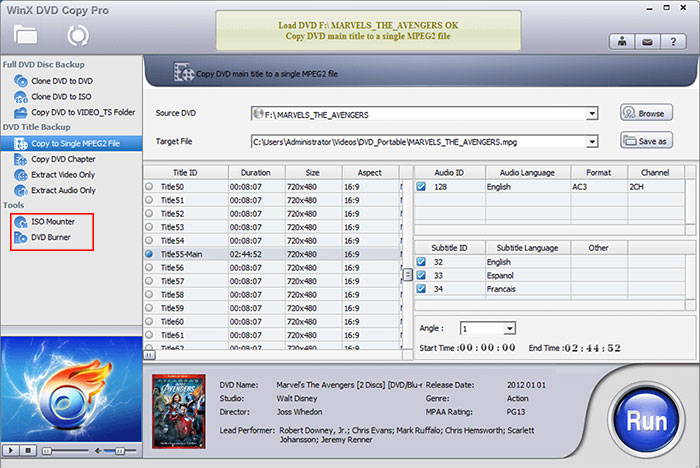
Beyond copying, WinX DVD Copy Pro integrates tools for ISO mounting and disc burning. This allows:
- Direct testing of ISO images without creating a physical disc
- Burning ISO or VIDEO_TS folders to blank discs quickly
- Maintaining full menu structure and multi-track audio during restoration
Performance & System Load
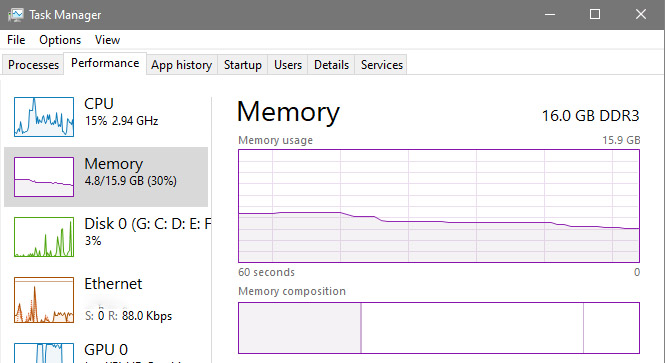
Copy speed and system load were measured across Windows 10 and 11. On our Intel i5 test system:
- Full 1:1 DVD copy averaged 12–17 minutes
- CPU usage stayed below 35%, even during batch operations
- No crashes or overheating occurred during prolonged use
WinX DVD Copy Pro Pros & Cons
Based on hands-on testing, WinX DVD Copy Pro shows clear strengths and some limitations. Its focus is on reliable DVD backup, bypassing common protections, and preserving disc structure. However, it doesn’t cover every platform or offer advanced video conversion features, which may influence decisions depending on individual needs. Here's a practical breakdown from actual use.
- Extremely simple interface, easy for beginners to use
- Bypasses most DVD copy protections automatically
- Generates true lossless 1:1 backups
- Relatively affordable compared to competitors
- Not available for macOS or Linux systems
- No built-in video compression or format conversion
WinX DVD Copy Pro Pricing & Purchase Advice
WinX DVD Copy Pro proves to be a solid choice for straightforward DVD backups. Pricing is competitive and simple, with clear distinctions between standard annual subscriptions andlifetime licenses. Understanding your own backup needs helps decide which plan provides the best value without paying for features you don’t use.
Official Pricing Plans for WinX DVD Copy Pro
Pricing for WinX DVD Copy Pro is straightforward and reflects its focus on reliable DVD backup rather than additional extras. Options are designed to suit different needs, from basic annual subscriptions to lifetime licenses with extra perks, letting users choose the plan that fits their usage and budget.
- Standard: ~34.95 USD / 1 Year (3 PCs), includes 1-year free upgrades and 30-day money back guarantee
- Premium: ~42.95 USD / Lifetime License (1 PC), includes lifetime free upgrades, priority support, and a 3-month WinX DVD Ripper Platinum license as a gift
- Bundle: WinX DVD Ripper + DVD Copy Pro Lifetime License / 1 PC at $79.95, includes free lifetime upgrades and priority tech support
WinX DVD Copy Pro Purchase Recommendations
Choosing the right WinX DVD Copy Pro plan depends on your specific backup and media management needs. Simple disc-to-disc copying requires only the core license, while users who want additional conversion options or multi-device support may benefit from bundled or extended packages.
- If you only need basic DVD copying, the lifetime license is sufficient.
- If you also need DVD-to-digital conversion or more advanced upscaling features, consider adding WinX DVD Ripper Platinum or other DVD ripping, video editor, enhancer software.
- For multiple devices or managing a larger media library, look at full suite bundles for best convenience and value.

How to Use WinX DVD Copy Pro to Back up DVDs
WinX DVD Copy Pro lets you back up a DVD to another disc without losing menus, subtitles, or audio. It works on Windows 11/10/8/7/XP and older, and supports single- or dual-layer discs. Follow the steps below for a smooth 1:1 copy.
Step 1: Insert the DVD you want to copy into your drive and launch WinX DVD Copy Pro. Select Clone DVD to DVD under Full Disc Backup. Prepare a blank writable disc; single-layer DVDs hold 4.7GB, dual-layer up to 8.5GB. Supported types include DVD-/+R (DL), DVD-/+RW (DL), and DVD RAM.
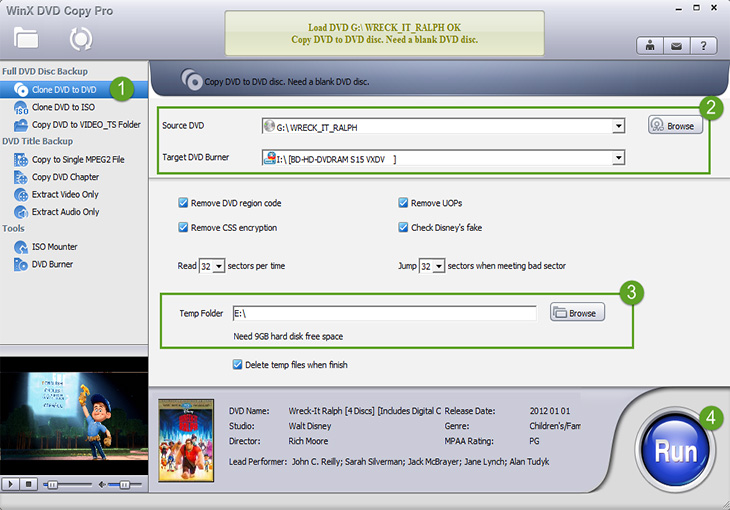
Step 2: Choose your source DVD and target drive (the blank disc) from the drop-down menus. If you have only one optical drive, leave the target as default—the software will create a temporary ISO file during copying.
Step 3: Click Browse to set a temporary folder for saving the ISO. If the DVD has copy protection, check the appropriate boxes. For scratched or damaged discs, specify sectors to skip. This ensures the copy completes without errors.
Step 4: Hit RUN to start the process. Single-drive users will first get an ISO file, then be prompted to insert the blank DVD for burning. Adjust writing speed and mode if needed, then click Burn to transfer the ISO to the disc, keeping all original content intact.
Tip: Slower writing speeds help reduce errors with older discs. If multiple drives are available, reading and writing simultaneously will speed up the process.
 FAQs about WinX DVD Copy Pro
Yes, WinX DVD Copy Pro includes recovery mechanisms for minor scratches and damaged sectors. In testing, most lightly damaged discs copy successfully, while heavily scratched or warped DVDs may require multiple attempts. Users often note the software is more reliable than basic free DVD copy tools for old discs.
WinX DVD Copy Pro automatically bypasses common protections like CSS, UOPs, RCE, Sony ARccOS, and Disney X-Project. It also handles region-coded discs. Users frequently highlight this feature as a key reason for purchase, allowing smooth copying of commercial DVDs without manual configuration.
On average, a full 1:1 DVD copy completes in 12–17 minutes on modern PCs. Copy speed varies with disc condition, drive performance, and system resources. Forum users appreciate the balance between speed and accuracy, as aggressive speed-focused tools often risk skipping chapters or losing quality.
WinX DVD Copy Pro supports DVD-to-DVD, ISO image, and VIDEO_TS folder outputs. Users can also extract only video or audio tracks if desired. This versatility allows backing up to blank discs or storing digital copies on hard drives, NAS, or cloud services without losing menus or structure.
Yes, it handles complex DVD structures, including 99-title discs and TV series DVDs. Users report that selecting main titles or full disc copies is straightforward, and the software reliably preserves chapters, menus, and audio tracks. This makes it practical for backing up multi-episode collections efficiently.
Yes, the standard license covers up to three PCs for a 1-year subscription, while lifetime licenses are per PC. Users planning to backup DVDs across several devices need to select the appropriate plan. Forum discussions often stress checking license terms to avoid activation conflicts.
External Sources:
1. CD and DVD copy protection : CD/DVD copy protection uses encryption, DRM, errors, and unique disc features to prevent copying.
2. Optical disc image : ISO images replicate optical discs sector-by-sector, preserving all data and file structures.
3. DVD-5, DVD-9, and DVD-10 : DVD types: DVD-5 (4.7GB), DVD-9 (8.5GB), DVD-10 (9.4GB, double-sided).
4. How to clone a DVD : Cloning a DVD creates an ISO backup, preserving all data and bootability.
5. DVD Forum Charter : Archived from the original (PDF) on November 28, 2024.
6. DVD recordable : Comparing recordable CDs and DVDs.


 Free Download
 Free Download