







VideoByte DVD Ripper Review 2026: Real-World Tests
 Donna Peng
Updated on
VideoByte BD-DVD Ripper sits in the middle of today’s crowded DVD backup tools, easy enough for beginners, yet packed with enough options to handle full disc conversion workflows. In our hands-on test, we didn’t just look at feature lists, but measured real ripping speed, system load, stability, and output quality using a full-length commercial DVD. This review breaks down how it performs in everyday use, and whether it actually delivers consistent results for long-term DVD and Blu-ray backup needs.
Overview of VideoByte DVD Ripper
When it comes to backing up DVD, most users don’t just want another “converter”—they want something that actually works without breaking subtitles, losing audio tracks, or choking on protected discs. VideoByte DVD Ripper is built for exactly that type of everyday use case: turning physical discs into clean, playable digital files that can run smoothly on phones, laptops, TVs, and media servers like Plex.
In real-world usage, this kind of tool is less about flashy features and more about consistency—how fast it reads a disc, how well it preserves quality, and whether it can handle commercial DVDs without constant errors. VideoByte sits in that middle-ground category: not the most advanced ripper on the market, but positioned as a simple, stable option for users who want to digitize their collection without a steep learning curve.
What VideoByte DVD Ripper Is Built For
At its core, VideoByte DVD Ripper is designed to bridge the gap between physical media and modern playback environments. Instead of relying on optical drives or standalone DVD players, users can convert discs into digital formats that fit today’s ecosystem. This includes movies, TV box sets, home-recorded discs, and ISO backups.
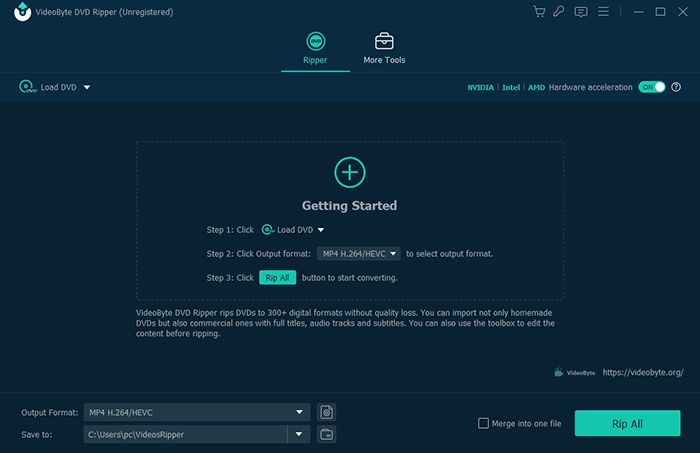
Where it stands out in practice is convenience: load a disc, pick a format, and start converting. It’s clearly built with non-technical users in mind, but still leaves enough control for users who want to tweak output settings.
Format Support and Output Flexibility
In terms of output, VideoByte DVD Ripper supports most mainstream video formats used today. This makes it easy to move content between devices without worrying about compatibility issues.
It typically covers formats such as MP4 and MKV for high-quality archiving, along with other common options like MOV and AVI for broader device support. On top of that, it also provides device presets, which can be useful if you just want something that “works out of the box” without manual encoding knowledge.
VideoByte DVD Ripper Core Features
- DVD backup & conversion: Handles standard discs, including ISO files, folder structures.
- Encrypted disc support: Works with many commercial DVDs and Blu-rays, though performance.
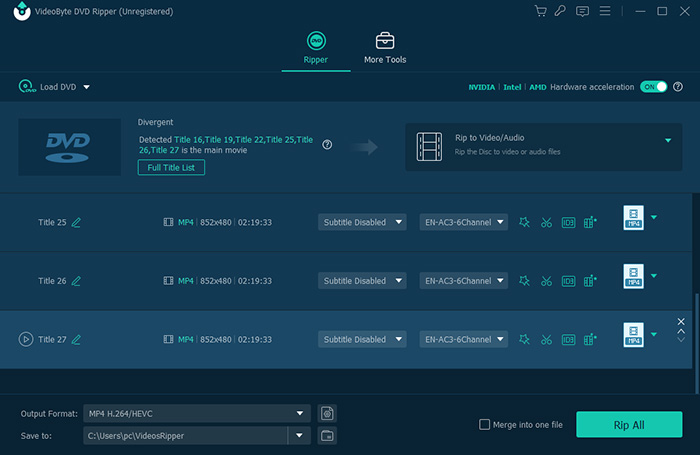
- Subtitle & audio retention: Keeps multiple audio tracks and subtitle streams when available.
- Custom output control: Lets users adjust resolution, bitrate, codec, and file size.
- Hardware acceleration: Uses GPU support when available to reduce conversion time.
Everyday Experience Using It
From a usability standpoint, VideoByte DVD Ripper feels intentionally straightforward. You don’t need to understand encoding settings to get usable results. That makes it appealing for users who are digitizing a personal DVD shelf rather than building a professional media pipeline.
However, like most all-in-one rippers, the real experience depends heavily on the disc type. Standard DVDs tend to work smoothly, while heavily protected or older commercial discs may require more patience or fall back to alternative tools depending on the protection level.
Pricing Snapshot
The entry option is a 1-Year Subscription, priced at $29.95. This plan includes full DVD support on 1 PC, along with one year of updates and access to all features. VideoByte offers a Single License at $59.95. This is the more commonly chosen option, since it unlocks lifetime access to the full feature set, lifetime updates, and a longer 30-day money-back guarantee.
Compared to competitors like WinX DVD Ripper or MakeMKV, VideoByte sits in a mid-range pricing tier: not the cheapest entry point, but also cheaper than full professional suites like DVDFab when bundled features are considered. The key difference is that VideoByte pushes users toward lifetime licensing as the practical long-term option, while the subscription plan feels more like a trial pathway than a sustainable choice for serious DVD collectors.
Read More: WinX DVD Ripper Platinum Review - Pros, Cons, and Speed Test Results

VideoByte Review: Performance Benchmarks
To evaluate VideoByte DVD Ripper in a more realistic scenario, we tested it using a full-length commercial DVD (Wreck-It Ralph title). The goal was to measure not only conversion speed, but also system load, stability, and output quality under typical user conditions. This is important because DVD ripping performance is often more dependent on disc structure, encryption complexity, and hardware acceleration than simple software claims.
During testing, the software successfully completed the ripping process, but performance varied depending on the stage of the workflow. The disc analysis phase was relatively fast, while the main conversion stage took significantly longer, especially under H.264 MP4 output settings at 852×478 resolution and 29.97 fps. GPU usage remained moderate, suggesting partial hardware acceleration rather than full utilization.
Test Performance Breakdown (Real DVD Rip Result)
From a real-use perspective, the most noticeable limitation was not raw speed but output quality consistency. While the conversion completed successfully, the resulting video showed visible softness compared to the original disc, which may matter for users prioritizing archival-grade backups. On the other hand, the separation of subtitle files into an independent folder is an advantage for users who prefer manual subtitle management in media servers like Plex.
| Metric | Result |
|---|---|
| Disc Source | Wreck-It Ralph (DVD Title 1) |
| Disc Analysis Time | 11 sec |
| Pre-processing / Operation Time | 104 sec |
| Conversion Time | 560 sec |
| Total Processing Time | 664 sec |
| Output Format | MP4 (H.264), 852×478, 29.97 fps |
| Output Size | 1.28 GB |
| Average FPS | 194.86 |
| GPU Usage (Avg.) | 25.37% |
| GPU Power (Avg.) | 9.69W |
| CPU Usage (Avg.) | 18.55% |
| GPU Temperature (Peak) | 48°C |
| GPU VRAM (Peak) | 461 MB |
| RAM Usage (Peak) | 18.57 GB |
| Bitrate | 1475 kb/s |
| Quality Observation | Noticeably blurry compared to source |
| Stability Notes | Trial version crashed twice in editing/effects panel (~1 min mark) |
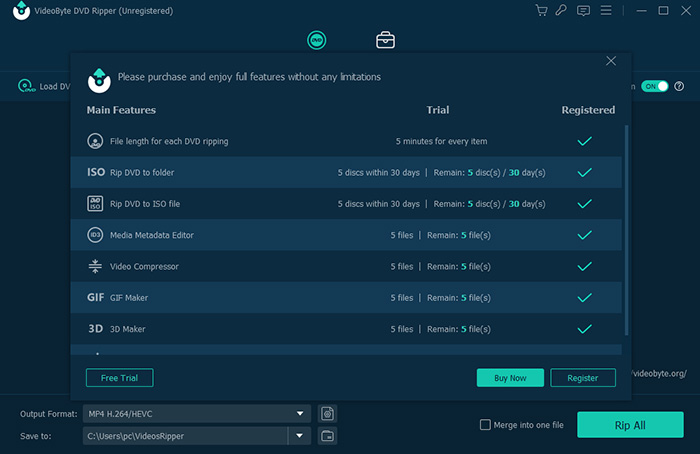
| Free Version Limitation | Output limited to 5-minute video segments |
| Subtitle Handling | Subtitles exported separately into a folder (useful for management) |
Overall, the test suggests that VideoByte DVD Ripper performs reliably for standard DVD conversion tasks, but its efficiency and stability depend heavily on feature usage and version type (trial vs full). Users who rely on editing tools or expect near-lossless quality may need to evaluate alternatives for more demanding workflows.
Key Findings After Testing VideoByte DVD Ripper
Based on hands-on testing with a full DVD workflow, VideoByte DVD Ripper shows a mixed but clearly defined performance profile. It performs well in basic ripping scenarios, but shows limitations in output sharpness and editing stability under stress conditions.
| Category | Key Finding | Practical Impact |
|---|---|---|
| Ripping Speed | Moderate overall (fast disc scan, slower conversion phase) | Acceptable for occasional DVD backups, not optimized for bulk ripping |
| Output Quality | Noticeable softness in H.264 output at tested settings | Not ideal for high-end archival or quality-sensitive users |
| System Load | Low to moderate CPU/GPU usage | Runs smoothly on mid-range systems without heavy overheating |
| Stability | Editing/effects panel crashes observed in trial version | Core ripping works, but advanced tools may be unreliable in trial |
| Subtitle Handling | External subtitle export supported | Good compatibility for Plex and external media players |
| Free Version Limits | 5-minute output restriction | Only suitable for testing, not real backups |
VideoByte DVD Ripper fits best into the ease-of-use category rather than the “maximum quality or professional control” category. It delivers stable baseline performance for DVD conversion, but users with large libraries or strict quality requirements may still prefer more advanced alternatives.
Pros and Cons of VideoByte DVD Ripper
Beyond feature lists and marketing claims, real-world performance often reveals a more balanced picture of any DVD ripping tool. In our hands-on testing of VideoByte BD-DVD Ripper, combined with general user feedback patterns from review platforms, the software shows a mix of strengths in usability and format flexibility, but also some limitations in output quality consistency and advanced disc handling.
While the interface is clearly designed to be beginner-friendly and the conversion workflow is straightforward, certain edge cases—such as editing stability and quality retention at lower bitrate settings—become more noticeable during longer DVD processing tasks. Below is a summary of its practical advantages and drawbacks based on both testing results and typical user experiences.
Pros
1. Easy-to-use interface with minimal learning curve
In testing, the workflow was straightforward: load disc → select format → start conversion. Even users with no prior DVD ripping experience can complete a full conversion without adjusting advanced settings.
2. Wide format and device support
The software successfully exported DVD content into MP4 (H.264), MKV, MOV, and other common formats. Device presets also reduce setup time for mobile, tablet, and media server playback scenarios.
3. Stable performance in standard ripping tasks
In our “Wreck-It Ralph” DVD test, the full conversion completed in 664 seconds total, with moderate system load (CPU ~18.55%, GPU ~25.37%). This indicates the tool can handle typical DVD backups without stressing mid-range hardware.
4. Subtitle handling works well for media library use
Subtitles were exported separately into a dedicated folder instead of being hard-burned into the video. This is particularly useful for Plex or VLC users who prefer flexible subtitle management.
5. Hardware acceleration support
GPU-assisted processing helped maintain consistent conversion speed during longer DVD encoding sessions, especially for H.264 output.
Cons
1. Output quality can feel softened in some scenarios
In our test output (852×478 H.264, 1475 kb/s), the resulting video appeared noticeably blurrier compared to the original disc source. This suggests compression trade-offs that may affect archival users.
2. Editing module stability issues (trial version observed)
During testing, the software crashed twice while entering the effects/editing panel around the 1-minute mark. While core ripping functions remained stable, advanced editing tools may not be fully reliable in all cases.
3. Free version is heavily restricted
The trial version only allows up to 5-minute output, which limits meaningful real-world backup use. It is essentially a testing-only version rather than a practical solution.
4. Pricing is not the lowest in its category
With a 1-year plan at $29.95 and a lifetime license at $59.95, VideoByte sits in a mid-range pricing tier. Compared to free tools like MakeMKV or lower-cost DVD rippers, this may feel expensive for users with basic needs.
5. Advanced disc handling limitations (based on user feedback patterns)
While standard DVDs work smoothly, more complex or heavily protected discs may not always deliver consistent results, which is a common limitation in this category of software.
 FAQs about VideoByte DVD Ripper
Yes, VideoByte DVD Ripper is generally considered safe to install and use. In our testing, the software did not include any suspicious background processes or adware behavior. It runs as a standard desktop application for DVD conversion. As with any media tool, it is recommended to download it only from the official website to avoid modified or third-party versions.
VideoByte is a legitimate software brand that offers multiple multimedia tools, including DVD and Blu-ray ripping solutions. It is not a scam product. However, like many commercial media utilities, user experiences vary depending on expectations—some users find it easy to use and reliable for basic ripping, while others prefer more advanced tools for professional-grade workflows.
VideoByte BD-DVD Ripper supports many common DVD and Blu-ray protection schemes, and in our testing it successfully processed standard commercial DVDs. However, performance can vary depending on the type and strength of encryption. Heavily protected or newly released discs may not always be handled consistently compared to specialized tools designed specifically for advanced decryption.
Yes, VideoByte offers a lifetime license option for BD-DVD Ripper. In our breakdown, the one-time purchase plan is priced at $84.95 (tax excluded) and includes lifetime access and updates for one PC. This is often preferred over the subscription model, which requires annual renewal at $69.95 per year.
Based on our testing, most core ripping functions run normally, but occasional issues may appear in specific modules such as the built-in editing/effects panel. In the trial version, we observed crashes when entering the effects interface. If the software fails to work properly, common causes include outdated GPU drivers, unsupported disc formats, or limitations in the trial version.
VideoByte is worth considering if you want a simple DVD and Blu-ray conversion tool with an easy workflow and decent format support. In our real-world test, it handled full DVD conversion within a reasonable time frame (about 664 seconds total). However, users focused on maximum output quality or advanced editing control may find better value in alternatives like WinX DVD Ripper or DVDFab.
The best alternatives depend on your needs. WinX DVD Ripper is often chosen for fast DVD backup performance, DVDFab offers more advanced Blu-ray and DRM handling features, and MakeMKV is popular as a free option for lossless MKV extraction. Compared to these, VideoByte focuses more on ease of use rather than advanced control or professional-level customization.
Yes, VideoByte BD-DVD Ripper supports retaining multiple audio tracks and subtitles when converting DVDs or Blu-rays. In our testing, subtitles were also exported as separate files rather than being permanently embedded, which is useful for users who manage their media libraries through players like VLC or Plex.


 Free Download
 Free Download