


WinX DVD Ripper vs HandBrake: Which One Is Better for DVD Ripping?
WinX DVD Ripper and HandBrake have long been among the list of best DVD ripping tools, yet they take noticeably different approaches. HandBrake is a free, open-source transcoder known for its extensive encoding options, while WinX DVD Ripper is designed to simplify DVD backup and conversion, especially when working with protected discs.
Choosing between them isn't simply a matter of free versus paid. Factors such as ripping performance, DVD compatibility, output flexibility, hardware acceleration, and workflow can make one a better fit depending on what you plan to do with your DVD collection.
In this comparison, we'll examine both programs across the areas that matter most, including ripping speed, output quality, supported DVD types, format options, hardware acceleration, customization, and overall user experience.

Part 1. WinX DVD Ripper vs HandBrake: Quick Verdict
HandBrake is a powerful open-source video transcoder with advanced encoding controls, while WinX DVD Ripper provides a more complete DVD backup workflow with broader disc compatibility and simpler conversion options.
Category |
WinX DVD Ripper |
HandBrake |
Best For |
Users who want to digitize DVD collections, handle commercial discs, and convert videos with minimal setup. |
Users who need a free encoder with detailed control over video compression and output parameters. |
DVD Compatibility |
Supports homemade DVDs, DVD folders, ISO files, and a wide range of commercial DVD protections. |
Works well with homemade and unprotected DVDs. CSS DVDs require additional libdvdcss support. |
Output Options |
350+ profiles covering MP4, MOV, MKV, AVI, MPEG, audio formats, and device-specific presets. |
MP4, MKV, and WebM output with extensive codec and encoding customization. |
Speed Performance |
Faster DVD analysis and smoother DVD conversion workflow in our benchmark test. |
Competitive encoding performance, but DVD preparation depends on source accessibility. |
Hardware Acceleration |
Supports Intel Quick Sync, NVIDIA NVENC/CUDA, and AMD hardware acceleration. |
Supports Intel Quick Sync, NVIDIA NVENC, AMD VCN, and Apple VideoToolbox. |
Ease of Use |
Beginner-friendly workflow with ready-made profiles and fewer manual settings. |
More technical interface with deeper control for experienced users. |
Our Verdict: Choose WinX DVD Ripper if you need a straightforward way to back up DVDs, especially copy commercial discs with copy protection or complex structures. Choose HandBrake if you mainly convert unprotected videos and prefer advanced encoding customization over automated DVD processing.
Part 2. WinX DVD Ripper vs HandBrake: Overview
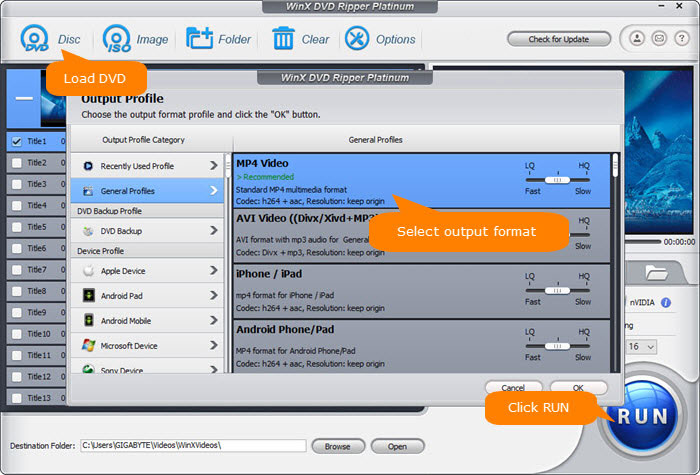
WinX DVD Ripper is a stand-alone free DVD ripping software program for Windows and Mac. It is more professional and concentrated on ripping copy-protected DVDs without the assistance of extra plugins. It digitizes DVDs and converts DVD folders/ISO images to MP4, MOV, MKV, FLV, MPEG, MP3, iPhone, iPad, Apple TV, Android, PS4, Xbox One Digital supported videos at fast speed.
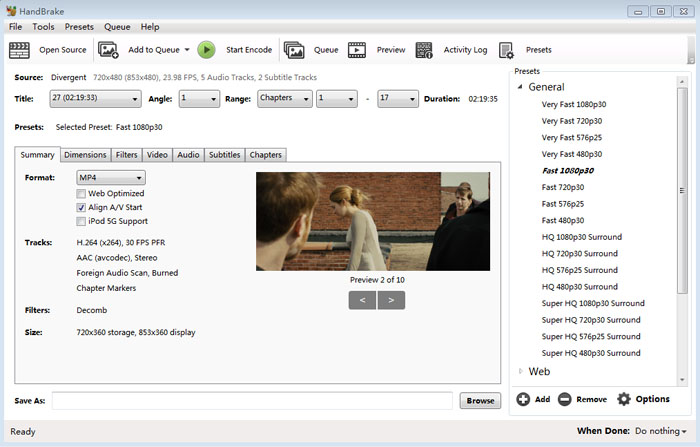
HandBrake is an open source, GPL-licensed, multiplatform, multithreaded video transcoder, available for Windows, Linux and Mac OS X. It is capable of converting general or homemade DVDs. If you want to rip copy-protected DVD with HandBrake, you need to install libdvdcss. Besides DVD ripping, it can also decode and encode videos.
Distribution Information
WinX DVD Ripper |
HandBrake |
|
Initial Release |
2006 |
2003 |
Developer(s) |
Digiarty Software Inc. |
HandBrake community |
Market Standing |
With 14 years of experience, the software has been the first choice of millions users for digitalizing DVD discs to hard drive. It stands good reasons to rival HandBrake in some aspects. |
As one of the household bellwether free DVD rippers, HandBrake has dominated the market and made a clean sweep of most similar DVD backup and conversion software over years. |
Part 3. Handbrake vs WinX DVD Ripper: DVD Compatibility & Output Flexibility
1. Supported DVD Sources
HandBrake: Accepts DVD discs, VIDEO_TS folders, Blu-ray folder structures, and common video files as input. Out of the box, it works well with homemade and unprotected DVDs. CSS-encrypted discs may be readable after installing libdvdcss, but newer copy protection schemes found on many commercial DVDs are generally unsupported.
WinX DVD Ripper: Supports DVD discs, ISO images, and VIDEO_TS folders, while also handling a wide range of commercial DVD protections, including CSS, region codes, Sony ARccOS, UOPs, APS, RCE, and many newer structural protections. This allows most retail movie DVDs to be processed without installing additional decryption tools.
2. Output Formats and Device Profiles
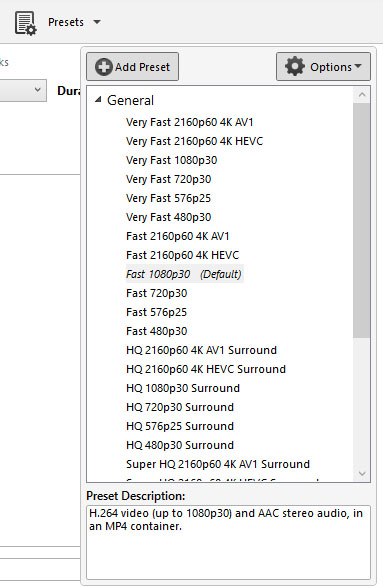
HandBrake: Exports videos in MP4, MKV, and WebM containers with extensive encoder settings for H.264, H.265 (HEVC), AV1, VP8, VP9, and more. It also includes presets for popular playback devices, web streaming, and general-purpose encoding, making it well suited for users who prefer fine control over compression settings.
WinX DVD Ripper: Offers more than 350 built-in output profiles covering MP4, MOV, AVI, WMV, MPEG, FLV, H.264, MP3, ISO backup, and additional formats. Presets are available for smartphones, tablets, TVs, gaming consoles, media servers, and other playback devices, reducing the need for manual configuration.
Our Take: HandBrake provides greater control over encoding parameters and is an excellent choice for converting homemade DVDs or existing video files. WinX DVD Ripper stands out when compatibility is the priority, especially if you frequently archive commercial DVDs, create ISO backups, or need ready-to-use presets for different devices.
Part 4. Handbrake vs WinX DVD Ripper: DVD Copy Protection Test
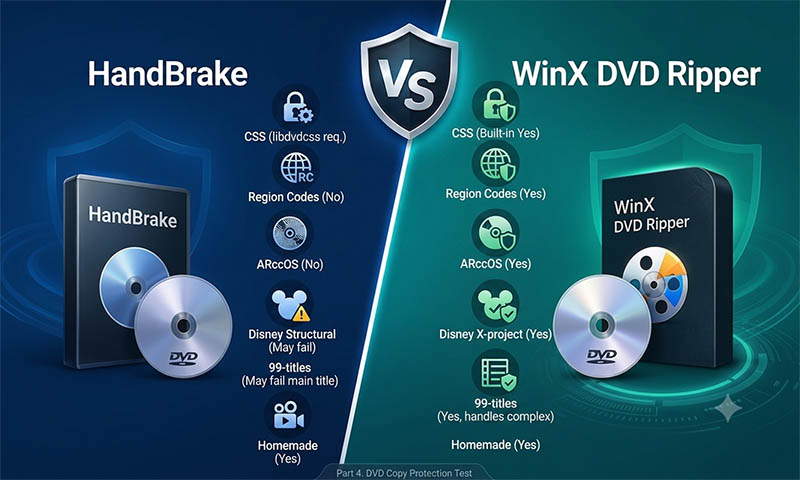
For many users, the biggest difference between HandBrake and WinX DVD Ripper isn't encoding quality, it's whether the software can successfully open and process commercial DVDs. To evaluate their real-world compatibility, we tested both applications with retail movie DVDs using several common copy protection schemes.
DVD Protection |
WinX DVD Ripper |
HandBrake |
CSS Encryption |
Supported with built-in decryption |
Requires libdvdcss |
Region Codes |
Supports region-coded DVDs |
Not supported |
Sony ARccOS |
Supported |
Generally unsupported |
Disney Structural Protection |
Supported |
May fail to process correctly |
99-title DVDs |
Designed to handle complex DVD structures |
May have difficulty identifying the main title |
Homemade DVDs |
Supported |
Supported |
HandBrake is primarily used for transcoding unprotected video sources. It can read some CSS-encrypted DVDs after installing libdvdcss, but it generally cannot bypass more advanced copy protection found on many commercial movie discs.
WinX DVD Ripper, by comparison, includes built-in DVD decryption and handled every test disc in our evaluation without requiring additional software. The process was automatic, allowing the discs to load directly for conversion or backup.
Our Take: If you mainly convert homemade DVDs or VIDEO_TS folders, both programs are capable choices. However, for commercial DVDs purchased from retailers, WinX DVD Ripper offers a noticeably smoother experience because it supports a much broader range of copy protection technologies without extra setup.
Part 5. WinX DVD Ripper vs HandBrake Benchmark Test
To compare the real-world performance of WinX DVD Ripper and HandBrake, we tested both programs with the same Wreck-It Ralph DVD (Title 1) under identical output settings. The test focused on DVD analysis speed, total processing time, system resource usage, and output quality.
Test Environment
Test Item |
Details |
Source |
Wreck-It Ralph DVD (Title 1) |
Output Format |
MP4 H.264 |
Duration |
1 hour 41 minutes |
Comparison Metrics |
Parsing time, conversion time, total processing time, GPU/CPU usage, and video quality scores |
Speed Performance
Performance |
WinX DVD Ripper |
HandBrake |
DVD Analysis Time |
5 sec |
31 sec |
Conversion Time |
616 sec |
575 sec |
Total Processing Time |
648 sec |
656 sec |
Effective FPS |
177.14 FPS |
100.30 FPS |
Result: The overall processing time between the two programs was very close, with WinX DVD Ripper completing the task slightly faster (648 seconds vs 656 seconds). However, the larger difference appeared during DVD analysis, where WinX loaded and analyzed the disc significantly faster than HandBrake.
WinX also achieved a higher effective processing speed of 177.14 FPS, compared with 100.30 FPS from HandBrake, showing an advantage in handling the initial DVD preparation stage and overall workflow efficiency.
Output Quality Comparison
Quality Metric |
WinX DVD Ripper |
HandBrake |
Output Size |
967 MB |
976 MB |
Bitrate |
1201 kbps |
1225 kbps |
Resolution |
720×404 |
713×360 |
PSNR |
13.7858 |
N/A |
SSIM |
0.5952 |
N/A |
Result: Both programs produced similar file sizes, but the HandBrake output showed noticeable playback issues in this test. Without libdvdcss installed, HandBrake was unable to properly preview the protected DVD source, and the converted video contained heavy blocking artifacts, making it unsuitable for normal viewing.
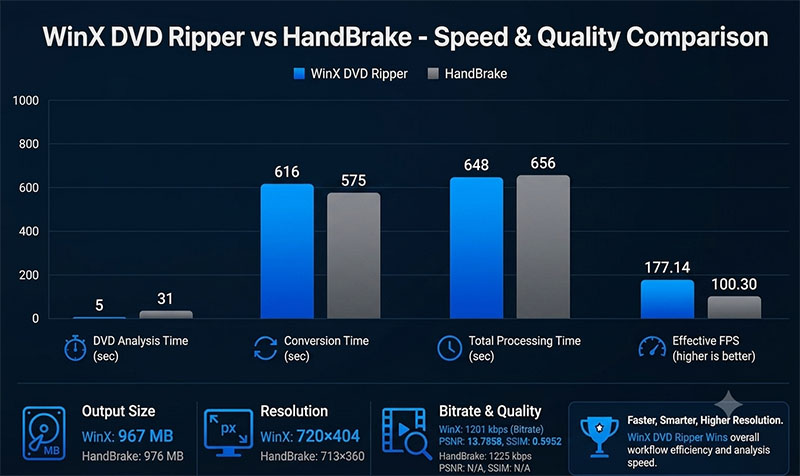
This result does not represent HandBrake's encoding quality itself. Instead, it highlights the importance of DVD decryption support when processing commercial discs. A successful DVD rip requires accurate source access before encoding quality can be evaluated.
Benchmark Conclusion: In this DVD test, WinX DVD Ripper provided a smoother workflow with faster disc analysis, higher effective FPS, and a properly viewable output file. HandBrake remains a capable video encoder, but its DVD ripping performance depends heavily on whether the source disc is fully accessible and correctly decrypted.
Want to see how DVD rippers perform in real tests? Our complete DVD ripper benchmark report covers processing speed, GPU acceleration performance, copy-protection handling, and video quality comparisons.
Part 6. WinX DVD Ripper vs HandBrake: Hardware Acceleration
Hardware acceleration plays an important role in modern video processing, especially when converting large DVD collections. Both WinX DVD Ripper and HandBrake support GPU-assisted encoding, but they approach acceleration differently.
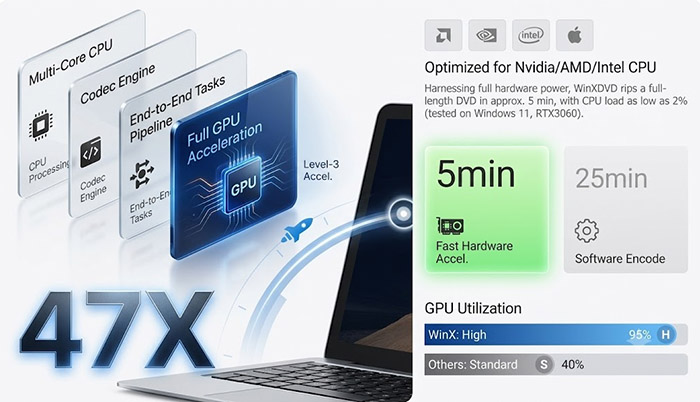
WinX DVD Ripper: Supports Intel Quick Sync, NVIDIA NVENC/CUDA, and AMD hardware acceleration technologies to reduce encoding workload and improve conversion efficiency. During our DVD benchmark test, WinX completed the conversion with lower average CPU usage while maintaining a higher effective FPS, helping achieve a smoother ripping process.
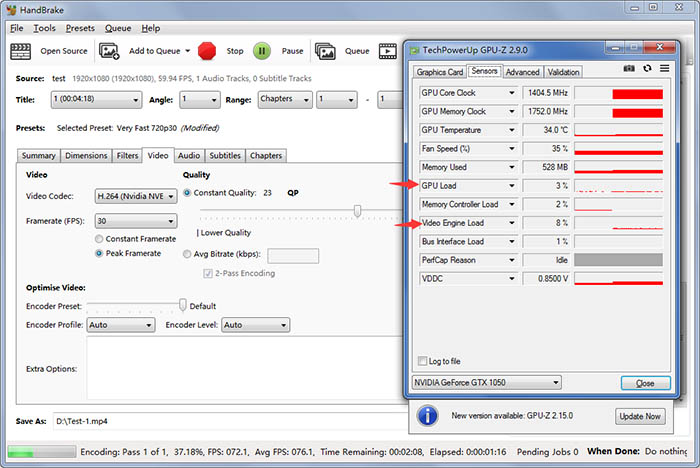
HandBrake: Supports hardware encoding through Intel Quick Sync Video, NVIDIA NVENC, AMD VCN, and Apple VideoToolbox. However, hardware acceleration mainly benefits the encoding stage. Some operations, including DVD scanning, filtering, and source analysis, may still rely heavily on CPU performance.
Hardware Acceleration |
WinX DVD Ripper |
HandBrake |
Intel Quick Sync |
Supported |
Supported |
NVIDIA NVENC / CUDA |
Supported |
Supported |
AMD Hardware Encoding |
Supported |
Supported |
GPU-assisted DVD Workflow |
Integrated into DVD ripping process |
Mainly focused on video encoding |
Our Take: Both applications can take advantage of modern GPUs, but the difference is in how acceleration fits into the overall workflow. WinX DVD Ripper provides a more streamlined hardware-assisted DVD conversion experience, while HandBrake offers greater flexibility for users who want to fine-tune encoding parameters.
Part 7. WinX DVD Ripper vs HandBrake: Ease of Use
The learning curve is another major difference between WinX DVD Ripper and HandBrake. While both programs can produce high-quality digital videos, they are designed with different levels of user control in mind.
WinX DVD Ripper: Uses a more straightforward workflow. Users can load a DVD, select an output profile, adjust a few basic settings, and start conversion without dealing with complicated encoding parameters. The built-in profiles are especially helpful for users who want to prepare videos for phones, TVs, Plex servers, or other devices.
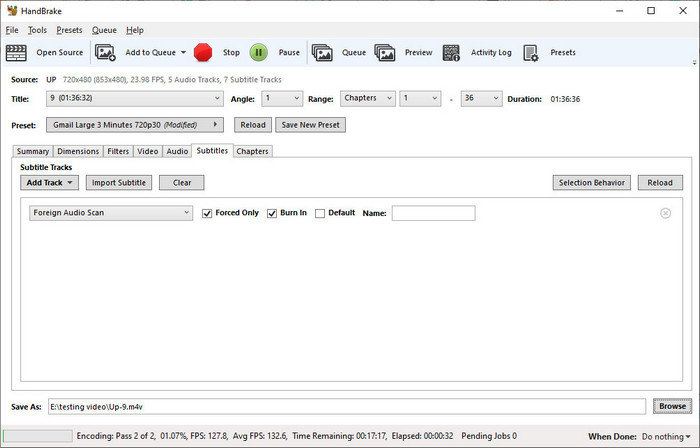
HandBrake: Provides deeper control over video encoding, including codec selection, bitrate adjustment, filters, frame rate options, and advanced audio settings. This flexibility makes it attractive to experienced users, but beginners may need more time to understand the available options and choose the right settings.
Usability |
WinX DVD Ripper |
HandBrake |
Interface |
Simple and workflow-focused |
Feature-rich but requires more learning |
Preset Options |
350+ device and format profiles |
General, Web, Device, and encoding presets |
Advanced Settings |
Basic customization options |
Extensive encoder controls |
Best For |
Users who want fast DVD conversion with minimal setup |
Users who prefer detailed control over encoding |
Our Take: HandBrake is a better fit for users who enjoy adjusting encoding settings and optimizing output files manually. WinX DVD Ripper is easier to approach for anyone who wants to convert a DVD collection quickly without spending time learning complex parameters.
Neither of these two fits your exact needs? Whether you are looking for an open-source FFmpeg frontend, a Mac-native DVD ripper, we’ve evaluated all top contenders in our top HandBrake alternatives comparison matrix.
Part 8. Frequently Asked Questions
Can HandBrake rip protected DVDs?
HandBrake is mainly designed for converting unprotected video sources. Some CSS-encrypted DVDs can be accessed with libdvdcss, but it does not provide built-in support for many commercial DVD protections such as region codes, ARccOS, or complex DVD structures.
Is WinX DVD Ripper faster than HandBrake?
In our DVD benchmark test, WinX DVD Ripper showed faster DVD analysis and a higher effective FPS. The total conversion time was similar, but WinX provided a smoother workflow when processing the DVD source from loading to final output.
Does HandBrake produce better video quality than WinX DVD Ripper?
Both can produce high-quality video when using similar encoding settings. HandBrake provides more manual control over codecs and compression parameters, while WinX DVD Ripper focuses on balancing output quality, file size, and ease of conversion through optimized profiles.
Does HandBrake need libdvdcss to rip DVDs?
For some CSS-protected DVDs, HandBrake requires libdvdcss to access the disc content. However, installing libdvdcss does not enable HandBrake to handle all commercial DVD protection methods.
Which is better for Plex, WinX DVD Ripper or HandBrake?
Both can create Plex-compatible videos, especially with MP4 and H.264 output. WinX DVD Ripper is more convenient for users who want direct DVD-to-Plex conversion, while HandBrake offers more encoding adjustments for users who prefer manual optimization.
Which one is easier to use, WinX DVD Ripper or HandBrake?
WinX DVD Ripper is generally easier for beginners because it provides ready-made profiles and a more straightforward DVD conversion workflow. HandBrake offers more advanced settings, but users may need more time to understand encoding options.
Does HandBrake support GPU acceleration?
Yes. HandBrake supports hardware encoding through technologies such as Intel Quick Sync, NVIDIA NVENC, AMD VCN, and Apple VideoToolbox. However, GPU acceleration mainly improves encoding speed rather than DVD analysis or source preparation.
Do I need both HandBrake and WinX DVD Ripper?
It depends on your workflow. HandBrake is a strong choice for advanced video encoding, while WinX DVD Ripper combines DVD reading, conversion, compression, and device-ready output in one application. Many users only need one tool depending on their DVD backup goals.