






 win
win

 Super Resolution
  Video Stabilization
  Frame Interpolation

 Denoise Image
  Restore Old Photo
  Unblur Image
  Recover Face
  Upscale Image
  Colorize Photo
 Video Conversion >
 Video Compression >
 Screen Recording >



8 Best Video Upscaler Software [Tested & Compared]

Summary: This is a tried-and-true test about 8 best AI video upscalers/enhancers, accompanied by before-and-after images for reference. To help you choose the desired one, their key features, pros, cons, price availability, and rating from trusted sites will also be provided.
Many videos we actually watch are still blurry, low-resolution, or heavily compressed. Old clips, downloaded footage, or even social media videos often don’t match the sharp quality our screens can support. Shooting in true 4K or 8K isn’t always possible, and upgrading your camera or gear isn’t realistic for most people. To make it easier to get higher resolution videos like 4K videos, here comes the best video upscaling software. After tried-and-true test, we have picked 8 best video upscaler software to help you upscale and enhance videos from low resolution to high resolution.
Industry Update: Adobe's acquisition of Topaz Labs is one of the biggest developments in AI video enhancement in 2026. It confirms that AI-powered restoration, denoising and upscaling are becoming core creative technologies rather than standalone niche tools.
8 Best AI Video Upscaling Software to Enhance Video Quality
Video upscaler tools are everywhere now, but not all of them are worth your time. Some barely make a difference, and others ruin the original look with weird artifacts or over-processing. We tested a bunch of them and narrowed it down to 8 video upscalers that actually work the way they’re supposed to. Let's start with Topaz Video AI.
How I test:
I tested all the best AI video upscalers/enhancers with the same video in the same environment.
- The test environment: GeForce GTX 650, Intel(R) Core(TM) i5-4430 CPU@3.00GHz, 8GB RAM, Windows 10 64bit.
- The test video: A shaky, blur, and noisy video in 360p. The video source: https://cdn.pixabay.com/video/2016/09/21/5598-185024745_tiny.mp4 (10s / MP4 / 360p / 605KB).
- The test metrics: I spent hours testing every video upscaler software reviewed here, and ensured if these video upscaling software can stabilize, deblur, denoise, and convert the video to 4K. Find out more about how we test.
Topaz Video AI
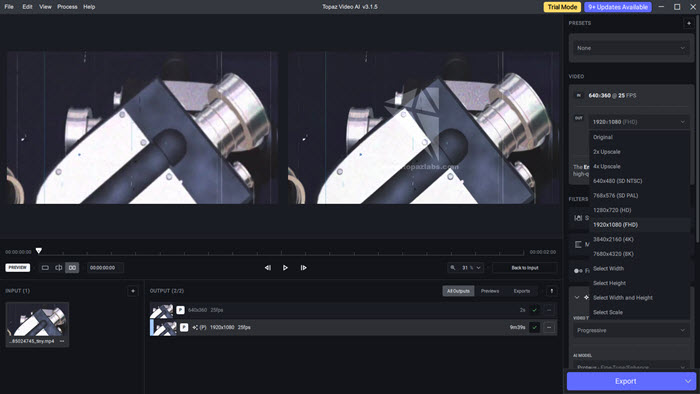
A comprehensive best video upscaler employs neural networks to enhance videos through AI video upscaling, motion interpolation, and shake stabilization.
Developed by Topaz Labs, Topaz Video AI utilizes advanced machine learning algorithms and artificial intelligence technology to improve the quality and resolution of videos up to 16K, making them sharper, clearer, and more detailed.
The machine learning algorithm, known as temporal and spatial neural network (TSNN) technology, helps analyzes multiple frames in a video sequence to understand motion and details, and then uses this information to intelligently enhance each frame individually. After training a lot of videos, the test results are far better than many other video upscaling software.
After the recent updates, the best video upscaling software from Topaz feels more polished in everyday use. The new Proteus Natural model produces a softer, more natural upscale that avoids the crunchy sharpening Proteus sometimes had, especially on older footage. Noise handling is also better with the added denoise filter. Stability fixes for Nyx XL and Aion help prevent dropped frames and color issues, and exports generally run more smoothly.
See full review about Topaz Video AI >>
Key features:
- Enhances and upscales video to 4K/8K/16K at 60fps/120fps;
- De-interlaces videos;
- Motion interpolation (16x);
- Motion deblur;
- Shake stabilization;
- Creates cinematic slow-mo;
- Convert SDR to HDR;
- Trims and crops videos;
- Removes duplications.
- Fewer motion artifacts;
- Recovers video details; recovers low-quality/noisy videos;
- Deinterlaces interlaced footages;
- Restores old footage;
- Converts DVDs to Blu-ray quality ;
- Upscales CG or cartoons;
- The results are natural and smooth;
- Smoother panning and no camera shake;
- Supported inputs: AVI, DV, FLV, M1V, M2TS, MKv, MOV, MP4, MPG, MPEG, WebM, WMV, TS, VOB, MXF, M4V; & image sequences (png, tif, tiff, jpg, jpeg, exr);
- Supported outputs: ProRes, H.264, H.265, VP9, TIFF, PNG, JPEG, and EXR;
- Previews the results;
- AI-powered, process videos automatically;
- Easy for newbies.
- Requires a powerful GPU and CPU;
- Slow processing speed, very time-consuming;
- The output video file size is very large;
- The free version has a watermark;
- Unknown error when upscaling videos to 4K 60fps.
Compatibility: Windows, Mac
Rating: 4.6/5 (G2)
Pricing: Topaz Video is subscription-only: $25/month when billed annually ($299 total), or $33/month with monthly billing. The annual plan is non-cancellable during the year.
My experience with Topaz Video AI's video upscaling:
Using this video upscaler software was surprisingly simple. It offered five different AI video enhancement models I could choose from right away, including options to upscale videos to 4K, 8K, or 16K, fix low-quality or noisy footage, deinterlace videos, restore old recordings, and even enhance CG or cartoon content. On top of that, there were eight handy presets like 4K slow motion, 8K/16K super slow motion, upscale to 4K, upscale to 4K at 60FPS, deinterlacing, crop stabilization, and upscaling to HD quality. Customizing videos took me just a few clicks, and everything felt intuitive and user-friendly. Here is detailed Topaz Video AI performance test >>
Winxvideo AI
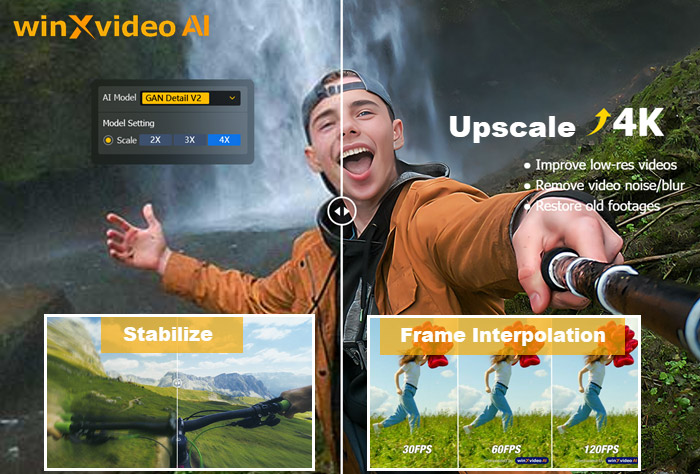
The best AI-powered video upscaler/enhancer for low-resolution videos that can upscale resolution, stabilize videos, and boost FPS. Download Winxvideo AI video enhancer to upscale videos to 4K for higher quality.
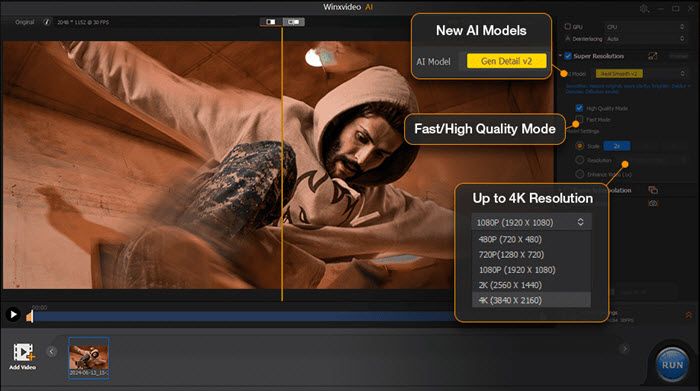
Winxvideo AI is an advanced AI-powered best video upscaler that enhances videos and images with superior resolution, clarity, and quality. It upscales to 4K, stabilizes shakiness, and increases frame rates to 60fps/120fps/240fps. The new Gen Detail model enhances sharpness and perceptual quality, while Real Smooth restores visuals by smoothing flaws and improving fidelity. Both integrate cutting-edge AI-powered Deblurring and Denoising technologies. Additionally, the software now offers Fast Mode for speed and High Quality Mode for the best results, along with three resolution presets (1080p/2K/4K) in Super Resolution for easy selection.
With NVIDIA® TensorRT™ support, Winxvideo AI optimizes AI inference speed for faster processing. Whether working with camera recordings, AI-generated images, or videos from iPhones, GoPros, and drones, it delivers top-tier enhancement. Ideal for photographers, vloggers, and marketers, Winxvideo AI refines visuals, elevates content quality, and helps engage audiences more effectively.
Key Features:
- Enhances and upscales old, low-quality, noisy video to 4K;
- Upscales & restores images and photos to 4K/8K/10K ;
- Stabilizes shaky videos;
- Boosts FPS to 60fps/120fps/240fps and creates slow-motion videos;
- Super Resolution mode can automatically deblur, denoise, and enhance videos;
- Enhances videos resolution by 1x, 2x, 3x, and 4x to reach 4K;
- Smoothens video by boosting FPS to 60fps, 120fps, 240fps, and even 480fps;
- Stabilizes videos to reduce camera shake;
- It requires minimal computer resources and;
- AI-powered. GPU-accelerated. 47x faster. High-quality.
- Easy for newbies.
- Requires quite powerful computer;
- Sometimes the software crashes.
* APIs for GPU Computing: Vulkan ≥ 1.2.x, OpenCL ≥ 1.0.
* NVIDIA: Quadro 410 or higher, GeForce GT 630 or higher, GeForce GTX645 or higher.
* Intel: Intel® UHD Graphics 620 (WHL GT2) or higher, Graphics 510 or higher.
* AMD: AMD Radeon RX550 series or higher.
My experience with Winxvideo AI's video upscaling:
I had noticed that most AI-based video upscaling software demands really powerful, high-end hardware to work properly. If I was using a low-end computer, there’s a good chance the software might crash, or worse, the upscaling process might not even finish. Some tools wouldn't even let me install them!
But Winxvideo AI was a total game-changer. Unlike other best video upscaling software, it’s lightweight and super easy to use. I was able to take low-resolution videos and upscale them to 4K effortlessly, and the quality improvement was impressive. The best part? The whole process was straightforward - almost like a one-click solution! Every function was automatic that I only needed to select an option and Winxvideo AI would do the rest jobs for me.
FYI: The Winxvideo AI you just downloaded has a big improvement! There are 4 new AI models in Super Resolution, two for AI video enhancement and two for AI image enhancement, and a "Fast Mode" for much faster video upscaling and enhancing. That will give you a better result when AI video upscaling.
- Added: "Gen Detail" model for generating more details, clarity, and sharpness for videos/images, and delivering better perceptual quality.
- Added: "Real Smooth" for video/image restoration, smoothing, flaw elimination, and better fidelity.
- Integrated: Breakthrough AI-powered Debluring and Denoising technologies in "Gen Detail" and "Real Smooth" models.
- Added: "Fast Mode" and "High Quality Mode" for video super-resolution, offering users flexibility between speed and quality.
- Embedded: The NVIDIA® TensorRT™ supports into the new AI models to optimize inference speed.
- Included: Three resolution presets (1080p/2K/4K) in Super Resolution, enabling users to select output resolution directly.
- Implemented: Denoising effect across all AI models of Super Resolution, enhancing image clarity.
AVCLabs Video Enhancer AI
An AI-based video upscaling and video quality enhancement software that uses neural networks to upscale video from SD to HD, HD to 4K, and 4K to 8K.
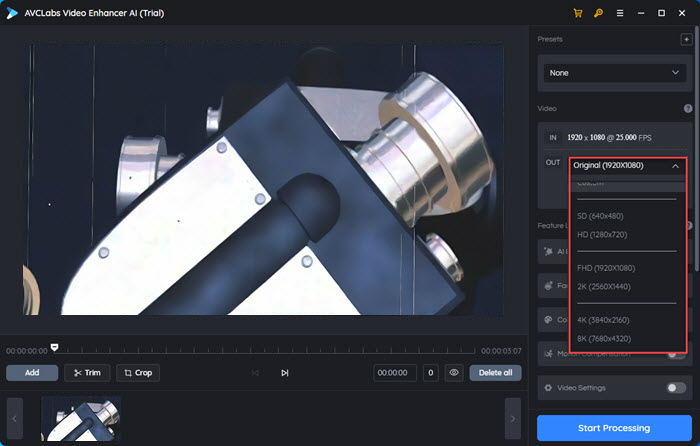
AVCLabs Video Enhancer AI is also an AI-based video upscaler software to help users upscale video resolution and enhance video quality. It can upscale a video up to 400%, from 480p to 1080p, 720p to 4K, 1080p to 4K, 4K to 8K, etc. at 60fps or even 120fps. It gives your footages a new look, while keeping details and motion consistency. AVCLabs Video Enhancer AI is really a good option to give a new birth to your old homemade videos, music videos, recordings, anime episodes, movies clips, etc.
How does AVCLabs Video Enhancer AI upscale videos? It adopts powerful algorithms and AI technology to train hundreds of videos and then empowers itself to own the ability to automatically enhance a video. To make the old low-resolution video look clear and high-quality, this AI video upscaler will upscale a video by enlarging video resolution, fixing blur, denoising, deinterlacing, reducing flickers, reduce shaking, enhancing and correcting color, interpolating frames, removing scratches, sharpening the details, and so on.
Key features:
- Enhances and upscales videos from 480p to 1080p, 1080p to 4K, and 8K;
- De-noises videos;
- De-interlaces videos;
- Face refinement;
- Creates slow-mo videos;
- Colorizes videos;
- Interpolates videos;
- Trims and crops videos.
- Enlarges video resolution to 4K/8K;
- Outputs videos up to 60fps/120fps;
- Reduces flickers and noises;
- Fixes blurry videos;
- De-interlaces videos;
- Adjusts the brightness/saturation/contrast, bitrate and audio;
- Retouches faces and beautifies portrait-style footages;
- Supports newer encoding formats: H.264, H.265, VP9, and AV1;
- Face enhancement;
- Motion compensation.
- Requires a powerful GPU and CPU;
- The processing time of a 4K video is very long;
- Limited output formats;
- It takes a long time to preview a video;
- The trial version has a big watermark;
- The computer runs very slow when upscaling a video.
Compatibility: Windows, Mac
Rating: 5.0/5 (G2)
Pricing: A trial version is available. The Perpetual plan is priced at $199.90 (1-month plan: $39.95, 1-year plan: $89.95).
My experience with AVCLabs's AI video upscaling:
The video upscaling options were easy for me to find in the software, including "Upscale to HD", "Upscale to 4K", "4x Slow Motion", "8x Super Slow Motion", "Convert to 60fps", "Upscale to 4K and Colorize", and "Upscale to 4K and Convert to 60fps". Plus, AI features were obvious like AI Enhancement, Face Enhancement AI, Colorize AI, and Motion Compensation AI, letting me enhance my video with just one click.
The software also worked wonders with old footage. Besides converting 360p to 4K, it could make my older videos look crystal clear and high-quality on modern, larger screens.
VideoProc Converter AI
An AI-powered 4K video upscaling software designed to enhance videos of all types, along with other video processing abilities.
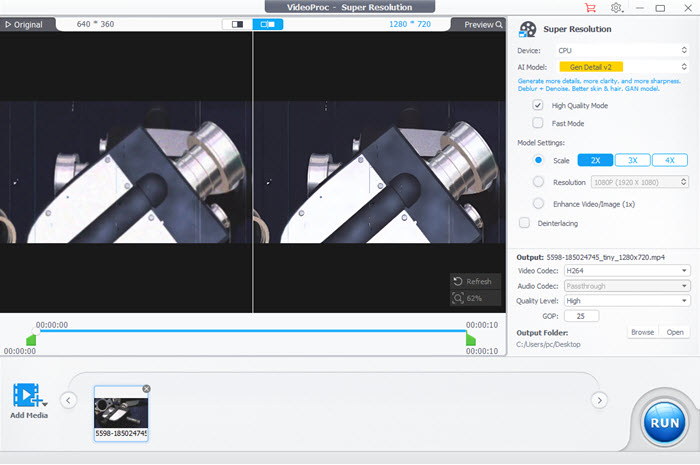
VideoProc Converter AI is one of the best video upscaler software for low-resolution videos, leveraging its Super Resolution technology to enhance videos and images by up to 400%. It can transform 360p footage into HD or 4K, preserving fine details without introducing frame loss, color distortion, or flickering effects. Whether the source is outdated VHS tapes, mini DVs, DVDs, or low-res online videos, it effectively elevates their quality, making them suitable for modern screens.
Beyond basic upscaling, VideoProc Converter AI includes powerful tools like AI stabilization and AI Frame Interpolation, designed to handle dynamic, high-motion content such as sports or gaming footage. These features ensure smooth playback, even with fast-moving scenes and complex details. Despite its advanced capabilities, the software remains lightweight and efficient, minimizing the load on your hardware. It offers real-time Super Resolution, dynamically adjusting GPU memory usage to optimize performance, ensuring seamless AI video upscaling with minimal resource demands.
Key features:
- Upscale videos/images by 400% to 4K/8K/10K.
- AI frame interpolation.
- AI stabilization.
- AI denoise.
- All-in-one AI video upscaling solution: enhance resolution, boost fps, deblur, denoise, and deinterlace;
- The Fast Mode and High Quality Mode for more flexibility between upscaling speed and quality;
- Wide format compatibility: old VHS tapes, mini DVs, DVDs, and low-res videos;
- Lightweight and efficient.
- Limited customization;
- Hardware demands for high-resolution upscaling;
- Not a one-size-fits-all solution.
Compatibility: Windows
Rating: 4.2/5 (Trustpilot)
Pricing: Free; $34.95/year (3PCs), $54.95 for a lifetime license (1PC), $79.95 for a family lifetime license (3-5PCs).
My experience with VideoProc's AI video upscaling:
VideoProc Converter AI delivered a solid overall performance in my test. I upscaled a 720p*346 video by 4x using its Gen Detail V3 and Real Smooth V3 and found that it produced a noticeable improvement without making the footage look overly processed. Edges and fine details became sharper, while motion remained natural and frame-to-frame consistency was good. It also handled noise reasonably well, earning 4.2/5 across image quality, detail, motion fidelity, consistency, and noise reduction.
Want to know how well VideoProc actually enhances low-resolution footage? Check out our VideoProc Converter AI review for real-world AI upscaling tests, image comparisons, and performance results.
PowerDirector
An AI video editor with AI video enhancement for users with any skill level.
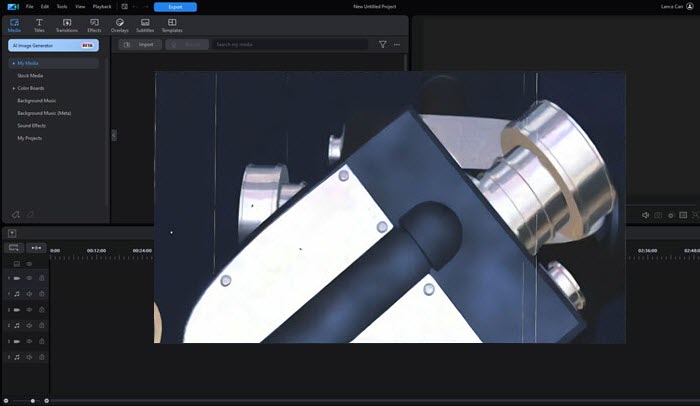
PowerDirector, developed by CyberLink, offers an advanced AI video enhancement tool that automatically improves both video and audio quality. Using artificial intelligence, it analyzes footage to make adjustments in color correction, lighting, and sound. The software excels as an AI video upscaler for 16K video upscaling, providing features like denoising, white balance fixes, and video stabilization for shaky footage. Whether you're a beginner or professional, PowerDirector simplifies the editing process, enabling users to create polished, high-quality content with ease.
Beyond its core AI video upscaling feature, the best video upscaler offers advanced features to fine-tune your videos, including HDR effects, color matching, and lens corrections. You can also elevate the visual impact with color grading, titles, transitions, and pan/zoom effects. For added creativity, the software includes AI Sky Replacement, allowing you to replace dull skies with breathtaking landscapes.
The latest updates make the best video upscaler feel much more capable and creative. Text-to-Video and Image-to-Video now leverage high-end models like Kling 2.6, Vidu Q2, Sora-2, and Runway Gen-4, producing smoother motion and more coherent storytelling. Cloud-based enhancements deliver cleaner, sharper upscales with improved frame interpolation. The AI background remover nails fine details like hair and edges, while HDR support adds richer colors and deeper contrast.
Key features:
- AI video enhancement in a click;
- Stabilize action cam footage and correct lens distortions;
- Achieve crystal-clear audio with AI-powered Audio Enhancements;
- Eliminate grain and background noise using video and audio denoise;
- Enhance colors with the Split Toning tool for a more dramatic effect.
- AI-Powered enhancement;
- Packed with advanced features for professional users;
- User-friendly interface, perfect for beginners to learn quickly;
- Supports a wide range of formats, including 360-degree and 3D videos.
- Loss of detail in extreme upscaling;
- Upscaling can be resource-intensive, requiring a powerful computer;
- Learning Curve for Advanced Features;
- Occasional visual artifacts, like blurring and pixelation.
Compatibility: Windows, Mac
Rating: 5.0/5 (PCMag)
Pricing: Premium version available for a 30-day free trial, then $19.99/month.
My experience with PowerDirector's AI video enhancement:
It supported all of my video formats, and the best part was I can upload directly to social media, saving me tons of time. What really impressed me, though, was its AI-powered video and audio enhancements, plus support for NVIDIA Broadcast. Whether I was fixing shaky action cam or drone footage, restoring old videos, adjusting uneven lighting, improving bad audio, or upscaling videos to give them a professional touch, this video upscaler software made it all super easy.
HitPaw Video Enhancer
An AI video resolution enhancer to enhance and enlarge low-res videos up to 4K/8K, along with noise reduction, anime/human face repair, and black and white movies colorizing.
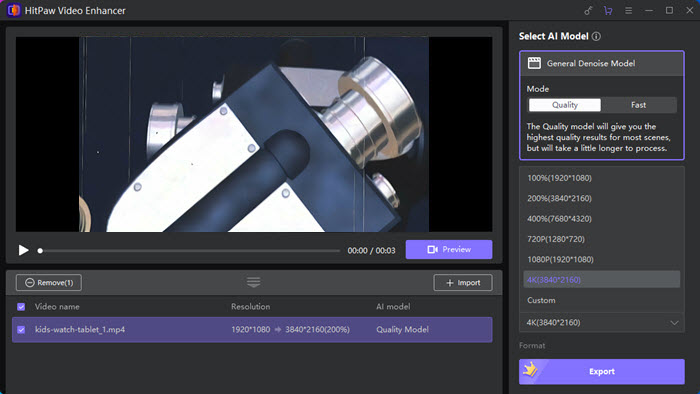
HitPaw Video Enhancer (HitPaw VikPea) is a modern video upscaler software using AI technology to improve the quality of videos by enhancing various aspects such as resolution, brightness, sharpness, and colors. It provides users with a user-friendly interface and a range of features to enhance and optimize their videos.
This video upscaler software extends beyond basic upscaling with tools like SDR-to-HDR conversion for richer color and brightness, as well as stabilization and frame interpolation for smoother motion.Also, it supports downscaling high-resolution 4K videos so as to reduce the video size and make the video compatible with the specific display requirements.
HitPaw can noticeably sharpen edges and improve clarity, especially in faces and animated content. However, it is not without limitations. Some users report that the AI can occasionally over-smooth textures, giving footage a slightly artificial or plastic look, particularly in skin details.
Key features:
- Enhances and enlarges low-res videos to 4K;
- Noise reduction;
- Sharpens videos;
- Repairs videos of anime and human face;
- Colorizes black and white movies.
- Supports batch processing;
- GPU-accelerated, fast and high-efficient;
- No watermarks;
- 4 AI models: Denoise Model, Animation Model, Face Model, and Colorize;
- Adds colors to black and white videos;
- Creates animations from videos;
- Removes noises;
- Previews the upscaled videos;
- No network required for local videos.
- Needs Windows 10/11 64bit and macOS 10.15 computer, or above;
- Requires powerful GPU and CPU to smoothly process videos;
- No complete control over specific parameters or advanced settings;
- Sometimes it create artifacts;
- Limited outputs: MOV and MP4.
Compatibility: Linux, Mac
Rating: 2.0/5 (G2)
Pricing: A trial version is available. The perpetual version is priced at $437.99 (1-month plan: $53.99 , 1-year plan: $124.99).
You can click here for a thorough review of HitPaw Video Enhancer and performance test >>
My experience with HitPaw's AI video upscaling:
I recently tried HitPaw Video Enhancer, and it offered an impressive range of tools to fine-tune videos. I was able to easily adjust brightness, contrast, saturation, and sharpness, which helped bring out the best in my footage. The noise and grain reduction feature worked great, leaving my videos cleaner and smoother. Batch processing was a huge time-saver, especially for larger projects. Since results depend on the original video quality and chosen settings, I found experimenting with adjustments and using the preview option really helpful to achieve the perfect look. Overall, it’s a versatile and user-friendly video enhancer.
DVDFab Video Enhancer AI
An AI-based tool for video quality enhancement and resolution enlargement, trained by a neural network plus super-resolution technology.
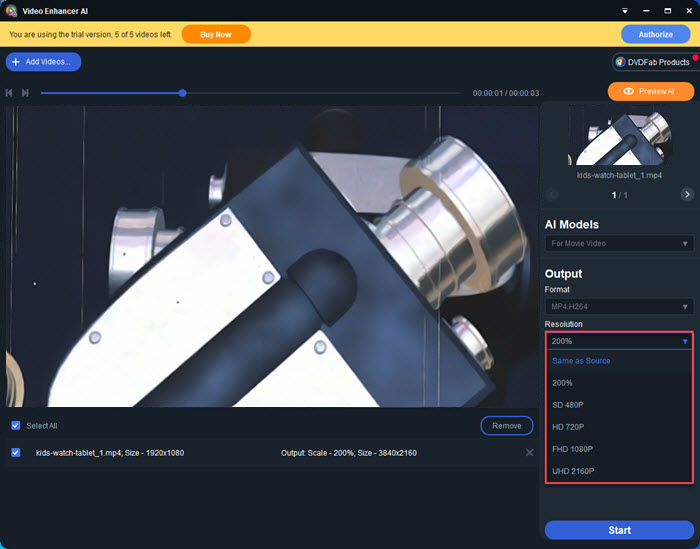
DVDFab Video Enhancer AI is a powerful AI video upscaler to enhance video quality to bring your old videos to new life. It uses Super Resolution technology to upscale videos to 4K seamlessly. It offers dedicated options tailored to different types of footage, including an anime model, a denoise model, and a general model for balanced video restoration.
By predicting the missing pixels through a neural network, the best video upscaling software of DVDFab replenishes the details and sharpness of low-resolution videos so that the quality will be clearer and higher than the original videos. Also, its noise reduction capability can effectively reduce various types of noise in videos, such as grain, compression artifacts, and random pixel fluctuations.
In addition to that, DVDFab Video Enhancer provides tools to adjust the brightness, contrast, and saturation levels of videos. These adjustments allow users to fine-tune the visual elements and improve the overall color accuracy and vibrancy of their videos.
Key features:
- Enhances video quality and enlarges video resolution to 4K;
- De-blocks videos;
- De-interlaces videos;
- Reduces noises;
- Corrects colors.
- Inputs 3GP, ASF, AVI, FLV, M2TS, MOV, MP4, M4V, MPEG, DAT, MKV, RMVB, RM, TS, VOB, WMV, etc;
- Outputs MP4 H.264, MP4 H.265, MKV H.264, and MKV H.265;
- Upscales videos to 4K;
- Boosts saturation and brightness of images;
- Corrects colors;
- Reduces noises and removes artifacts;
- Sharpens blurry lines;
- Supports all mainstream graphics cards.
- The installation process is very slow and costs a lot of time;
- Upscaling conversion failed error message occurs occasionally;
- The trial version can only upscale 5 videos;
- The full version is costly;
- Only outputs 2 formats: MP4 and MKV.
Compatibility: Windows
Rating: 4.5/5 (G2)
Pricing: A trial version is available. The lifetime version is priced at $99.99 (1-month plan: $59.99, 1-year plan: $79.99).
My experience with DVDFab's AI video upscaling:
I recently tested DVDFab Video Enhancer AI, and it’s an impressive tool for improving video quality with great results. The software exceled at upscaling resolution, enhancing video quality, and improving color and sharpness. It also removed distractions like noise or grain, giving my video a cleaner, more professional look. The process was quite easy and intuitive, with a simple, one-click solution.
Video2X
Open-source free video upscaler that upscales videos, GIFs, and images in high quality.
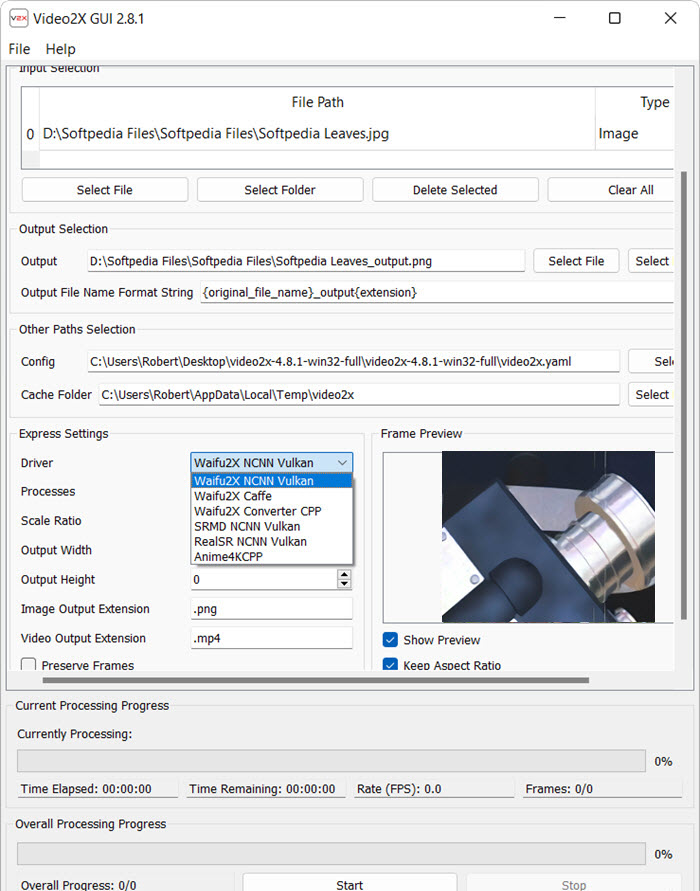
Video2x is an open-source video upscaling software tool that upscales videos to 2X of their original resolution. Video2X works as a flexible framework that brings together multiple high-end neural networks, such as Waifu2x, Real-CUGAN, and Real-ESRGAN, allowing users to choose different engines depending on whether they’re working with anime, cartoons, or real-world footage.
Video2X also provides various options and settings to customize the video upscaling process according to individual preferences. Users can choose the desired output resolution, adjust parameters related to sharpness, noise reduction, and other visual aspects to achieve the desired result.
While the best video upscaler Video2X does offer a GUI, the initial setup can feel overwhelming, particularly for non-technical users who may need to manually configure dependencies, drivers, and FFmpeg paths before anything works properly. On the positive side, it’s completely free, runs locally without cloud dependency, and supports both Windows and Linux with broad GPU compatibility through Vulkan.
Key features:
- Upsacles videos, GIFs, and images;
- Video frame interpolation.
- Upscales videos to 2X of their original resolution;
- Preserves the original contents;
- Real-time processing;
- Supports popular video codecs and containers.
- It is not compatible with Windows 10S and macOS;
- The final results are not very satisfying;
- Sometimes there is loss of original quality;
- Sometimes it creates artifacts and noises;
- Requires high-end hardware.
Compatibility: Linux, Mac, Windows
Rating: 3.7/5 (SOFTPEDIA)
Pricing: Free.
My experience with Video2X's AI video upscaling:
I tested Video2X’s AI video upscaling on a 360p video, and the result was impressive. It upscaled the footage to 720p with noticeable improvements in clarity and sharpness. What I liked most is that it’s lightweight and open-source, so it ran smoothly on my mid-range PC without needing high-end hardware. While the setup took a bit of effort, the process was simple once configured. For a free upscaling tool, Video2X delivered solid results and was worth trying out.
Comparison Table of the Best 8 AI Video Upscaling Software
Topaz Video AI is widely considered the industry benchmark for AI video upscaling in terms of quality, but its high price puts it out of reach for many casual users. Winxvideo AI is picked as a powerful and budget-friendly AI video upscaler, with comprehensive features like video/image upscaling, deblurring, denoising, restoration, and deshaking—all at an unbeatable one-time price of $54.95.
| Video Upscaler | Excel at | Scale | Price |
|---|---|---|---|
| Topaz Video AI | Video upscaling and blurry face recovery. | 2x, 4x, 6x, 4K, 8K, 16K | $299 lifetime | Winxvideo AI | Video/image upscaling, delurring, denoising, restoration, deshaking & adding details. | 1x, 2x, 3x, 4x 480p, 720p, 1080p, 2K, 4K |
$54.95 lifetime |
| AVC Labs Video Enhancer AI | Pixelated videoup scaling | 2x, 4x | $299.90 lifetime |
| VideoProc Converter AI | Video upscaling, delurring, denoising, deshaking & adding details. | 1x, 2x, 3x, 4x 480p, 720p, 1080p, 2K, 4K |
$54.95 lifetime |
| PowerDirector | Video upscaling while editing. | HD, 2K, 4K, 8K, 16K | $54.99/year |
| HitPaw Video Enhancer | Increasing overall clarity | 2x, 4x | $437.99 lifetime |
| DVDFab Video Enhancer AI | DVD video upscaling | 2x, 3x | $99.99 lifetime |
| Video2X | GIF upscaling | 2x, 3x, 4x | Free |
How We Test the Best Video Upscaler Software
To choose the best video upscaler software, here are the points we followed to ensure an unbiased and effective review and ranking of AI video upscalers.
1. Upscaling Quality: We thoroughly evaluate the improved resolution, focusing on how well details are preserved, clarity is enhanced, and sharpness is maintained in the upscaled video.
2. Format and Resolution Compatibility: We test each video upscaler’s performance across a broad range of formats and resolutions, from standard definition to 4K, ensuring adaptability for diverse video types.
3. Processing Speed and Efficiency: We assess the software's processing speed and resource management, emphasizing its ability to upscale efficiently and maintain high quality, even for large or high-resolution files.
4. User Experience and Interface: We review the software’s intuitiveness and ease of use, ensuring it caters to both beginners and professionals with straightforward navigation and accessible features.
5. Cross-Platform Compatibility: We verify the software’s functionality across multiple operating systems, including Windows, macOS, and Linux, ensuring seamless access for users on their preferred platforms.
6. Editors’ and users’ reviews: We value user feedback and rely on insights from reputable media outlets to gather professional opinions on an AI video upscaler.
By thoroughly evaluating each AI video upscaler software across these critical aspects, we ensure our top recommendations uphold the highest standards. Whether you're enhancing personal projects or managing professional video production, the tools we highlight are designed to deliver exceptional results for all needs and skill levels.
In conclusion:
AI video upscalers have completely transformed the manner in which we perceive and engage with videos. Through their sophisticated algorithms and machine learning capabilities, these tools effectively diminish video noise, enhance stability, and elevate the overall visual quality. Whether it involves restoring vintage photographs or crafting breathtaking animations, these AI video upscaling software breathe life into images in unimaginable ways. If needed, choose affordable one like Winxvideo AI based on your budget from this list to enhance your video quality easily.
Download Winxvideo AI video enhancer to upscale videos to 4K to improve video quality
 Free Download
 Free Download
Winxvideo AI is for PC, while Macxvideo AI (from our MacXDVD brand) is for macOS.
 Best AI Video Upscaler FAQs
Yes, but results vary. Good AI upscalers can significantly enhance sharpness, reduce noise, and restore details in low-resolution videos. However, lower-quality tools may over-smooth footage or create unnatural textures.
Topaz Video AI is widely considered the best overall in terms of output quality, especially for professional use, while tools like Winxvideo AI offer a more balanced option for everyday users.
You can upscale to 4K, but quality depends on the source video and the AI model used. Clean, high-bitrate footage produces much better results than heavily compressed or blurry videos.
This usually happens when the AI over-processes textures, leading to overly smooth skin or artificial details. Choosing the right model and settings helps reduce this issue.
Yes, tools like Video2X are free and open-source. However, they require more setup and technical knowledge compared to commercial one-click solutions.
Key factors include output quality, processing speed, ease of use, supported AI models, and whether it works well with your hardware (especially GPU performance).

