






 win
win

 Super Resolution
  Video Stabilization
  Frame Interpolation

 Denoise Image
  Restore Old Photo
  Unblur Image
  Recover Face
  Upscale Image
  Colorize Photo
 Video Conversion >
 Video Compression >
 Screen Recording >



UniFab Review 2026: Is It Worth $319? (Pros, Cons & Best Alternative)
 Mike Rule
Updated on
In an era where high-resolution displays are the standard, the challenge isn't just making a video "bigger"—it's about reconstructing lost data without creating that dreaded "uncanny valley" plastic look. As 4K and 8K screens become household norms, low-bitrate legacy content often looks worse than ever.
Unifab, a comprehensive suite from the DVDFab ecosystem, positions itself as the one-stop AI-powered solution for video & audio enhancement. But with a hefty $319.99 price tag for the All-In-One lifetime license, the stakes are high. Does it actually deliver professional-grade results, or is it just a collection of flashy filters? Let's dive into the technical reality.
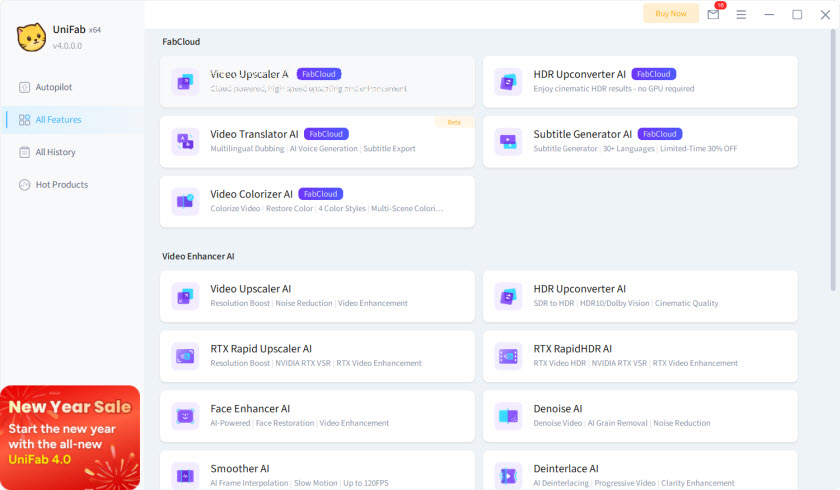
UniFab Overview: What Unifab Is and the Killer Features
UniFab is a Windows-based AI video enhancement application developed by DVDFab. It is designed to improve video quality using AI models rather than traditional filters, with a focus on legacy footage and consumer-level workflows. Instead of a full non-linear editor, color grading suite, or professional restoration system, Unifab sits somewhere between consumer tools and semi-pro enhancement software. Below are the killer features at a glance:
- Video Upscaler AI: Leveraging generative deep learning, this module goes beyond pixel stretching to upscale footage from SD to 4K or even 16K. It offers specialized models like Equinox for general video, Kairo for anime, and Titanus for cinematic TV shows. Users with NVIDIA RTX GPUs can utilize the RTX Rapid Upscaler for lightning-fast processing powered by NVIDIA's Super Resolution technology.
- HDR Upconverter AI: This tool transforms SDR videos into HDR10 or Dolby Vision by intelligently re-mapping luminance and color depth. It enhances peak brightness, contrast, and color saturation to create a true high-dynamic-range experience. For those requiring efficiency, the RTX RapidHDR AI feature significantly accelerates the conversion process while maintaining professional visual standards.
- Smoother AI: Designed for fluid motion, this frame interpolation engine inserts AI-synthesized frames to turn standard 24FPS or 30FPS content into ultra-smooth 60FPS or 120FPS. This is particularly effective for removing "judder" in high-action scenes, providing a modern high-frame-rate look without the "ghosting" artifacts common in traditional interpolation methods.
- Audio Upmix AI: A unique standout for home theater enthusiasts, this module intelligently redistributes standard 2.0 stereo tracks into immersive EAC3 5.1 or DTS 7.1 surround sound. By analyzing audio frequencies and spatial data, it recreates a multi-channel environment that breathes new life into old movie soundtracks and flat audio recordings.
- Deinterlace & Denoise AI: These models are surgical in their approach. The Deinterlacer eliminates the interlaced effect found in legacy DVD rips (480i) and converts into progressive scan, while the Denoiser AI targets digital ISO noise and compression artifacts common in low-light mobile footage or high-compression web videos.
- Video Stabilizer AI: This module is engineered to detect and correct unwanted camera shake automatically. It effectively transforms shaky footages like extreme sports, mountain biking, travel vlogs, etc into smooth video. It offers three distinct intensity modes (Mild, Moderate, Strong) to tailor the stabilization to the severity of the original motion.
- Face Enhancer and Photo Colorizer AI: The Face Enhancer supports 2x and 4x high-resolution outputs, specifically enhancing facial details with sharp edges. Meanwhile, the Photo Colorizer detects objects, environments, and lighting in black and white historical footage, classic films and more, applying realistic and vivid color palettes.
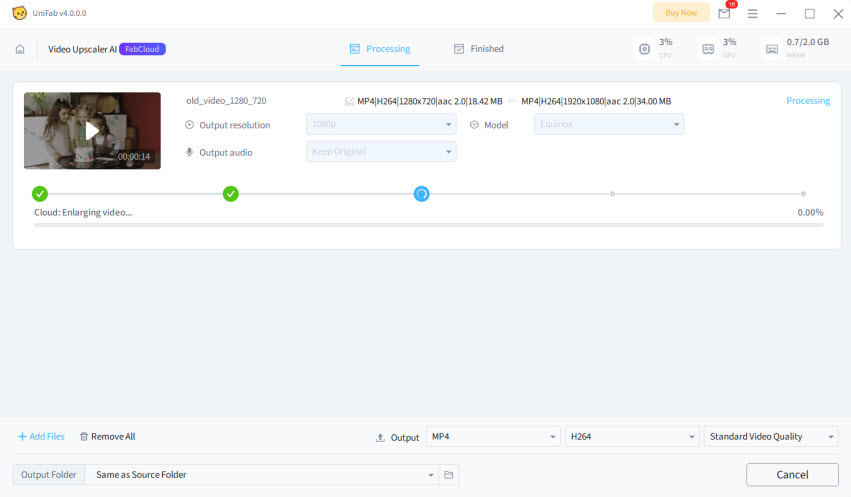
How Does Unifab AI Perform? Real-World Benchmarks
Before we jump into the side-by-side visual comparisons, we need to address the "elephant in the room": Hardware.
Since UniFab utilizes heavy generative AI models rather than simple filters, it is incredibly demanding. If your system doesn't meet the baseline, you won't just experience slow speeds—the software may crash or fail to initialize the AI models entirely. Based on official documentation and real-world performance data from 2026, here is what you need to run UniFab All-In-One effectively.
System Requirements: Can Your PC Handle the Heavy Lift?
UniFab is built to leverage NVIDIA's Tensor Cores and AMD's AI Accelerators. While it can technically run on mid-range hardware, the experience of upscaling to 4K or converting to Dolby Vision requires a "power-user" setup.
| Component | Minimum Requirement (720p/1080p) | Recommended (4K/8K & HDR) |
|---|---|---|
| Operating System | Windows 10/11 (64-bit only) | Windows 11 (64-bit) |
| CPU | Intel i5 (8th Gen) / Ryzen 5 | Intel i7 / Ryzen 7 |
| RAM (Memory) | 8 GB | 16 GB – 32 GB (DDR4 or DDR5) |
| GPU (NVIDIA) | GTX 10-series (4GB VRAM) | RTX 3060 or higher (8GB–12GB+ VRAM) |
| GPU (AMD) | RX 500 Series | RX 6000 / 7000 Series (RDNA 2/3) |
| Hard Drive | 10 GB free space | 100 GB+ free SSD |
Crucial User Considerations
- The NVIDIA Advantage: While UniFab supports AMD, features like RTX Rapid Upscaler and RTX RapidHDR are exclusive to NVIDIA RTX cards. These can reduce rendering time compared to generic GPU modes.
- VRAM is King: For 4K upscaling, the AI model needs to load massive datasets into the GPU memory. If your VRAM is below 8GB, the software may default to "CPU Mode," which can take 70+ hours for a full-length movie.
- Thermal Stability: During AI rendering, your GPU will likely run at 90-100% capacity for hours (or days). Ensure your laptop or PC has excellent ventilation to prevent thermal throttling or hardware damage.
- Nvidia Driver Tip: Always use Studio Drivers (instead of Game Ready Drivers) for better stability when running long AI enhancement tasks.
To assess whether UniFab truly justifies its premium pricing, I conducted a series of intensive real-world tests on a high-end workstation equipped with AMD Ryzen 5 5600x 6-Core processor and 6700XT-8G.
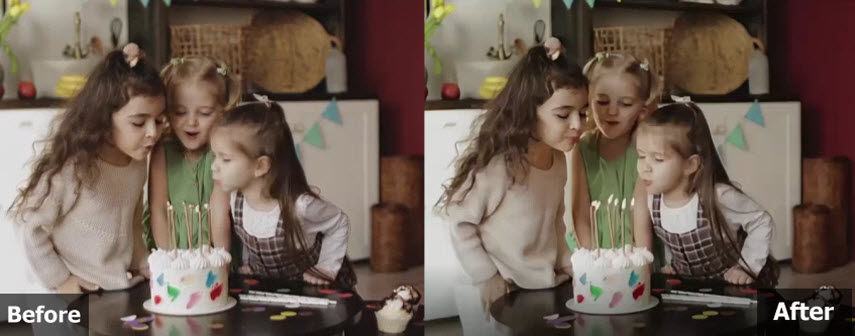
Scenario 1: 720p to 1080p Legacy Upscaling
- The Task: Restore a grainy 1990s birthday footage and upscale to 1080p
- Models Used: Video Upscaler AI (Titanus).
- The Result: UniFab features an array of AI models, such as Titanus and Rhea; however, during my testing with 1990s source footage, the system's automated logic consistently defaulted to the Equinox model. While this 'Auto-selection' simplifies the workflow, it may limit users seeking more manual precision. In terms of output, the software delivered a noticeable boost in overall clarity; however, upon closer inspection or 100% magnification, minor tiling artifacts became visible, particularly where the AI attempted to reconstruct facial details from the original source. Processing also remained computationally demanding (took over 37min for 720p to 1080p upscaling), even on a capable R5 5600X and 6700XT configuration.
Scenario 2: SDR to HDR10 Conversion
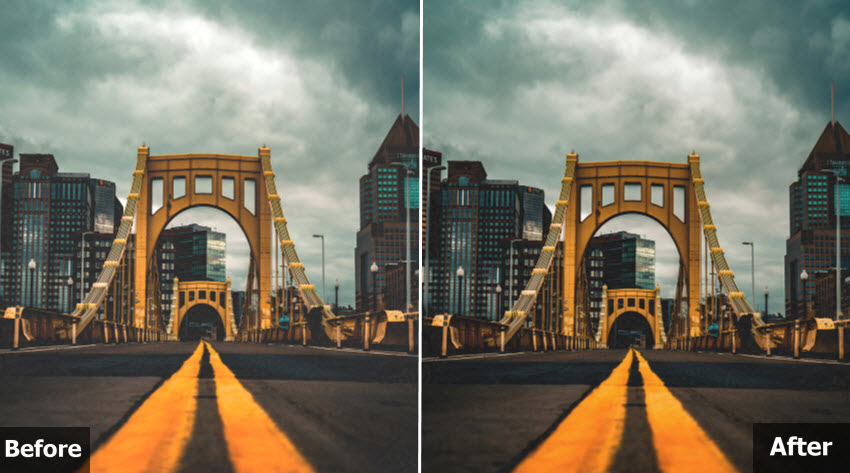
- The Task: Convert a 1080p Standard Dynamic Range (SDR) action clip into HDR10.
- Models Used: HDR Upconverter AI.
- The Result: The HDR Upconverter re-mapped the luminance impressively. In a sunset scene, the peak brightness of the sun felt authentic, reaching high nits on my HDR monitor without blowing out the highlights. The color depth was expanded into the DCI-P3 space, making the original SDR footage look like a modern 4K Blu-ray remaster.
Scenario 3: Face Enhancement Test
- The Task: Enhance a blurry 720p clip with loss of facial definition.
- Models Used: Face Enhancer AI (High Quality).
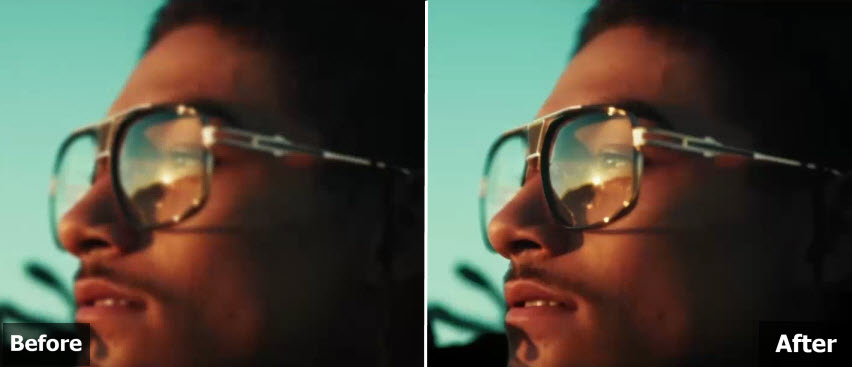
- The Result: Tested the Face Enhancer AI on low-resolution source material. The model successfully enhanced high-frequency details, with spectacle frames and facial features appearing much sharper and more defined. However, the output exhibits residual tiling artifacts when magnified, particularly in areas with complex textures. While using High Quality, details were preserved and the texture was much better.
Pricing and Value: Is Unifab Worth the Cost
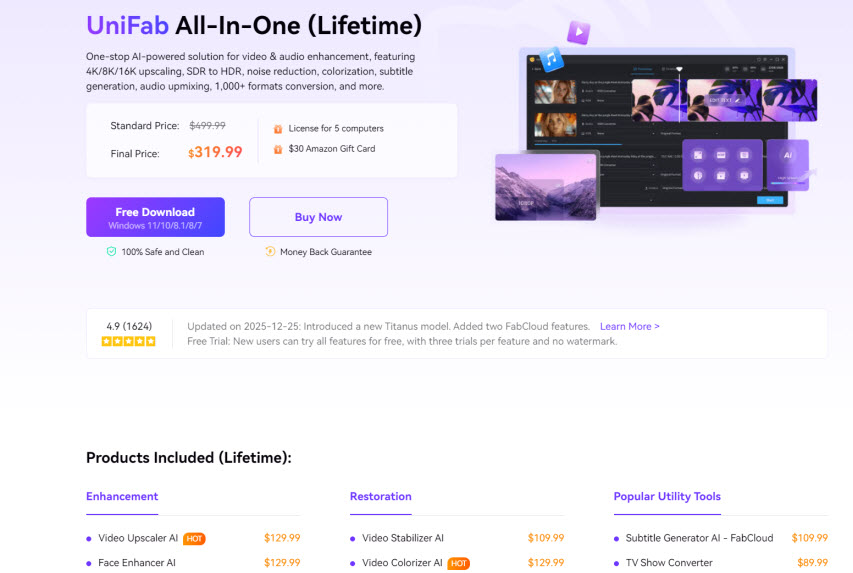
UniFab's pricing can feel inconsistent in practice, largely due to frequent limited-time promotions and rotating bundle offers. For new buyers, this creates multiple purchase paths—some far more cost-effective than others.
1. Individual AI Modules
If you only need a specific function, UniFab allows you to purchase individual AI modules. In practice, however, this is usually the least economical option.
- Video Upscaler AI /Face Enhancer AI/ HDR Upconverter AI: often listed around $129.99 each (Lifetime)
- Denoise AI / Video Stabilizer AI: commonly priced near $109.99 each (Lifetime)
- Smoother AI / Deinterlace AI: typically around $89.99 each (Lifetime)
Purchasing just two core modules—such as Upscaling and HDR—can already push the total cost beyond $250, placing it uncomfortably close to the discounted price of the full UniFab suite.
2. The All-In-One Lifetime Suite
- Standard Price: $499.99
- Typical Sale Price: $319.99
- What's Included: Access to all 17+ AI tools (Titanus, HDR, Upmix, etc.), a 5-PC license, and often a $30 Amazon gift card or similar rebate.
- Value: For a one-time payment, you own the tech forever with no recurring subscription fees—unlike competitors who charge annually.
Pros & Cons: An Honest Evaluation
No software is perfect. I've cross-referenced my findings with active discussions on Reddit (r/upscaling) and the DVDFab Community to ensure this verdict is objective, here is the breakdown:
- All-in-One Workflow: You don't need separate tools for audio, upscaling, and HDR.
- Superior HDR Logic: Unlike many competitors, UniFab's SDR-to-HDR conversion doesn't just "crank up the brightness"—it smartly adjusts contrast and saturation for a true HDR effect.
- Superior Audio Upmixing: The ability to separate dialogue into a center channel for 5.1 is genuinely impressive.
- Zero learning curve: perfect for beginners who don't understand bitrate or grain.
- The High Barrier to Entry: $319.99 is a steep price. If you only have a handful of videos to fix, this might feel like overkill compared to cheaper alternatives. In addition, the pricing structure can be confusing.
- System Resource Hog: If your GPU has less than 8GB of VRAM, the software can become unstable or refuse to load high-end models entirely. Even on a high-end GPU, 4K rendering is slow (approx. 8-12 FPS).
- The "Fake HDR" Controversy: Critics on Reddit argue that the HDR/Dolby Vision output doesn't always meet strict compliance standards and acts more like a "dynamic contrast filter."
- Over-smoothing on faces and fine textures.
- Workflow Fragmentation: You currently cannot perform video enhancement and frame interpolation (Smoother AI) in a single pass—it requires two separate exports.
- Oversimplified AI feature control: Lack the granular sliders or options such as the grain, face, scaling options, etc required to address the profiles of specific sources.
A Better Alternative: UniFab vs. Winxvideo AI
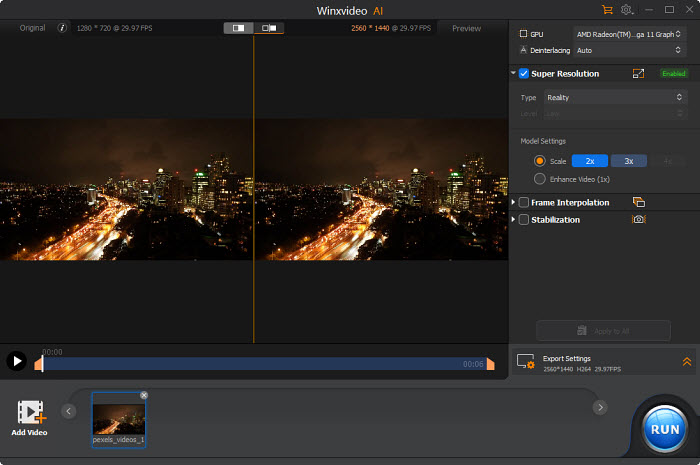
UniFab is not cheap, and its value depends heavily on whether you'll actually use multiple AI modules. For users who find UniFab too heavy or expensive, Winxvideo AI offers a compelling alternative focused on speed. While UniFab focuses heavily on AI enhancement, Winxvideo AI takes a more workflow-oriented approach, combining AI video, audio, and image upscaling with conversion, compression, editing, and recording tools.
 Free Download
  Free Download
Winxvideo AI is for PC, while Macxvideo AI (from our MacXDVD brand) is for macOS.

Winxvideo AI |

Unifab |
|
|---|---|---|
| Price |
1 year: $34.95 Lifetime: $54.95 |
lifetime: $319.99 |
| Preview |
YES |
YES but limited |
| Manual Control |
YES |
NO |
| Processing Speed |
Fast avg. 10fps |
Slow avg. 5fps |
| Texture Preservation | ★ ★ ★ ★ ★ | ★ ★ ★ ★ |
| AI Features | ||
| AI Super Resolution | YES 2X, 3X, 4K scaling options |
YES No scaling options |
| AI Video Stabilization | YES 2 modes, 4 presets, 3 crop types |
YES 3 strength presets |
| AI Frame Interpolation | YES up to 480FPS |
YES up to 120FPS |
| AI Deinterlacing | YES | YES |
| AI Image Enhancer | YES |
NO |
| AI HDR Upconverter | NO | YES |
| AI Audio Suppression | YES | NO |
| AI Vocal Remover | YES | YES |
| Convert/Compress | ||
| Convert Video | YES | YES |
| Convert Audio | YES | YES |
| Compress | YES | YES |
| Download | ||
|
Download Video |
YES | NO |
| Download Audio | YES | NO |
| Download Playlists | YES | NO |
| Record | ||
| Screen & Webcam | YES | NO |
| PIP & Green Screen | YES | NO |
| Toolbox | ||
| Edit: Cut, Merge, Split... | YES | YES |
|
Remove Fisheye |
YES | NO |
|
A/V Sync |
YES | NO |
To understand where your $319.99 or $54.95 is going, let's look at how these two modern AI engines perform in side-by-side scenarios.
Test 1: Upscaling Comparison
Both UniFab's Video Upscaler AI and Winxvideo AI delivered a significant boost in overall clarity during the enlargement process. UniFab successfully identified and sharpened the subject, providing a crisp look; however, upon closer inspection, the output exhibited some tiling artifacts in the upscaled areas. In comparison, Winxvideo AI’s Gen Detail V3 model produced a more refined result, balancing noise reduction with a higher degree of texture fidelity. The output from Winxvideo AI felt more authentic, capturing intricate details that appeared more natural than the UniFab processing.
Test 2: Face Recovery Comparison
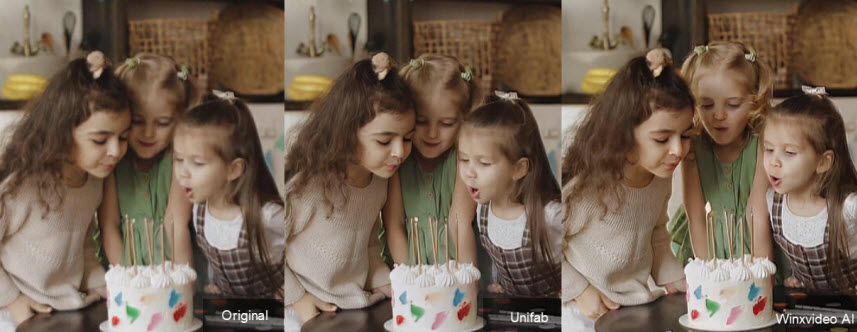
In my testing, both UniFab and Winxvideo AI achieved impressive clarity through different approaches. When using UniFab’s Standard Quality setting, the AI successfully sharpened facial features, though tiling artifacts remained visible upon enlargement. However, switching UniFab to High Quality mode significantly refined the output, bringing it on par with Winxvideo AI and delivering substantially better detail. Meanwhile, Winxvideo AI—utilizing its Gen Detail V3 model and High Quality mode—consistently provided a clean, sharp result with excellent skin texture preservation, notably achieving this balance with significantly faster rendering speeds, up to 18x faster than Unifab.

In conclusion, while UniFab ($319.99) is a powerful "heavyweight" for deep restoration and 8K/HDR archiving, its steep price and extreme hardware demands make it a niche choice for enthusiasts. In contrast, Winxvideo AI (~$54.95) emerges as the more practical and versatile alternative; it delivers similarly sharp, consistent results with its diversified AI models, offering significantly faster rendering and a smoother user experience without requiring a top-tier workstation.
 FAQ about Unifab
AI-based video reconstruction is an extremely resource-intensive process. When using heavier models such as Titanus, even high-end RTX 40-series GPUs may only achieve single-digit FPS during 4K upscaling. This is expected behavior rather than a hardware fault.
To improve performance, make sure you are using NVIDIA Studio Drivers, close background applications to free up VRAM (UniFab often requires 8GB or more for 4K workloads), and confirm that Hardware Acceleration is manually enabled in the settings. For NVIDIA users who prioritize speed, the RTX Rapid Upscaler module is specifically optimized for faster processing with minimal quality compromise.
UniFab's SDR-to-HDR feature is AI-driven tone mapping, not a simple brightness or contrast filter. The software analyzes luminance and color information in SDR footage and converts it into HDR10-compatible output, expanding perceived dynamic range and color depth.
That said, UniFab cannot recreate highlight or color data that was never captured by the original camera. While it does not replace native HDR or professional color grading, it is significantly more advanced than traditional HDR filters and can make SDR content look noticeably more vibrant on modern HDR displays—particularly OLED panels.
While UniFab may launch on such systems, it is not recommended for AI enhancement tasks. Real-world user feedback consistently shows that systems with less than 16GB of RAM or without a dedicated GPU often experience instability, including preview freezes, render failures, or recurring Error 400 messages during processing.
For mid-range laptops or systems relying on integrated graphics, Winxvideo AI tends to offer a more stable and hardware-friendly experience, delivering acceptable AI enhancement without pushing the system beyond its limits.
UniFab may not be the best choice for users who rely on high-volume batch processing, work primarily on mid-range laptops, or require fine-grained manual control over AI behavior. Its AI models prioritize automated enhancement over customization, and processing speed can become a bottleneck even on powerful hardware. Users who value faster workflows, better GPU efficiency, and a more balanced approach to AI upscaling and everyday video processing may find Winxvideo AI to be a more practical long-term solution.
Yes, UniFab is 100% safe and legitimate software developed by DVDFab Software, a company with years of experience in the multimedia industry. It is free of malware, viruses, and bundled third-party advertising, provided you download it from the official website.


