






Is MakeMKV Down? Current Status, 525 Error & Fixes
 Jack Watt
Updated on
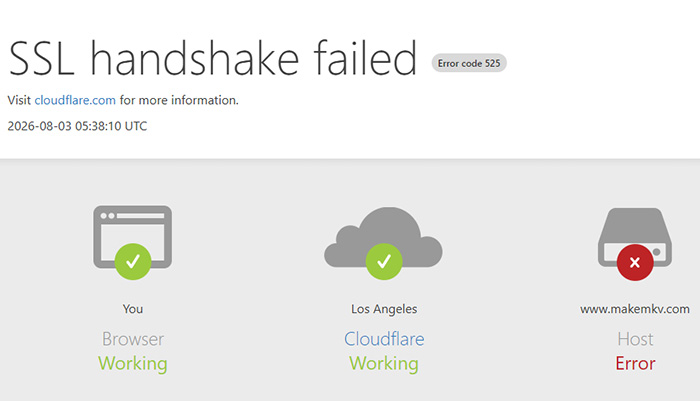
MakeMKV is currently experiencing partial website availability issues. Some users cannot access makemkv.com, download the software, retrieve a beta key, or open the purchase page, while others can still reach certain services normally. Reported errors include HTTP 525, DNS resolution failures, connection timeouts, and "Server can't be reached" messages.
The problem does not affect every user or service in the same way. This guide breaks down the current MakeMKV status, the most likely causes of these outages, and the practical fixes to try when the website, download page, or beta key is unavailable.
Is MakeMKV Down Right Now?
Yes, MakeMKV is currently experiencing a partial website outage. The main website, download page, and purchase page may return HTTP 525 errors, while the official forum and beta-key page can remain accessible. Existing installations may still work normally.
| MakeMKV Service | Possible Status | What It Means |
|---|---|---|
| Homepage | Partially or completely unavailable | makemkv.com may fail to load, time out, or return DNS or connection errors |
| Download Page | May be unavailable | New users may be unable to download the latest MakeMKV installer |
| Forum | May remain accessible | Users can check outage reports, announcements, and community updates |
| Beta Key Page | May be unavailable | Existing users may be unable to retrieve the latest beta registration key |
| Purchase Page | May be unavailable | New users may be unable to purchase or activate a MakeMKV license |
| Installed MakeMKV | Usually still works | An existing installation can generally continue ripping DVDs and Blu-rays even when the website is inaccessible |
What Happened to MakeMKV?
These reports do not necessarily indicate a single global outage. MakeMKV availability can vary according to DNS resolution, network routing, geographic location, CDN or proxy behavior, and temporary server-side problems. This explains why one user may successfully access the website or download MakeMKV while another user encounters a timeout or DNS error at the same time.
| Date | Event |
|---|---|
| July 18, 2026 | Users began reporting problems accessing the MakeMKV website and related services. |
| July 28, 2026 | MakeMKV community discussions pointed to ongoing backend or server-side access problems. |
| July 31, 2026 | Users reported problems related to the MakeMKV beta key and website availability. |
| August 1, 2026 | A new beta key was reported in the MakeMKV community, allowing users to regain access where the key page was available. |
| August 3, 2026 | Some users continued to report that the main MakeMKV website remained inaccessible or unstable. |
| August 10, 2026 | MakeMKV website ERROR code 525. SSL handshake failed. |
Common Signs That MakeMKV Is Down
If you are trying to determine whether the problem is with MakeMKV rather than your own computer, look for these symptoms:
- Cloudflare cannot establish an SSL connection to the origin server.
- "Server can't be reached" or "This site can't be reached" errors appear.
- DNS_PROBE_FINISHED_NXDOMAIN or other DNS resolution errors occur.
- The homepage takes several minutes to load or times out completely.
- The official download page cannot be opened.
- The MakeMKV beta registration key page is unavailable.
- The MakeMKV purchase page cannot be accessed.
Importantly, a MakeMKV website outage does not necessarily mean the software itself has stopped working. If MakeMKV is already installed on your computer, you can generally continue ripping DVDs and Blu-rays. The main problems arise when you need to download a new installer, retrieve a beta key, purchase a license, or install MakeMKV on a new computer.
MakeMKV Down: Quick Answers to Common Problems
If you are searching for a specific MakeMKV problem, the answer depends on what you are trying to access. Use the table below to quickly identify the issue and the most practical next step.
| Common Search Query | Quick Answer |
|---|---|
| Is MakeMKV down? | MakeMKV may be partially unavailable. The website can fail to load, time out, or return DNS or connection errors, while some services or existing installations may still work. |
| Why is MakeMKV offline? | The problem may involve DNS resolution, network routing, domain services, or temporary server-side issues. Try another network or DNS server and check again later. |
| MakeMKV download unavailable | The official download page may be inaccessible or the installer may not be retrievable. Try the official website later or use a trusted software archive if you need the installer immediately. |
| MakeMKV beta key expired | The installed version may require a new beta key while the key page is unavailable. Check the MakeMKV forum for the latest key or use a licensed version. |
| Can I still use MakeMKV? | Yes. If MakeMKV is already installed, you can generally continue ripping DVDs and Blu-rays even when the official website is unavailable. |
| MakeMKV purchase page unavailable | The Buy or license page may be inaccessible during a website outage. Wait for the purchase service to recover before buying or activating a license. |
| MakeMKV alternative | If the website remains unreliable, compare alternative DVD and Blu-ray rippers based on disc support, output formats, ripping speed, GPU acceleration, and licensing. |
For most users, the key distinction is whether MakeMKV itself is installed and working. A website outage mainly affects downloads, beta key updates, purchases, and new installations rather than the basic ripping process on an existing installation.
Why Is MakeMKV Down?
Unlike a scheduled maintenance announcement, MakeMKV outages rarely come with an official explanation. During our research, we reviewed recent discussions across Reddit, the MakeMKV forum, VideoHelp, Plex communities, Linux distributions, and public DNS reports. While no single cause explains every outage, several patterns appear repeatedly whenever makemkv.com becomes slow, unreachable, or partially unavailable.
Possible Cause 1: Temporary Server Outages or Performance Problems
The most common explanation is a temporary server-side issue. Many users report that the website isn't completely offline—it simply becomes extremely slow. Instead of loading within a few seconds, pages may take one or two minutes to appear, while others eventually time out altogether.
This isn't an isolated incident. Community discussions dating back months describe the same behavior: the website works normally one day, slows dramatically the next, and occasionally becomes inaccessible before recovering later without any official announcement. This suggests intermittent server instability rather than a permanent shutdown.
Possible Cause 2: DNS Resolution Failures
Another frequently reported issue involves DNS rather than the website itself. Instead of displaying a server error, browsers often return messages such as "DNS_PROBE_FINISHED_NXDOMAIN", "Server can't be found", or "Name could not resolve."
These errors usually indicate that your device cannot translate makemkv.com into a valid IP address. In some cases, users on different internet providers report completely different results at the same time, suggesting that DNS propagation or resolver caching may affect accessibility.
Possible Cause 3: Domain Registration Problems
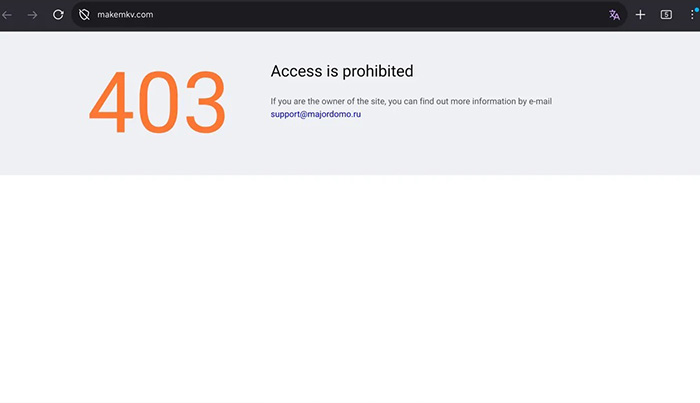
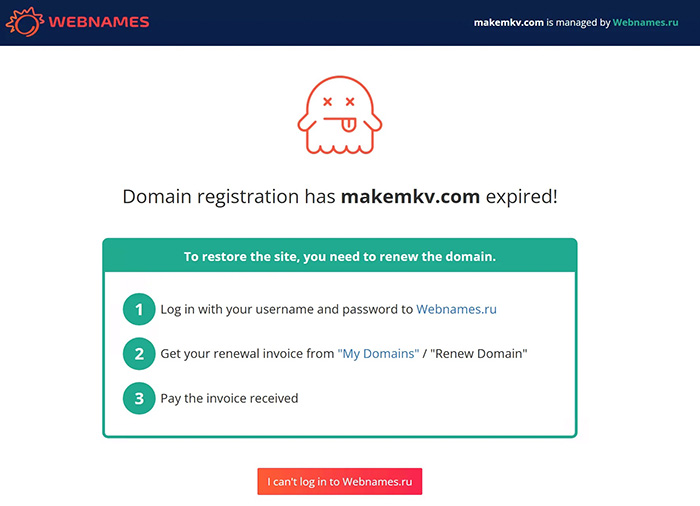
One of the most widely discussed incidents occurred when users discovered that the MakeMKV domain registration had expired temporarily. Instead of loading the official website, some visitors were redirected to a registrar holding page or a Russian-language parking page, while DNS records disappeared or pointed to different name servers.
Because DNS records depend on an active domain registration, an expired domain can make the website appear completely offline even if the web server itself is still operational. During this period, users also reported missing DNS records, changing name servers, and download pages becoming inaccessible until the domain status was restored.
Possible Cause 4: Cloudflare Cache or CDN Issues
Some users report that repeatedly refreshing the page eventually loads the website, while others receive Cloudflare cache pages or temporary "Always Online" versions. This suggests that cached content may still be available from certain Cloudflare edge locations even when the origin server cannot be reached.
As a result, two users visiting the website at the same time may experience completely different behavior depending on which CDN node handles their request.
Possible Cause 5: Regional Network Routing Differences
Location also appears to play a role. During several outages, users in one country reported normal access while others in different regions received DNS failures or connection timeouts. Some users found that disabling a VPN restored access, while others temporarily reached the website by switching VPN locations or changing DNS providers.
Although this doesn't necessarily indicate geo-blocking, it does suggest that regional routing, ISP DNS servers, or network propagation can influence whether the website is reachable.
Possible Cause 6: Heavy Traffic or Search Crawlers
A smaller number of community members speculate that traffic spikes, automated crawlers, or search engine bots occasionally overwhelm the website. According to this theory, excessive requests could slow the server or temporarily make it unavailable for normal visitors.
However, it's important to note that this explanation comes entirely from user discussions. There has been no official confirmation that crawler traffic is responsible for any MakeMKV outage.
Was MakeMKV Taken Down by Copyright Enforcement?
Whenever the website disappears, many users immediately wonder whether MakeMKV has been removed following a DMCA complaint or legal action against DVD and Blu-ray ripping software. While the concern is understandable, there is currently no public evidence supporting this theory.
Across recent outages, community investigations have instead pointed toward technical issues such as server instability, DNS failures, domain registration problems, or network routing errors. Although no one outside the project can completely rule out every possibility, available information does not indicate that the website has been permanently removed due to copyright enforcement.
How to Fix MakeMKV Website Not Loading/Down
If makemkv.com won't load, the problem isn't always on your computer. Community reports show that some outages affect only certain regions, internet providers, or DNS servers. Before assuming the website has disappeared permanently, work through the following fixes in order.
1. Wait and Try Again Later
Many recent MakeMKV outages have been temporary rather than permanent. During several incidents, users reported that the homepage eventually loaded after one or two minutes, while others regained access a few hours later without changing any settings. If the website appears unusually slow instead of completely unreachable, waiting and refreshing later is often the simplest—and surprisingly effective—solution.
2. Check Whether the Problem Is Local or Global
Before changing your computer settings, determine whether the issue affects everyone or only your connection. Try opening MakeMKV in another browser, on another device, or using your phone's mobile network. If the website works elsewhere, the problem is more likely related to your browser cache, local DNS resolver, or internet provider rather than the MakeMKV server itself.
3. Disable Your VPN or Switch Network Locations
Several Reddit users found that MakeMKV immediately became accessible after disconnecting their VPN, while others restored access by switching to a different VPN server or internet connection. Because VPN services often use different DNS resolvers and routing paths, changing locations can quickly reveal whether the problem is caused by network routing rather than the website itself.
4. Refresh Your DNS Cache
If your computer has cached outdated DNS records, it may continue looking for an old server even after the website has recovered. Flushing the DNS cache forces your operating system to request updated records.
Windows
ipconfig /flushdnsmacOS
sudo dscacheutil -flushcache
sudo killall -HUP mDNSResponder
Linux (systemd)
sudo resolvectl flush-caches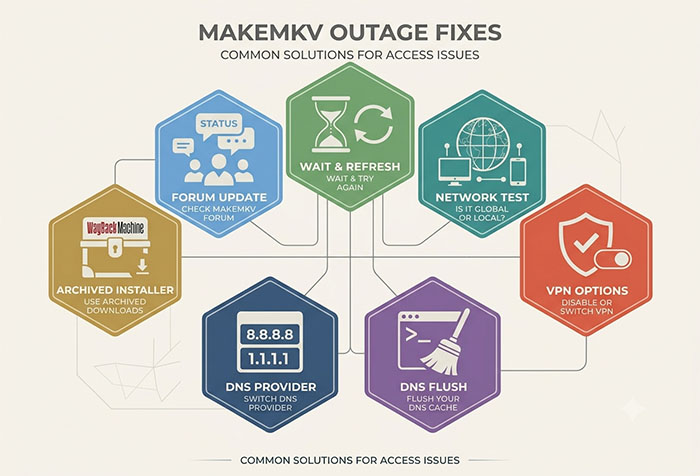
5. Switch to a Different DNS Provider
If your ISP's DNS servers haven't updated after a domain or DNS incident, changing to a public DNS service often restores access sooner. Many users successfully switched to Google Public DNS (8.8.8.8 / 8.8.4.4) or Cloudflare DNS (1.1.1.1 / 1.0.0.1) while waiting for their ISP's DNS records to refresh.
6. Download the Installer from the Wayback Machine
When the official download page is unavailable, many users temporarily obtain archived installers through the Internet Archive's Wayback Machine. This approach has repeatedly helped Linux users, new PC setups, and anyone needing to reinstall MakeMKV during website outages. Always verify that the archived file matches an official release before installing it.
7. Use Reputable Mirror Downloads Carefully
Trusted software libraries such as VideoHelp occasionally mirror recent MakeMKV releases when the official website cannot be reached. If you choose this option, download only from well-established sources, compare version numbers with official release notes when possible, and avoid installers hosted on unknown file-sharing websites.
8. Check the MakeMKV Forum for Status Updates
Even when the main website experiences problems, the MakeMKV forum may still contain useful information. Community members frequently post outage updates, temporary download links, and the latest beta registration key. Checking the forum can quickly confirm whether other users are experiencing the same issue and whether a workaround is already available.
9. Allow Time for DNS Propagation
If MakeMKV has recently recovered from a DNS or domain issue, not every DNS server updates immediately. Depending on your ISP, location, and DNS provider, the latest records may take anywhere from several hours to 48 hours to propagate worldwide. During this period, some users can access the website while others continue receiving DNS errors.
MakeMKV Website Down? Try This Tested Methods
 FAQs about MakeMKV Down
Not necessarily. Most recent incidents involve temporary website outages, DNS issues, or domain-related problems rather than the MakeMKV project shutting down permanently. In many cases, the website becomes available again after several hours or days, although availability may vary by region.
The most common causes include temporary server outages, DNS resolution failures, domain registration issues, Cloudflare caching problems, or regional network routing. If other users can access the site while you cannot, switching DNS servers, disabling your VPN, or waiting for DNS propagation may help.
There is currently no official announcement that MakeMKV has been discontinued. Although the website has experienced repeated outages and periods of limited availability, the software itself continues to receive updates and remains widely used for DVD and Blu-ray backup.
Yes. If MakeMKV is already installed and activated or running under a valid beta key, it can usually continue ripping DVDs and Blu-rays without requiring the website. Website outages mainly affect downloads, beta key retrieval, software updates, and license purchases.
If the official download page is unavailable, the problem is usually related to the website rather than your computer. Temporary server outages, DNS issues, or domain problems can prevent downloads. Until the website is restored, some users obtain archived installers through the Internet Archive or other trusted software repositories.
Not always. During several recent website outages, users reported that the purchase page was unavailable or could not process license orders. If the Buy page isn't working, the best option is to wait until the official website is fully restored rather than attempting to purchase through unofficial sources.
The beta registration key is only required while using the free beta version of MakeMKV. It expires periodically and must be replaced with the latest beta key published by the developers. A paid license removes the need to update the beta key.


