




Fastest DVD Ripper 2026: Speed Tests, GPU Acceleration & Real Results
DVD ripping speed depends heavily on the software engine, hardware acceleration support, DVD encryption handling, and output settings. While HandBrake is a popular free choice, many users find that ripping a full-length DVD can take several hours because it lacks built-in decryption support and relies heavily on CPU encoding. We tested popular DVD ripping tools including Handbrake, MakeMKV, and found that WinX DVD Ripper is fastest DVD ripper. Below is detailed review and hands-on test performance.
Table of Contents
Part 1. DVD Ripping Speed Benchmark: Testing the Fastest DVD Rippers
After testing all the popular DVD rippers (including HandBrake, Freemake, VLC, and more) in the market, we've come to the conclusion that WinX DVD Ripper Platinum features World's No.1 fast DVD ripping speed. It can acheive up to 47x real time faster, 500 FPS maximally. With support to unique Level-3 hardware acceleration (Intel QSV, Nvidia Nvenc/Cuda, AMD), Multi-core CPU (up to 8), Super Encode Engine based on MMX- SSE & 3DNow! and Hyper-threading tech, it allows you to rip a DVD to MP4 within 5 minutes!
The following table is the speed test comparison table of WinX DVD Ripper and HandBrake which is one of the most popular DVD rippers.
|
WinX DVD Ripper Platinum |
HandBrake |
Testing computer: Windows 10 (64 bit) PC [Intel® Core(TM) i7-8700K CPU] |
||
Utilize Intel QSV to speed up ripping |
||
Avg. FPS |
369 (frame per second) |
306 (frame per second) |
Time to rip a 2.5h disc to MP4 |
9min 16s |
17min 55s |
Support Nvidia NVENC in DVD ripping |
||
Avg. FPS |
387 (frame per second) |
355 (frame per second) |
Time to rip a 2.5h disc to MP4 |
8min 45s |
17min 58s |
Key Takeaway: In our DVD ripping speed test, WinX DVD Ripper Platinum completed a 2.5-hour DVD to MP4 conversion significantly faster than HandBrake when hardware acceleration was enabled. With Intel Quick Sync Video (QSV), WinX achieved 369 FPS and finished ripping in 9 minutes 16 seconds, while HandBrake took 17 minutes 55 seconds. Using NVIDIA NVENC acceleration, WinX further improved speed to 387 FPS and completed the same task in 8 minutes 45 seconds, showing the advantage of GPU-accelerated DVD ripping for faster video processing.
Ripping speed is only one part of a complete DVD backup workflow. Factors such as DVD compatibility, supported formats, subtitle handling, output quality, and overall reliability also play an important role. For a broader look at the leading tools available today, explore our list of the best DVD rippers.
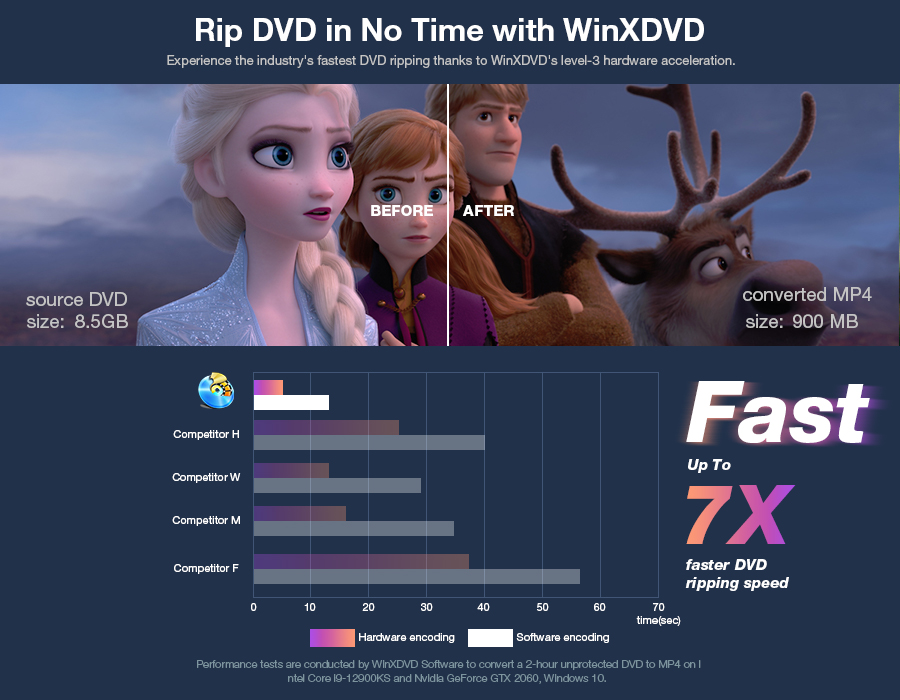
Part 2. What Makes a DVD Ripper Fast? Key Factors That Affect DVD Ripping Speed
A fast DVD ripper needs to handle several stages efficiently, including reading the disc, analyzing DVD structure, decoding video, encoding the output format, and utilizing computer hardware. In real-world testing, the biggest speed differences usually come from hardware acceleration, GPU encoding efficiency, CPU optimization, and how quickly the software analyzes DVD content.
1. Hardware Acceleration: The Biggest Factor in DVD Ripping Speed
Hardware acceleration is one of the most important technologies behind fast DVD ripping. Traditional DVD conversion relies mainly on CPU processing, which can become a bottleneck when encoding high-quality video. A DVD ripper with hardware acceleration can offload part of the encoding workload to the GPU, allowing the system to process video data more efficiently.
Modern acceleration technologies such as Intel Quick Sync Video (QSV), NVIDIA NVENC, and AMD hardware encoding can significantly reduce conversion time, especially when ripping full-length DVDs or converting to compressed formats like MP4 and H.264.
During our speed tests, DVD rippers with GPU acceleration completed the same DVD-to-MP4 conversion task noticeably faster than CPU-only workflows, making hardware support a key factor when choosing the fastest DVD ripping software.
2. GPU Encoding: How Graphics Cards Speed Up DVD Conversion
GPU encoding plays a major role in improving DVD ripping performance because video encoding is highly parallelized and well-suited for graphics processors. Instead of forcing the CPU to handle every encoding task, GPU-based encoders can process multiple video frames simultaneously.
For users with NVIDIA, Intel, or AMD graphics hardware, a DVD ripper that supports GPU acceleration can deliver higher FPS (frames per second) and shorter processing times. This is especially noticeable when converting large DVD collections, where saving several minutes per disc can add up to hours of saved time.
However, GPU acceleration is not only about having a supported graphics card. The software engine also matters. Poor optimization may result in low GPU utilization and limited speed improvements.
3. CPU Optimization: Efficient Multi-Core Processing Still Matters
Although GPU acceleration has become an important part of modern DVD ripping, CPU performance and software optimization still affect overall speed. DVD ripping involves multiple tasks, including disc analysis, decoding, audio processing, and file packaging, which may rely on CPU resources.
A well-optimized DVD ripper can take advantage of multi-core processors, hyper-threading technology, and efficient encoding algorithms to maintain faster performance even when GPU acceleration is unavailable.
This is why two DVD rippers running on the same computer can produce different results. The difference often comes from how efficiently the software uses available hardware rather than the hardware specifications alone.
4. DVD Analysis Speed: Fast Ripping Starts Before Encoding
Many users focus only on encoding speed, but DVD analysis time can also affect the overall ripping experience. Before conversion begins, a DVD ripper needs to read the disc structure, identify titles, detect chapters, and process encryption information.
A slower DVD analyzer may spend several minutes scanning the disc before the actual conversion starts, especially with commercial DVDs containing complex structures or multiple titles.
A fast DVD ripper should quickly load DVD content, accurately detect the main movie title, and minimize preparation time before encoding begins. Faster analysis improves the entire workflow, not just the final conversion stage.
Other Factors That Affect DVD Ripping Speed
- DVD drive speed: A slower optical drive or USB connection can limit how quickly data is read from the disc.
- Output format: H.265/HEVC encoding usually takes longer than H.264 because it requires more processing power.
- Video quality settings: Higher bitrate and resolution settings increase encoding time.
- Computer hardware: CPU generation, GPU model, RAM, and storage speed can all influence final results.
Key Takeaway: The fastest DVD ripper is not determined by one feature alone. Hardware acceleration, GPU encoding support, CPU optimization, and fast DVD analysis all work together to reduce ripping time. For users who frequently convert DVDs, choosing software that efficiently uses modern hardware can significantly improve speed and overall workflow.
Speed is only part of the picture. To see how different DVD rippers perform under identical test conditions, explore our complete DVD Ripper Benchmark Report featuring DVD loading speed, GPU acceleration performance, decryption success rates, encoding efficiency, and quality comparisons.
Part 3. How to Rip DVD at the Fastest Speed?
To begin with, download this fast DVD ripper on your Windows (11, 10, 8.1/8, 7, XP, Vista, etc.) or Mac computer, and then install it following the wizard. Next, follow the steps below to perform fast DVD ripping on Windows 10/11 process.
Step 1. Insert DVD to DVD-ROM, and click "DVD Disc" to import DVD. You're also able to load Video_TS folders, ISO image.
Step 2. Select an output profile as you like. If you don't know which to choose, MP4 is always recommended for its wide compatibiliy.
Learn settings to rip DVDs fast with good quality & small size >>
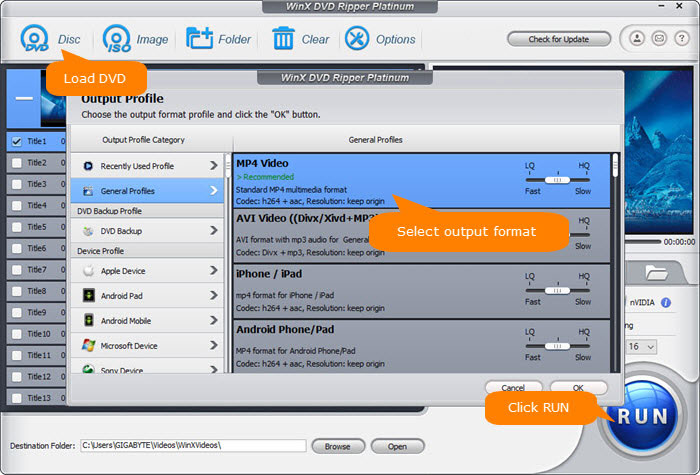
Step 3. Specify a destination folder to store ripped DVD video by clicking "Browse".
Step 4. Make sure you've checked Hardware Accelerator and set the CPU core to the utmost. By default, Hardware Accelerator is checked and the CPU core use is set to the maximum value. This can make your DVD to MP4 ripping much faster and meanwhile relieve computing burden from CPU to graphics expert GPU so as to avoid DVD ripping CPU overheating/overuse issues.
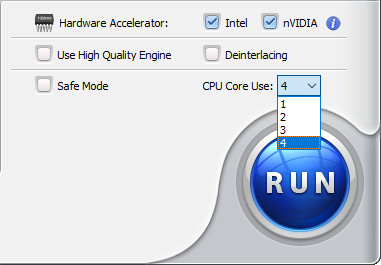
Step 5. Hit "RUN" to begin ripping DVD. Then it will accomplish the DVD ripping process at a fast speed.
 Important:
To get the fastest way to rip DVDs, try the following tips:
• Enable hardware acceleration: Use a DVD ripper that supports Intel QSV, NVIDIA NVENC, or AMD hardware encoding to reduce CPU workload and speed up video conversion.
• Choose the right output settings: H.264 MP4 usually provides a good balance between speed, quality, and compatibility. Higher resolutions, higher bitrates, or H.265 encoding may require more processing time.
• Use a faster computer: A modern multi-core CPU and supported GPU can significantly improve encoding speed, especially when processing full-length DVDs.
• Use a reliable DVD drive: A faster optical drive can reduce disc reading and loading time. For external DVD drives, a stable USB 3.0 connection can help maintain consistent data transfer speeds.
• Avoid unnecessary background tasks: Closing CPU- or GPU-intensive applications can free system resources and help maintain faster ripping performance.
Part 4. FAQs About the Fastest DVD Ripper
In our speed tests, WinX DVD Ripper Platinum delivered faster DVD-to-MP4 conversion than HandBrake by utilizing Intel QSV, NVIDIA NVENC, and AMD hardware acceleration. For users who frequently convert DVDs, a GPU-accelerated DVD ripper can significantly reduce processing time.
HandBrake can take a long time to rip DVDs because it focuses mainly on video conversion rather than DVD ripping. It does not include built-in support for most commercial DVD protections and may require additional tools such as libdvdcss. Its encoding speed also depends heavily on CPU performance and selected quality settings. Higher-quality presets, H.265 encoding, and older hardware can make DVD conversion much slower.
DVD ripping time varies depending on the software, computer hardware, DVD condition, and output format. A CPU-only workflow may take 30 minutes to several hours for a full-length DVD, while a hardware-accelerated DVD ripper can often complete DVD-to-MP4 conversion within 5 to 15 minutes on modern computers.
Yes. GPU acceleration can speed up DVD ripping by transferring part of the video encoding workload from the CPU to the graphics processor. Technologies like NVIDIA NVENC, Intel QSV, and AMD hardware encoding allow supported DVD rippers to process video frames more efficiently and reduce overall conversion time.
The main factors affecting DVD ripping speed include hardware acceleration support, GPU encoding performance, CPU power, DVD analysis speed, optical drive speed, output format, and video quality settings. A fast DVD ripper optimizes these factors together instead of relying on a single speed improvement.