-
Best iTunes Alternatives
- #1. WinX MediaTrans
- #2. MediaMonkey
- #3. MusicBee
- #4. WALTR Pro
- #5. AnyTrans
- #6. CopyTrans
- #7. iMazing
- #8. VOX
- #9. AIMP
- #10. foobar2000
- #11. JRiver Media Center
- #12. Audirvāna
12 Best iTunes Alternatives for Windows and Mac in 2026
Summary: The best iTunes alternative depends on what you use it for, whether that is managing a music library, syncing an iPhone or iPad, backing up device data, or simply moving media between devices. We reviewed and compared a wide range of software and picked 12 options that are worth considering for these different needs.
For years, iTunes was the hub for managing music libraries, playlists, purchases, iPhones and iPods, and device backups. Apple has since split those jobs across several apps. On Windows, Apple Music handles music, Apple TV handles movies and TV shows, while Apple Devices manages iPhone and iPad syncing, backups, and restores. iTunes remains available for podcasts and audiobooks. On Mac, Music, TV, Podcasts, and Finder cover the main jobs iTunes used to handle.
The newer apps are more focused, but the old all-in-one workflow is gone. That can be inconvenient if you manage a large local music library, regularly move media between an iPhone and computer, or want more control over backups and device data. The 12 alternatives below cover different parts of that old iTunes workflow.
Quick Picks: The Best iTunes Alternatives at a Glance
Here is our quick shortlist based on the exact part of iTunes you're looking to replace:
- 📲 For iPhone media transfer and management: WinX MediaTrans | iMazing
- 🎵 For music library management on Windows: MediaMonkey | MusicBee
- 🔄 For easier iPhone and iPad content transfer: WALTR Pro | AnyTrans
- 🎧 For recovering and managing music: CopyTrans
- ▶️ For local music playback and broad audio format support: VOX | AIMP | foobar2000
- 🔊 For large media libraries and higher-end audio playback: JRiver Media Center | Audirvāna
Part 1 Why You Need an iTunes Alternative
Once the all-in-one hub for Apple devices, iTunes has become fragmented on macOS and notoriously clunky on Windows. Today, users turn to alternatives for several practical reasons:
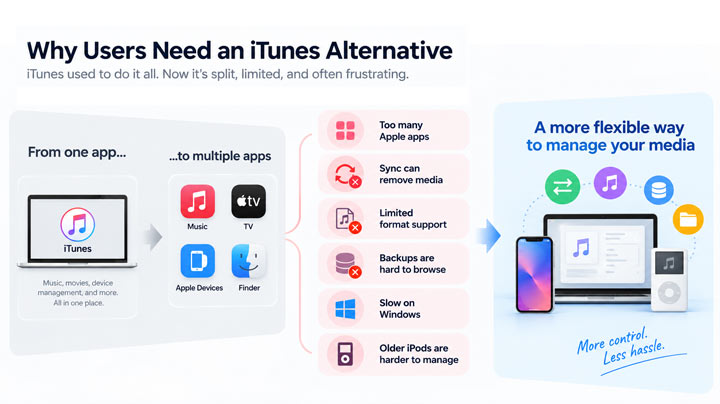
- Too many Apple apps. Music, movies, device syncing, and backups are now split across different apps, so users have to switch between several tools for tasks that iTunes once handled in one place.
- Syncing can remove existing media. Adding or syncing selected songs may replace or remove content already stored on the device, especially when an iPhone is connected to a different library.
- Less control over local media. Formats such as FLAC, APE, and MKV are not natively supported, while tools for batch tagging, artwork fixes, duplicate cleanup, and large library organization are fairly limited.
- Slow and heavy on Windows. iTunes can take longer to launch and use more system resources than necessary, even for simple jobs such as transferring a few songs or checking a device.
- Limited control over backups and older devices. Apple backups are mainly designed for full-device restore, making it difficult to export selected data, while older iPods can also be harder to recover or manage with current Apple software.
Ultimately, you don't need a tool that does everything iTunes tries to do, whether it does it well or not. Just focus on the specific features that fit your workflow—whether that's more flexible file transfer, a lighter music player, or deeper backup control, etc.
Part 2 What to Look for in an iTunes Alternative
Not every iTunes alternative is built for the same job. Some are better at managing a large music library, while others are mainly designed for iPhone syncing, backups, or file transfer. When comparing the options, these are the areas worth paying attention to:
Platform and device compatibility: Check whether the software works on Windows, macOS, or both, and which Apple devices it supports, especially if you still use an older iPhone, iPad, or iPod.
Music library management: Look at how well it handles local music, playlists, tags, artwork, ratings, and different audio formats, not just whether it can play a song.
iPhone and iPad management: If device syncing matters to you, consider whether the app can move selected files, copy media in both directions, create backups, or access data stored on the device.
Ease of use: A replacement should make common tasks easier, not simply give you another complicated interface to learn.
Pricing: Some alternatives are completely free, while others limit key features to a paid license or subscription. It is worth checking what you can actually do before paying.
No More iTunes! Transfer & Manage Files Smoother with the Best iTunes Alternative
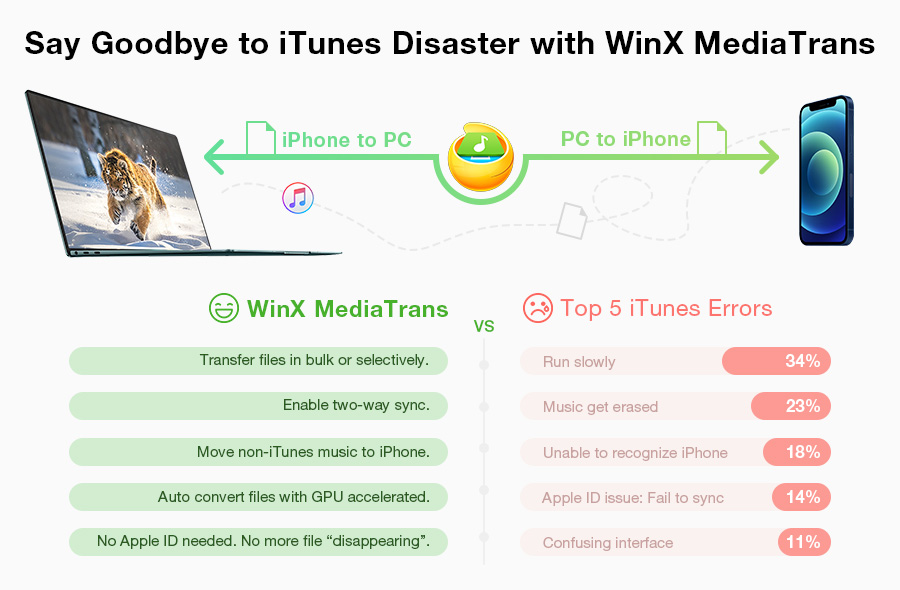
WinX MediaTrans is the best alternative to iTunes. It connects your PC with iPhone iPad in a blink of an eye, enabling two-way transfer as simple as copy-and-paste, without erasing your existing data. You can manage and transfer music, photos, videos, books, etc securely.
Part 3 Comparison of the 12 Best iTunes Alternatives
The 12 iTunes alternatives below do not all replace the same part of iTunes. Some focus on music libraries and playback, while others are better for iPhone transfers, backups, or device management. Use this table to quickly see what each option is best at and whether it fits the way you use iTunes.
| iTunes Alternative | Platform | Best For | Main Strength | iPhone Management | Price |
|---|---|---|---|---|---|
| WinX MediaTrans | Windows | iPhone media transfer | Selective two-way transfer without full-library sync | Media transfer | Free trial |
| MediaMonkey | Windows | Large music libraries | Tagging, playlists, library organization, and format conversion | Basic sync | Free + paid |
| MusicBee | Windows | Free music management | Lightweight library management and customizable playback | Limited | Free |
| WALTR Pro | Windows, macOS | Easy media transfer | Drag-and-drop transfer with automatic format conversion | Media transfer | Free trial |
| AnyTrans | Windows, macOS | Broad iPhone content management | Handles many types of iOS data from one interface | Strong | Free trial |
| CopyTrans | Windows | Music transfer and recovery | Recover and rebuild music libraries from iPhone or iPod | Strong for media | Some free tools |
| iMazing | Windows, macOS | iPhone backups and device data | Multiple backup snapshots and selective data export | Excellent | Limited free use |
| VOX | macOS, iOS, Windows Beta | Lossless and Hi-Res playback | High-resolution playback and cloud music access | No | Free + paid |
| AIMP | Windows | Lightweight local playback | Broad format support with low system overhead | No | Free |
| foobar2000 | Windows, macOS | Customizable playback | Advanced tagging, components, and audio customization | Limited | Free |
| JRiver Media Center | Windows, macOS, Linux | Large home media libraries | Manages music, video, photos, and network media together | Limited | Free trial |
| Audirvāna | Windows, macOS, Linux | Audiophile music playback | High-resolution local library playback and audio hardware control | No | Free trial |
Part 4 Top 12 iTunes Alternatives for Windows (10/11) and Mac
1. WinX MediaTrans
Best for bulk or selective two-way transfer between iPhone/iPad and PC, with GPU acceleration.
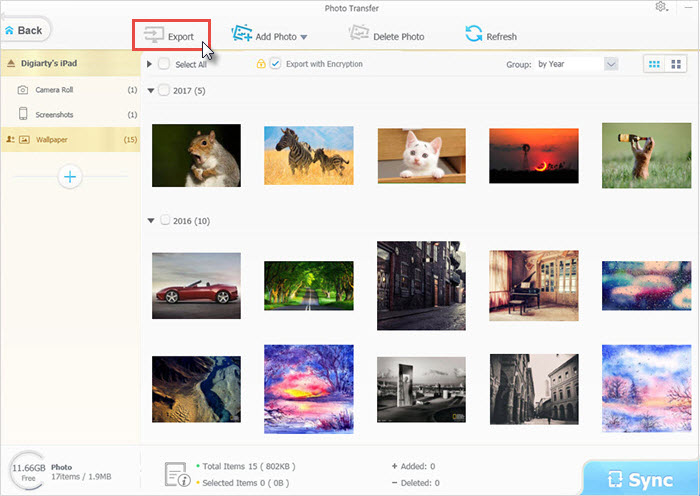
WinX MediaTrans is a solid iTunes alternative for Windows users who want an easier way to manage media on an iPhone or iPad. It brings music, photos, videos, books, voice memos, and ringtones into one place, with two-way transfer between the device and PC. You can use it without iTunes installed, and it gives you much more control over what gets added, removed, or backed up. This is where MediaTrans feels easier than iTunes. iTunes relies heavily on library syncing, which can be awkward when you only want to move a few files and may affect media already stored on the device. MediaTrans lets you transfer one file, selected items, or a large batch in either direction without syncing the whole library. New music can be added without replacing the songs already on the iPhone, and GPU acceleration helps with large photo and video transfers.
It goes beyond file transfer too. You can create and edit playlists, change song titles, artists, and album information, manage ringtones and voice memos, and convert unsupported media during transfer. It can convert formats such as HEIC, MKV, and M4A when needed, and photos or videos copied to a PC can be protected with password encryption.
Pros
- Fast selective transfer between iPhone and PC
- Two-way transfer for music, photos, and videos
- Playlist and basic music management
- Media conversion during transfer
- Supports current iPhones and iOS versions
Cons
- Windows only
- No full-device backup
- Limited desktop music-library features
Price: Free trial with paid licenses available.
WinX MediaTrans vs iTunes
WinX MediaTrans |
iTunes |
|
Backup & restore whole iPhone iPad |
No |
Yes |
Two-way transfer |
Yes |
No |
Selectively transfer music, photos, videos, contacts, books, voice memos, etc. |
Yes |
No |
Encrypt iPhone iPad data |
Yes |
Yes |
Edit music & make ringtones |
Yes |
No |
Supported formats |
All common media formats |
MP3, MP4, M4A, MOV, H.264 only |
2. MediaMonkey
Best for managing large music libraries, playlists, and metadata.
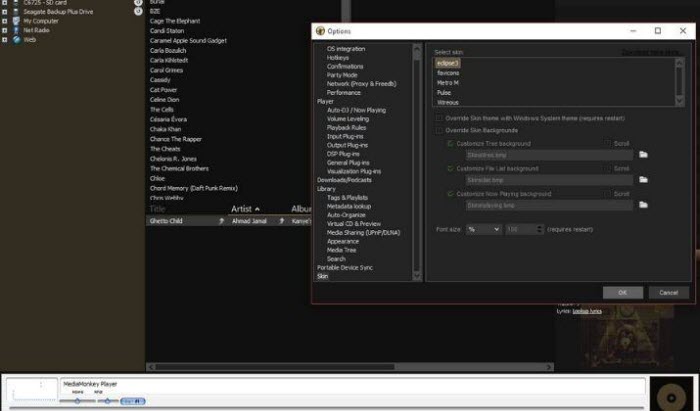
MediaMonkey is a strong iTunes alternative for Windows if you mainly used iTunes to organize and play a large music collection. It handles tens of thousands of music and video files, with better tools for tagging, playlists, album art, duplicate cleanup, format conversion, and CD ripping. It is also a good choice for longtime iTunes users because it can bring over playlists, ratings, and play history from an existing iTunes library. MediaMonkey still supports syncing music, videos, playlists, artwork, and other library data with iPhones, iPads, and iPods, with automatic conversion for unsupported formats.
For music library management, MediaMonkey gives you more control than iTunes, especially once the collection gets large or messy. The main downside is that the interface can feel busy, and some advanced organization and conversion features require the paid Gold version.
Pros
- Strong library and metadata management
- Good for very large music collections
- Can import iTunes playlists, ratings, and play history
- Supports Apple device syncing
- Useful free version
Cons
- Windows only
- Interface can feel busy
- Some advanced features require Gold
Price: Free. Gold starts at $39.95.
Best for free music library management and playback on Windows.
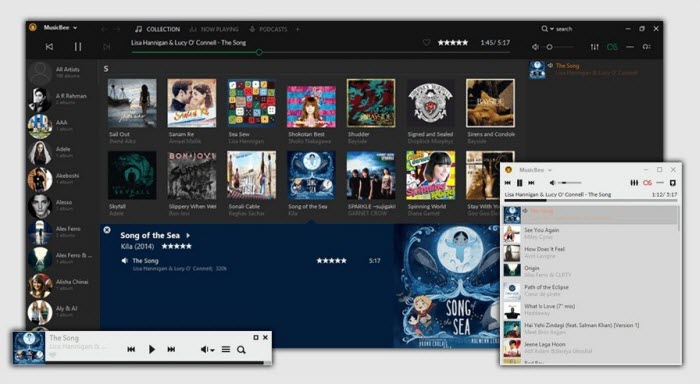
MusicBee is a strong iTunes alternative for Windows users who mainly want to organize, play, and customize a local music collection. It combines a full music library with playlists, auto-tagging, podcasts, web radio, and SoundCloud support. It is also lightweight, even with a large library, and works on Windows 7 through Windows 11.
For playback, MusicBee gives you much more control than iTunes. It includes a 10-band or 15-band equalizer, DSP effects, gapless playback, logarithmic volume scaling, and WASAPI and ASIO support for higher-end audio hardware. Skins and plugins can change both the look and the functionality, and the add-on library is still actively maintained.
MusicBee can also sync playlists, podcasts, and audiobooks with portable devices, with on-the-fly format conversion when needed. Its strengths are still on the desktop music side, though. It is not the best choice if you need full iPhone backups, photo transfer, messages, or other iOS data management. For people who mainly used iTunes as a music player and library manager, MusicBee remains one of the best free replacements available.
Pros
- Free
- Strong music library and tagging tools
- Excellent playback and audio controls
- Podcasts, web radio, and SoundCloud support
- Skins and plugins for deeper customization
- Device syncing with format conversion
Cons
- Windows only
- Limited for full iPhone and iPad management
- Some advanced setups depend on plugins
Price: Free.
4. WALTR Pro
Best for simple file transfer to iPhone, iPad, and iPod.
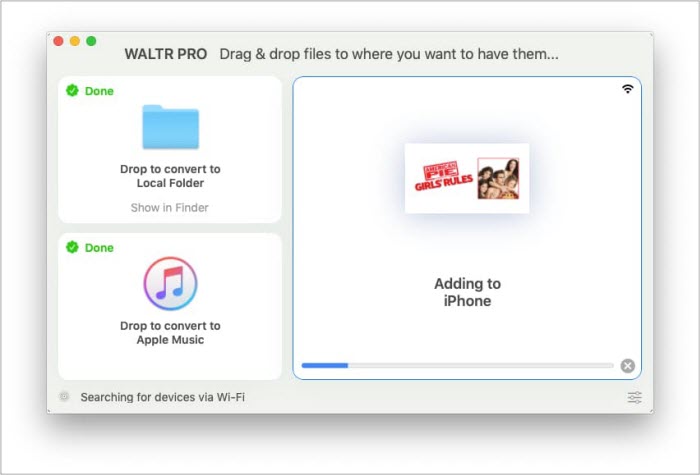
WALTR Pro is a good iTunes alternative for users who want a simpler way to move media to an Apple device. You can transfer music, videos, PDFs, ePub books, and audiobooks over USB or Wi-Fi without setting up or syncing an iTunes library first.
Its biggest advantage is how it handles unsupported formats. WALTR Pro can recognize files such as FLAC, MKV, AVI, and other formats that Apple devices may not play directly, convert them during transfer, and send them to the right app on the device. The whole process is based on drag and drop, so there is much less setup than with a traditional iTunes sync.
WALTR Pro also includes metadata tools that can fill in missing album artwork, artist names, genres, and other information. This helps transferred music and videos appear properly organized once they reach the device. It is a good fit for media transfer, but it does not replace iTunes for full iPhone backups or deeper device management.
Pros
- Simple drag-and-drop transfer
- USB and Wi-Fi support
- Converts unsupported media formats during transfer
- Sends files to the appropriate Apple app
- Automatic metadata editing
Cons
- Limited music library management
- No full iPhone backup
- Large Wi-Fi transfers can be slower
Price: Starts at $9.95 per month.
5. AnyTrans
Best for managing many types of iPhone data in one app.
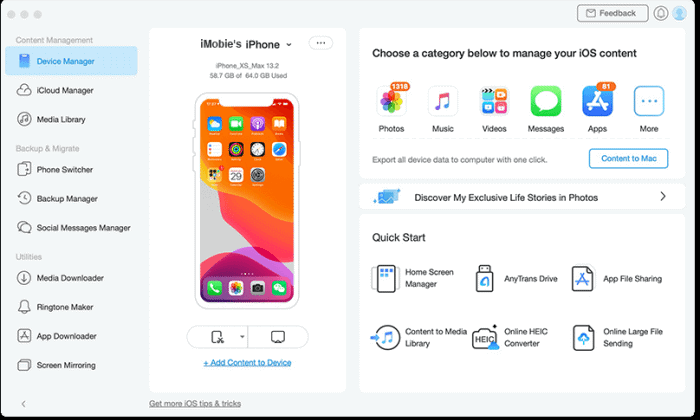
AnyTrans is a broader iTunes alternative for people who want to manage more than music and media. It works with 27 types of iOS data and can transfer content between an iPhone, iPad, iPod, computer, iTunes library, and iCloud. Photos, music, messages, apps, contacts, and WhatsApp data can all be handled from the same program.
It gives you more choice than the traditional iTunes sync process. You can preview content and transfer selected files without replacing other data on the device. Backups can be full or incremental, and AnyTrans can create automatic wireless backups as well. It can also browse some content stored inside iTunes and iCloud backups. The amount of functionality is useful if you want one program for several jobs, but the interface can feel busy if you only need music transfer. It is also closer to an iPhone manager than a desktop music player, so MediaMonkey or MusicBee makes more sense for a large local music library.
Pros
- Manages 27 types of iOS data
- Selective transfer without overwriting existing content
- Full and incremental backups
- iCloud and iTunes content management
- Works on Windows and macOS
Cons
- More features than some users need
- Most useful features require payment
- Limited as a desktop music player
Price: $39.99/year or $59.99 for a one-time license for one computer.
6. CopyTrans
Best for managing and recovering music from iPhones and older iPods on Windows.
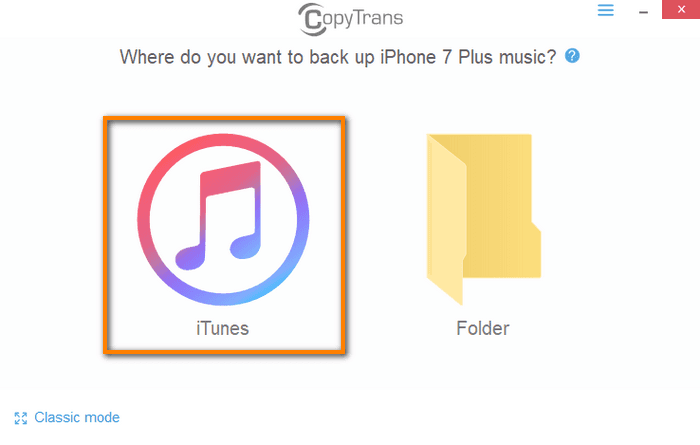
CopyTrans is a robust iTunes alternative for Windows, designed for users who need to migrate their music libraries from an Apple device to a PC. It preserves more than just audio and video; it also transfers playlists, artwork, ratings, and play counts. This makes it an essential tool for those recovering a library after a PC crash, a Windows reinstallation, or when the only surviving copy of their music is on an iPhone or iPod.
It offers two distinct backup methods: Smart Backup and Classic Mode. Smart Backup provides a streamlined, one-click solution that syncs all media to iTunes while automatically filtering out duplicates. Conversely, Classic Mode offers granular control, allowing users to manually select and export specific tracks or playlists to a chosen folder on their hard drive. For adding music back to an iPhone or iPod, CopyTrans Manager lets you drag and drop songs from a PC, create and edit playlists, change titles, genres, ratings, lyrics, and artwork, and remove tracks without syncing through iTunes. The downside? CopyTrans is Windows only, and its wider backup, photo, and contact features are split into separate apps, so it feels less unified than iMazing or AnyTrans.
Pros
- Restores music libraries from iPhone and iPod to PC
- Keeps playlists, artwork, ratings, and play counts
- Smart Backup avoids duplicate transfers
- Selective transfer with Classic Mode
- Free CopyTrans Manager for adding and organizing music
Cons
- Windows only
- Features are divided across several CopyTrans apps
- Apple Music DRM tracks cannot be freely copied to a PC
Price: CopyTrans Manager is free. Other CopyTrans apps are paid.
7. iMazing
Best for iPhone backups and deeper device management.
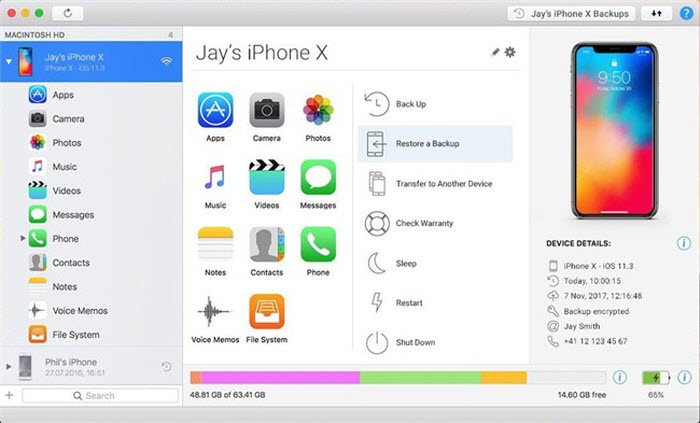
iMazing is one of the stronger iTunes alternatives for users who care about iPhone backups and device data. Available for Windows and macOS, it can transfer music, photos, videos, and files, while also letting you browse and export messages, contacts, call history, and other data from an iPhone or iPad.
Its backup system gives you more control than Apple's standard local backup tools. iMazing can keep multiple backup snapshots instead of leaving you with only the latest state, and it can open local backups created by iTunes, Finder, or Apple Devices. Some data, including messages and call history, needs to be read from a local backup first, and iMazing does not directly access iCloud backups.
Pros
- Multiple local backup snapshots
- Browses and exports many types of iPhone data
- Works with existing Apple local backups
- Music, photo, video, and file transfer
- Windows and macOS support
Cons
- Many advanced features require a paid subscription
- Some device data requires a local backup first
- No direct access to iCloud backups
Price: Free features are available. Premium features require a subscription.
8. VOX
Best for lossless and Hi-Res music playback on Mac.
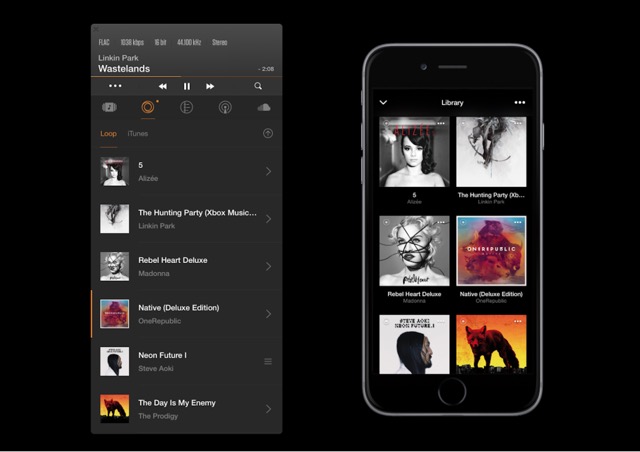
VOX is a good iTunes alternative for users who care about music playback and support for lossless audio. It handles common formats such as MP3 and M4A, along with FLAC, ALAC, APE, CUE, and other Hi-Res formats. The Mac player can access both a personal music collection and an existing iTunes library, with playback up to 24-bit/192kHz.
It also supports SoundCloud and more than 30,000 internet radio stations, giving you more ways to listen without keeping everything inside one local library. VOX Premium adds Music Cloud, which lets you upload your own music without compressing or changing the original files. The same library can then be played on Mac, iPhone, iPad, and Windows through VOX Universal, although the Windows version is still in beta. Playlists can sync across supported devices too.
Pros
- Strong lossless and Hi-Res format support
- Can access an existing iTunes library
- Available on Mac, iPhone, and Windows through VOX Universal
- Optional lossless cloud storage
- Advanced audio settings with Premium
Cons
- No full iPhone backup or device management
- Cloud storage requires VOX Premium
- Many advanced playback features are paid
Price: Free player available. VOX Premium is paid.
9. AIMP
Best for lightweight music playback on Windows.
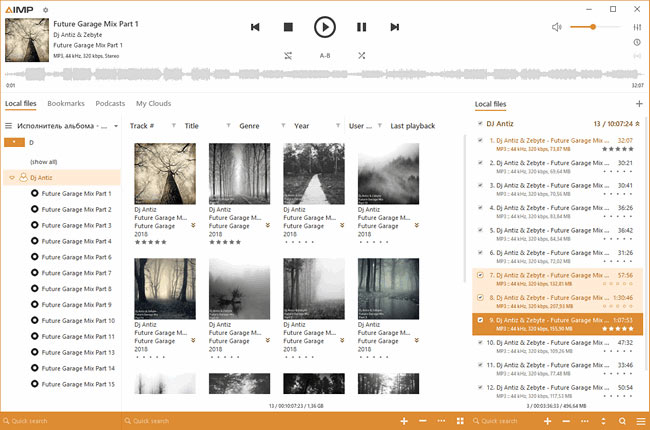
AIMP is a free iTunes alternative for users who mainly need a local music player. It supports a very wide range of audio formats, including MP3, AAC, FLAC, ALAC, APE, Opus, DSD, and many older formats. It can play music stored locally, on a NAS, or in cloud storage, and it supports podcasts and internet radio too.
The player offers more audio control than iTunes. ASIO and WASAPI output are supported, along with a built-in equalizer, audio processing, playlists, and tools for working with music files. The current Windows release is AIMP 5.40.2726, published on September 1, 2026.
AIMP is much narrower than the old iTunes. It does not manage iPhone backups or sync an Apple device. But if iTunes was mainly your desktop player, AIMP is fast, free, and handles far more audio formats.
Pros
- Free
- Very broad audio format support
- ASIO and WASAPI output
- Supports local files, NAS, cloud sources, and radio
- Lightweight
Cons
- No iPhone or iPad management
- Windows focused
- Less suited to complex media libraries than MediaMonkey
Price: Free.
10. foobar2000
Best for customizable music playback and advanced tagging.
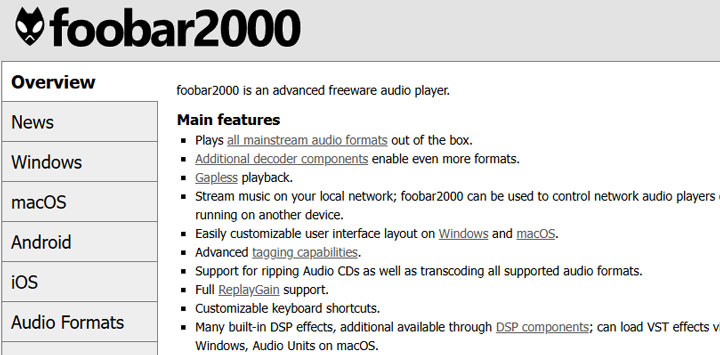
foobar2000 is another free iTunes alternative built around local music rather than Apple device management. It plays all mainstream audio formats, supports gapless playback and ReplayGain, and includes strong tagging, CD ripping, and audio conversion tools. Windows and macOS users can customize the layout, while extra components add support for more formats and features.
It is a good fit for people who found iTunes too restrictive as a music player. foobar2000 gives you much more control over how the library looks, how tags are handled, and how audio is processed. Recent versions also include built-in network audio streaming, so music can be played across compatible devices on the same network.
The flexibility comes with a learning curve. A basic setup is easy enough, but deeper customization takes time. foobar2000 also does not replace iTunes for iPhone backups, file management, or normal iOS syncing.
Pros
- Free
- Strong tagging and format support
- Gapless playback and ReplayGain
- Highly customizable
- Windows and macOS versions
- Large component ecosystem
Cons
- No full iPhone management
- Advanced customization can take time
- Less polished out of the box than some music managers
Price: Free.
11. JRiver Media Center
Best for large music and home media libraries.
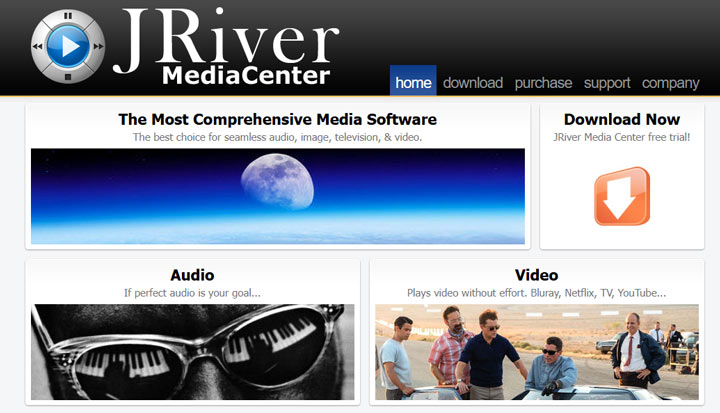
JRiver Media Center is a good iTunes alternative for users who want one program to manage far more than music. It handles audio, video, photos, television, and network media in the same library. Its database is designed for very large collections, with detailed metadata tools and strong support for home theater and multi-room playback.
The audio side is much more advanced than iTunes. JRiver supports WASAPI, ASIO, DSD, VST processing, resampling, and a wide range of file formats. It can scan an existing collection automatically, rip CDs, and organize media by metadata.
JRiver makes the most sense if iTunes used to sit at the center of a large home media collection. It is less useful for modern iPhone backup and device management, and the amount of settings can be overwhelming if you only need a simple player.
Pros
- Handles music, video, photos, and TV
- Excellent for very large media libraries
- Strong metadata and audio tools
- Home theater and network playback
- Windows, macOS, and Linux support
Cons
- No dedicated iPhone backup system
- More complex than a normal music player
- Expensive compared with free alternatives
Price: 30-day free trial. The cross-platform Master License costs $124.98.
12. Audirvāna
Best for audiophile music libraries and high-quality playback.
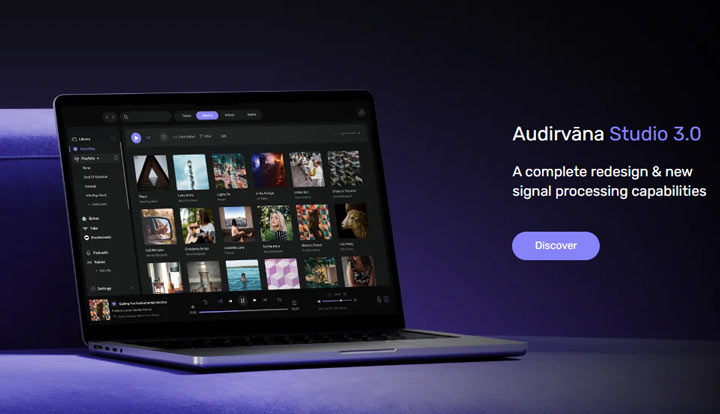
Audirvāna is an iTunes alternative for users who want better control over a local music library and care about audio quality. Audirvāna Origin supports FLAC, ALAC, WAV, AIFF, DSD, and other high-resolution formats, with no practical library size limit for normal use. It can monitor music stored on internal drives, USB storage, or a NAS, and it can synchronize with an Apple Music library.
Playback is built around direct access to audio hardware, USB DAC support, high-resolution output, and advanced audio processing. Audirvāna Studio adds integrated streaming services, radio, podcasts, and online metadata features. Origin keeps the focus on local music and uses a one-time license.
Audirvāna covers the music side of iTunes very well, but it has no role in iPhone backups or general iOS management. It is also one of the more expensive choices here, so its value depends heavily on how much you care about playback quality and a serious local library.
Pros
- Excellent local music library support
- FLAC, ALAC, DSD, and other Hi-Res formats
- USB DAC and advanced audio support
- Apple library synchronization
- Windows, macOS, and Linux support
Cons
- No iPhone backup or device management
- Expensive compared with free music players
- Advanced audio features may be unnecessary for casual listening
Price: Audirvāna Studio costs $7.99/month or $79.99/year. Audirvāna Origin is available as a one-time purchase.
FAQs
1. What is the best iTunes alternative for managing music?
MediaMonkey is our top choice for managing a large local music library. It offers strong tools for playlists, tags, artwork, ratings, duplicate cleanup, and library organization, and it can import data from an existing iTunes library. MusicBee is another excellent option if you want a free Windows music manager with strong playback and customization features.
2. What is the best iTunes alternative for iPhone backups?
iMazing is the better choice if full iPhone or iPad backup management is your priority. It can keep multiple local backup snapshots and lets you browse and export many types of data from those backups. WinX MediaTrans is better suited to selective music, photo, and video transfer rather than full-device backups.
3. What is the best iTunes alternative for Mac?
It depends on what you need. iMazing is a strong choice for iPhone backups and device management, WALTR PRO is useful for simple drag-and-drop media transfer, while VOX and Audirvāna are better suited to music playback and lossless audio libraries.
4. Can I still use iTunes on Windows?
Yes. iTunes is still available for Windows, but Apple now uses separate apps for many of its former functions. Apple Music handles music, Apple TV handles movies and TV shows, and Apple Devices manages iPhone and iPad syncing, backups, and restores. iTunes remains available on Windows mainly for podcasts and audiobooks.