











What Resolution Is Blu-ray? Standard Blu-ray, 4K Blu-ray, and DVD Compared
 Donna Peng
Updated on
Standard Blu-ray discs typically use a resolution of 1920 × 1080 (Full HD), while newer Ultra HD Blu-ray discs support 3840 × 2160 (4K). Although streaming platforms now offer high-resolution video, Blu-ray discs still provide several advantages, including higher bitrates, less compression, and better audio quality. For viewers who care about picture clarity and consistent playback quality, Blu-ray and Ultra HD Blu-ray remain some of the best ways to watch movies at home.

Quick Answer: What Resolution Is Blu-ray?
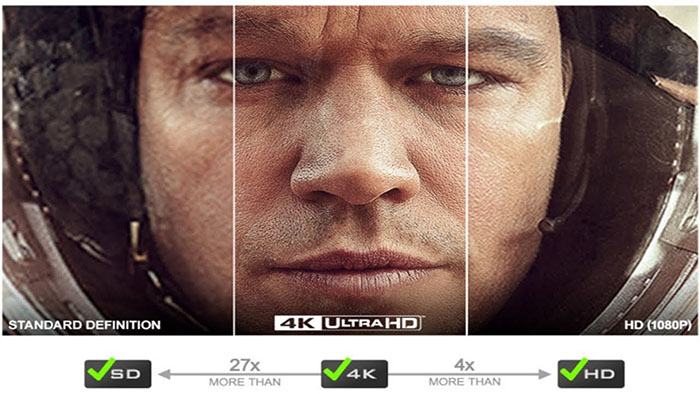
The standard resolution of Blu-ray discs is 1920 × 1080 pixels, commonly known as 1080p Full HD. This format delivers significantly higher picture quality than DVD and became the dominant home video standard when HDTVs started replacing older televisions. However, not all Blu-ray discs use the same resolution. Standard Blu-ray movies are typically 1080p, while Ultra HD Blu-ray discs support 3840 × 2160 resolution, which is commonly referred to as 4K.
The difference between these formats mainly comes down to pixel count and detail. A 1080p Blu-ray frame contains around 2 million pixels, while 4K video contains over 8 million pixels. That means 4K offers four times as many pixels, which can produce sharper images on large screens.
Here is a quick comparison of common disc formats:
| Format | Resolution | Pixel Count | Quality Level |
|---|---|---|---|
| DVD | 720 × 480 | ~345,000 pixels | Standard Definition |
| Blu-ray | 1920 × 1080 | ~2.07 million pixels | Full HD |
| Ultra HD Blu-ray | 3840 × 2160 | ~8.29 million pixels | 4K UHD |
| 4K Streaming | 3840 × 2160 | ~8.29 million pixels | 4K UHD |
While resolution is important, it's not the only factor that determines picture quality. Blu-ray discs also use higher bitrates and less compression than most streaming platforms, which is why many viewers feel Blu-ray movies often look cleaner and more detailed.
What Is Blu-ray Quality Exactly?
When people ask about Blu-ray resolution, they are referring to the number of pixels used to create each video frame. Resolution is usually written as width multiplied by height. For example, a 1080p Blu-ray image contains 1920 pixels horizontally and 1080 pixels vertically.
Multiplying those numbers together results in approximately 2.07 million pixels per frame. These pixels combine to form the detailed images you see on your television screen. The "p" in 1080p stands for progressive scan. Unlike interlaced video formats such as 1080i, progressive scan displays the entire frame in a single pass. This results in smoother motion and clearer images, particularly during fast-moving scenes.
Blu-ray movies are typically presented in a 16:9 widescreen aspect ratio, which matches the shape of modern HDTVs. This format ensures movies fill the screen correctly without stretching or distortion. In addition to resolution, several other factors affect how good a Blu-ray movie looks:
- Video bitrate
- Compression method
- Color depth
- Source quality of the film master
This is why two movies with the same resolution can still look slightly different depending on how they were encoded and mastered.
What is Standard Blu-ray Resolution (1080p Explained)
Standard Blu-ray discs were introduced to replace DVDs and provide a much higher level of picture quality. The most common resolution used on Blu-ray movies is 1920 × 1080, also called Full HD or 1080p. This increase in resolution was a major upgrade from DVDs, which only supported standard-definition video. Blu-ray allowed studios to release films in a format that matched the capabilities of high-definition televisions.
Blu-ray discs typically store video using several different codecs. The most common ones include:
- H.264 / AVC
- VC-1
- MPEG-2
Among these, H.264 became the most widely used because it offers excellent compression efficiency while preserving fine image detail. Another advantage of Blu-ray is its higher bitrate. Blu-ray video streams can reach up to around 40 Mbps, which allows movies to retain more visual detail and reduce compression artifacts.
Standard Blu-ray discs also provide more storage space than DVDs:
- Single-layer Blu-ray: 25GB
- Dual-layer Blu-ray: 50GB
This additional storage allows Blu-ray discs to include not only high-quality video but also lossless audio formats such as Dolby TrueHD and DTS-HD Master Audio.

What Is 4K Blu-ray Resolution (Ultra HD Blu-ray)
Ultra HD Blu-ray was introduced several years after the original Blu-ray format to support the growing popularity of 4K televisions. These discs offer significantly higher resolution and improved visual technologies. The resolution of Ultra HD Blu-ray is 3840 × 2160 pixels, which is commonly called 4K UHD. Compared with 1080p Blu-ray, 4K contains four times the number of pixels, allowing for sharper textures and finer details.
Ultra HD Blu-ray also uses a newer video compression technology known as HEVC (H.265). This codec allows large 4K video files to be stored efficiently while maintaining high picture quality. Another key advantage is bitrate. Ultra HD Blu-ray discs can reach video bitrates of up to 128 Mbps, which is much higher than typical streaming services.
Many 4K Blu-ray releases also include support for advanced visual features such as:
- HDR10
- Dolby Vision
- 10-bit color depth
These technologies expand brightness and color range, producing more realistic highlights, deeper shadows, and richer colors.

What Is Blu-ray vs DVD Resolution
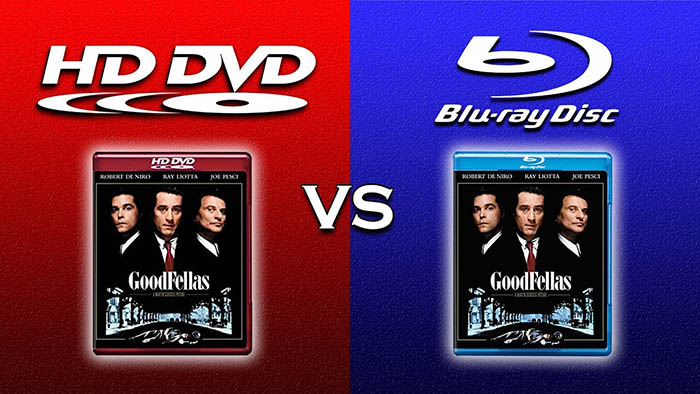
One of the biggest reasons Blu-ray became popular was the massive jump in resolution compared to DVDs. DVDs were designed during the standard-definition television era and therefore have much lower resolution.
Typical DVD video resolution is 720 × 480 in NTSC regions. While this was acceptable for older televisions, it appears soft and blurry on modern HDTVs. Blu-ray increased the resolution dramatically to 1920 × 1080. This means Blu-ray contains roughly five times more pixels than DVD video.
As a result, Blu-ray movies usually appear:
- Sharper and more detailed
- Cleaner during fast motion
- More suitable for large screens
When watching on modern TVs, especially screens larger than 55 inches, the difference between DVD and Blu-ray becomes very noticeable.
What Is Blu-ray Resolution vs 4K Streaming
Many streaming platforms now offer movies in 4K resolution, which leads to a common question: why do some Blu-ray movies still look better than 4K streams? The answer often comes down to bitrate and compression. Streaming services must compress video heavily in order to deliver content over the internet efficiently.
Typical streaming bitrates are around:
- 4K streaming: 15–25 Mbps
In contrast, Ultra HD Blu-ray can reach bitrates of up to:
- 4K Blu-ray: up to 128 Mbps
Higher bitrates mean less compression and more preserved image detail. This is why many home theater enthusiasts believe Blu-ray discs still provide the best possible picture quality outside of a cinema.
Can Blu-ray Be 720p or 4K?
Some people assume that Blu-ray always means 1080p, but technically the Blu-ray format supports several resolutions. These include 720p, 1080i, and 1080p. In practice, however, most commercial Blu-ray movies are encoded in 1080p because it offers the best balance between quality and compatibility with HDTVs.
When people refer to 4K Blu-ray, they are usually talking about the newer Ultra HD Blu-ray format rather than standard Blu-ray discs.
Therefore the general rule is:
- Standard Blu-ray = 1080p
- Ultra HD Blu-ray = 4K
Understanding this distinction helps avoid confusion when comparing disc formats.
 FAQs about Blu-ray Resolution
Most Blu-ray movies are released in 1920 × 1080 resolution, also known as 1080p Full HD. This resolution provides significantly more detail than DVD and is optimized for HDTV displays.
Standard Blu-ray movies are usually 1080p. However, newer discs known as Ultra HD Blu-ray support 4K resolution (3840 × 2160). These require a compatible 4K Blu-ray player and television to display the full resolution.
The main reason is bitrate and compression. Streaming platforms compress video heavily to reduce bandwidth usage, while Blu-ray discs store video at much higher bitrates. This allows Blu-ray to preserve more detail, resulting in cleaner images and fewer compression artifacts.
Yes. When you play a standard Blu-ray disc on a 4K television, the TV usually upscales the 1080p image to fit the 4K screen. While upscaling can improve perceived sharpness, it is not the same as native 4K resolution from an Ultra HD Blu-ray disc.
Many movie enthusiasts still prefer Blu-ray because it offers consistent picture quality, lossless audio, and permanent ownership of physical media. Compared with streaming, Blu-ray discs often provide higher bitrates and fewer compression artifacts.
External Sources:
1. Blu-ray Disc Association Official Website : The official site of the Blu-ray Disc Association explains the Blu-ray format, its development, and why Blu-ray and Ultra HD Blu-ray deliver high-quality video and audio for home entertainment systems.
2. What Is Ultra HD Blu-ray – Blu-ray Disc Association : Official explanation of Ultra HD Blu-ray technology, including support for 3840 × 2160 resolution, HDR, higher frame rates, and immersive audio formats such as Dolby Atmos and DTS:X.
3. Blu-ray.com Blu-ray FAQ : A comprehensive Blu-ray FAQ covering specifications such as maximum video resolution, supported codecs (AVC, VC-1, MPEG-2), and typical Blu-ray video bitrates up to about 40 Mbps.
4. Blu-ray Technology Overview : Overview of Blu-ray technology including storage capacity (25GB single-layer and 50GB dual-layer discs), high-definition 1080p support, and improved data transfer rates compared with DVDs.
5. Ultra HD Blu-ray Specifications : Technical overview of 4K Blu-ray discs including resolution (3840 × 2160), HDR support, HEVC video encoding, and disc capacities up to 100GB.
6. 1080p Video Standard : Wikipedia entry describing the 1080p Full HD standard used by most Blu-ray movies, including typical frame rates and encoding specifications used on Blu-ray discs.


 Free Download
 Free Download