
"I'm re-encoding my video library into MKV containers and x265 codecs with HandBrake using an R710 w, 72 gigs of RAM, 2x Intel Xeon L5640 2.26GHz and six 7200 rpm hard-drives in a RaidZ2 configuration. My issue is that HandBrake only gets 20% utilization across the 12 physical cores/24 logical cores, whether the video is 480p, 720p 1080p or etc."
There are so many reasons why HandBrake does not use 100% CPU on your computer. It could be issues out of processor version and HandBrake video settings. Too many CPU cores and threads cause problem too. We'll give you a detailed analysis of those possible reasons. Also, you can find ideas helping tweak settings to up the utilization of CPU and make HandBrake convert content faster.
Reason 1. Quite possibly, the video encoding is as fast as it can be and there is no need to max out your CPU power.
New CPU comes with better architecture, tuned CPU scheduler and more cache. All this brings about a more energy efficient CPU resource allocation model. It is said that each new-gen CPU will be about 5-10% faster than the previous of last year, at the same clock speed. So HandBrake not using 100% CPU doesn't mean it runs slowly. Maybe the transcoding speed is the same as before or much faster.
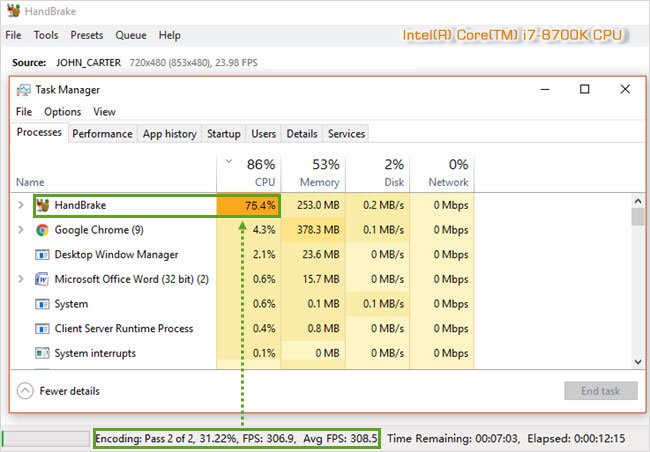
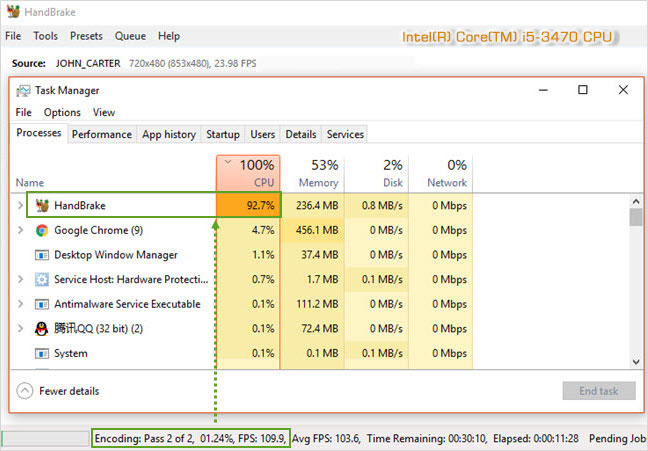
Here is a comparison of HandBrake CPU usage on both i7-8700K and i5-3470 with exactly the same settings. The input source is a DVD of John Carter, while the output settings are x264, Fast 720p and frame rate same as source.
The picture below shows that HandBrake reaches up to 308 average fps with 75% CPU usage on i7-8700K while only 103 fps with 93% CPU usage on i5-3470. So you'd better measure the x264 performance by speed (fps) instead of CPU usage.
Reason 2. When encoding video, whether HandBrake can use all CPU cores or not is mainly depending on the codec selection. To be specific, HandBrake uses FFmpeg, libvpx and x265 as a backend. FFmpeg's multithreading ability relies on the codec.
• Algorithms of different codecs have a big effect on the capability of CPU utilization, especially the use of multi-cores and multi-threading. For example, VP9 has more decent support for multiple cores than x264/H.264.
• The new-version codec with algorithm revised might be more efficient than its old version, requiring less processing power.
Reason 3. HandBrake not using all cores might be caused by multi-cores or multi-threading. As we mentioned before, multi-threading capability is decided by codec, specifically, the algorithm of codec. So the results could be:
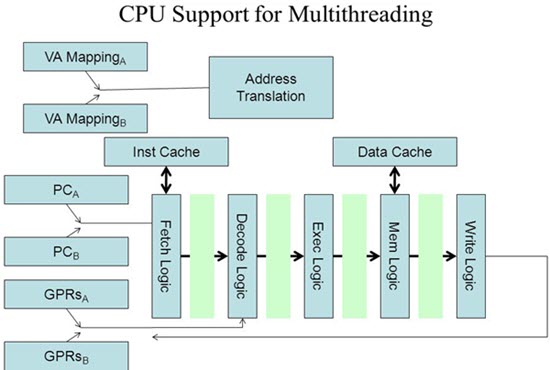
• When there are just a few CPU cores and logical processors, say 4 cores 4 threads, thread synchronization can be easily implemented by codec. Thus HandBrake CPU usage could be as high as 90% to 100%.
• When you have multi-cores and hyper-threading, say 6 cores 12 logical processor, it requires a really complicated codec algorithm to execute multiple cores and threads concurrently. It is likely to slow down a bit each time a CPU runs a different thread than before. The more cores and threads you have, the harder to synchronize them and the lower the CPU usage might be.
• But remember it is not certain that higher CPU usage will absolutely lead to faster video conversion. The encoding efficiency might be same, faster or slower in different CPU usage cases.
Reason 4. A special case for HandBrake low CPU usage is using it to rip a protected DVD. HandBrake can deal with some encrypted file after installing libdvdcss. But you will experience a long-time title scanning process, like 10 minutes. This Pass 1 step doesn't need to run CPU and the CPU usage is only 2%-3%. When it switches to Pass 2 encoding step, the CPU usage will soar to 90% or higher.
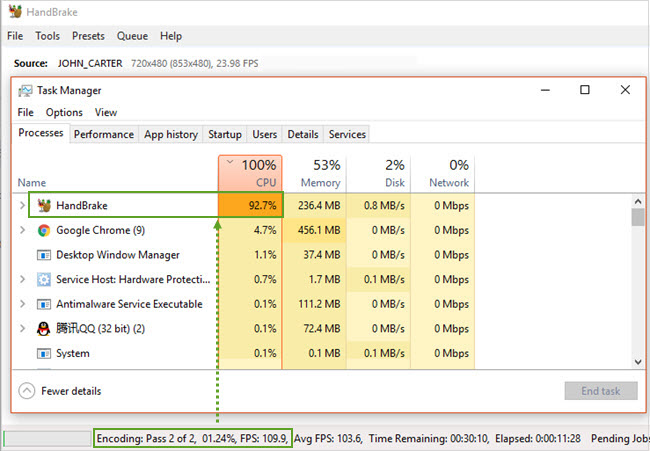
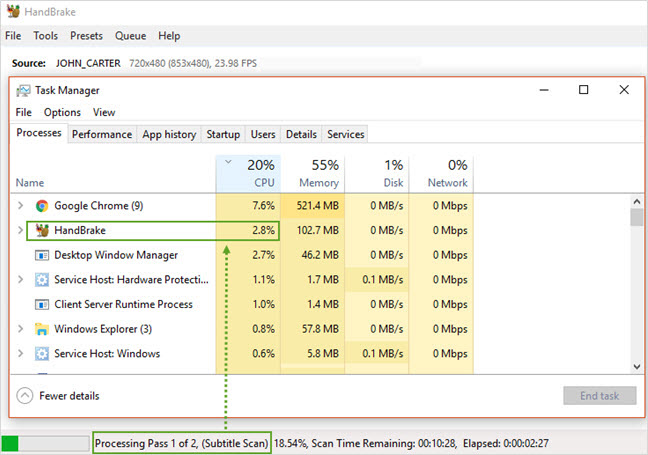
Reason 5. It is possible that constant updates make HandBrake get better at sharing CPU resources rather than hogging them. It may peg 100%, but when there are some other processes, your HandBrake CPU usage is going to be lower. So HandBrake not using all cores is not a problem.
Reason 6. The worst case is there is a hard limit on how much CPU resource can be used on a program. And 50% CPU usage really halve the encoding efficiency.
FYI, HandBrake can maximally use 6 to 8 CPU cores with diminishing returns thereafter. See the details in https://handbrake.fr/docs/en/latest/technical/video-encoding-performance.html

Rip and digitize homemade, scratched, movie DVDs / folder / ISO image and DVDs with 99 titles - the new DRM encryption adopted by Disney and other DVD distributors, bypass DVD CSS, region code, Sony ARccOS, UOPs, APS, RCE, level-3 hardware accelerated.
For PC and Mac only. Go to mobile page.
 George Williamsemail
George Williams is a senior editor at Digiarty covering all the latest tech in mobile industry for the better part of the first four years, from iPhone, Samsung to other innovative gadgets. And now he's been dived into data backup and management to keep data safe on mobile devices in the recent three years. Outside the tech, he is a songwriter and loves hip-hop.
Home | About | Privacy Policy | License Agreement | News | Contact Us | How-tos
 Copyright © 2026 Digiarty Software, Inc. All rights reserved


 Free DVD Ripper
 Convert Videos
 iPhone Transfer
 How-tos
 Download