







FFmpeg Review 2026: Features, Performance, Pros, Cons
 Jack Watt
Updated on
While FFmpeg can convert, compress, edit, and stream almost any video format, most users first encounter it through frustration rather than functionality. The command-line interface, steep learning curve, and complex syntax make it very different from typical video software. In this review, we take a practical, hands-on look at FFmpeg, focusing on real usage scenarios, performance behavior, and whether it still makes sense for everyday users compared to modern GUI-based alternatives.
What Is FFmpeg (From a User Perspective, Not a Developer Definition)
If you've ever converted a video, compressed a large movie file, recorded your screen, or streamed content online, there's a good chance you've already benefited from FFmpeg—even if you've never installed it yourself. Unlike traditional software with buttons, menus, and a polished interface, FFmpeg is primarily a command-line multimedia engine that runs behind the scenes.
This distinction is important because FFmpeg is often misunderstood. Many people search for "What is FFmpeg?" expecting a video converter or editor they can launch and use immediately. In reality, FFmpeg is more like the engine under the hood: an incredibly powerful toolkit that processes video, audio, subtitles, and images, but usually requires commands rather than mouse clicks to operate.
Why Most Users Use FFmpeg Without Realizing It
One of the most surprising things about FFmpeg is how often it appears indirectly in everyday media workflows. While relatively few casual users interact with FFmpeg itself, millions use software that relies on its technology. Numerous video converters, media servers, screen recorders, and content creation tools either integrate FFmpeg directly or build their processing pipelines around it.
That means when a video is transcoded, resized, compressed, or prepared for streaming, FFmpeg is frequently doing the heavy lifting behind the scenes. For most users, the interface they see is simply a more accessible layer built on top of FFmpeg's underlying capabilities.
Why So Many Video Tools Depend on FFmpeg
During our evaluation, one theme appeared repeatedly across developer communities and video production forums: FFmpeg has become the industry's default media processing framework. The reason is straightforward—it supports an enormous range of codecs, containers, filters, and workflows while remaining free and actively maintained.
Applications such as FFmpeg-based video converters, media players, streaming tools, and recording software rely on its encoding and decoding capabilities. Even many commercial products that market their own processing technology still use FFmpeg somewhere within their media pipeline because of its reliability and extensive format support.
Core Features: What Is FFmpeg Actually Used For?
From a practical standpoint, FFmpeg is used whenever media files need to be transformed, optimized, or analyzed. Its capabilities extend far beyond simple format conversion and cover nearly every stage of modern multimedia processing.
- Video conversion: Convert between formats such as MP4, MKV, MOV, AVI, and WebM.
- Video compression: Reduce file sizes while maintaining acceptable visual quality.
- Audio processing: Extract, convert, normalize, or replace audio tracks.
- Subtitle management: Embed, extract, or convert subtitle streams.
- Streaming workflows: Prepare content for HLS, DASH, RTMP, and live broadcasting.
- Media analysis: Inspect codecs, bitrates, metadata, and file structure information.
Because of this flexibility, FFmpeg is equally useful for content creators compressing uploads, Plex users organizing media libraries, developers building video applications, and broadcasters managing large-scale streaming infrastructure.
Backend Engine vs End-User Software
Perhaps the easiest way to understand FFmpeg is to stop thinking of it as a typical application and start thinking of it as media infrastructure. Unlike consumer software designed around visual workflows, FFmpeg prioritizes control, automation, and compatibility. This is why experienced users often describe it as a toolkit rather than a traditional video editor or converter.
In real-world use, FFmpeg sits firmly on the backend side of the multimedia ecosystem. It is exceptionally powerful, highly flexible, and trusted throughout the industry, but it was never designed primarily for beginners. For users willing to learn its workflow, however, few media tools offer the same combination of performance, format support, and long-term versatility.
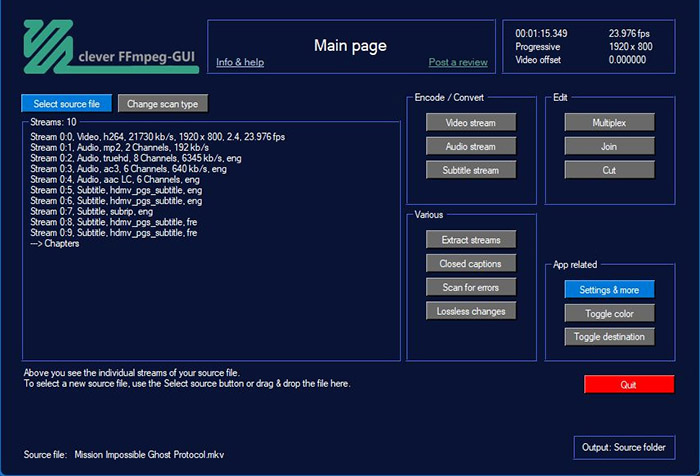
First Impressions & Setup Experience (Installation & Learning Curve Test)
One of the first things we noticed during testing is that FFmpeg feels very different from traditional video software. There is no setup wizard, no welcome screen, and no obvious workflow to guide new users. Instead, you're essentially installing a media processing engine that expects commands as input. For experienced users, this offers unmatched flexibility. For beginners, it can feel intimidating from the very first launch.
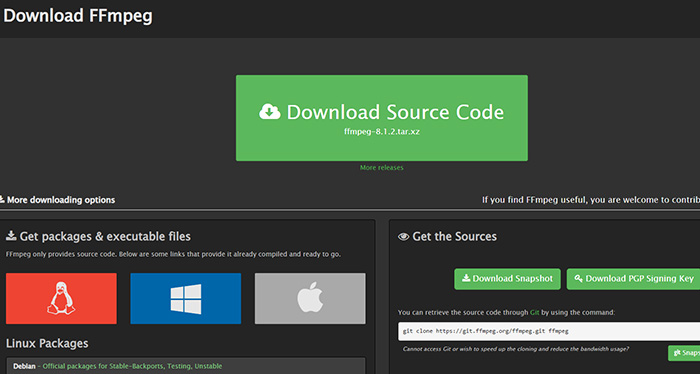
Installation Experience Across Windows, Mac, and Linux
The installation process varies significantly depending on the operating system. On Linux, FFmpeg is often available directly through package managers, making setup relatively straightforward. macOS users can typically install it through Homebrew in a single command. Windows, however, remains the platform where new users encounter the most friction. Downloading builds, extracting files, configuring system paths, and verifying installation can be confusing for users who have never worked with command-line tools before.
From a purely technical perspective, FFmpeg isn't difficult to install. The challenge is that many users expect a traditional application, only to discover that the installation process ends with a command-line utility rather than a clickable program.
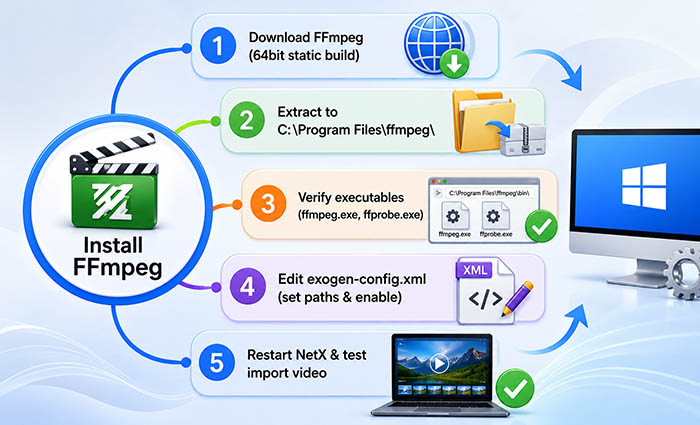
The First Successful Run Is the Biggest Barrier
Interestingly, the hardest part of learning FFmpeg is usually not advanced encoding or automation. It's getting the first command to work correctly. During testing, once the software was installed and the first conversion completed successfully, the workflow became much easier to understand.
This aligns with feedback from many long-term users. The initial learning curve is steep because FFmpeg provides almost no visual guidance. However, after learning a handful of common commands, users often begin to understand why the tool has remained popular for more than two decades.
Our Take After Setup
Based on our experience, FFmpeg's reputation is well deserved: it works exceptionally well once configured correctly. The challenge is that installation and early usage remain its biggest weaknesses. Most modern software focuses on accessibility, while FFmpeg prioritizes control. Whether that's a drawback or an advantage depends largely on the type of user sitting behind the keyboard.
FFmpeg Review: Real-World Performance, Hands-On Evaluation
In real-world testing, FFmpeg behaves less like a typical application and more like a processing engine whose performance depends heavily on how it is configured. The same tool can feel extremely fast in one workflow and surprisingly complex or error-prone in another. This makes user experience highly variable depending on codec type, command structure, and system setup.
| Category | Observed Behavior | Practical Impact |
|---|---|---|
| Encoding Speed (H.264 vs H.265) | H.264 processing is generally stable and faster; H.265 encoding is significantly slower and more CPU-intensive | Good for standard exports, but HEVC workflows require longer processing time and stronger hardware |
| CPU / GPU Usage | Primarily CPU-bound by default; GPU acceleration depends on explicit configuration and hardware support | Lightweight for basic tasks, but high-resolution encoding can fully saturate CPU usage |
| Batch Processing | Strong performance in scripted batch workflows once commands are correctly configured | One of FFmpeg’s biggest advantages for large-scale media processing and automation |
| Error Handling | Verbose command-line errors when codecs are missing or parameters are incorrect | Powerful for debugging, but overwhelming for beginners who rely on trial-and-error |
| Long Processing Stability | Stable during extended encoding sessions, with minimal crashes under normal configurations | Reliable for long exports, server-side processing, and continuous workflows |
From a usability perspective, what works smoothly in FFmpeg is everything related to automation and batch execution. Once a correct command is established, performance becomes highly consistent and scalable across large workloads.
What breaks in real usage is usually not the engine itself, but the setup layer—incorrect parameters, unsupported codecs, or missing libraries often lead to failed outputs or confusing error messages.
Where users tend to give up is during troubleshooting. Unlike GUI tools that guide users visually, FFmpeg requires interpreting error logs and adjusting commands manually, which creates a steep friction point for non-technical users.
FFmpeg Pros and Cons - User Feedback & Testing
Based on hands-on evaluation and patterns repeatedly mentioned in developer communities and user forums, FFmpeg shows a very clear split between exceptional technical capability and a steep usability barrier. It is widely regarded as a power tool in media processing, but the real experience depends heavily on user skill level and workflow setup.
- Extremely powerful format support across nearly all modern and legacy codecs
- Unmatched automation capability through scripting and command-based workflows
- Lightweight runtime performance with minimal system overhead for basic tasks
- Widely adopted industry-standard backend used in many professional tools
- Strong batch processing advantage for large-scale media conversion tasks
- Steep learning curve, especially for users unfamiliar with command-line tools
- No native graphical interface and often relies on third-party GUIs
- Complex command syntax increases entry difficulty for beginners
- Not beginner-friendly and requires technical understanding for basic tasks
- Debugging errors can be time-consuming due to verbose command-line output
 FAQs about FFmpeg
FFmpeg is used for processing multimedia files, including video conversion, compression, audio extraction, streaming, and format transcoding. In real-world workflows, it acts as a backend engine that powers many video tools rather than a standalone consumer application.
Yes, FFmpeg is free and open-source software. It is released under LGPL or GPL licenses depending on configuration, which allows users to download, modify, and use it without paying any license fee.
FFmpeg itself is safe when downloaded from official or trusted sources. It is widely used in professional software and media platforms. However, because it is a command-line tool, users should avoid unofficial builds that may be modified or bundled with unwanted components.
FFmpeg and HandBrake serve different purposes. FFmpeg offers more control, automation, and format flexibility through command-line operations, while HandBrake provides a user-friendly graphical interface. In practice, FFmpeg is more powerful, but HandBrake is easier for beginners.
FFmpeg is difficult for beginners because it uses command-line syntax instead of a graphical interface. Users must understand parameters, codecs, and file paths, which creates a steep learning curve compared to modern video editing software.
FFmpeg can compress videos with minimal quality loss depending on the codec and settings used. Lossless compression is also possible using specific codecs, but most real-world use cases involve balancing file size and visual quality rather than completely avoiding any loss.
Yes, FFmpeg supports GPU acceleration through hardware encoders such as NVIDIA NVENC, Intel QSV, and AMD AMF. However, it must be explicitly enabled and properly configured depending on the system and driver support.
FFmpeg can perform basic video editing tasks such as trimming, merging, cropping, and filtering. However, it is not a traditional timeline-based video editor, so complex editing workflows require precise command-line operations or scripting.
FFmpeg supports a very wide range of formats including MP4, MKV, AVI, MOV, WebM, MP3, AAC, FLAC, and many more. Its compatibility is one of the main reasons it is widely used across media tools and platforms.
FFmpeg is legal software. It is an open-source project used globally in media production and software development. However, legality of use depends on how it is applied, especially when dealing with copyrighted content, which is subject to local laws.


