









How to Convert DVD to WMV on Windows and Mac
Summary: Converting DVDs to WMV is a practical way to make your videos easily playable on Windows PCs, Xbox consoles, and older media players. While VLC doesn't handle protected DVDs, here's how to digitize DVDs to WMV with WinX DVD Ripper.
Windows Media Video (WMV) is a compressed video file format developed by Microsoft, designed for smooth playback on Windows platforms. Initially created for Internet streaming as a competitor to RealVideo, WMV remains a widely compatible format for Windows PCs, Xbox consoles, and older media players.
WMV is also one of the default video formats supported by Windows Movie Maker, making it ideal for users looking to edit DVD videos or low-resolution footage on legacy editing tools. If you have DVDs with family memories, classic movies, or rare content, converting them to WMV ensures hassle-free playback and easy editing on Windows devices.
All you need is a reliable DVD ripper to rip your DVDs and convert them to WMV format. This not only preserves your discs as digital backups but also makes them compatible with Windows Movie Maker, Xbox, and older media players — perfect for home viewing, office presentations, or embedding in PowerPoint slides.
Table of Contents
What is the Best DVD Ripper to Convert DVD to WMV?
There are at least six factors should be taken into your considerations, including:
- The ability to convert DVD to WMV. This of course should be the first factor we should think about.
- Output video quality. I guess no one like watching obscured videos after spending his valued time to convert a DVD.
- Speed also. Time is especially important for modern people. So DVD ripper with fast converting speed is what users are pursuing for.
- Price. For many users, this might be the first thing they care. And most of them prefer DVD ripper freeware to solve their problem.
- Clean. No virus, adware, spyware, etc.
- Advanced functions. For advanced users, they also would like to try the advanced feature to make a stylish video, such as adding subtitle, adjust parameters, change video file size, trim video segment, and so on.
Considering these factors, WinX DVD Ripper might be the best choice for you. In addition to converting DVD to WMV, WinX DVD Ripper can also convert DVD disc to MP4, AVI, MOV, MPEG2, M2TS, FLV, ISO, VIDEO_TS folder, MP3, and many other media formats.
Please DO Not use WinX DVD Ripper to rip rental DVDs.
For Windows and Mac only. If you are a mobile user, please click here.
How to Convert DVD to WMV Format on Windows nad Mac?
Below is the basic guide on how to convert a DVD to WMV video.
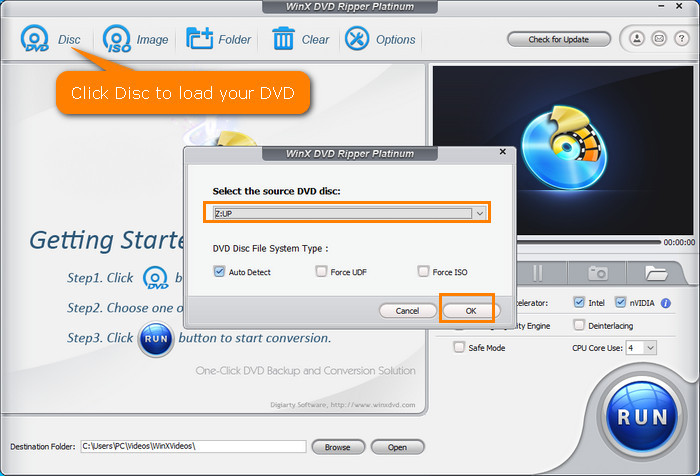
Step 1. Import DVD Disc
Insert DVD disc into DVD-ROM. Launch WinX DVD Ripper and click "DVD Disc" button to load DVD movie contents.
Step 2. Select WMV as Output Format
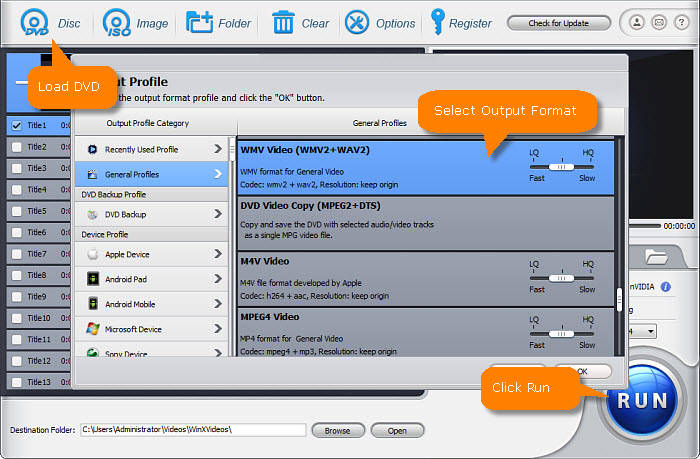
On the Output Profile window, select "General Profiles" and then choose "WMV Video".
Step 3. Set Destination Folder
Click "Browse" button, select a destination folder in the dialog box that opens, and click OK.
4. Start Converting DVD to WMV
After finishing the above settings, click "RUN" button on the main interface to begin converting DVD movie to WMV.
Disclaimer: Digiarty Software does not advocate ripping copy-protected DVDs for any commercial purpose and suggests referring to the DVD copyright laws in your countries before doing so.
Why Convert Your DVDs to WMV?
Converting DVDs to WMV format offers multiple advantages, especially for Windows-based users and anyone working with legacy devices or local media libraries. Here’s why DVD to WMV is still a smart, practical choice:
- Seamless playback on Windows PCs, laptops, and tablets without extra codecs. Works smoothly with Windows Media Player.
- Compatible with Xbox 360 and Xbox One for easy DVD playback via USB or network streaming.
- Playable on many older media players, home theater systems, and early smart TVs with USB ports.
- Supported by Windows Movie Maker and easy to embed in PowerPoint presentations.
- Preserves DVDs by backing up content digitally, saving physical storage space.
- Good balance of file size and quality, ideal for local network streaming and older NAS devices.
- Widely used in business, education, and archives for training videos and e-learning content.
FAQs on Converting DVD to WMV
1. What is WMV and why convert DVDs to WMV?
WMV (Windows Media Video) is a Microsoft-developed video format widely supported on Windows PCs, Xbox consoles, and many older media players. Converting DVDs to WMV makes your videos compatible for smooth playback and editing on these devices.
2. Can I directly rip DVDs to WMV format?
Yes, with the right DVD ripper software you can convert DVDs directly to WMV, preserving video quality and enabling playback on Windows devices without extra codecs.
3. Is WMV better than MP4 or MKV for DVD conversion?
It depends on your needs. WMV offers better compatibility on legacy Windows systems and Xbox consoles, while MP4/MKV might provide wider cross-platform support. For Windows-centric playback and editing, WMV is a smart choice.
4. Will converting DVDs to WMV reduce video quality?
Properly done, DVD to WMV conversion maintains good quality. Some compression is inevitable, but most rippers optimize to keep videos clear while reducing file size.
5. How do I play WMV videos on non-Windows devices?
WMV is less compatible with macOS, iOS, and many smart TVs. You may need third-party players like VLC or convert WMV to a more universal format like MP4 for these devices.
6. How can I convert DVDs with multiple audio tracks or subtitles to WMV?
Look for DVD rippers that support multi-track ripping and subtitle extraction. Some software allows you to keep or choose audio tracks and subtitles when converting to WMV.
7. What software do you recommend for ripping DVD to WMV?
WinX DVD Ripper Platinum and similar tools offer easy, fast DVD to WMV conversion with GPU acceleration and options to keep multiple audio tracks and subtitles.
8. Can I stream WMV videos over a home network?
Yes, WMV files are lightweight and compatible with many media servers and devices, making them suitable for local network streaming, especially in Windows-based environments.


