








How to Convert DVD to MOV on Mac and Windows
 Estrella H.
Updated on
There are several reasons why one may need to convert DVD to MOV format. He or she may want to convert DVD to MOV just for backup in case careless scratches, for playback with QuickTime, for playback on iPhone, for storing and sharing videos over the internet, or for editing and post-production work. To do this, you'll need to download a DVD to MOV converter which will be introduced below, especially if you are trying to convert some store-bought DVDs.
Part 1. Best DVD to MOV Converter for Mac and Windows
There are several software options available for converting DVD to MOV format. The most popular option is WinX DVD Ripper. It can rip and convert DVD to MOV format, as well as other formats. It is available for Windows and Mac operating systems. Powerful DVD decryption, fast DVD ripping and high-quality output make WinX DVD Ripper an impressive showing. It can ingest any DVD disc and auto detect the main title on its own.
Main features of WinX DVD Ripper:
- Rip DVD to MOV (MPEG4/H.264), MP4, M4V, MKV, FLV, AVI, 3GP, iPhone iPad Android, etc., 350+ preset profiles.
- Circumvent region code, CSS, UOPs, AACS 2.0 or complicated Sony ARccOS, bad sector, Disney X-project DRM, and other copy protections.
- Intel/Nvidia/AMD GPU hardware accelerated, 47x real-time faster speed, 5 mins to rip a full DVD.
- Built-in De-interlacing and High Quality Engine, convert DVD to MOV with 98% quality kept, no quality loss.
 Free Download
 Free Download
Part 2. How to Convert DVD to MOV with WinX DVD Ripper
Preparations: Free download and install WinX DVD Ripper on your Windows PC or Mac. The Windows version is perfectly compatible with Windows 7, 8, 8.1, 10, and 11, while the Mac version can work on Mac OS X 10.6 and higher.
Next, follow the steps below to convert DVD format to MOV. Our tutorial will use the Windows version as an example. If you are an Mac user, you can also refer to this tutorial to convert DVD to MOV on Mac, because the steps for the Mac version are similar.
Step 1. Load DVD.
Insert the DVD you want to convert into your computer's DVD drive. If your computer doesn't have a built-in DVD drive, connect an external DVD drive to your computer.
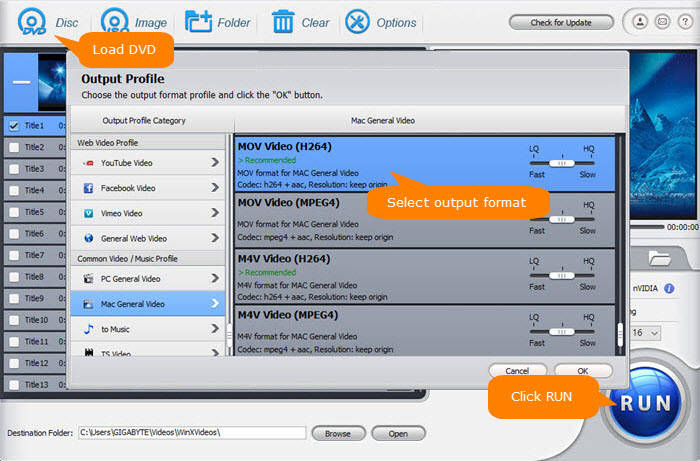
Then, run WinX DVD Ripper and click on the "DVD Disc" button to select and open the inserted DVD.
Step 2. Select MOV as Output Format.
After loading DVD, WinX DVD Ripper will pop up the Output Profile dialog. You should select the output format as MOV from the list of available formats. MOV profile can be found in the category of General Profiles, PC General Video, Mac General Video, General Web Video, and Facebook Video. Simply choose one based on where you want to use the MOV files.
Step 3. Select Content to Convert.
After analyzing the DVD contents, WinX DVD Ripper will display all DVD titles with the main title selected. If you want to convert other titles, you can change it manually. What's more, you can click the Edit button to edit the selected title further, including trimming, cropping, and subtitling video.
Step 4. Set Output Folder for the MOV Output.
Click "Browse" button in output setting area, select a destination folder in the dialog box that opens, then you can click "OK" now.
Step 5. Start Converting DVD to MOV.
Click on the "RUN" button to start ripping your DVD to MOV now. Then, you just need to wait for the software to finish the conversion. And you can choose "Shut down computer when conversion completed", so that you do not need to waiting for the completion.
Once the conversion is complete, locate the MOV file in the output folder and check that it plays properly.
That's it! You have successfully converted DVD to MOV using WinX DVD Ripper. You can now play the video on any device or media player that supports MOV format.
Conclusion
MOV is a file extension used by the QuickTime wrapped files. The format was created by Apple Computer to work with multimedia files. The advantage of MOV files is the ability to contain abstract data references for the media data, and MOV is the best video format supported by QuickTime. So, if you want to rip a DVD to a digital file on Mac, the best video format is MOV. Besides, DVD discs could not be played directly with QuickTime player, so it is necessary to convert DVD format to MOV.
Converting DVD to MOV format is quite easy with WinX DVD Ripper. It accepts both home-made and copy-protected DVDs and can finish the conversion from DVD to MOV in a matter of minutes only.
Disclaimer: Digiarty Software does not advocate ripping copy-protected DVDs for any commercial purpose and suggests referring to the DVD copyright laws in your countries before doing so.
Still have trouble about converting DVD to MOV on Windows (10)/Mac? Just Email Us


