












How to Rip a Copy-Protected DVD on Windows (10) & Mac [Updated!]
Summary: Ripping copy-protected DVDs requires software that can handle DVD encryption such as CSS, region codes, or structural protections. Tools like WinX DVD Ripper, HandBrake, and MakeMKV are commonly used for protected DVD ripping.
Copy-protected DVDs are where things get frustrating. You insert the disc and then nothing works. Your computer either refuses to read it properly, or the rip stops halfway with errors you can’t explain. Even Handbrake can quickly hit a wall. We tested most popular DVD ripping methods in real-world setups and narrowed them down to 8 that actually work for protected DVD copy.
Free Download the Best DVD Ripper for Copy-Protected DVDs
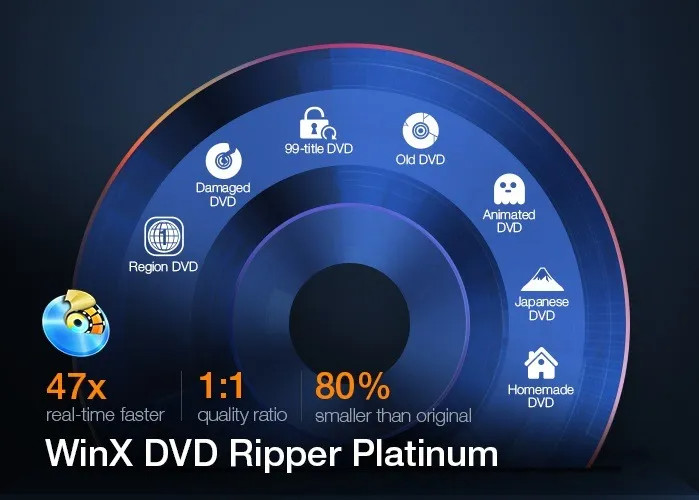
WinX DVD Ripper is a time-tested and reliable solution that can cope with any homemade or commercial DVD, whether it is copy-protected with region codes, CSS, UOPs, or severely encrypted by Sony ArccOS, Disney X-project DRM. Rip protected DVD to MP4, ISO, MOV, MPEG, AVI, MP3, etc swiftly with full GPU acceleration and preserve the best possible quality thanks to its High-Quality Engine.
Part 1. Best Tools to Rip Copy-Protected DVDs: Quick Comparison Guide
The comparison below highlights best DVD ripping software, focusing on supported disc types, practical use cases, and whether free versions or trials are available.
Software |
Supported DVDs and Protections |
Best for |
Free Trial |
|
Rating: 4.5 |
Almost all commercial DVDs, incl. region-locked DVD, CSS DVD, 99-title, new/old, workout DVD, DVD with UOP, Macrovision, Disney X-project DRM, Sony ARccOS, etc. |
Fast and reliable ripping of almost any copy-protected DVD to MP4, ISO, VIDEO_TS, MOV, AVI, etc. Best choice for new or tricky protected releases. |
|
|
Rating: 4.4 |
Some CSS and regional DVDs can be ripped with libdvdcss installed. |
Free, open-source DVD ripping for classic or older DVDs. Best for tech-savvy users who don’t mind extra setup. |
|
|
Rating: 4.2 |
DVDs and Blu-rays with AACS, BD+, CSS; some region-locked DVDs. |
Lossless backup to MKV format, especially for Blu-rays. Ideal for users prioritizing quality over format flexibility. |
|
|
Rating: 4.5 |
New, old, regional DVD, CSS DVD, etc. |
Touching up copyrighted DVD movies apart from ripping. |
|
|
Rating: 4 |
Classic DVDs with CSS, UOP, and region codes; cannot handle modern advanced protections. |
Making a shrunk copy of old copy-protected DVDs from 8.5GB to a single-layer 4.7GB with minimal loss of quality. |
|
|
Rating: 3.8 |
Unprotected or lightly protected DVDs; CSS/region-locked DVDs only if libdvdcss is installed. |
Suitable for users who want to play and rip DRM-protected DVDs with libdvdcss. |
|
|
Rating: 4.0 |
CSS, region code, UOPs, Macrovision content protection. |
Playing and occasionally ripping simple protected DVDs. Not reliable for new DRM schemes. |
|
|
Rating: 4.5 |
CSS, RC, RCE, APS, UOPs, and Sony ARccOS. |
Ripping copy-protected DVDs to DVD9, ISO, and folder.. |

 Try now
If you want a stable way to rip almost any DVD, from new releases to tricky protected discs, WinX DVD Ripper is your best bet. DVDFab HD Decrypter is another strong choice for advanced DRM. MakeMKV is ideal if you want a perfect, lossless backup in MKV format, especially for Blu-rays. HandBrake (with libdvdcss) and DVD Decrypter work well for older or lightly protected DVDs. VideoProc Converter is convenient for editing during ripping, and VLC is mostly suited for playing or ripping simple DVDs.
Part 2. How to Rip Copy-Protected DVDs on Windows 10/11 and Mac? [8 Methods]
Can you rip a copy-protected DVD for personal, fair-use backup? In many regions, it's legally acceptable to make a digital copy of DVDs you own, as long as it's not for distribution. The real challenge is that most commercial DVDs come with various types of copy protection, preventing direct ripping with ordinary tools.
To handle these protections, you’ll need a professional DVD ripper that’s capable of decrypting or bypassing the restrictions. So, which tool works best for copy-protected DVDs on Windows and macOS? Below, we break down the top options and show you how to rip a protected disc step by step.
Method 1. Rip Copy-Protected DVDs with WinX DVD Ripper
- Supported DVDs: DVDs protected by all forms of copy protection.
- Supported output formats: 350+ output profiles, including ISO image, VIDEO_TS folder, MP4, AVI, WMV, MP3, and more.
- Compatible OS: Windows, Mac
WinX DVD Ripper has gained a strong foothold in the market for 19 years, attracting over 86 million users worldwide. Each year over 3.6 million DVDs have been processed successfully, from homemade DVDs to copy-protected DVDs like CSS, regional discs, 99-title, workout, old, and new movies or TV shows.
When you rip a protected DVD, WinXDVD takes advantage of its unique and always up-to-date title check mechanism to crack the protection and access the encrypted data on the disc, whether it is encoded with CSS, UOP, APS, Macrovision Ripguard, Sony ARccOS, or Disney X-project (99-title). The exceptional DVD decrypting ability has placed WinXDVD at the forefront of DVD ripper software.
Pros:
- Defeat DVD copy protections & support any type of DVD, incl. 99-title, new, old, unplayable, non-standard, Disney DVD, etc.
- Supports GPU hardware acceleration. 47X real-time faster speed.
- Supports a wide range of formats and device profiles like MP4, MOV, AVI, WMV, MP3, iPhone, iPad, and Android.
- Enhanced DVD analysis engine in the latest version for improved handling of new complex disc structures.
- Original quality can be maintained.
Cons:
- Not compatible with Linux.
How to Copy Your Copyright Protected DVDs with WinX DVD Ripper?
Prior to the ripping, please feel free to free download and install WinX DVD Ripper to have a try! It's a lightweight tool. The Windows version is 31.6 MB only while the Mac version is 52.2 MB only.
 Free download WinX DVD Ripper Platinum on Windows PC
Free download WinX DVD Ripper Platinum on macOS
Step 1. Load the copy-protected DVD you want to rip.
Insert the DVD into the tray with the logo side facing up, and close the tray. If your computer doesn't have a DVD drive, you can connect an external drive to your computer. Here we insert Disney/Pixar® "Up" DVD to have a try!
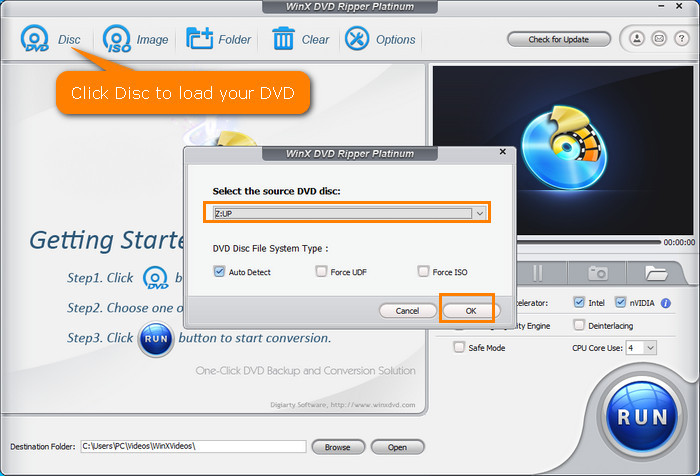
Launch WinX DVD Ripper, click the "DVD Disc" button at the top left corner, and then select the source DVD disc. No need to specify the DVD disc file system type. Just leave it as default and click OK. It will begin analyzing the DVD info, and auto-check the right title.
Step 2. Select the output format.
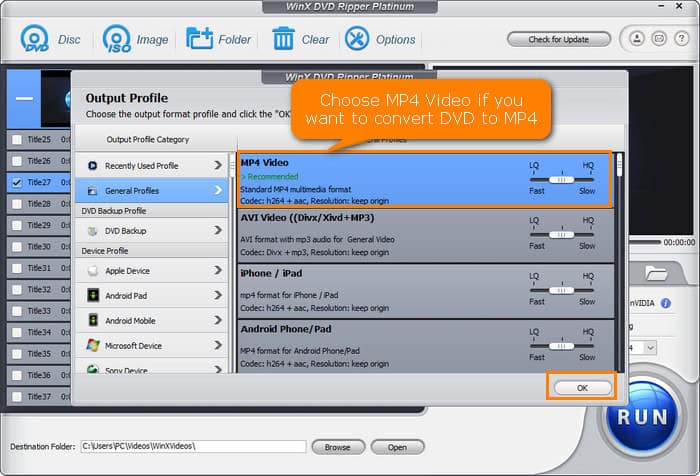
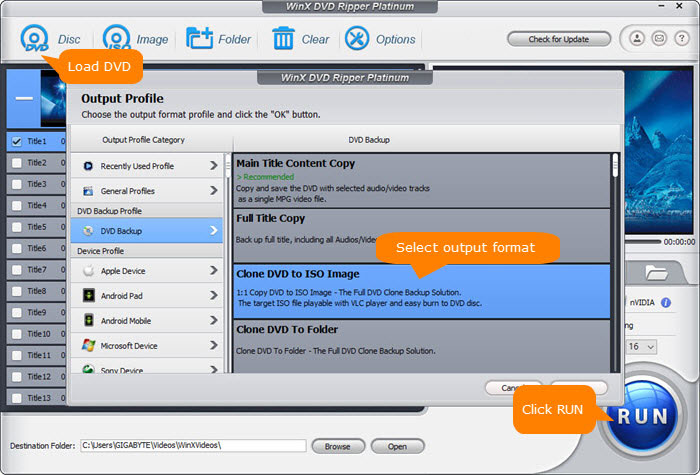
After loading the DVD, an Output Profile window will show up. Now, you need to choose a format as per your needs. Scroll down and you'll find all popular formats and device presets covered. You can copy protected DVDs to ISO, hard drive, USB for preserving, or digital video formats like MP4, MKV, MOV, etc.
- To copy protected DVD to MP4, you can click "General Profiles" and select "MP4 Video".
- To copy protected DVD to ISO for full DVD backup, click "DVD Backup" and select "Clone DVD to ISO Image".
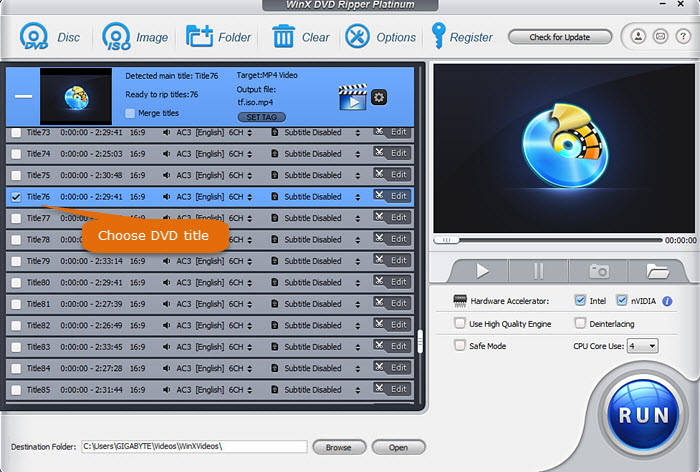
Step 3. Choose DVD title to rip.
Confirm that the title selected by WinX DVD Ripper is what you need. If it's not, you can manually correct it. If you have other titles you need to copy, simply check them.
Step 4. Start ripping the copy-protected DVD.
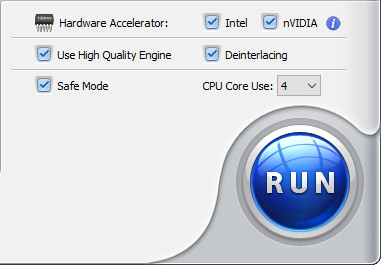
Choose where to store the ripped DVD movie files by clicking the "Browse" button. When you have done all settings, just hit the "RUN" button. Then the program will begin transcoding your encrypted DVD to a desired format and unleash the full potential of your DVD collection immediately.
Note: To deal with strictly encrypted DVDs, you'd better choose "Safe Mode" which is located at the right sidebar of WinX DVD Ripper's main interface.
Step 5. Find your digital copy.
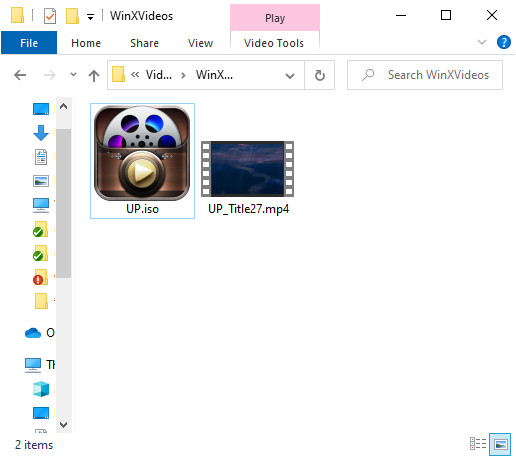
Once WinX DVD Ripper finishes ripping, you can see the digital copies in the destination folder you set before.
Legal Disclaimer: WinXDVD, developed by Digiarty Software, is designed strictly for personal, non-commercial media backup under fair use. Digiarty Software strictly respects copyright laws and does not condone, facilitate, or support copyright infringement or unauthorized copying. Users are advised to check and comply with their local DVD copyright laws and regulations before use.
Method 2. Rip a Copy-Protected DVD with HandBrake + libdvdcss
- Supported DVDs: DVDs protected by CSS and region code.
- Supported output formats: MP4, MKV, and WebM.
- Compatible OS: Windows, Mac, Linux
HandBrake is a free open-source and world-famous DVD and video transcoding tool that can convert DVDs to MP4 (M4V), MKV, and WebM on Windows, macOS, and Linux. It has secured second place among DVD ripping software thanks to the highly customizable features it offers, giving you more control over the output quality and file size by customizing the video/audio codecs, bitrates, file formats, and other settings.
Can HandBrake rip copy-protected DVDs? No. If the DVD is protected with advanced copy protection schemes, Handbrake is unable to break DVD copy protection on its own, instead, you may get errors such as "No Valid Source Found", "No Title(s) error", and "The source may be copy-protected. Handbrake doesn't support the removal of copy protections".
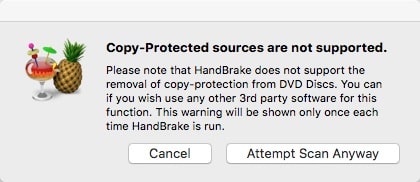
Getting around the DVD copyright protection error is to use HandBrake in conjunction with a third-party DVD decryption library called libdvdcss, which was originally designed to access and unscramble DVDs encrypted with the Content Scramble System (CSS). However, advanced protections like Sony ARccOS, Disney X-project DRM, and some regional restrictions cannot be decrypted by libdvdcss.
NEW: In HandBrake 1.11.2, the update improves DVD workflows mainly through better stability and subtitle handling. VobSub palette issues in MP4 are fixed, preventing broken DVD subtitles. MPEG-2 encoding memory leaks are resolved, making long DVD rips more stable. x265 2-pass crash fixes also improve reliability when copying protected DVDs to HEVC formats.
Pros:
- Free and open source.
- Compatible with Windows, Mac, and even Linux.
- Has a plethora of customizable options.
Cons:
- Needs additional decryption library to handle CSS protection. Can't handle all copy protection schemes.
- Can't create ISO from DVD.
- Output file compatibility depends on your encoding settings.
- Some options are difficult to understand for non-tech savvy users.
- It doesn't offer help by email or phone!
How to Rip Protected DVDs using Handbrake?
Just follow our guide and try your luck.
Step 1. Download and install Handbrake.
You're suggested to download it from the official site – Handbrake.fr. The latest version 1.11.0 is compatible with macOS 10.13 and later, Windows 10 and later, and Linux. And you can download old releases from archives. For Windows, Microsoft .NET Desktop Runtime version 10.0 is required.
Step 2. Install libdvdcss on Windows and Mac to rip DVD that is copy protected with CSS.
The easiest way to make libdvdcss available to HandBrake is to install VLC media player, which includes this library. After installing VLC, restart your computer and HandBrake should be able to detect and use it.
Alternative for Windows:
- For 64-bit Windows systems, download the 64-bit version
- For 32-bit Windows systems, download the 32-bit version
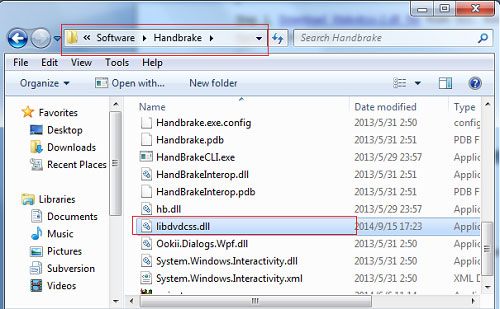
Rename the downloaded file to libdvdcss.dll and place it in your Windows system directory:
- For 64-bit Windows:
C:\Windows\System32 - For 32-bit Windows on 64-bit systems:
C:\Windows\SysWOW64
Alternative for macOS:
- Installing VLC is recommended
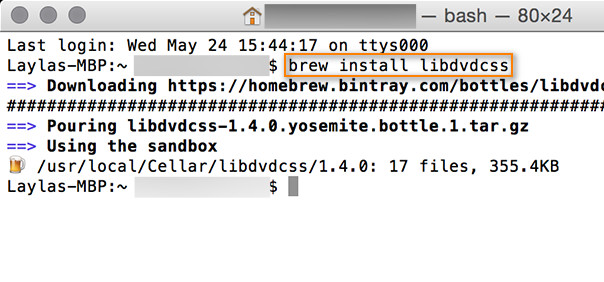
- Note: Homebrew installation is no longer reliable on recent macOS versions. For older macOS versions, you may use legacy libdvdcss packages here.
You can also click here to learn a detailed guide about Handbrake libdvdcss installation >>
Step 3. Load the DVD to HandBrake.
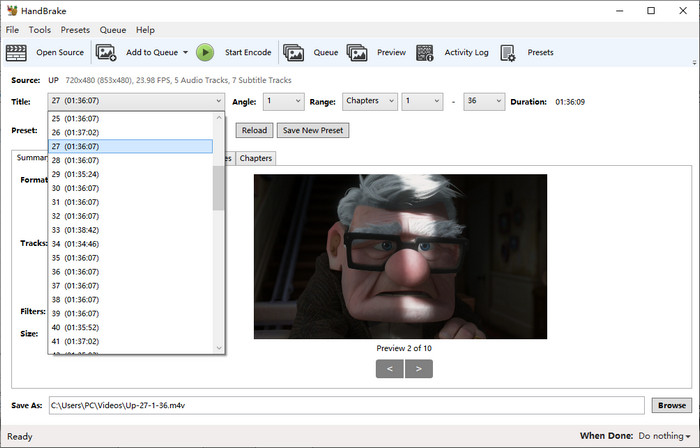
Insert the copy protected DVD into the DVD drive, after both Handbrake and libdvdcss are ready. Then open HandBrake and click on your DVD when the Source Selection screen appears. Then, HandBrake will start scanning the titles in your DVD. You can manually choose the titles or chapters if the auto-selected ones are not correct.
Step 4. Choose an output preset and adjust the output setting.
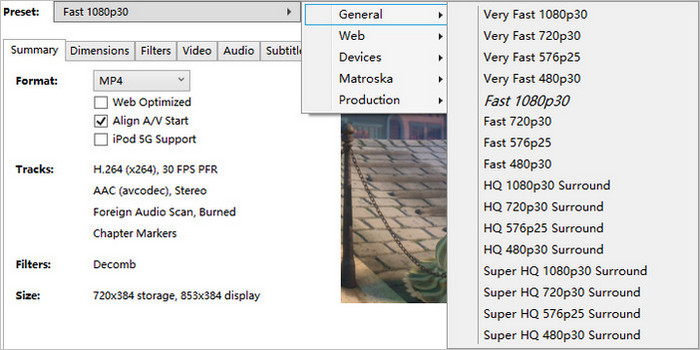
Click on the Presets drop-down menu and select a preset. Preferably, you can choose Super HQ 480p for NTSC DVDs, and Super HD 576p for PAL DVDs. As to the quality setting for DVDs, use H.264 codec for better compatibility with your device, and pick constant quality and high quality RF between 18 and 22.
In addition, you can click the Audio tab where you are allowed to choose the audio track, audio codec, bitrate, and mixdown. To specify a subtitle track or add external subtitles for the resulting file, just feel free to click the Subtitles track. If you're technical, you can also click other tabs here to adjust settings.
Step 5. Specify the destination for the output file.
Click the Browse button at the bottom right to specify the destination path including the directory and file name. This is where your DVD copy will be created and what it will be named.
Step 6. Try ripping the protected DVD.
Move the mouse to the top of the interface and click the green button called Start Encode. Then, HandBrake will begin to convert the encrypted DVD to MP4 or MKV. You can see a progress bar at the bottom.

Method 3. Copy a Protected DVD with MakeMKV
- Supported DVDs: DVDs protected by CSS, region code, and AACS.
- Supported output formats: MKV
- Compatible OS: Windows, Mac, Linux
MakeMKV is one of the popular DVD rippers that copy protected DVDs. One notable feature of MakeMKV is to rip protected DVDs and Blu-rays to MKV for backup. This achievement is due to the use of a process called "deCSS" that involves identifying and decoding the encrypted data on the DVD and the leverage of CellWalk, a feature in MakeMKV that helps handle DVDs with multiple titles or episodes.. This is particularly useful for movers or TV shows broken up into multiple titles or episodes that may not correspond to the actual content and are intentionally encoded with DVD copy protections instead.
Another strength of MakeMKV is its ability to extract the video of a protected DVD to an MKV container without re-encoding, making the whole process take 10-15 minutes instead of hours. This preserves all video and audio tracks including HD audio, chapter information, and all meta-information (track language and audio type), though the output file can be up to GB in size. MakeMKV works well for old DVD collections that are copy protected. MakeMKV's LibreDrive helps MakeMKV itself read protected Blu-rays/DVDs cleanly, but it can’t be accessed externally.
But it cannot circumvent all DVD DRM protection schemes and shows some errors such as scan failure, program hangs, truncated titles, etc. We are waiting for more improvement in copying severely protected DVDs in the future. Or click here to check more capable DVD copy software >>
NEW: MakeMKV v1.18.4 brings minor stability improvements and bug fixes. The key fix addresses a crash affecting Linux ARMHF builds on certain architectures, improving compatibility and reliability for ARM-based systems.
Pros:
- All features are free during BETA.
- Available for Windows, Mac OS X, and Linux.
- No quality loss.
- Fast speed.
- No need to download an additional DVD decrypter.
Cons:
- Exports MKV files only. No other output formats.
- Large file size (the same as input).
- Can't rip all copyright-protected DVDs.
- Lack of support for new DVD releases.
- Lack of regular update of the decryption keys for the software.
How to Copy DRM Protected DVDs with MakeMKV?
MakeMKV is compatible with Windows, Mac, and Linux. You can get a copy from makemkv.com. Your MakeMKV beta key expired? Check Free MakeMKV Beta Key/Lifetime Key/Registration Code.
Step 1. Load the copy-protected DVD to MakeMKV.
Insert a target DVD in your optical drive. Open MakeMKV and then click the optical drive button on its interface to let MakeMKV read your DVD.
If you're seeing that the "decrypt" options are grayed out, it could be because the disc has a protection that MakeMKV can't handle, or the version of MakeMKV you're using may be out of date. In some cases, MakeMKV may not be able to decrypt all DVDs, particularly newer or more heavily protected ones.
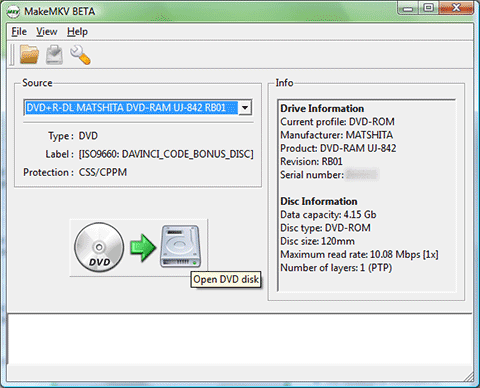
Step 2. Select content to copy.
When the source DVD is loaded, MakeMKV will display its content as a tree structure. Now, you need to choose the title(s), audio, and subtitles you want to convert and save as MKV.
Step 3. Set the output folder and begin copying the protected DVD.
Just click the yellow file folder button to select the directory for the output MKV file. Press the button under Make MKV and it will copy files from copyright-protected DVD. You can see the progress, the elapsed time, and the remaining time.
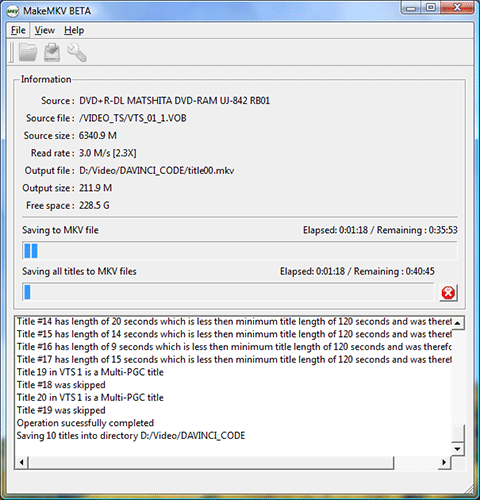
Method 4. Rip Copy-Protected DVDs with VideoProc Converter
- Supported DVDs: DVDs protected by various copy protections.
- Supported output formats: MP4, AVI, WMV, and more
- Compatible OS: Windows, Mac
VideoProc Converter certainly packs a punch. One of its greatest strengths is its ability to rip copy protected DVD without requiring any third-party programs or plugins. It can bypass most of the popular encryption schemes used to protect DVDs.
Except for the good DVD ripper with copy protection removal feature, it boasts a wide range of output formats to choose from, including popular options such as MP4, AVI, MOV, and MKV, as well as more niche formats like FLV, WebM, and 3GP. Users can also customize their output settings to suit their needs, such as adjusting the resolution, bitrate, frame rate, and audio quality.
In addition to its powerful ripping and conversion features, VideoProc Converter includes a suite of editing tools that allow users to trim, crop, merge, and add subtitles to their videos. These features are particularly useful for anyone looking to make quick edits to their DVD content before finalizing the conversion.
Pros:
- Can avoid DVD copy protection schemes.
- Allow editing video before ripping.
- Support hardware acceleration.
Cons:
- Incompatible with mobile and Linux.
- Doesn't support Bluray or CD.
- No DVD burning option.
How to Use VideoProc to Copy DVD with Copy Protection?
Step 1. Download and install VideoProc Converter.
It is compatible with Windows and Mac and requires 200MB of hard-disk space for installation.
Step 2. Load the copy protected DVD.
Insert the target DVD into your computer's DVD drive. Open VideoProc Converter, click the DVD module and then click the DVD Disc button to select the inserted DVD.

Step 3. Choose content to copy.
You need to specify which DVD title, audio track, and subtitle track you want to rip.
Step 4. Select output format.
Click the tab "Popular", "Video", "Device", "Backup", or "Music" at the bottom to select a desired output format.

Step 5. Begin copying protected DVD.
After you click the RUN button at the bottom right, the copying will begin immediately.
Method 5. Copy Protected DVDs for Free with DVD Shrink
- Supported DVDs: DVDs protected by CSS, UOP, and region codes.
- Supported output formats: ISO image and VIDEO_TS folder.
- Compatible OS: Windows
DVD Shrink is another free program that can copy copyright-protected DVDs and make a shrunk backup from an original 8.5GB to a single-layer 4.7GB writeable DVD, ISO, or VIDEO_TS folder you can store on your hard drive.
Featuring a DeCSS decryption algorithm, DVDShrink can rip copy protected DVD and strip CSS copy protection and User operation prohibition (prohibiting skipping over previews or "FBI Warnings" and so on). Moreover, it can also bypass the DVD region restrictions and allow the copy to be either made region-free (the default setting) or set for any region code.
We've hit a snag when ripping some newly released titles. In our test, DVDShrink is defeated by some newer copy protection techniques such as Macrovision Ripguard and may manifest errors such as Invalid File Structure, Invalid Navigation Structure, and Data Redundancy Check Error (CRC Error), I/O device error, let alone the Disney X-project DRM. After all, DVD Shrink stopped updating as early as 2005. sometimes swapping to a different DVD drive fixes stubborn discs.
Let's get back on track. DVD Shrink is still a good option when you want an easy solution to copy protected DVDs for free.
Suggested reading =>> How to convert DVD to digital for playback on the go >>
Pros:
- Circumvent CSS, UOP, and region protections.
- Compress the data on a DVD.
Cons:
- It is a discontinued program.
- It can't remove recent DVD copy protections.
- It can't convert DVDs to portable-friendly formats, such as MP4.
- A five-dollar donation.
How to Bypass Copy Protection from DVD with DVD Shrink?
Here we'll show you how to copy protected DVDs with DVD Shrink.
Step 1. Download and install DVD Shrink.
The current stable English version is 3.2.0.15 while the German version is 3.2.0.16. ALL other versions with additional words in the name like DVD Shrink 2010/2011, DVD Shrink 2001, DVD Shrink 2014 or newer are SCAMS!
Step 2. Open DVD Shrink and configure the preferences.
When you first use DVD Shrink, you might want to configure the preferences. To do this, click Edit -> Preferences.
Step 3. Open the copy protected DVD.
Insert the DVD you want to copy into the DVD drive and then click the Open Disc button on DVD Shrink to select it as the source DVD. Then, DVD Shrink will begin analyzing your DVD. Once the analysis has been completed, you'll see the general structure of the DVD on the upper left side of the window. You can see 3 top categories, including Menus, Main Movie, and Extras.
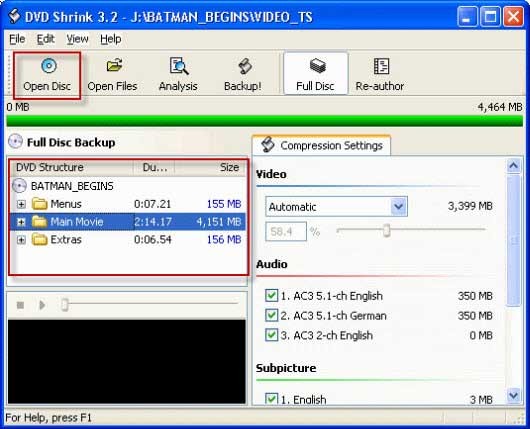
Step 4. Specify compression settings and the audio track and subtitle you need.
Move to the Compression Settings section and then choose desired compression ratio. If you choose "Automatic", DVD Shrink will compress the video to fit on a DVD5 disc.
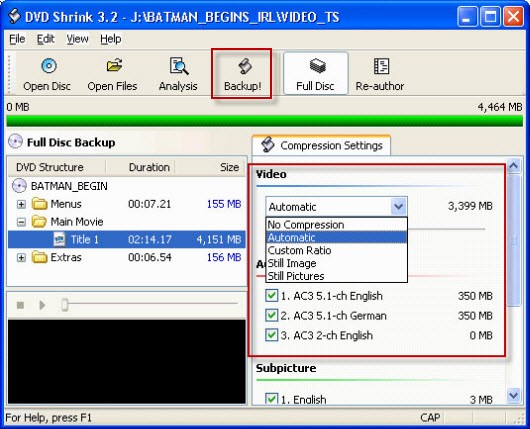
Step 5. Start to back up your copy protected DVD movie.
When you have finished the above settings, click the "Backup!" button on the top center. Then the Backup DVD window will pop up. Here, you need to select the backup target and target folder of the DVD output files. After finishing settings, click OK to begin backing up the DVD.
Method 6. Copy Protected DVD with VLC
- Supported DVDs: DVDs protected by CSS and region codes.
- Supported output formats: MP4, MKV, AVI, and more.
- Compatible OS: Windows, Mac, Linux
As a free and open-source video and DVD player, VLC goes a step further, capable of converting DVDs to more formats such as MP4, AVI, and MKV, without paying any licensing fees or worrying about proprietary software restrictions.
Just like Handbrake, coping with copy-protected DVDs is realizable with the help of third-party libdvdcss library, libdvdcss allows VLC to access DVDs encrypted with CSS by automatically finding the decryption keys, but it does not support advanced protections such as ARccOS, RipGuard, or Disney X-project DRM. VLC is not suitable for large DVD collections or heavily protected DVDs, better used as a temporary workaround rather than a primary ripping solution.
Pros:
- Open-source and cross-platform compatibility.
- Support multiple video and audio file formats.
- More features such as streaming media over the network, adjusting playback speed, filter application, etc.
Cons:
- Lack the ability to copy encrypted DVDs unless you install libdvdcss.
- DVD ripping is relatively slower compared with other professional tools.
- Output may lose subtitles, chapters, or secondary audio tracks due to incomplete DVD structure parsing.
How to Rip Copy-protected DVD with VLC and Libdvdcss?
Now, let's check how to copy a slightly protected DVD with VLC.
Step 1. Download and install the VLC media player.
Go to the VLC official page. Choose the right version as per your need. The mobile version supports playback only — DVD ripping is available on desktop systems. But this is only feasible to rip non-protected DVDs since there is no mobile version available for libdvdcss.
Step 2. Install libdvdcss on Windows and Mac.
Follow the instructions to install libdvdcss as mentioned previously in Handbrake section. Make sure to copy the libdvdcss-2.dll file to the "plugin" directory inside the VLC installation directory on Windows. Or copy the libdvdcss.2.dylib file to the "/user/local/lib" directory on Mac.
Step 3. Load the DVD.
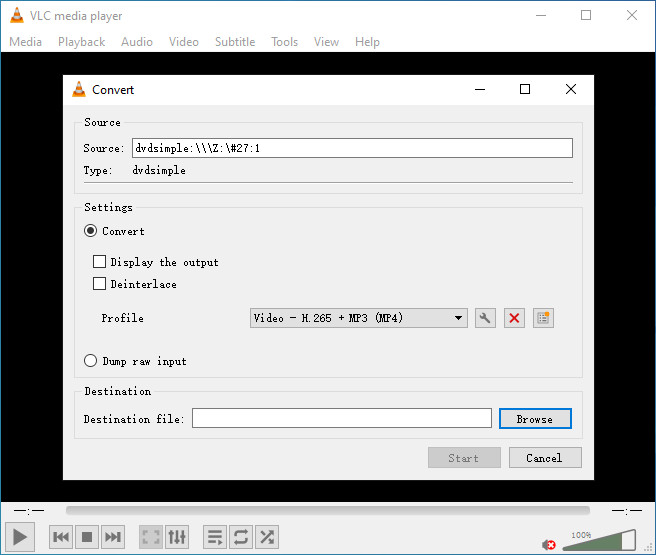
Launch VLC and click on the Media tab from the menu bar, and select Convert/Save. Click on the Disc tab in the Open Media window, and select DVD as the disc selection. Choose the DVD drive letter from the Disc device and select Convert/Save.
Step 4. Choose an output format.
Pick an output format and set your preferred settings in the Convert window. Set the destination file and start time.
Step 5. Start ripping the DVD.
Click the "Start" button to begin the DVD ripping process.
Method 7. Copy Protected DVDs with DVD Decrypter
- Supported DVDs: DVDs protected by CSS, region code, UOPs, and Macrovision content protection.
- Supported output formats: VIDEO_TS folder
- Compatible OS: Windows
From its product name, it's evident that DVD Decrypter is capable of handling encrypted DVDs. Specifically, it can decrypt DVD encryption schemes and then copy the DVD into a VIDEO_TS folder. If you don't mind extracting the DVD into a VIDEO_TS folder, you can give it a try. The older tool can't create an exact ISO copy of the DVD, including menus and all content, while bypassing copy protection. You’ll need to use additional software (like ImgBurn) to convert the files into ISO format if you want them that way.
However, it's important to note that this product ceased updates as early as 2005, so it may not be able to handle DVDs released after that time. Newer encryption methods may be beyond its capabilities. The official website has also been shut down. As a result, users can only obtain this software through mirror websites or other online sources.
Pros:
- It is 100% free.
- Easy to use.
Cons:
- It has been discontinued for years, so it is possibly unable to rip DVDs with latest copy protections.
- It can only rip DVD to VIDEO_TS folder, so you may need additional tool to convert the output to more widely-used formats.
- It isn't compatible with Mac and Linux.
How to rip protected DVDs with DVD Decrypter?
Step 1. Download and install DVD Decrypter.
You can download DVD Decrypter from various sources, including the mirror site (http://www.dvddecrypter.org.uk/), VideoHelp (https://www.videohelp.com/software/DVD-Decrypter), and others.
Step 2. Import DVD into DVD Decrypter.
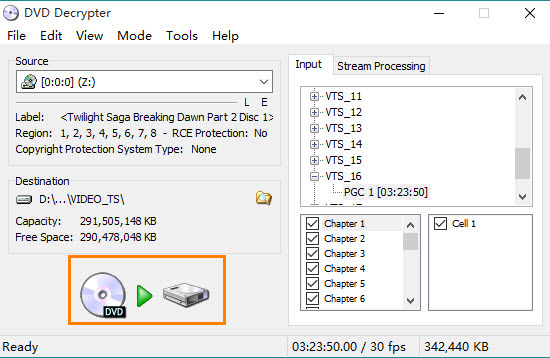
Insert the copy-protected DVD you wish to rip into your DVD drive. Then, launch DVD Decrypter and make sure the DVD is selected within the Source section.
DVD Decrypter will display information about your DVD, including its label, region, RCE protection, and copyright protection system type.
Step 3. Specify destination.
In the Destination section, click the folder icon to designate a location for saving the copied DVD.
Step 4. Begin ripping DVD.
Click the Decrypt button, which is represented by a DVD disc, an arrow, and a hard drive icon, to initiate the ripping process for your copy-protected DVD.
Method 8. Rip Copy Protected DVDs with DVDFab HD Decrypter
- Supported DVDs: CSS, RC, RCE, APS, UOPs, and Sony ARccOS.
- Supported output formats: DVD9, ISO, and folder.
- Compatible OS: 64-bit Mac OS/Windows
DVDFab HD Decrypter is a solution to rip copy-protected DVDs on both Mac and Windows platforms. DVDFab HD Decrypter's straightforward interface and automated content recognition streamline the DVD ripping process, enhancing user experience. It supports to bypass various common DVD copy protection, such as CSS, Sony ARccOS, RCE, APS, and UOPs.
Despite the software being labeled as "freeware," some have encountered persistent prompts to purchase the full version and have expressed frustration over the software's inability to handle newer discs and its continuous insistence on upgrading to the paid version.
Pros:
- Easy to use.
- Support various common DVD copy protection.
Cons:
- Issues with newer DVDs.
- Not compatible with Linux.
How to rip protected DVDs with DVDFab HD Decrypter?
Step 1. Download and install DVDFab HD Decrypter.
Download DVDFab HD Decrypter from its official site (https://www.dvdfab.cn/dvdfab-hd-decrypter.htm), install the tool by following its on-screen instructions, and run the tool.
Step 2. Insert DVD disc and choose rip option.
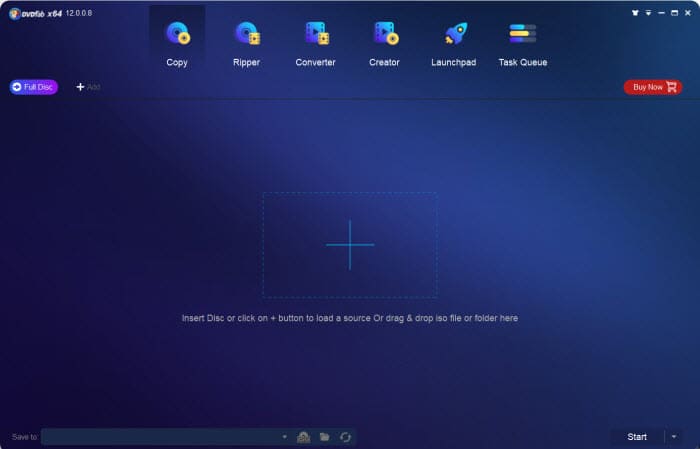
Insert the DVD you wish to rip into your computer. Choose Ripper from the option bar at the top of the interface.
Step 3. Load DVD disc and scan.
Click the "+" button to load the DVD movie. Wait for DVDFab HD Decrypter to decrypt and scan the movie. By default, DVDFab HD Decrypter will rip the copy protected DVD to MP4 format.
Step 4. Start the ripping process.
Click the "Start" button to start to rip copy protected DVD. The conversion progress will be displayed, including CPU load.
Want to know more about DVDFab's features and if DVDFab is worth it? Read our complete DVDFab review and performance test >>
Part 3. How Did We Choose These Copy-Protected DVD Rippers?
We started by searching on Google and browsing forums to find 15 potential DVD ripping tools. In order to provide our readers with a comprehensive evaluation and comparison so that they can make informed decisions when choosing the right software for their needs, we gathered basic information, considered multiple factors such as software functionality, user-friendliness, compatibility, output quality, processing speed, product update frequency, brand reputation, professional reviews, and user feedback. Finally, we selected the most popular and best-performing DVD conversion tools based on our testing results.
Before testing ripping copy-protected DVDs on Windows 10/11 and Mac, it's crucial to understand the challenges posed by copy protection. For the sake of protecting valuable DVD contents from piracy, manufacturers have introduced dozens of DVD copy protection schemes[1], such as Content Scramble System (CSS), Region Code Enhanced (RCE), User Operation Prohibition (UOP), Sony ARccOS DVD protection, DVD-Cops, and LaserLock.
These DVD encryption measures create a digital fortress around the DVD, making it inaccessible to casual copying attempts. Explanatorily, a key is deliberately embedded within the coding way of the disk, which can only be read by an "authorized" tool. Attemptingto rip a DRM-protected DVD without access to the code results in a host of failures, from the inability to locate a valid source to scrambled rip and software crashes.
Most important of all, we bought various encrypted DVDs and Blu-rays from different studios and regions to test their capabilities of removing DVD copy protections. DVD Shrink, Handbrake, and VLC can get by on region-locked or CSS DVDs that are relatively aging, the latter two of which can fulfill the task with the help of libdvdcss. MakeMKV is one of the unique tool that can deal with Blu-ray discs. We are also happy that WinX DVD Ripper has no problem ripping Disney protected DVD, animated DVD, and workout DVD.
Ultimately, the tool to rip a protected DVD depends on your specific preferences. If you want a free program, choose VLC, Handbrake, or MakeMKV. If the overall ability to rip protected DVDs matters to you most, WinX DVD Ripper is your best bet.
Part 4. Is It Legal to Copy a Protected DVD?
In the context of copying protected DVDs, it is still considered illegal in the United States according to the Digital Millennium Copyright Act (DMCA). In other countries, such as Canada, fair use may allow for making backup copies of protected DVDs for personal use, as long as the copying does not infringe on the copyright owner's exclusive rights.
Will you be sued for copying protected DVDs you legally purchased for personal use? No. All the copy process happens on your local computer. As long as you don't distribute the contents for commercial purposes, you are safe. As a general rule, it is always best to check the laws in your specific jurisdiction before you copy any protected DVD.
Part 5. FAQs about Copy-Protected DVD Ripping
1. Can VLC rip copy-protected DVDs?
YES, partially. VLC media player contains a library called libdvdcss that allows it to bypass the Content Scramble System (CSS) encryption used by some DVDs. If the DVD has a different kind of copy protection mechanism, VLC may not be able to handle it, and may only partially rip the DVD or deliver a resulting file with missing audio. You need to rely another program to remove copy protection from DVD.
2. Can ImgBurn copy protected DVDs?
No. Although ImgBurn is based on the optical disc burning engine of DVD Decrypter, it isn't able to bypass copy protections from DVDs.
3. How to determine if a DVD is copy-protected?
Almost all store-bought DVDs are protected with DRM (Digital Rights Management). Some copy-protected DVDs may have warning labels on the packaging or on the disc itself with the text "THIS DVD IS COPY PROTECTED" or so.
And some discs don't say in plain text that it is encrypted. Some programs will tell you that your DVD is copy-protected when try to make a copy of it. And some don't give you a prompt but just give some strange errors or unplayable output. If you fail to replicate a DVD with HandBrake or something else, then it is probably due to copy protection.
4. How to duplicate copy protected DVD (copy protected DVD to DVD)?
While browsing Reddit, I've noticed that some people want to duplicate a copy-protected DVD onto another DVD. To do this, you have two options.
Option 1: Rip the copy-protected DVD using software like WinX DVD Ripper or a similar tool. Once you have the ripped DVD file, use a separate DVD burning software to transfer it onto another DVD.
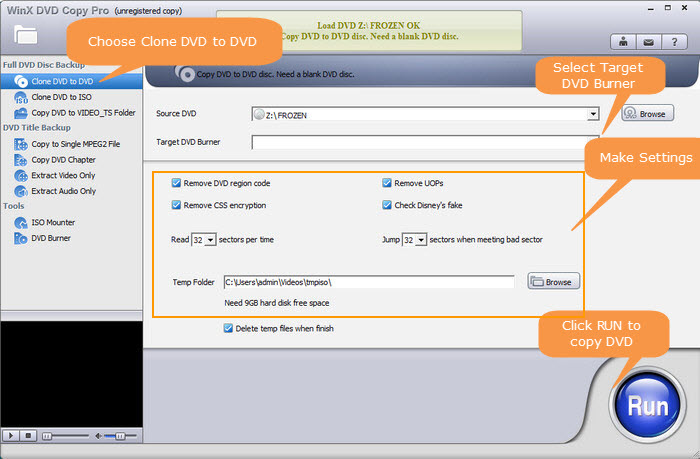
Option 2: Utilize WinX DVD Copy Pro to duplicate the protected DVD directly onto another DVD. WinX DVD Copy Pro is equipped to bypass DVD copy protections and offers a convenient way to perform a direct DVD-to-DVD copy.
Whether you opt for the first or second method depends on your specific requirements and preferences.
5. Can you damage a copy-protected DVD by making a copy of it on the computer?
No. A DVD cannot be ruined just by reading or copying. But you need to be careful while using DVD because it is easy to be scratched. What's more, a faulty reader may also scratch your DVD. So, take good care of your vulnerable DVD disc and always make digital copy.
6. Will DVD still be copy-protected after ripping?
Yes. If you rip a DVD with copy protection, the copy protection will not be removed from the DVD. Store-bought movie DVD/Bluray discs are non-rewritable, thus their data is untouched when you insert the disc into your disc reading drive for just playing, ripping, or copying.
7. The video stored on DVDs is encrypted. Where do we get the key to decrypt the DVD when we play it?
The key to decrypt the DVD is stored within the DVD player firmware. This technical hardware contains the software necessary to play and decode the DVD's content.
External Sources - What is DVD copy protection?
DVD copy protection refers to the various methods and techniques used to prevent unauthorized copying of DVDs. These methods aim to protect the intellectual property rights of content creators and distributors by preventing piracy and unauthorized distribution of their copyrighted material. As a result, common DVD rippers cannot copy protected DVDs with DRM protection. There are different types of DVD copyright protection methods, including but not limited to region code, RCE, CSS, Sony ArccOS, APS, UOP, and Disney X-Project.
- Region code and RCE: DVD region code is a digital rights management tech used to control the distribution of DVDs. The idea behind it is to limit the ability of DVDs to be played in other countries or regions. Its successor RCE is an additional layer of DVD DRM protection to further restrict DVD playback in players that are not intended for that specific region.
- Content Scramble System (CSS): CSS works by encrypting the audio & video data on a DVD using a 40-bit encryption key, stored on DVD itself and embedded in the DVD player. When a DVD is inserted into a compatible player, the software retrieves the encryption key from the DVD and uses it to decrypt the video and audio data, allowing it to be played back.
- Sony ARccOS (Advanced Regional Copy Control Operating Solution) Protection: ARccOS works by adding deliberate errors to the DVD data that are designed to confuse DVD ripping software. These errors are placed in areas of the DVD that are not usually accessed during playback, but which are read by ripping software in order to create a copy of the DVD.
- Analog Protection System (APS), also known as Copyguard or Macrovision: APS works by adding deliberate and continuous distortions and errors to the video signal, meant to disturb the copying process and render the copied content unusable or unwatchable.
- User Operation Prohibition (UOP): UOP a DVD copy protection mechanism that limits certain operations that can be performed by users on DVDs. It is implemented by adding a flag to the DVD content that instructs the DVD player to prevent certain user operations, such as skipping or fast-forwarding through FBI warning or advertisement.
- Disney X-Project: Disney X-Project is a type of DRM technology used by Disney to produce fake and redundant titles in a DVD on purpose to confuse DVD ripping software. It has proven effective at preventing piracy of Disney movies. Most of time, common software fails to choose the right title, and may therefore lead to incomplete rip or produce rip up to 40GBs.


