How to Free Convert/Burn M4V Videos to DVD Disc?
Convert M4V to DVD disc in a few clicks on Windows (10) PC
Do you have a lot of M4V files on your iTunes library? Do you want to remove iTunes DRM protection, then convert M4V to DVD disk to backup so that you can enjoy wonderful M4V on DVD recorders or on huge-screen TV? Now this article will satisfy you on how to convert quicktime to DVD format.
What is M4V?
M4V as a file container format comes to us with the prevalence of Apple's products, such as iPod, iPhone, and iTunes Store. Apple uses M4V files to encode TV episodes, movies, and music videos. However, the .M4V files can only be played on Apple portable devices like QuickTime Player, iPod, iPhone, iPad, etc. To convert M4V to DVD format and burn M4V to DVD disc, you need an M4V to DVD creating software.
Best M4V to DVD Burner - WinX DVD Author
WinX DVD Author is 100% free, clean and professional DVD authoring software, enables you to convert and burn AVI, M2TS, WMV, DivX, Xvid, MPEG, MOV, FLV, H.264, MKV, M4V, etc. to DVD. This free M4V to DVD converter also supports adding DVD background music, background picture, authoring DVD menu and DVD chapter menu.
Download the clean and free M4V to DVD converter now to convert and burn iTunes QuickTime M4V video files to DVD disc, VOB file and DVD folder easily on Windows 11, 10, 8(.1), 7 etc., be it 32 or 64 bit. You're also able to personalize the DVD with chapter menu & subtitle, add music/picture as the background...
How to Free Convert M4V Videos to DVD on Windows (10)
To begin your DVD creation process, you should firstly download WinX DVD Author, the free M4V to DVD converter and burner on your Windows (10) PC.
Step 1. Insert a blank DVD and run free M4V to DVD converter
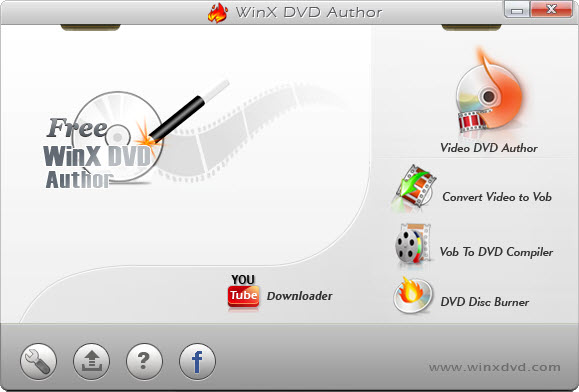
Insert a blank DVD and run WinX DVD Author you'll see the window below. Please click Video DVD Author button to continue.
Step 2. Collect M4V video files to make DVD creation
1. Click "+" sign to add source M4V video clips. Batch adding M4V videos are allowed. You can also delete/move up/move down listed M4V video clips by clicking relevant button or just by right clicking them.
2. Click ">>" to continue.
Step 3. Create DVD menu and chapter menu to self define your DVD file
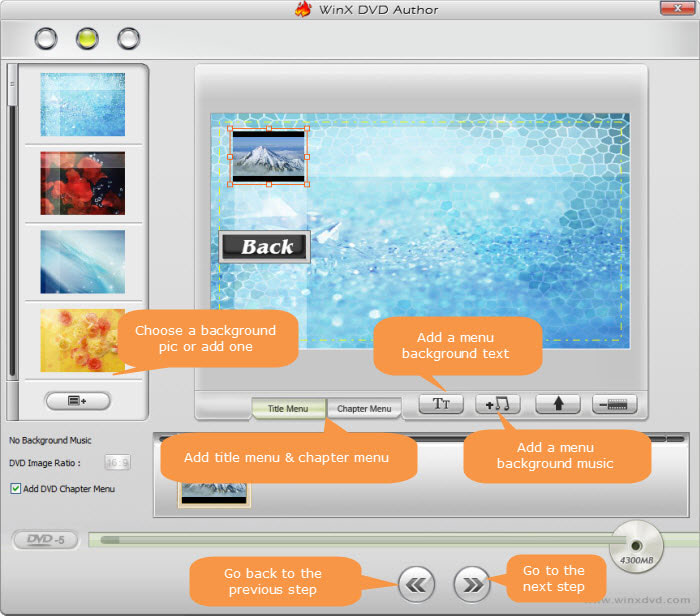
1. In the left lane are the images available for use as background, but you can add the image you want by clicking 
2. To create title menu and chapter menu, you only need to click Title Menu/Chapter Menu button or  to edit.
3. Add Background Music - Click  , and use the window that opens to locate the desired file to the soundtrack of the menu.
Step 4. Begin the M4V to DVD creation on Windows (10)
Choose Output Folder and Output Format, then hit "Start" and begin the free M4V to DVD converting and burning task on Windows (10).
With Free WinX DVD Author to convert/burn M4V to DVD, you can freely transfer TV episodes, full-length movies, and music videos in M4V format into DVD. It can convert and burn almost all videos to DVD, such as MKV, M2TS, M4V, AVI, MP4, MPEG, WMV, 3GP, DviX, Xvid, ASF, MOV, FLV, H.264, RM, RMB, OGG, QT, etc with top quality and fast speed.