






How to Solve HandBrake No Title Found Error When Ripping DVDs?
"I click on the source of the DVD and I get an error saying 'No titles found. Please make sure you have selected a valid non copy protected source'. What am I doing wrong? Could it be that HandBrake isn't removing the copyrighted stuff?"
Handbrake no title found is one of the most common errors when ripping DVD with HandBrake. What’s the reason? DVD copy-protection is the main cause to blame as HandBrake by fault can’t rip DVDs with encryption methods like CSS, Sony ARccOS, Disney DRM and 99-titles. Of course, there are some other reasons that we will explain below. But for both commercial DVDs with copy protections and non-commercial DVDs like home-made discs, WinX DVD Ripper Platinum is the best tool to rip DVDs without no title found, can’t scan title or won’t showing all titles error.
[Solved] No Title Found, Can't Scan Title, not Showing All Titles When Ripping DVD with HandBrake
WinX DVD Ripper Platinum is highly suggested to help solve HandBrake no titles after scan DVD error. It will scan and analyze all DVD movie titles automatically and fleetly, and will point out the correct main title of your DVD discs or ISO files for you.
- Show all titles and automatically found the main title even from 99-title DVD.
- Remove commercial DVD protections: CSS, RCE, Sony ArccOS, UOPs, Disney DRM.
- Bypass region codes. Rip DVD from America, Japan, Australia, etc.
- Convert DVD to MP4, H.264, AVI, WMV, MOV, iPhone, Android, Xbox, Apple TV, etc.
Table of Contents
Part 1. Why Do You Have HandBrake No Title Found Error?
If your HandBrake can’t scan DVD titles when ripping DVDs, it means that one of the following is the case:
Possible reason 1: Your DVD is copy-protected. – Main reason
The big improved 1.0.0 version of HandBrake was released in December 2016 and now the latest version 1.2.0 is now available. But HandBrake is actually a video transcoder which doesn’t support for ripping copy-protected DVDs. If you install libdvdcss for HandBrake, you may have chance to access and unscramble DVDs encrypted with CSS protection without no title found error. However, your HandBrake is still incapable of remove advanced copy protections including Region Code, AACS 2.0, Sony ArccOS, UOPs, 99-tiltles and Disney X-project DRM. That’s why we suggest you to turn to WinX DVD Ripper Platinum – a DVD ripper works with any DVDs.
Possible reason 2: Your Handbrake version is too old.
HandBrake 1.2.0 is the latest version. If you got a version lower than 1.0.0, please download HandBrake 1.2.0 from official site: https://handbrake.fr/. After installing, try to rip your DVD with the newest version. Note, all versions of HandBrake can rip non-commercial DVDs only.
Possible reason 3: You’ve selected a broken or damaged DVD disc.
If your DVD disc is damaged or scratched, HandBrake is not able to recognize it. So, try to fix your DVD disc first.
Part 2. How to Solve HandBrake No Title Found Error Caused by DVD Copy-protections?
Now that you’ve known the main reason causing HandBrake no title found, not showing all titles and scanning title stuck errors, you should turn to HandBrake alternative WinX DVD Ripper Platinum which can really bypass all encryption methods. It is very easy to rip DVD with it.
Step 1. Free download, install and launch WinX DVD Ripper Platinum on your computer.
Step 2. On the main UI, click DVD Disc, ISO Image or DVD Folder to load DVD movie.
Step 3. When the Output Profile window pops up, choose a video format such as MP4.
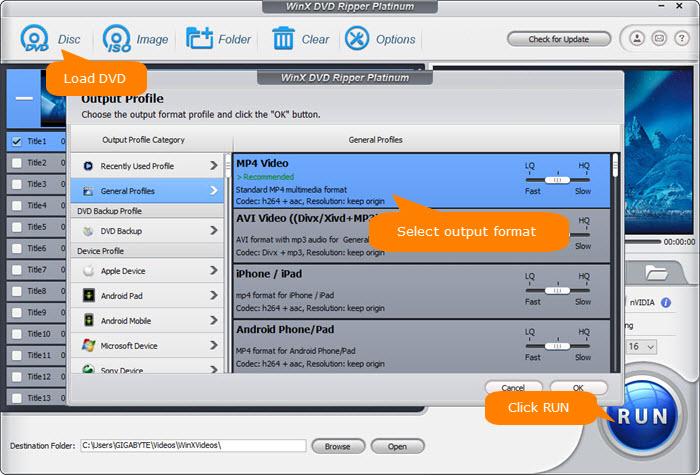
Step 4. Click Browse button to select the destination folder to saved the ripped DVD media file.
Step 5. Hit RUN button to start converting and ripping DVD to MP4 video.
Disclaimer: Digiarty Software does not advocate ripping copy-protected DVDs for any commercial purpose and suggests referring to the DVD copyright laws in your countries before doing so.


