












WinX Blu-ray Decrypter User Guide
WinX Blu-ray Decrypter is clipping Blu-ray backup software to decrypt Blu-ray disc to hard drive of computer. It is compatible with all known encryptions and copy protections, including AACS, BD+, BD-Live, etc, and is and will be upgraded continuously to support the latest ones. This professional 3D to 2D Blu-ray Decrypter supports both Full Disc Mode and Title Mode to decrypt and backup Blu-ray disc to a M2TS video file or a Blu-ray folder. It is an ideal way to protect Blu-ray discs from scratch or loss.
1. Import Blu-ray disc in your Blu-ray drive, download and launch WinX Blu-ray Decrypter. Click "Load BD" to load your Blu-ray.
2. Tick "Full Disc Mode" under Target Mode as your target backup mode to backup complete Blu-ray disc to hard drive.
3. Click "Browse" button and choose the destination to save your decrypted Blu-ray folder.
4. Hit "Run" to start decrypting and backing up Blu-ray disc to a Blu-ray folder as a complete backup copy of Blu-ray.
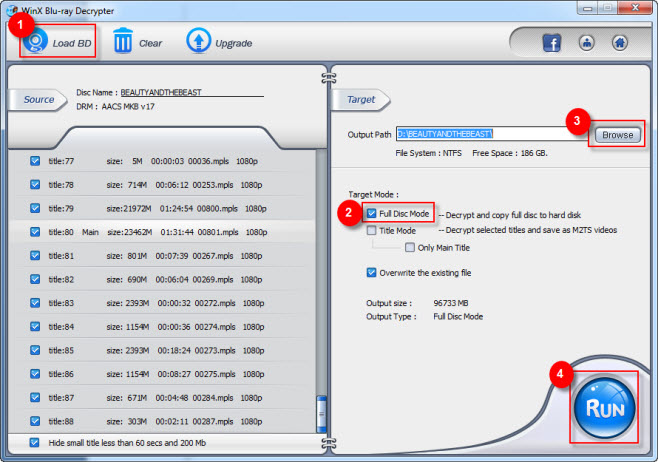
1. Load Blu-ray disc by clicking "Load BD".
2. Tick "Title Mode" under Target Mode as your target Blu-ray backup mode.
3. Choose your desired Blu-ray title manually.
4. Hit "Run" to start decrypting Blu-ray disc to computer, so you can get a M2TS file with selected title.
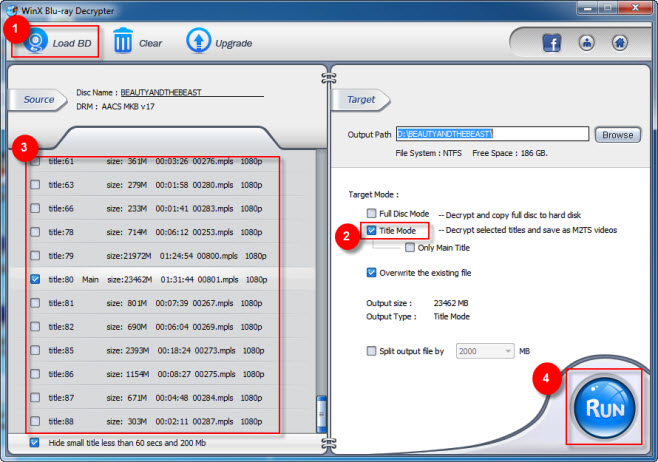
1. Load Blu-ray disc by clicking "Load BD".
2. Choose "Title Mode" under Target Mode as your target Blu-ray backup mode.
3. Tick "Only Main Tile" so that you can backup Blu-ray disc to M2TS file with only the main title.
4. Hit "Run" to start the Blu-ray main title backup process. It takes only about 25 minutes before you get the main content of Blu-ray video on your computer.
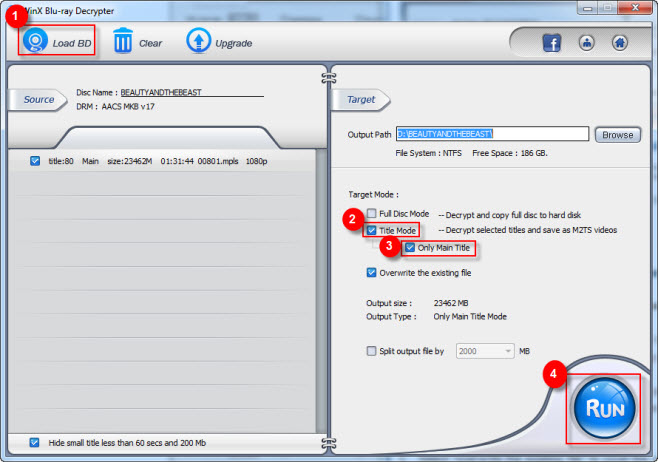
Other Useful Tips
1. Select "overwrite the existing file" to cover the repeated file existing on your computer.
2. Uncheck the "overwrite the existing file" to rename your output file in the "Output Path" area.
3. Split output file in Title Mode copy to shrink the output Blu-ray file based on the need.
Q: Can I decrypt and backup Blu-ray while keeping the original video/audio output effect?
A: Yes. In support of Blu-ray DTS/E-AC3 and MLP/TrueHD Audio System, Winx Blu-ray Decrypter can decrypt and copy Blu-ray to a file or folder while persevering the original audio quality. It also can provide HD Blu-ray output and original video effect without audio/video quality lose.
Q: Can I backup Blu-ray encrypted with any other Blu-ray disc?
A: Yes. With cutting-edge and continuously upgraded technologies, Winx Blu-ray Decrypter can remove any Blu-ray copy protections and encryptions, such as BD+ and BD-live from BD-video media, bus encryption and 10th Generation BD+, etc. Besides, it supports Blu-ray disc, Disc BD-R and Disc BD-RE.
Q: How Can I shrink my Blu-ray output file before the process of Blu-ray decryption?
A: Choose "Split output file". You can define the number of splitting file size among 1000, 2000, 4000 and 8000 MB optionally based on your own needs.