









-
8 Ways to Convert DVD to Digital
- 1. WinX DVD Ripper

- 2. VUDU
- 3. HandBrake
- 4. Vidcoder
- 5. VLC
- 6. MakeMKV
- 7. DVDWalmart
- 8. ClearClick
- Quick Comparison
- FAQs
How to Free Convert DVD Disc to Digital File with Higher Quality
DVDs may be fading from everyday use, but the need to convert DVDs to digital files is more relevant than ever. Maybe you're looking to back up a wedding video before the disc wears out, convert a childhood cartoon collection for your kids to stream, or simply make old movies playable on phones, tablets, or smart TVs. Whatever the reason, digitizing DVDs is a smart and practical move.
However, with many tools claiming to convert DVDs for free—some handling protected discs, others not—it's tough to know which ones actually work. To save you time, I tested a variety of DVD to digital converters and handpicked the best ones worth trying in 2026.
Free vs Paid DVD Digitizers: What You Need to Know
While free DVD to digital tools are a great starting point—especially for homemade discs or light use—but they often struggle with copy-protected DVDs, limited formats, or slow conversion speeds. If you're digitizing an entire DVD collection, especially copy-protected or region-locked discs, a paid tool with faster ripping, quality output, and broader compatibility may be better. That's why this list includes both 100% free tools and paid options—so you can choose based on your needs, not just your budget.
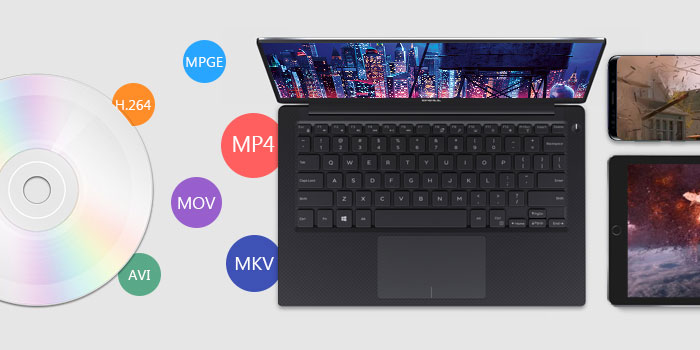
1-Minute Choice: Which Method Suits Your Case?
Finding the right tool depends on your hardware and disc types. Use this table to find your best path instantly:
If your goal is... |
Best Recommendation |
Key Benefit |
Digitize Protected DVDs |
Best for commercial/encrypted discs; 47x real-time fast speed. |
|
100% Free / Homemade |
Open-source and versatile for unencrypted or homemade DVDs. |
|
No DVD Drive |
Hands-off mail-in service; perfect for users without hardware. |
|
Mobile Only |
Convert by scanning UPC barcodes via app (No PC required). |
|
Lossless Backup |
Extracts raw data to MKV; best for Plex and media servers. |
Full List of the Best DVD to Digital Converters in 2026
Below is our complete handpicked list of the top 8 solutions, including free software, hardware, and retail services. Whether you need a simple tool or a pro-grade digitizer, you'll find it here:
- WinX DVD Ripper - Best overall. Digitize homemade and commercial DVDs with fast speed. Offer flexible quality controls.
- #2. VUDU – Most convenient for mobile. Perfect for scanning DVD barcodes to get digital copies directly on your phone (US only).
- #3. HandBrake - Best free transcoder. The go-to open-source option for homemade DVDs. Offer extensive format customization.
- #4. Vidcoder - Best for beginners. A simplified version of Handbrake with a clean interface and batch features.
- #5. VLC - Best for occasional use. Offer simple tasks on unencrypted discs, though speed and reliability may vary.
- #6. MakeMKV - Best for lossless backup. Extracts raw data into MKV files. Best for Blu-ray owners and Plex users.
- #7. DVDWalmart - Best offline service. Ideal for seniors or those without a DVD drive. Hands-off but more expensive.
- #8. ClearClick - Best hardware solution. A standalone box to digitize DVDs and VHS tapes without a computer.
How We TEST & Why You Can Trust Us:
To identify the best methods and tools to digitize a DVD, we researched trusted sources and gathered real user feedback from community forums such as Reddit. We then thoroughly tested each option under controlled conditgions to evaluate their true performance. Our testing details include:
1. Tested tools: We evaluated 20 popular DVD digitizing tools, including free and paid options, desktop software, online services, to cover a broad spectrum of user needs.
2. Test environment: All tests performed on the same computer setup to ensure fairness and consistency: an Intel Core i7-12700K processor, 32GB DDR4 RAM, Windows 11 Pro (64-bit) operating system, and NVMe SSD storage for fast read/write speeds.
3. Key evaluation metris: we assessed each tool for conversion speed and stability under continuous ripping, support for different DVD types, including encrypted and region-locked discs, output format variety such as MP4, ISO, MKV, AVI, etc, qualtiy retention compared to the original DVDs, user interface, available advanced options, and additional features like subtitle and audio extraction, hardware acceleration support.
This comprehensive approach, blending hands-on testing with community feedback, allowed us to craft a well-rounded and practical list of the top 8 DVD to digital converters. Each recommendation includes key features, pros, and cons to help you find the best fit for your specific needs. Let's dive into the details.
8 Best DVD to Digital Converting Tools: In-Depth Hands-On Reviews
#1. WinX DVD Ripper
Compatible OS: Windows 7 - Windows 11; Mac OS X 10.6 - macOS Tahoe
WinX DVD Ripper has garnered praise from top tech publications like TechRadar and PCMag, as well as enthusiastic user communities such as Quora and VideoHelp. Trusted by millions since its 2009 launch by Digiarty Software, it stands out for digitizing nearly any DVD regardless of encryption or release date. Frequent updates ensure compatibility with the latest protections that most tools can't handle. The Safe Mode helps prevent common issues like missing titles, dropped frames, or audio/video sync errors, ensuring smooth, high-quality conversions. It also supports hardware acceleration to speed up ripping and transcoding, and can output to a wide range of popular digital formats like MP4, MKV, AVI, and more.
Who it's for: WinX DVD Ripper is a ideal for users with extensive DVD collections who want a fast and cost-effective solution to convert copy-protected DVDs to digital format on Windows or Mac. Unlike VUDU that charges per DVD conversion, WinX DVD Ripper offers both one-year subscription and lifetime license. During the eligible period, users can convert as many DVDs as they like without any additional costs.
Free Download WinX DVD Ripper Platinum to Convert DVD to Digital Videos
If you are on a mobile device, click here for full features.
 Editor Review
The latest version of Platinum, 8.5, boasts hardware acceleration with support for Intel QSV and NVIDIA (CUDA), NVENC, and Intel Hyper-Threading Technology. Its maker, Digiarty Software, claims that this allows 500 FPS (with X32 DVD drives), and that converting a whole DVD can take little as five minutes. - by Michael Muchmore at PCMag
Pros:
- Digitize home-made DVDs and commercial copy-protected DVDs.
- Offer a wide range of output formats.
- Superfast conversion speed.
- Allow editing video before ripping.
Cons:
- Need to download and install this software on your computer.
- Need a computer with a built-in DVD drive, or an external drive.
[Tutorial] How to digitize DVDs with WinX DVD Ripper?
Step 1. Download and install WinX DVD Ripper.
Download the WinX DVD Ripper installer for your computer here. Run the installer and follow the instructions to complete the installation.
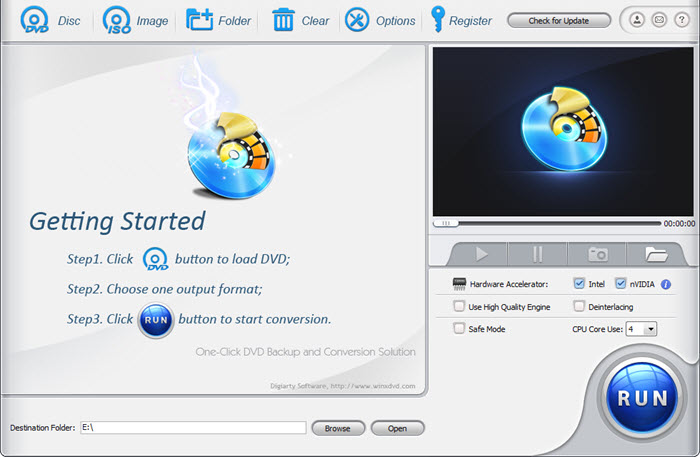
Step 2. Load the DVD disc.
Insert the DVD disc into your computer's DVD drive. Then, open WinX DVD Ripper and click the "DVD Disc" button to import the DVD. WinX DVD Ripper will scan the DVD disc and automatically detect the main movie title. Of course, you can select title manually.
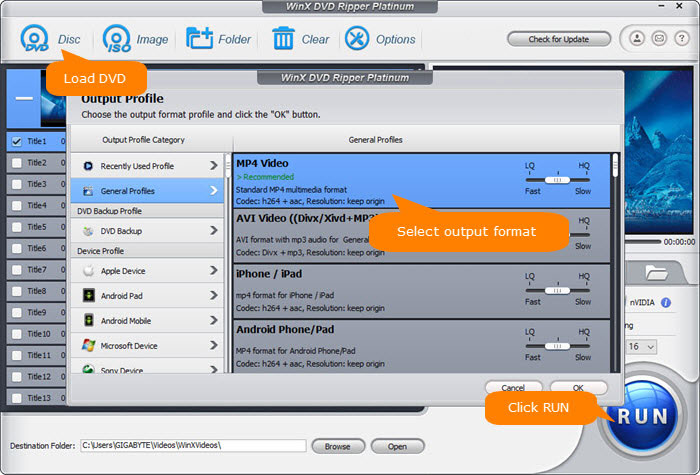
Step 3. Choose an output format.
In the "Output Profile" window, select the output format for your digital copy. For general playback and storage, MP4 is a widely compatible choice. You can also opt for formats like AVI, MKV, ISO, or VIDEO_TS folder if you're backing up the full disc structure. If you're planning to watch the digitized DVD on a specific device, simply pick a ready-made profile optimized for iPhone, Android, Xbox, PlayStation, Smart TV, and more—no manual tweaking needed.
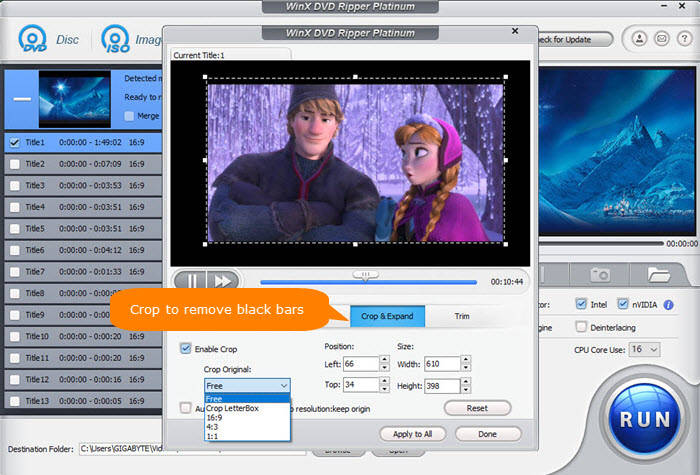
Tips: Before making a digital copy of DVD movie, you can click the Settings icon to adjust the video/audio settings, for instance,bit rate, aspect ratio, frame rate, sample rate, etc. You can also click "Edit" to add subtitles, adjust the volume, trim the video to get the favorite clips, crop & expand the video to remove black bars. If you're using a Plex server, choose 'High Quality' and 'Deinterlacing' to ensure the video looks smooth on large screens.
Step 4. Start DVD to digital conversion.
Click "Browse" to set a folder to store the digital copy extracted from your DVD. Then, click the "RUN" button to start the conversion. The conversion process may take a few minutes, depending on the length of the DVD, the output format you choose, the settings you use (enable hardware accelerator or not), and your computer configuration. If your computer has a loud fan, enabling 'Hardware Acceleration' not only speeds up the process but also keeps the CPU temperature lower.
In my test digitizing the Disney movie Frozen 2 to MP4 format, it took approximately 10 minutes to process the 1 hour and 46-minute video using default settings on my computer. My system specs are ani7-12700Kz and 12.0GB of RAM. The frame rate during conversion averaged around 270 FPS.
Tips: If you meet problems in digitizing DVDs, choose "Safe Mode" to rip any DVD smoothly.
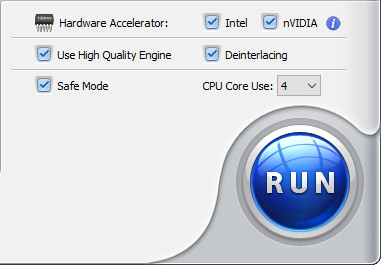
Once the conversion is complete, your digital copy will be saved in the location you specified. You can then play your digital copy on any device that supports the selected format. For centralized management and easy access, you can also add your digital copies to Plex. Check how to add DVD movies to Plex >>
How is its performance in practice? In my test digitizing the Disney movie Frozen 2 (1 hour 46 minutes) to MP4 using default settings, it took approximately 6 minutes on my computer with an Intel Core i7-12700K processor, 32GB DDR4 RAM, Windows 11 Pro (64-bit), and NVMe SSD storage. With hardware acceleration enabled, CPU usage averaged 40-55%, allowing smooth multitasking without slowdowns. The conversion ran at an average frame rate of approximately 350 FPS. The output quality closely matched the source file, maintaining sharp visuals and synchronized audio with no noticeable degradation.
Watch video tutorial on how to digitize DVD to digital MP4 with best quality settings
#2. Fandango at Home (formatly VUDU)
Compatible OS: Android, iOS
With VUDU's disc to digital service (Vudu has been renamed to Fandango at Home), you can use your mobile device to scan the UPC barcode on your disc to get a digital copy. No need to open your computer. No need to install a DVD to digital converter software. VUDU can save you a lot of effort. Moreover, it allows you to convert your DVDs to HDX quality (1080p), although it is a bit pricey. But for some users, the expense may be worth it.
Who it's for: VUDU is a good choice for users who need to digitize a small collection of DVDs into digital files without the need for a DVD drive. However, it's important to note that VUDU has region limitations and is exclusively available in the US and Mexico.
If you have a substantial DVD collection, the costs can quickly add up. VUDU charges $2 (DVD to SD) / $5 (DVD to HDX) for each conversion, with a cap on the maximum number of conversions per year. Users are restricted to converting 100 DVDs annually. For instance, if you have 500 DVDs to convert, it would amount to $1000 for DVD to SD and $2500 for DVD to HDX, and completing all conversions would take 5 years.
Notes:
1. You can't digitize Disney, workout, and Home-made DVDs to digital files with VUDU.
2. You need the case and UPC code to convert with Disc to Digital.
3. Sometimes there is SD version available only. You cannot do anything to improve DVD quality.
4. VUDU provides digital files via the internet connection, which can be capped soon.
5. The process can be fraught with issues that are difficult to deal with, for example, can't find any titles in the cart, location doesn't match billing address, can't read barcode, operation timeout, etc.
Pros:
- Convert DVD to digital right from mobile.
- No need for a DVD drive.
- HDX quality available.
Cons:
- Expensive for users with large DVD collection.
- Only DVDs from partnering studios are supported.
- When you cancel the membership, you lose the movies.
How to Digitize DVDs to Digital on Android/iPhone with VUDU?
Before you use this service, you'd better type the name of your movie in Vudu.com's search bar to see if your movie is available for conversion.
- Visit vudu.com/disc on your Android or iPhone, scroll down and tap the Convert Disc button
- Sign up if you don't have an account. And then, sign in.
- Allow app permissions. Vudu will request permission to access your location data to ensure the billing address associated with your account matches your phone's location. The aim is to prevent misuse of the service, like scanning random DVDs you find outside your home.
- Scan the UPC barcode on your DVD case.
- Select output quality, SD or HDX.
- Pay for the DVD to digital conversion (DVD to SD: $2 per disc; DVD to HDX: $5 per disc), and then the digitized movies will be available in your Vudu account.
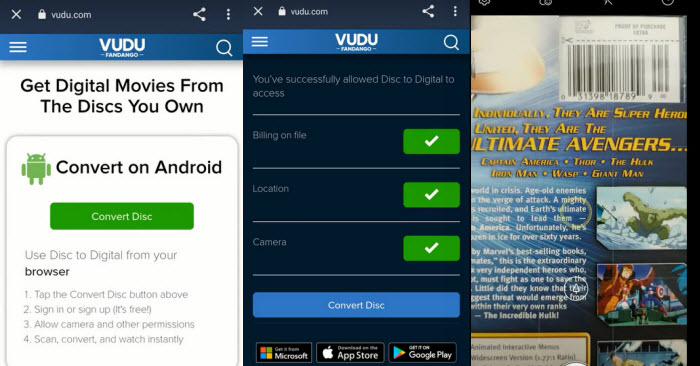
How is its performance in practice? In my real-world tests with Vudu's Disc to Digital service, the experience hinged entirely on the movie. For instance, I grabbed my DVD copy of Christopher Nolan's Inception, opened the Vudu mobile app, and scanned the UPC barcode on the case. Boom! The digital version was added to my Vudu library almost instantly, with no local processing or waiting time on my device. However, for Disney film Frozen 2, scanning the UPC barcode led to an immediate "This title is not eligible for Disc to Digital conversion" message. While the barcode scanning itself is always quick, the service's utility ultimately depends on whether the specific movie studio participates in Vudu's program.
#3. Handbrake
Compatible OS: Windows, macOS, Linux
We notice that HandBrake often emerges as a top recommendation for converting DVDs to digital format. It is widely recommended due to being free and easy to use. HandBrake allows users to digitize DVDs to common video formats including MP4, MKV, and WebM. Additionally, it provides a range of customization options for video and audio output, making it ideal for users seeking greater control over their conversion process.
Who it's for: HandBrake is suitable for those with limited budgets for DVD to digital conversion. It is a good choice for digitizing non-protected DVDs. In our real-world test, while Handbrake is free, it lacks a 'DVD Title Selection' logic for Disney's 99-title discs. You might end up ripping a 2-minute fake clip instead of the 100-minute movie. This is where a specialized tool like WinX saves hours of trial and error. However, if you intend to transfer copy-protected DVDs to digital with HandBrake, you will need to install libdvdcss to bypass DVD copy protection.
Pros:
- Totally free.
- Provide dozens of output presets.
- Rich settings.
Cons:
- Can't bypass DVD copy protections.
- Some settings are confusing for beginners.
- No merge option.
- No ISO or VIDEO_TS output options.
How to convert DVD to digital MP4/MKV/WebM free with HandBrake?
- Download, install, and open HandBrake on your computer. The steps are almost same on the Windows and Mac.
- Insert the DVD you want to digitize into your computer's DVD drive.
- Choose the DVD you want to digitize under "Source Selection". Then, it will scan you DVD titles.
- Choose the specific title you want to convert from the drop-down menu of "Title".
- Select a preset for your desired output format from "Presets".
- Adjust video audio settings as needed, such as resolution, codec, and bitrate.
- Specify save path for the digitized DVD copy by clicking on the "Browse" button at the bottom right.
- Click the "Start Encode" button (on Mac, it's "Start") at the top of the HandBrake window to begin the conversion process.
- Wait for the conversion process to complete. Once the conversion is finished, you can locate your newly created digital file in the destination folder you specified.
Editor Review
Presets make it easy to rip a video from a disc to a format compatible with several devices, like those that run the iOS or Android operating system. - by Stacy Fisher at Lifewire
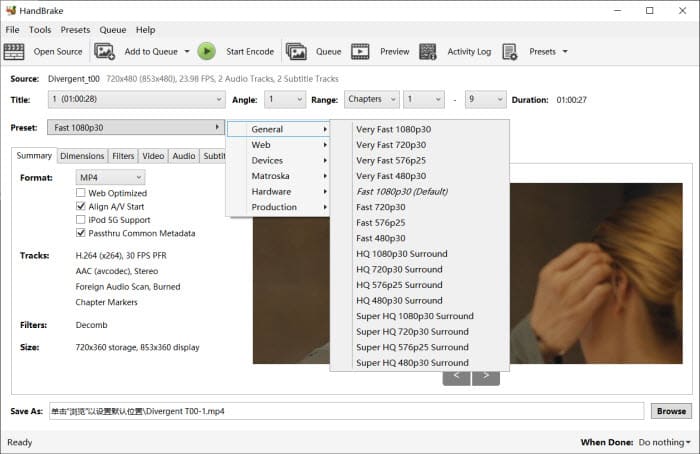
How is its performance in practice? I tested HandBrake with my graduation disc. It was converted smoothly to MP4 in about 25 minutes with CPU usage around 50%, producing high-quality, synced output. However, HandBrake couldn't read the Frozen 2 disc, and just gave mean error no valid titles, so it couldn't convert it without extra decryption tools. This is consistent with the fact that HandBrake doesn’t natively support copy-protected discs.
#4. Vidcoder
VidCoder is a free, open-source DVD to digital converter that utilizes HandBrake as its encoding engine. This means it offers many of the same functionalities as HandBrake, including the ability to convert DVDs to MP4 and MKV. While HandBrake is often preferred, some users encounter issues with its performance. In such cases, VidCoder serves as a reliable alternative.
Note: While VidCoder and HandBrake share similar core functionalities, there are key distinctions worth noting. Here's what sets VidCoder apart. Firstly, VidCoder is tailored exclusively for Windows users, while HandBrake extends its reach to a broader audience, catering to Windows, Mac, and Linux users. Secondly, VidCoder specializes in digitizing DVDs to MP4 and MKV formats. In contrast, HandBrake offers a broader range of output options, including MKV, MP4, and WebM, providing users with more flexibility in choosing their preferred digital format.
Who it's for: VidCoder is ideal for users who encounter difficulties with HandBrake. However, it is important to note that VidCoder cannot deal with copy-protected DVDs.
Pros:
- Free to use and open-source.
- Allow users to fine-tune output parameters.
Cons:
- Cannot digitize encrypted DVDs.
- Require .NET 6.0.2 Desktop Runtime (x64).
- The installation process is very slow.
how to turn a DVD into a digital file for free with VidCoder?
- Download and install VidCoder on your Windows computer. If you are required to install .NET 6.0.2 Desktop Runtime (x64), just do it. The installation process may take quite a long time.
- Insert the DVD you want to convert into your computer's DVD drive.
- Open VidCoder and select the "Open Source" button to load your DVD.
- Select the title you want to rip from DVD.
- Configure your output settings, including the format, quality, and destination folder.
- Click the "Encode" button to start the conversion process. VidCoder will handle the rest.
The DVD digitizing process can be resource-intensive, particularly for large or complex DVDs. VidCoder may place a considerable strain on the hardware resources, resulting in elevated temperatures and increased fan speeds.
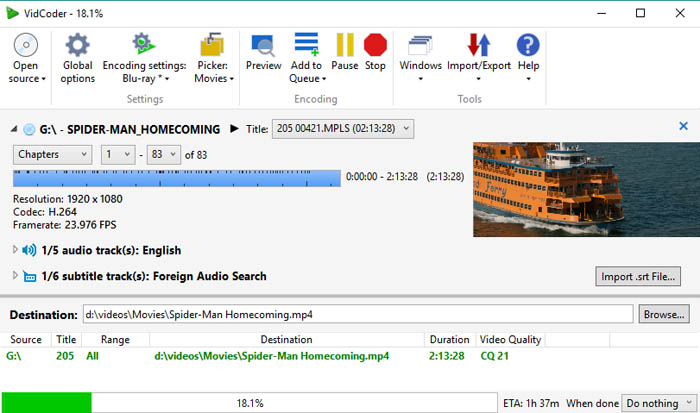
How is its performance in practice? For my home video DVD, VidCoder worked really well — I was able to batch-select multiple titles and convert the whole thing smoothly in about 28 minutes, quite similar to Handbrake, with good CPU usage and excellent output quality But when I tried ripping another DVD Frozen 2, it gave me error "VIDEO_TS inaccessible, CSS authentication not available". I know adding tools like libdvdcss may get around this, but even then, some newer DVDs still won't work. So for me, VidCoder worked well on unprotected discs but just couldn't handle Frozen without extra setup.
#5. VLC
Compatible OS: Windows, Mac, and Linux
While VLC may not be a dedicated DVD to digital converter, it offers a convenient solution for users who already have the software installed. By utilizing VLC, you can avoid the need for additional programs and extra expenses.
With VLC, you can convert your DVDs into a variety of digital formats, such as MP4, MKV, MOV, AVI, and WMV. Additionally, it provides options to adjust video and audio parameters such as bitrate and resolution. Furthermore, VLC can even handle some encrypted discs, adding to its versatility.
Who it's for: VLC is suitable for users who wish to rip DVDs and are comfortable with a potentially slower conversion speed. It's worth noting that VLC's conversion process may take as long as the duration of the movie itself, as VLC technically "streams" the video to a file on your hard drive.
Pros:
- Free of charge.
- It can do more than DVD to digital.
Cons:
- It requires quite a long time to digitize DVD.
- Strictly protected DVDs are not supported.
How to convert DVD to digital file freely with VLC?
- Download and install VLC if you don't have this tool on your computer.
- Insert the DVD you want to digitize into your computer's DVD drive.
- Open VLC, click "Media" and then select "Convert/Save".
- Click "Disc" tab and choose disc device, title, chapter, audio, and subtitle track. Then hit "Convert/Save".
- Choose profile, the output format you want to use.
- Click "Browse" to specify destination file.
- Hit "Start" to begin digitizing DVD to digital.
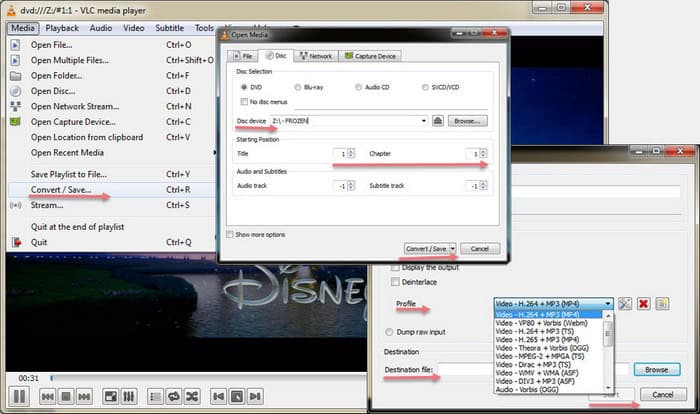
How is its performance in practice? While VLC managed to create digital files, I often ran into compatibility issues or playback errors on my Smart TV and iPhone. It seemed like the copies were sometimes incomplete or corrupted during the ripping process. Plus, when I tried protected commercial DVDs, VLC usually couldn't read or convert them properly and just gave errors. So for me, VLC works okay for basic, unprotected DVDs but isn't reliable for protected discs or for getting smooth playback.
#6. MakeMKV
Compatible OS: Windows, Mac, and Linux
MakeMKV is a popular DVD ripper, frequently mentioned in online forums. With MakeMKV, users can digitize protected Blu-ray and DVD discs into digital MKV files for free during its BETA phase. Notably, the conversion process preserves the original quality without any compression, ensuring that users receive a digital copy identical to the original.
Who it's for: MakeMKV features a simple and user-friendly interface, making it an excellent option for beginners who may be new to DVD and Blu-ray ripping. Its straightforward navigation system ensures that users can easily navigate through the software without encountering any complexities.
Pros:
- It can decrypt DVDs and Blurays.
- It keeps the original quality.
Cons:
- Support MKV format only.
- Output is uncompressed. Large file size.
- Lack editing options.
- Users are required to upgrade to new versions or input a registration key when new updates are released.
How to transfer DVD to digital MKV losslessly with MakeMKV?
- Download and install MakeMKV on your Windows, Mac, or Linux computer.
- Open MakeMKV and insert the DVD you want to digitize to digital.
- When MakeMKV detects your DVD, click the "Open DVD disk" button to let MakeMKV access your DVD.
- When you see a tree structure with your titles, video tracks, audios, and subtitles, just choose which titles or tracks you want to convert.
- Click "Set output folder" button to specify where you want to save the digital copy.
- Click the "Make MKV" button to begin converting DVD to MKV digital file.
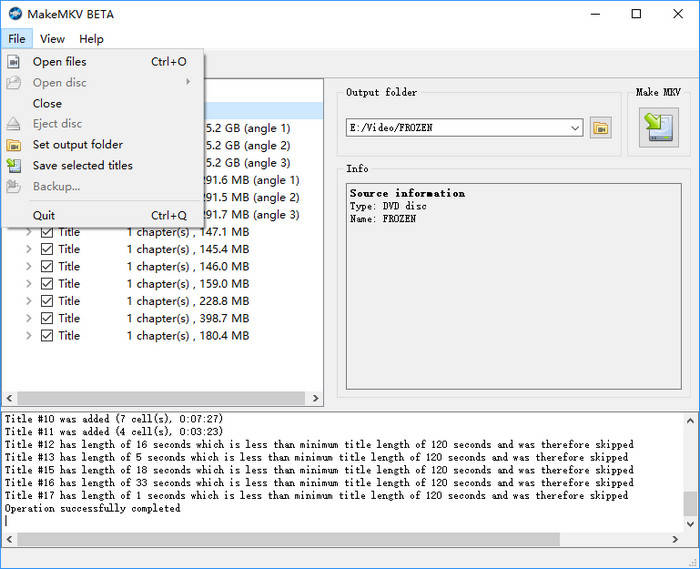
How is its performance in practice? I gave MakeMKV a shot on my setup. It handled my discs no problem and was pretty quick since it just rips the content without re-encoding. A 90-minute DVD took around 10–15 minutes to rip. CPU usage stayed pretty low because it's mostly just copying data. The output files are big MKVs but the quality is exactly the same as the original. For me, it's great for fast, lossless backups of DVDs—especially protected ones—but I usually use other tools if I want to convert those MKVs to formats like MP4.
#7. DVD to Digital Service near You (DVDWalmart's Digital Media Transfer)
DVDWalmart's Digital Media Transfer service accepts all previously transferred DVDs from Walmart and YesVideo, and other DVDs, MiniDVDs, CDs, and VCDs. It will store the digital copies in MemoryCloud and transfer it to a single USB if you ask it to. MemoryCloud provides 60 days of online access, allowing you to download, share, or save the digital copy to services like Google Photos. One hidden downside we noticed: retail services often compress the video to a fixed bitrate to save space on their cloud, which might look worse than a DIY rip on a 65-inch 4K TV.
Who it's for: This service is ideal for individuals with a modest collection of DVDs or other media seeking a hassle-free way to digitize DVDs near me. However, it's important to note that the service comes at a slightly higher cost. The price for creating a digital copy with MemoryCloud online access is $15.96 for the first 30 minutes and $5.46 for each additional 30 minutes. If it is a 2-hour movie DVD, you need to pay $32.34 for this service.
Tips: If you have a lot of DVDs to digitize to digital formats, it will cost a shedload of money. If you're on a budget, DVD to digital conversion software will be a better choice. Take WinX DVD Ripper as an example, you only need to pay $39.95 to get a one-year license, which can be used on 3 computers. After activating WinX DVD Ripper with this license, you can convert as many DVDs as you like and choose a desired output format. And it only takes a few minutes to get a digital copy of your DVD.
Pros:
- No computer or software required.
- Easy to use.
- Support multiple media types, incl. DVD, MiniDVD, VCD, VHS, and more.
Cons:
- Don't support customizing output.
- Considered relatively expensive for large collections.
- Time-consuming due to the recording process for DVD digitization.
- A standalone DVD player and a USB flash drive or SD card is required.
- Cannot bypass copy protection mechanisms.
How to use DVDWalmart to transfer DVD to digital copy?
- Create your order online or at Walmart.
- Bring your DVD and order confirmation printout (if you created your order online) to Walmart Photo near you or mail your order.
- Pick up the digital copy at Walmart if you dropped off your DVD at Walmart and wait for it to be delivered to you if you sent your media directly to Walmart. You may need to wait 3-4 weeks to get the digital copy.
- Receive your digital copy via MemoryCloud or USB drive.
How is its performance in practice? I tried Walmart's Digital Media Transfer with a few DVDs. It took about three weeks to get the digital files back via MemoryCloud. The quality was decent—playback was mostly smooth, though some fast scenes looked a bit compressed. It's convenient if you don't want to deal with software, but at $16 per 30 minutes, it's not cheap. For a small batch, it works fine, but for larger collections, I'd rather use something like WinX DVD Ripper.
#8. DVD to Digital Converter Device (ClearClick Video to Digital Converter 3.0)
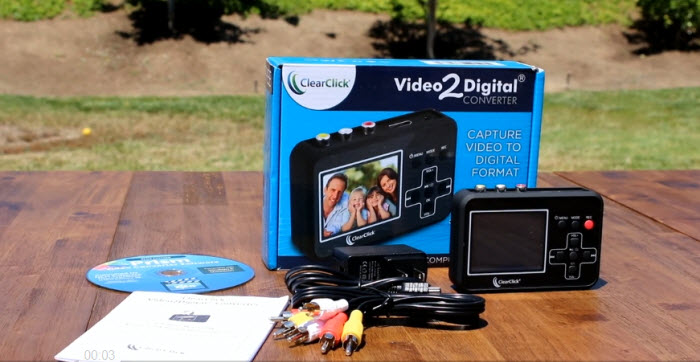
We have observed that many users search for "DVD to digital converter." When we input this keyword into Google, an Amazon result appears. Upon opening it, we find some DVD to digital hardware devices that can help digitize and record videos from DVDs to USB flash drive or SD card. A good example is ClearClick Video to Digital Converter 3.0. With this device, you can record video and audio from various sources such as VCR's, VHS Tapes, AV, RCA, Hi8, Camcorder, DVD, Turntables, Cassette Tapes and even retro gaming systems. No computer or software is required. The output format will be in MP4 for video or WAV/MP3 for audio.
Who it's for: The ClearClick Video to Digital Converter 3.0 is ideal for individuals who want to convert their old video tapes or camcorder tapes into digital format without the need for a computer or software. It's suitable for those with VHS tapes, VCRs, DVD players, DVRs, camcorders, Hi8, and retro gaming systems. Users who prefer a hands-off, one-button recording experience will find it especially conveninent.
Pros:
- No computer or software required.
- Supports a wide range of analog video and audio sources.
- Records directly to USB or MicroSD card (up to 512GB).
- Custom auto-stop feature allows precise recording duration.
Cons:
- Cannot digitize encrypted DVDs.
- Cannot record from HDMI or modern digital outputs.
- Does not upscale to HD; the maximum recording resolution is 720x480 pixels.
- The installation process is very slow.
How to use ClearClick to convert DVD to digital?
- Insert the DVD or other video/audio source you want to digitize to the converter.
- Connect ClearClick Video2Digital Converter with a RCA or 3.5mm cable.
- Plug in a USB flash drive or a SD card into the converter.
- Press the Record button on to converter to "digitize" and transfer your DVD to the USB or SD card. It will display the video on the 5" LCD screen as it transfers.
- Press the Record again to stop recording. Don't skip this step, otherwise you'll get a corrupted file.
- Remove the USB drive or SD card from the converter. After that, you can transfer your DVD video to computer or any device you like.
Tips: You can use the "Auto Stop" feature to stop recording after a preset amount of time.
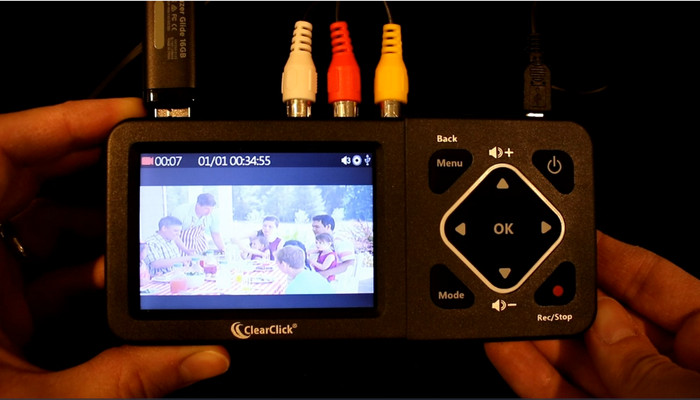
How is its performance in practice? I tested the ClearClick with my homemade graduation DVD, and it worked surprisingly well. Since it's a standalone device, I didn't need my PC—just popped in the DVD and recorded straight to USB in real time. It took about 90 minutes to capture the full disc, and the output was clean with solid audio-video sync. While it’s not a fast method due to real-time recording, but for simple, hands-off digitizing, especially when dealing with DVDs or older media like camcorder tapes, it's a convenient and reliable option, even if the real-time recording takes a bit longer.
Quick Comparison of the Best DVD to Digital Converter Tools
If you've read the in-depth reviews above, this chart offers a side-by-side look at key factors of the top DVD to digital converters like supported DVD types, output formats, conversion speed, and pricing. Click any tool name to read the full review and find the best fit for your needs.
Compare the DVD to Digital Converter Software/Service |
|||||
Software/Service |
Price |
Supported DVDs |
Supported Formats |
Speed |
|
| WinX DVD Ripper Platinum [Best Choice] | One-Year License / 3 PCs: $39.95, Lifetime Plan / 1 PC: $59.95 | Homemade DVDs, copy-protected DVDs, region-locked DVDs, new DVDs, old DVDs, unplayable DVDs, etc. | 350+ formats, incl. ISO, VIDEO_TS folder, MP4, MKV, MOV, MPEG, FLV, AVI, WMV, MP3, etc. | Fast. It can rip a 2-hour movie DVD within 5 minutes. | |
| Vudu | DVD to SD: $2+ tax / 1 disc DVD to HDX: $5+ tax / 1 disc | Commercial movie DVDs. Some titles are not supported. | MP4 | Fast | |
| HandBrake | Free | Unencrypted DVDs. | MP4, MKV, WebM | It could be tens of minutes to a few hours. | |
| VidCoder | Free | Unencrypted DVDs. | MP4, MKV | It could be tens of minutes to a few hours. | |
| VLC | Free | Unencrypted DVDs and some encrypted DVDs. | MP4, MKV, AVI, FLV, WebM, WMV, MP3, TS, etc. | It will take the entire runtime of the movie to digitize it. | |
| MakeMKV | Free | Unencrypted DVDs and some encrypted DVDs. | MKV | Usually about 20 to 30 minutes. | |
| DVDWalmart | $12.96 for the first 30 minutes & $5.46 for each additional 30 minutes. | Previously transferred DVDs from Walmart and YesVideo, and other DVDs, MiniDVDs, CDs, and VCDs. | MP4 | 3-4 weeks. | |
| ClearClick Video to Digital Converter | $109.95 | Unencrypted DVDs. | MP4, WAV, MP3 | It will take the entire runtime of the movie to digitize it. | |
Conclusion Which is the Best Way to Convert DVD to Digital?
Now that we've reviewed the top DVD to digital converters, it's time to sum things up. Which tool is the best fit for your needs?
- For Movie Collectors: WinX DVD Ripper is the top pick for its unmatched ability to bypass any encryption and its sheer GPU-accelerated speed.
- For Tech-Savvy Purists: A combination of MakeMKV (for 1:1 backup) and HandBrake (for compression) offers the best lossless-to-compressed workflow for Plex or NAS users.
- For Non-Tech Users (No Computer): If you don't own a DVD drive, Walmart’s service or Vuduare your only practical bets, despite the higher cost per disc.
- For Legacy Media: If you are digitizing both DVDs and old VHS tapes, a hardware device like ClearClick is the most versatile choice.
Each option has its trade-offs. The best fit depends on whether you prioritize speed, compatibility, budget, or simplicity. And once you've picked your tool, here are a few expert tips to help you get the best possible quality from your digital copies.
Pro Tips How to Improve the Quality of Digital Copy
When converting DVDs to digital files yourself, you can take steps to ensure the highest possible quality. Here are a few steps.
1. Prioritize a lossless format when storage allows: Re-encoding video in compressed formats like MP4 can reduce quality. If storage space isn't a concern, consider digitizing your DVDs to an ISO file or VIDEO_TS folder using tools like WinX DVD Ripper. These formats preserve the original DVD quality. For a more common format with minimal quality loss, use MakeMKV to convert your DVD to MKV format. This method also avoids re-encoding.
2. Choose the right balance with video settings: If storage space is limited, you can still achieve good quality by selecting the appropriate video codec and bitrate. H.264 or H.265 codecs offer a good balance between quality and file size. Avoid older codecs like MPEG-2. Higher bitrates (measured in megabits per second) generally result in better quality but larger files. Find a balance that suits your needs. Many DVD to digital converters such as WinX DVD Ripper offer presets optimized for common uses. If you're unsure about individual settings, these presets are a good starting point.
3. Leverage High-Quality processing: Some software boasts features like "High-Quality Engine" to enhance output quality. If video quality is a priority, enable these features before digitizing.
4. Deinterlace video: If your DVD source uses interlaced video (common in older content), use deinterlacing to eliminate combing artifacts (jagged edges) and improve motion smoothness.
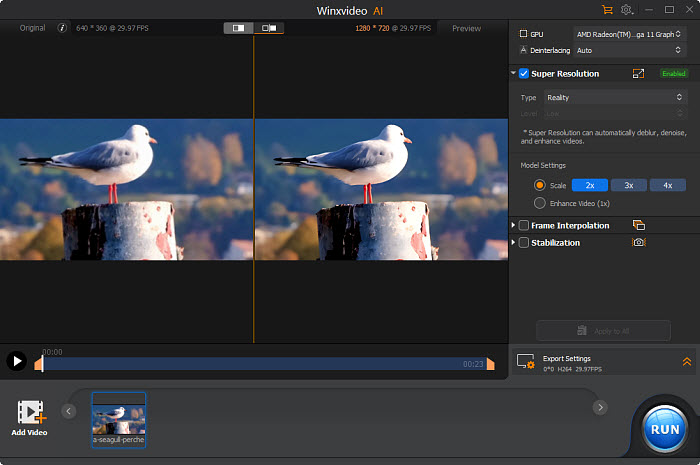
5. Upscale the digital copy to higher resolution with AI video enhancer: Standard DVDs are limited to a native resolution of 720×480 pixels (480p for NTSC, or 576p for PAL), which looks blurry or pixelated on today's large HD and 4K displays. To restore clarity and detail, you can use an AI video upscaling software such as Winxvideo AI. Leveraging advanced neural networks trained for super-resolution, it can intelligently upscale your DVD video by 2×, 3×, or even 4× while reducing noise, sharpening textures, and even generating more details — delivering a near-HD or even 4K viewing experience from your old DVD source.
Frequently Asked Questions (FAQ)
1. How to convert DVD to digital on Mac?
WinX DVD Ripper Platinum has a Mac version which can help you digitize DVDs on Mac. The procedure is like digitizing a DVD on Windows, so just download the DVD to digital converter on Mac and follow the steps in method 1.
If you want to try something different, you can try Disk Utility – Mac's built-in app that can rip DVDs without copyright. However, it can only export image file. Don't expect it to make a MP4 copy or other mainstreaming format from your DVD. If it's ok for you, just follow this:
- Go to Applications > Utilities, find and open Disk Utility.
- Locate your DVD and click on it.
- Choose New Image which is in the centre along the top.
- The next option to look out for is Image Format, which you should set to DVD/CD Master.
- Set Encryption to None.
- Hit save and the DVD will begin copying to the destination you specified. When the process is complete, just eject your DVD.
2. Can I convert copy-protected DVDs to digital?
It depends on the DVD to digital converter software you are using. Some programs, such as WinX DVD Ripper, can bypass copy protection and digitize protected DVDs, while others may not be able to. It is important to check the software's capabilities before attempting to turn a copy-protected DVD into a digital file.
3. What digital file formats can I convert my DVD to?
Most DVD to digital converter software can digitize DVDs to common file formats such as MP4, AVI, and MOV. Some software may also support less common file formats or allow you to customize the output format.
4. Can I convert my DVD to digital without losing quality?
It depends on the DVD to digital conversion software and the settings you use. Some programs will not allow you to preserve the menus of the original DVD, such as HandBrake. However, some software may offer options to preserve menus for the digital file.
5. Will my converted digital files have menus like the original DVD?
Yes. For example, if you choose to digitize a DVD to ISO or VIDEO_TS folder on WinX DVD Ripper, you won't lose quality. As for other output options, this program offers High Quality Engine to minimize this loss of quality and produce high-quality digital copies of your DVDs.
6. How to digitize home video DVD?
WinX DVD Ripper Platinum can not only digitize commercial movie and TV show DVDs but also handle home video DVD collection. Just insert your home video DVD to DVD drive, select it in the DVD ripping software, choose wanted titles and format, and hit RUN to get the digital copy out of your physical media.
7. How to boost DVD to digital conversion speed?
Here are some tips on how to improve the speed to digitize DVDs:
Solution 1. Enable Hardware Acceleration: If your software and hardware support it, enable hardware acceleration. This leverages your graphics card (GPU) to offload some of the processing tasks, speeding things up.
- On WinX DVD Ripper, you can find this option on the right side of the main interface.
- On HandBrake, you can click the Video tab, click the dropdown menu of Video Codec and select a format that utilizes hardware acceleration, such as those with Intel QSV, Nvidia NVEnc, or AMD VCE in the name.
Solution 2. Harness the power of your CPU cores: Modern processors often have multiple cores, which act like multiple CPUs working together. This can significantly accelerate DVD to digital conversion. Software like WinX DVD Ripper lets you take advantage of this. Simply access the "CPU Core Use" dropdown menu and choose the highest number available. When digitizing a DVD, the software will leverage all the processing power at its disposal for maximum speed.
Solution 3. Adjust settings: While some settings like higher bitrate improve the quality of your digital file, they also increase processing time. Find a balance between quality and speed based on your needs. Consider using presets optimized for faster conversion.
Solution 4. Close unnecessary programs: Close any background programs that might consume system resources while converting. This frees up processing power for the DVD digitizing task.
Solution 5. Ripping instead of full conversion: The DVD conversion programs we mentioned earlier allow you to select only the specific video content you want, like the main movie, instead of converting the entire DVD with menus and bonus features. Since you're focusing on a smaller amount of data, ripping can be significantly faster than full conversion. If you use WinX DVD Ripper, you'll save much effort. This is because it will automatically check the main movie title for you after scanning the DVD. If you use other tools, you need to play the DVD to identify the main title before selecting it for ripping.
Solution 6. Ensure your DVDs are clean and undamaged: A scratched or dirty DVD can take longer to read, impacting DVD digitizing speed. Ensure your DVDs are clean and undamaged.
Disclaimer: Digiarty Software does not advocate ripping copy-protected DVDs for any commercial purpose and suggests referring to the DVD copyright laws in your countries before doing so.


