






How to Add Soft/Hard Subtitles and Remove Subtitles with HandBrake
The more you use HandBrake, the more you will discover its mightiness. Not only can it rip DVDs, Blu-rays, and transcode viceos, but also gives you a full control over subtitles. It can help you add soft, hard coded subtitles, open or closed captions to movies, rip discs with subtitles, and remove subtitles from videos.
This article is a complete guide on how to manage subtitles with HandBrake. Besides, we' ll show you how to troubleshoot some common errors, such as HandBrake subtitles not showing up and HandBrake subtitles burn in greyed out.
Also Read: How to add subtitles to movie and TV series in digital and DVD format
Table of Contents
Best HandBrake Alternative to Add Subtitles to (Copy Protected) DVD
If you have some troubles with HandBrake in ripping DVD with subtitles, try the best HandBrake alternative - WinX DVD Ripper Platinum.
WinX DVD Ripper Platinum allows users to select soft, hard or forced subtitles, captions (open or closed) when ripping DVDs (including all kinds of copy-protected DVDs, Disney 99-title DVD, bad sector DVD, region code 1-6 DVD, DVD with fake playlist, oversized 75GB DVD, unplayable/damaged DVD, workout/AV DVD...). It can also add the external SRT subtitle files to DVDs in any language.
Tutorial: How to Add SRT Subtitle/Caption to DVD Video with WinX DVD Ripper
Free download and install the best subtitle adding alternative to HandBrake for Windows and macOS. After that, download an SRT subtitle or caption files online corresponding to the target movies.
Step 1. Insert a DVD or prepare a movie source in ISO or VIDEO_TS format, click the related button on the top left of the software until it adds your movie source.
Step 2. Select any output format according to your need before adding external movie subtitles.
Step 3. Click the Edit button to select "Add External SRT" option from the drop-down list or click Subtitle Disabled button on the main title bar.
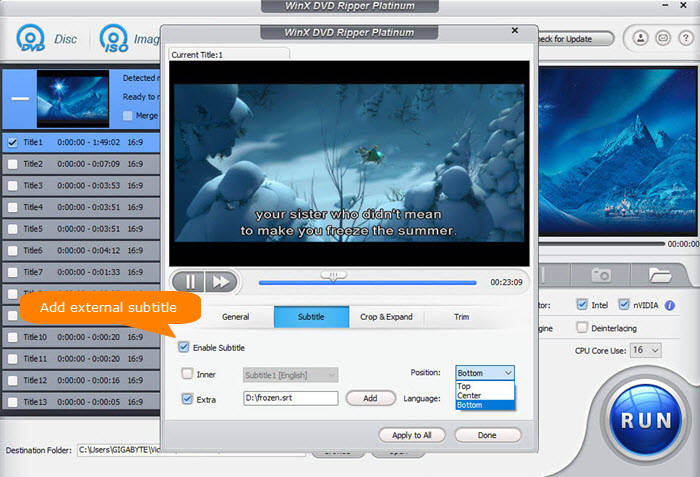
Step 4. Choose the "Subtitle" button, select the "Enable Subtitle" and check "Extra" below it. Click "Add" button to build in the downloaded SRT subtitle or open/closed caption just as shown in the picture.
Step 5. Select language and position of subtitle or caption and then hit "Apply to All" or "Done".
Step 6. Hit RUN button as the final step before the DVD subtitle ripping begins.
Video Tutorial: How to Add SRT Subtitles/Captions to DVD Movie While Ripping (Encrypted) DVD
Part 1. How to Add Soft, Hard Subtitles or Captions with HandBrake
HandBrake allows you to add both soft coded and hard coded subtitles, as well as open captions (aka. hard code captions) and closed captions (saved as .srt file format). Soft subtitles means that the subtitles appear as separate selectable tracks and can be turned on or off. Yet, hardcoded subtitles are written onto the image permanently and cannot be turned off.
Now let's download, install, and open HandBrake. Once done, follow our guide below to embed subtitles or captions to movie with HandBrake.
Step 1. Select the video you want to add subtitles to. Then HandBrake will scan your video immediately. If you import DVD or Blu-ray, you will also need to specify the title and chapters you want to rip. Note:
- Soft subtitles are currently unsupported in the WebM container.
- HandBrake cannot handle DVD copy protection schemes on its own. To cope with copy-protected Blu-rays and DVDs, you need to download libdvdcss or switch to a HandBrake alternative.
Step 2. Choose desired output preset.
Step 3. Go to Subtitles tab and then you can select desired subtitle track(s) from existing tracks or add an external subtitle file by clicking Import Subtitle. HandBrake supports subtitle files in SRT, ASS, and SSA format. Before doing so, please make sure you've already downloaded subtitles from online websites.
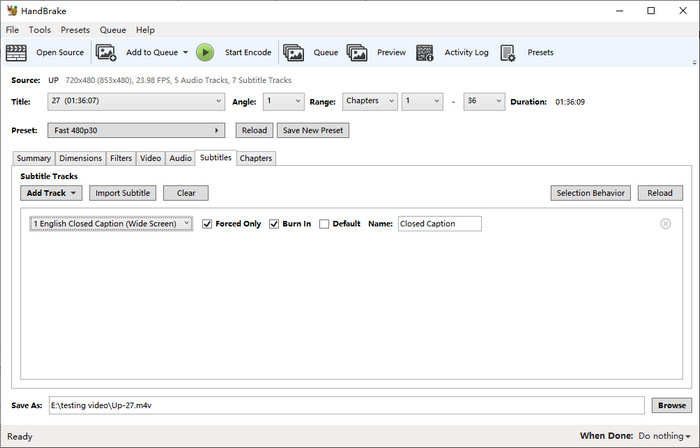
You'll find some subtitle options on HandBrake, including Forced Only, Burn In, and Default. What do Forced Only, Burn In, and Default mean in HandBrake? How to set subtitles in HandBrake?
Forced Only: When you check Forced Only, your subtitles will only show up when a foreign or alien language is spoken, or showed in a sign, location, or other text, aiming to explain the meaning but can not be placed in the dubbing.
Burn In: When you check Burn In, your subtitles will be permanently burned into the video. If you want to add hardcoded subtitles to video, check Burn In. If you want to add softcoded subtitles to video, don't check Burn In.
Default: When you choose Default, your subtitle will turn on by default.
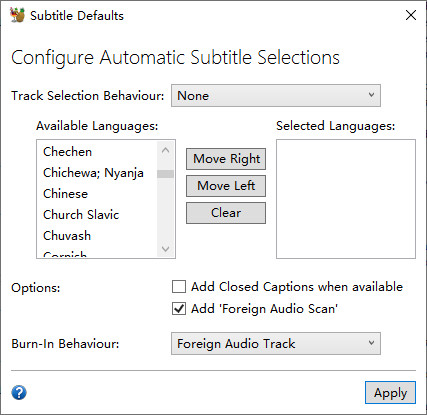
Accessing to Subtitles tab, you find that HandBrake has selected subtitle automatically. In fact, you can configure automatic subtitle selection by clicking Selection Behavior. Then the Subtitle Defaults window will pop up.
Step 4. Click Browse to specify output file name and save path.
Step 5. hit Start Encode and then HandBrake will start working. Once done, you will get a new file with added soft/hard subtitles or captions.
Click here to see more tools and apps to add subtitles to a video file.
Part 2. How to Remove Soft Subtitles on HandBrake?
Sometimes we don't want to see subtitles on the movie. HandBrake can remove subtitles from MP4 and more files. But before any further, we want to remind you that HandBrake cannot remove hardcoded subtitles. HandBrake can only remove soft subtitles from video.
Step 1. Import your video.
Step 2. Select output format. Select the format that best suits your needs, whether it's MP4, AVI, MKV, or another compatible format.
Step 3. Go to Subtitles tab and click Clear. Then, you will notice that all subtitle tracks below will disappear immediately.
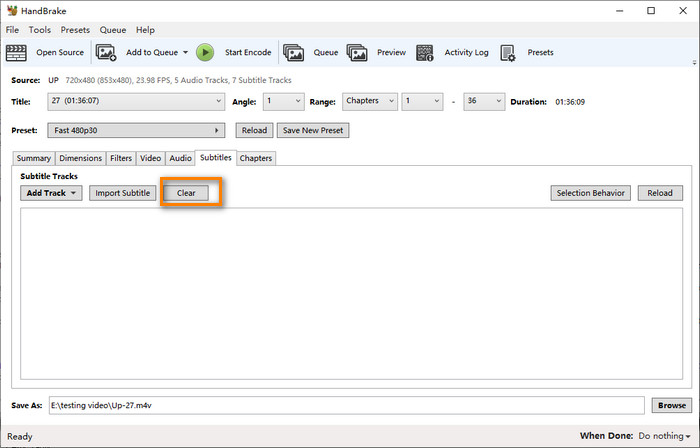
Step 4. Rename your destination file and destination folder.
Step 5. Hit Start Encode and then HandBrake will begin working to export a new video file with subtitles being removed.
Part 3. FAQs for HandBrake Subtitles
1. How to fix HandBrake subtitles not showing up?
Some users say that subtitles cannot show up after the video is converted with HandBrake. To fix this, you can try:
- Change your output container format. For example, if you chose M4V, now try MKV and see if the subtitles can show up.
- Extract the subtitle file from the original video and save it as a srt file.
- Change your subtitle/caption settings in HandBrake. Some programs may be unable to read image based subtitles (hardcoded subtitles). So if you checked Burn In, this time uncheck it and let HandBrake export text based subtitles (soft subtitles).
2. Why subtitles are always burned in when Burn In isn't checked in HandBrake?
Actually, this is a limitation of the MP4 format. If you choose MP4 or M4V, it'll hardcode. Because MP4 doesn't support bitmap subtitles, you cannot pass-through PGS into MP4. To fix this, you can either use MKV container or find a third party text subtitle and mux it in to use that.


