






How to Convert and Transfer DVDs to iPad (Pro/Mini/Air)
"I recently bought an iPad Pro for use while traveling etc. I want to copy some of my DVD movies to it for playback on flights - movies that are not normally playing on the plane. I was wondering how I might go about putting a DVD movie onto an iPad to play it."
iPad is a perfect device for watching movies on the go. Want to play DVD movies on iPad when you have a journey? It is easy if your DVDs come with digital copies. If not, you can purchase digital copies online. But if you don't want to spend extra money on movies you've already paid for, you can use a DVD ripper to convert DVD to iPad playable formats on computer, and then transfer the digitized DVD to iPad.
Table of Contents:
Part 1. Convert DVD to iPad Formats
There are many DVD to iPad converters, like Handbrake. But if you take DVD protections into consideration, you may need a little more technical know-how. If you need an easy-to-use yet powerful DVD to iPad converter, WinX DVD Ripper is the best choice.
WinX DVD Ripper stands out for the following features:
- It provides ready presets for iPads like iPad 10, iPad Pro, iPad Air, iPad mini. No need to set the video audio parameters by yourself. It also covers general video profiles like MP4, iPhone, Apple TV, iTunes, Android, PS4, Xbox, YouTube, and other 350+ profiles.
- Any DVDs you have are supported, incl. encrypted DVD movies, old DVDs, damaged discs, TV shows, workout DVDs, etc.
- It's fast with the utilization of Intel® (QSV), and NVIDIA® (CUDA/NVENC) powered hardware acceleration, multi-core CPU, and Hyper-threading technology. 5X faster than similar programs.
- High-quality digital copy of discs by leveraging the built-in High Quality Engine. The file size will be 80% smaller than the original.
- It also allows editing videos. You can trim, crop, merge video, and add external subtitle.
Let's free download WinX DVD Ripper to copy DVD to iPad and put DVD rip files on iPad.
Guide - how to rip and copy DVD to iPad with WinX DVD Ripper
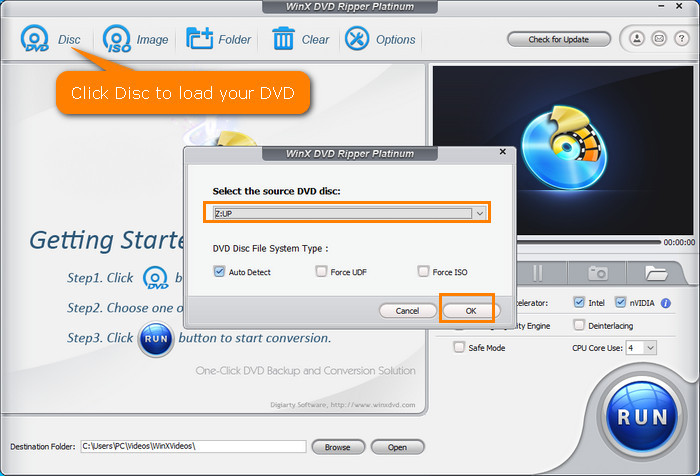
Step 1. Import target DVD into WinX DVD Ripper.
Insert target DVD into the DVD drive on your computer. Then, open WinX DVD Ripper and click "DVD Disc" button on the DVD ripper to select the DVD disc.
After finishing DVD scanning, this software will select the main movie automatically.
Step 2. Choose iPad output profile.
When you see Output Profile window, scroll down to "Apple Device", click "to iPad Video", and then choose an iPad profile based on which model you use and which codec and resolution you prefer to encode the resulting file with.

Alternatively, you can also head to "General Profiles" and select an output format that your iPad accepts.
FYI: iPad supported formats:
- H.264 video up to 1080p, 30 fps, High Profile level 4.1 with AAC-LC audio up to 160 Kbps, 48kHz, stereo audio in .m4v, .mp4, .mov;
- MPEG-4 video up to 2.5 Mbps, 640 by 480 pixels, 30 fps, Simple Profile with AAC-LC audio up to 160 Kbps per channel, 48kHz, stereo audio in .m4v, .mp4, and .mov file formats;
- Motion JPEG (M-JPEG) up to 35 Mbps, 1280 by 720 pixels, 30 fps, audio in ulaw, PCM stereo audio in .avi file format.
- HEVC up to 4K @ 60 fps is supported by iPad 6, iPad Pro 10.5-in and later.
Step 3. Start converting DVD to iPad.
Click the Browse button to set destination folder and click the big blue "RUN" button to let this DVD to iPad converter start ripping file.
That's it. It's quite easy to convert DVD to iPad with WinX DVD Ripper.
Guide - how to convert DVD to iPad with HandBrake
HandBrake is a free and open-source tool that can rip movie from DVD to MKV, MP4, or WebM. It has presets for Apple, Android, Amazon Fire, Chromecast, Roku, Playstation, and more. But, HandBrake doesn't have iPad-optimized presets. You need to create iPad presets on your own when necessary. It owns multiple video and audio parameter settings to alter the output file personally.
Note: Handbrake can't rip copy-protected DVD and always select the wrong main title. The output quality and ripping speed are always unsatisfactory.
Step 1. Download and install HandBrake.
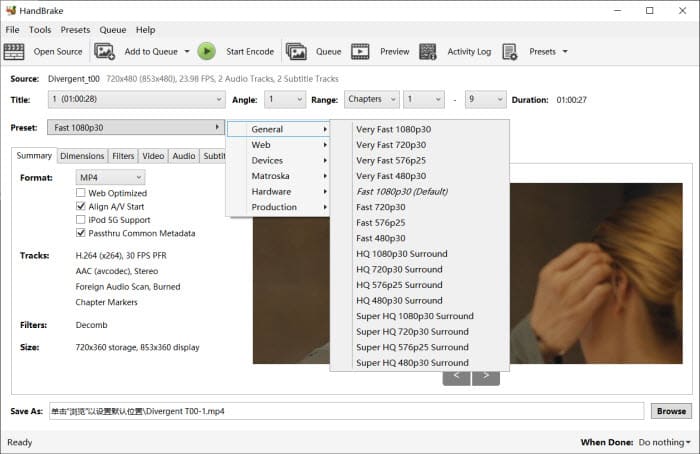
Step 2. Insert DVD into DVD drive. Then open HandBrake and you should see your DVD listed under HandBrake's Source Selection. Simply click it and HandBrake will scan the DVD titles. Once done, you need to select the title you want to convert.
Step 3. Choose a preset. Since HandBrake doesn't have an iPad preset, you need to set the video format for iPad (H.264, MPEG-4, Motion JPEG, HEVC). You can choose MP4 as the output video format and tap "Video" option and choose H.264 as the output video codec.
Step 4. Click "Browse" at the bottom right to set output file name and save path.
Step 5. Hit "Start Encode" button to begin converting DVD to iPad accepted format.
Part 2. Import the Converted DVD to iPad
We've shown you how to convert DVD to iPad readable format on Windows/Mac, you then need to transfer the movie that is already ripped off DVD from your computer to iPad. Here we will show you Apple's official way. If you're running on PC and Mac earlier than macOS Catalina, you can use iTunes to import the converted DVD to iPad. For Mac later than Catalina, you should use Finder. The steps to sync DVD to iPad using iTunes and Finder are quite similar.
Transfer DVD to iPad with iTunes:
Step 1. Launch iTunes, drag and drop the converted DVD movie to the left side of the iTunes to import the movie into your iTunes Library.
Step 2. Now the DVD movies are stored in your iTunes Library, connect your iPad to your computer via a USB cable.
Step 3. Once connected, the iPad icon should appear on the left side of iTunes under the Devices tab. Click it and go to the Movies tab.
Step 4. Check the Sync Movies checkbox and select the DVD movies you just imported to your iTunes library and press Sync.
Step 5. Now the DVD videos are in your iPad. Open the Videos app on your iPad and select the movie, hit Play and enjoy.

Transfer DVD rip file to iPad without iTunes
If you're not a fan of iTunes/Finder to add DVD to iPad, you can try other ways we list here.
- Use third-party software like WinX MediaTrans to sync the DVD digital copy file from PC/Mac to iPad.
- Use Plex. If you have downloaded Plex on the computer where you store DVD digital copy file, you can stream it to iPad if you have installed Plex app on iPad.
- Use Dropbox and other cloud storage services like Dropbox, iCloud, OneDrive, etc. to store your DVD digital copy. Thereafter, you can watch it on iPad through cloud storage app.
Now, we'll show you how to transfer DVD rip file to iPad with WinX MediaTrans.
WinX MediaTrans is a well-developed tool which focuses on transferring media files between iDevices and computer. It enables users to add videos from computer to iPad within a few clicks and delivers an extremely fast transfer speed. And, WinX MediaTrans will never delete original file and cause any data loss during transfer.
After downloading and installing WinX MediaTrans on your PC, you can transfer DVD video to iPad following steps below:
Step 1. Plug in iPad into computer. Launch WinX MediaTrans and it will automatically access iPad if the connection succeeds.
Step 2. Click Video module on the main interface to enter video sync page. There are five categories listed. Select Home Video, Music Video or TV Show and hit Add Video button. Get the ripped DVD video from target folder and click OK to import it to the sync page. Note: you are not allowed video to Video Recorded and Movies.

Step 3. Click Sync button to transfer the added DVD video to iPad.
Waiting the whole process is finished, you can freely watch DVD movies/TV shows on your iPad everywhere with no interruptions.
Tip: Apart from iPad compatible video files, WinX MediaTrans embeds a video converting engine enabling to transfer videos in any format (MKV, MTS, AVI, WMV, FLV etc.) to iPad with acceptable format for watching flawlessly. In addition, the auto-rotate function can change the video direction from vertical to horizontal to play with full screen.
Disclaimer: Digiarty Software does not advocate ripping commercial DVDs for any illegal purpose. You're suggested to refer to the DVD copyright laws in your country before doing so.
FAQ
1. Can I connect a DVD player to an iPad Pro?
No. iPadOS has no support for optical drives at all, so you can't connect a DVD player to an iPad directly.
2. How can I play a DVD on my iPad?
As iPads don't have built-in DVD drives, you can't directly play a physical DVD on your iPad. You need to use a DVD drive on your computer to rip the DVD into digital video files (like MP4 or MKV), and transfer these digital files to your iPad using iTunes or iCloud. Then you can play the DVD video on your iPad with a built-in Videos app or a third-party app.
If you don't want to convert, transfer, and play the DVD on an iPad, you can also do it via streaming. Connect your DVD player to your TV. Use a device like an Apple TV or a digital video recorder to capture the video output from the DVD player and stream it to your iPad.
3. Can you put a DVD onto an iPad?
Yes, you can put a ripped DVD video onto an iPad.


