
 Free DVD Ripper
 Convert Videos
 iPhone Transfer
 How-tos
 Download

Watch Video Guide - How to Process and Edit Videos using Winxvideo AI

Users' question about how to convert Blu-ray M2TS to AVI: I have some precious Blu-ray M2TS movies that I want to convert Blu-ray to AVI, or FLV, MOV, MPEG alike, and I can not seem to figure out how to convert them to the video formats, which are both playable and editable on my PC. Can you lead me out of this trouble. - From David Hauer, enthusiastic movie fan, now get driven crazy by the Blu-ray movie and post the question above.
Expert's response: to convert Blu-ray movie to AVI file format with fast ripping speed and high quality, a trustful video converter hold a deep-set position on this issue. It must be special designed for the HD video, such as BDAV, TrueHD, M2TS, MPEG-TS A/V. - From Neil Kaufman, a senior Software Review Editor.
Winxvideo AI is simply outstanding from all these available video converters, it lets you rip Bluray M2TS to MKV, AVI, WMV, MOV etc. with ease. Supporting Multi-track HD video, built-in hundreds of codecs, and armed with Full GPU Acceleration tech, Winxvideo AI can bring a super smooth and fast performance and is favored by the most fastidious software review editors. Moreover, featuring De-interlacing Engine and High Quality Engine, it offers the most vivid output image quality which makes millions of users' High-Def life much more colorful. This is the reason why Winxvideo AI can be honored as the most trustful Blu-ray M2TS to AVI video converter.

Convert ANY DVD discs and videos (M2TS) to WMV, MOV, MP4 (H.264), MKV, AVI, MPEG2, FLV, etc. for sharing with family and friends.
If you are a mobile user, please click here.
If you want to convert video from Blu-ray M2TS to AVI format, firstly download Winxvideo AI and do as following steps:
Step One
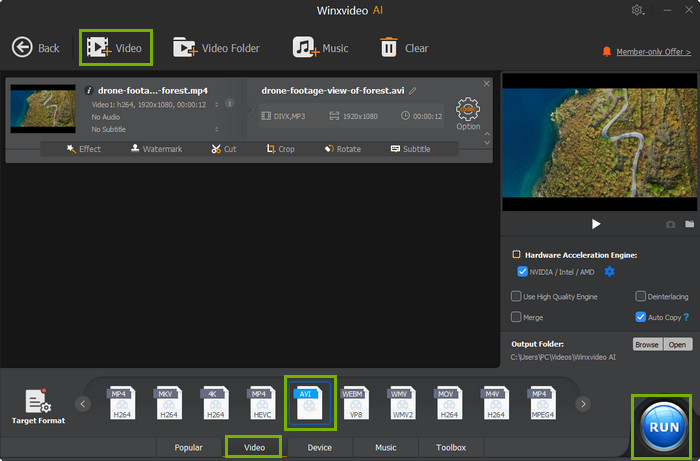
Launch Winxvideo AI and click "Video Converter " button to access to video conversion page.
Step Two
Click "+ Video" button to load the source Blu-ray M2TS file.
Step Three
Move to "Video" tab on the bottom of the window and select "AVI" format.
Otherwise, click "Target Format" button to get full list of output profiles. Go to "General Video" under "Common Video Profile" category and select "AVI Video" as output format. Click "Done".
Step Four
Click "Browse" button to set a destination folder.
Step Five
Click "RUN" button to start converting Blu-ray M2TS to AVI.
 Jack Watt@JackWat24348317
Jack Watt is a sought-after editor at Digiarty. He is responsible for digital and multimedia world, delivering definitive video and audio related software reviews, enlightening guides, and incisive analysis. As a fan of Apple, Jack Watt also brings his experience to more readers and focuses on writing of the Apple ecosystem at large.
Home | About | Privacy Policy | License Agreement | News | Contact Us | How-tos
 Copyright © 2026 Digiarty Software, Inc. All rights reserved